Subcontracting Backdate
| Lines of Code | 319 |
| Technical name | viin_mrp_subcontracting_backdate |
| License | OPL-1 |
| Website | https://viindoo.com/apps/modules/19.0/viin_mrp_subcontracting_backdate?force_show=1 |
| Required Apps | Manufacturing (mrp) Discuss (mail) Inventory (stock) |
| Included Dependencies | Inventory Backdate Backdate Operations Manufacturing Backdate |

Subcontracted production recorded on the day the goods came back
For manufacturers who subcontract production and enter receipts after the goods arrive
Complete the subcontracted manufacturing orders of a receipt on the receipt's date
Odoo 19.0 · Odoo Community · Odoo Enterprise · OPL-1
Extends Manufacturing Backdate, which records manufacturing orders and work orders on past dates.
What changes for your team
One date for the receipt and its subcontracted order
Today: finished goods come back from the subcontractor on Friday and the receipt is entered on Monday. Validating it also completes the subcontracted manufacturing order behind it.
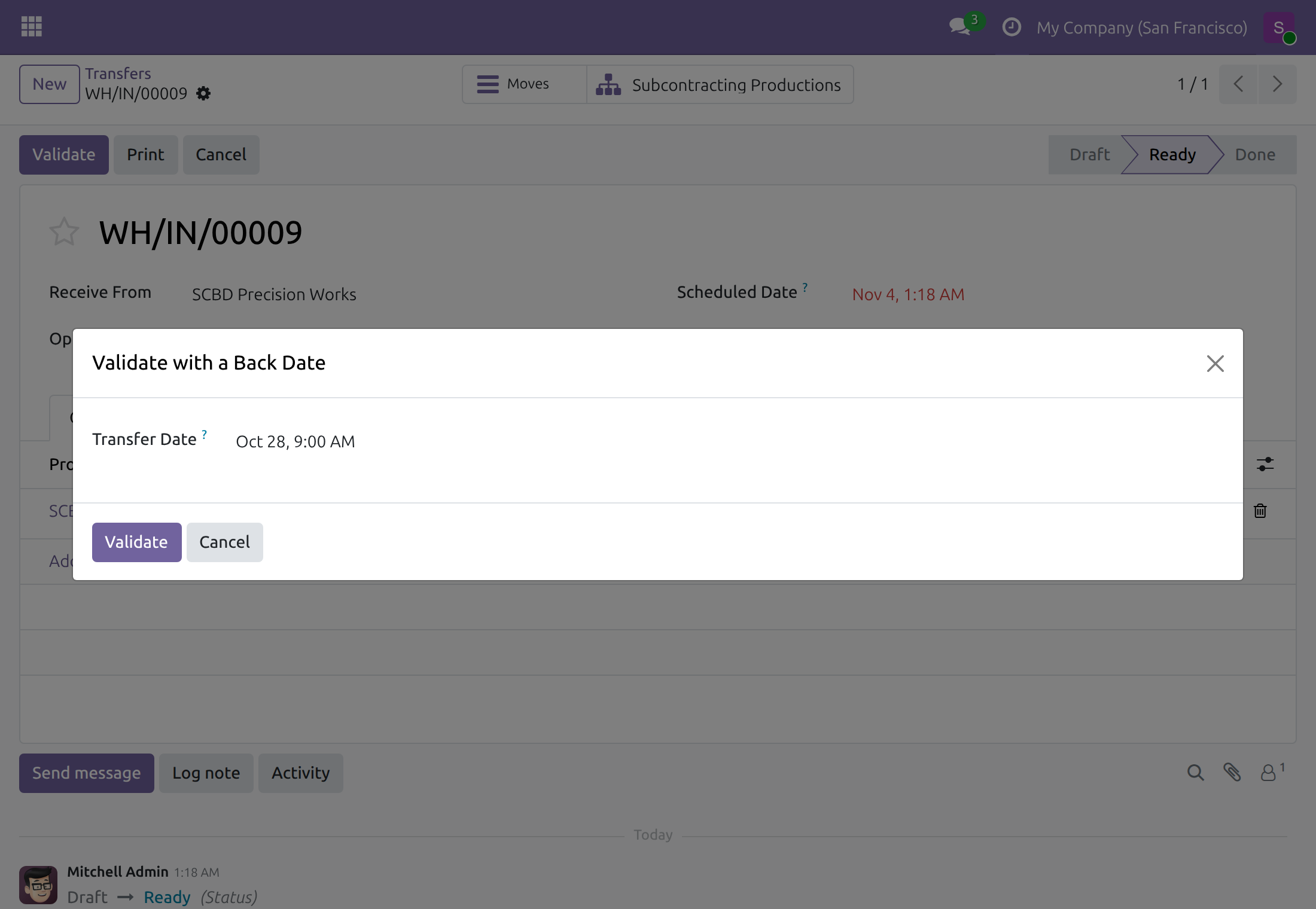
→ The Transfer Date chosen in the receipt's Validate with a Back Date dialog completes the order on that date too. Nobody is asked for a second date.
Accepted even before the planned start
Today: a subcontracted order is planned from its receipt, so its planned start is usually the day the receipt was created, after the goods arrived.
→ When the chosen date is earlier, the order's Start Date moves back to it: the order starts and finishes on the day the goods came back.
Components and finished goods on the real day
Today: a stock report at a past date has to show what the subcontractor really used and what really came back.
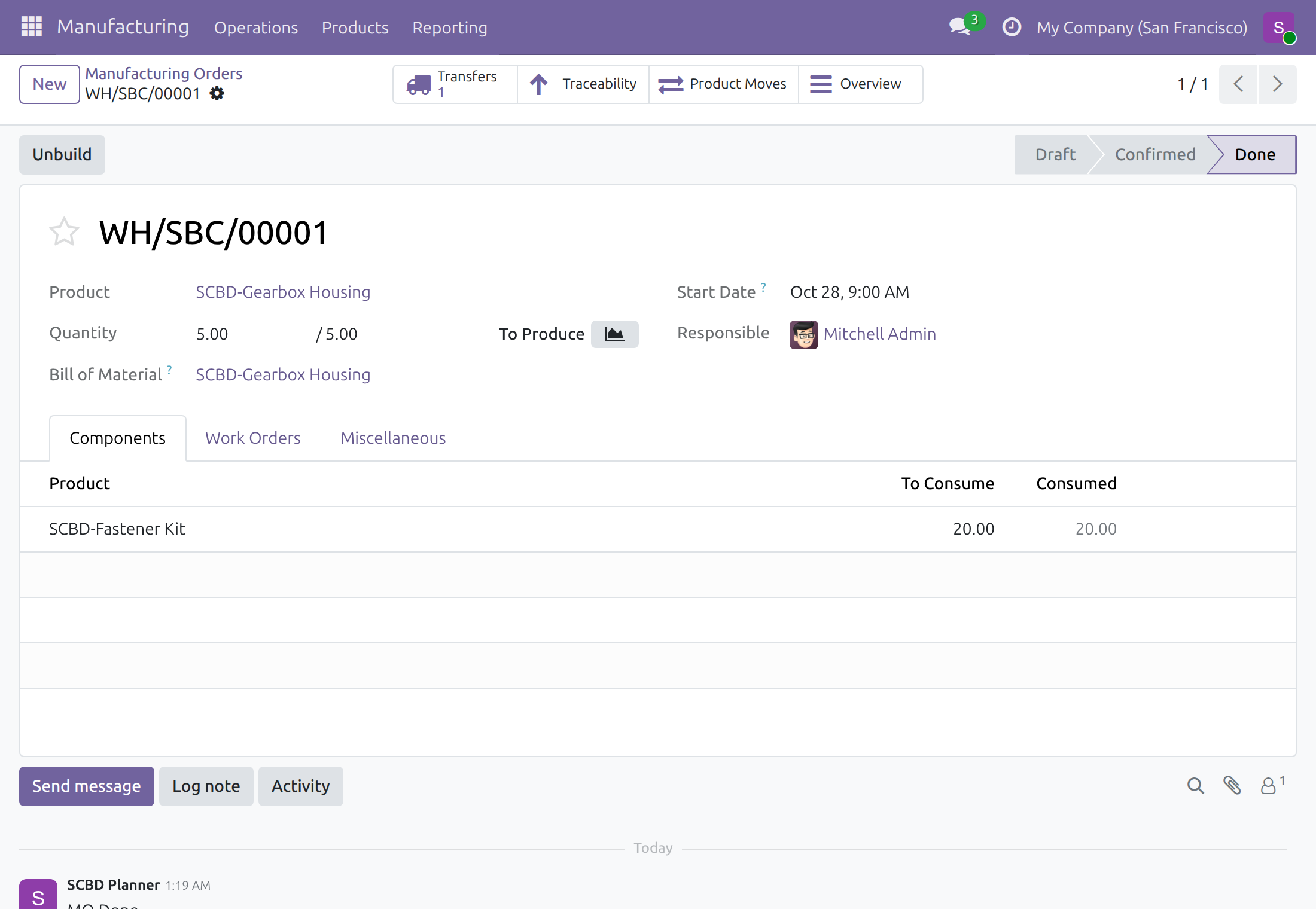
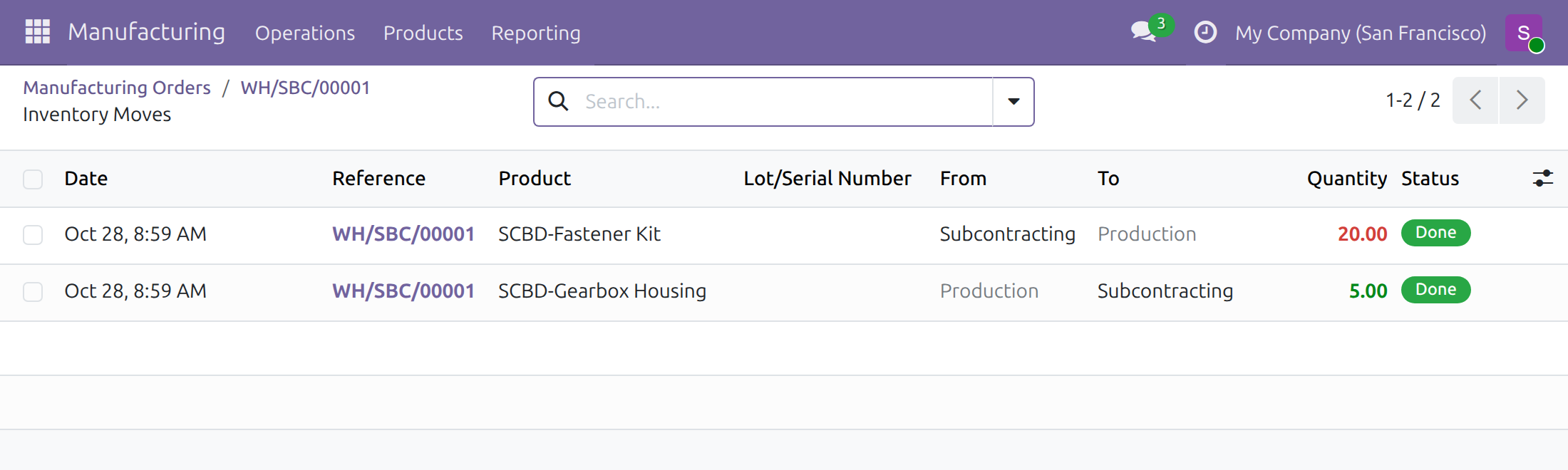
→ The components consumed at the subcontractor and the finished product carry the chosen date, so stock at any past date matches the receipt.
Ready on day one
Nothing to configure
It installs by itself when Manufacturing Backdate and Subcontracting are both turned on. No menu, no setting.
One right to give
People who record receipts on a past date need Inventory Backdate on the user form, in the Supply Chain section. Nobody holds it by default.
What is included
The receipt's date applied to its subcontracted manufacturing orders: for receipts validated with or without a past date, and for deliveries sent straight from the subcontractor to a customer. It adds no menu, setting or access right.
Before you decide
Does anyone answer a second date dialog?
No. A receipt validated with a past date passes that date to its order. A receipt validated without one completes its order at the current time, also for people who hold Manufacturing Backdate.
What about deliveries straight from the subcontractor to a customer?
With Odoo's dropshipping, validating that delivery completes the subcontracted order the same way.
Does it change the orders made in our own plant?
No. They keep asking the holders of Manufacturing Backdate for their completion date.
Which dates are refused?
A future date and, as for any transfer, a date in a locked accounting period. Nothing is validated until a valid date is chosen.
Which languages and time zones?
English and Vietnamese. Each person enters dates in their own time zone, which also sets the accounting day.
Try it, then ask us
The Documentation tab walks through set-up and both ways to validate a receipt from a subcontractor.
Pre-sales & partnership
viindoo.com/contactusTechnical support
viindoo.com/ticketTechnical requirements
- Odoo version: 19.0
- Editions: Odoo Community, Odoo Enterprise
- Required modules: Manufacturing Backdate, MRP Subcontracting
- Installation: automatic once both required modules are installed
- License: OPL-1
- Languages: English, Vietnamese
Subcontracting Backdate
Note
This guide is for administrators who give people the back-date rights, for production planners who follow subcontracted manufacturing orders, and for warehouse operators who validate the receipts of the goods that come back from a subcontractor.
Note
Extends Manufacturing Backdate - see the Manufacturing Backdate documentation for the dialogs of work orders and manufacturing orders. The date of the receipt comes from the dialog of Inventory Backdate.
Subcontracting Backdate makes a receipt from a subcontractor complete its manufacturing order on the same date as the receipt. A receipt of finished gearbox housings validated on Friday and entered on Monday records the subcontracted production on Friday, and a receipt validated without any back-date records it at the current time, whoever validates it.
Overview
When the finished goods come back from a subcontractor, validating the receipt also completes the subcontracted manufacturing order behind it: the components are consumed from the subcontractor's location and the finished product is produced. The module makes that completion follow the receipt, without asking a second time for a date.
- A receipt validated in the dialog Validate with a Back Date completes its subcontracted orders at the date chosen in that dialog. This holds even when that date is before the start planned for the order: the start of the order moves back to the chosen date.
- A receipt validated without a back-date completes its subcontracted orders at the current time, whatever back-date rights the person has.
- A subcontracted product delivered straight from the subcontractor to a customer (Odoo's dropshipping) completes its order the same way when the delivery is validated.
- Manufacturing orders that are not subcontracted keep asking the holders of Manufacturing Backdate for their completion date.
Nothing is added to the screens: the module installs by itself as soon as Manufacturing Backdate and Odoo's subcontracting are both installed. It has no menu and no setting.
Who does what:
| Role | What they do | Access right to assign |
|---|---|---|
| Administrator | Turns on Manufacturing Backdate and Subcontracting, and gives the back-date rights. | Administration: Settings |
| Warehouse operator | Validates receipts from the subcontractor at the current time. The subcontracted order is completed at the same time. | Inventory: User |
| Production planner or warehouse operator with the back-date right | Validates a receipt on the date the goods really arrived. The subcontracted order is completed on that date. | Inventory Backdate: Stock Backdate Operations (it includes Inventory: User) |
Setup (for the Administrator)
Installation
- Open Settings ‣ Backdate Operations, tick Manufacturing Backdate and click Save.
- Open Settings ‣ Manufacturing, tick Subcontracting and click Save.
Subcontracting Backdate installs with the second step and leaves with either of the two. The section Backdate Operations is described in the guide of Backdate Operations.
To record a receipt on a past date, people need the right Inventory Backdate: Stock Backdate Operations. Open Settings ‣ Users & Companies ‣ Users, open the user, and in the tab Access Rights choose Stock Backdate Operations on the row Inventory Backdate of the section Supply Chain. Having the right means the dialog is offered to that person; it never stops anyone else from working.
Warehouse operator: receive the finished goods at the current time
For everyone who validates receipts, with or without a back-date right on the manufacturing side.
Validate a receipt from the subcontractor
- Open the receipt, for example from Inventory ‣ Operations ‣ Transfers ‣ Receipts. Its partner is the subcontractor and its product has a subcontracting bill of materials.
- Click Validate.
The receipt is Done and the subcontracted manufacturing order is Done at the same moment. No dialog stays open, even for a person who holds Manufacturing Backdate but not Inventory Backdate.
Production planner with the back-date right: receive the goods on the day they arrived
For the people who hold Inventory Backdate: Stock Backdate Operations.
Validate the receipt on a past date
- Open the receipt from the subcontractor, for example from Inventory ‣ Operations ‣ Transfers ‣ Receipts.
- Click Validate. The dialog Validate with a Back Date opens and proposes the current time.
- In Transfer Date, enter the date and time the goods really arrived, in your own time zone.
- Click Validate, or Cancel to leave the receipt as it was.
The receipt is Done at that date, and so is the subcontracted manufacturing order. A date before the start planned for the order is accepted: the order starts and ends at the chosen date. An order planned to start before the chosen date keeps its start.
Check the subcontracted order
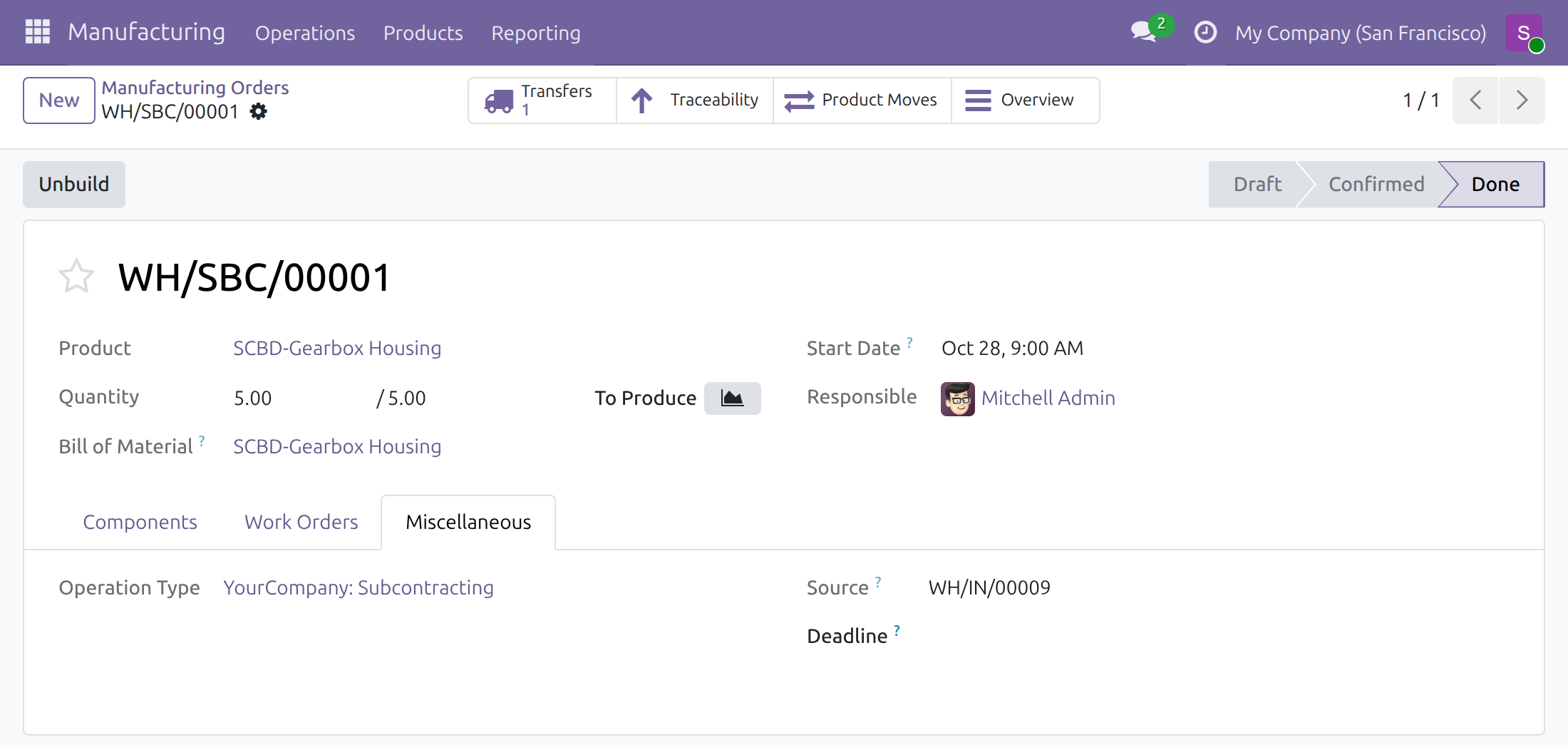
- Open Manufacturing ‣ Operations ‣ Manufacturing Orders and open the order of the receipt; its Source on the tab Miscellaneous is the receipt.
- Check that the order is Done and that its Start Date is not after the date you chose.
Click Product Moves on the order to see its stock movements: the consumed component and the finished product are dated on the chosen date, a minute before the chosen time, as Odoo stamps the movements just before it completes the order.
Good to know
- A back-date is never in the future: a date after the current time is refused, and the dialog stays open.
- A transfer dated in a locked accounting period is refused by Odoo.
- Dates are entered in your time zone; the accounting day is the day of the chosen date in your time zone.
Troubleshooting
- I validate a receipt from the subcontractor and the manufacturing order stays undone.
- The module installs when Manufacturing Backdate and Subcontracting are both ticked: check Settings ‣ Backdate Operations and Settings ‣ Manufacturing.
- No dialog opens when I click Validate on a receipt.
- You do not hold Inventory Backdate: Stock Backdate Operations, so the receipt is validated at the current time. Ask your administrator for the right.
- The date I entered is refused.
- Choose a date and time up to the current time, outside any locked accounting period.
FAQ
- Does the planner have to answer a second dialog for the subcontracted order?
- No. The date of the receipt is the date of the order.
- Does it change the manufacturing orders made in the plant?
- No. They keep asking the holders of Manufacturing Backdate for their completion date, as described in the guide of Manufacturing Backdate.
- What if the delivery goes from the subcontractor straight to the customer?
- Its subcontracted order is completed when the delivery is validated, even for a person who holds Manufacturing Backdate only.
This software and associated files (the "Software") may only be used (executed, modified, executed after modifications) if you have purchased a valid license from the authors, typically via Odoo Apps, or if you have received a written agreement from the authors of the Software (see the COPYRIGHT file).
You may develop Odoo modules that use the Software as a library (typically by depending on it, importing it and using its resources), but without copying any source code or material from the Software. You may distribute those modules under the license of your choice, provided that this license is compatible with the terms of the Odoo Proprietary License (For example: LGPL, MIT, or proprietary licenses similar to this one).
It is forbidden to publish, distribute, sublicense, or sell copies of the Software or modified copies of the Software.
The above copyright notice and this permission notice must be included in all copies or substantial portions of the Software.
THE SOFTWARE IS PROVIDED "AS IS", WITHOUT WARRANTY OF ANY KIND, EXPRESS OR IMPLIED, INCLUDING BUT NOT LIMITED TO THE WARRANTIES OF MERCHANTABILITY, FITNESS FOR A PARTICULAR PURPOSE AND NONINFRINGEMENT. IN NO EVENT SHALL THE AUTHORS OR COPYRIGHT HOLDERS BE LIABLE FOR ANY CLAIM, DAMAGES OR OTHER LIABILITY, WHETHER IN AN ACTION OF CONTRACT, TORT OR OTHERWISE, ARISING FROM, OUT OF OR IN CONNECTION WITH THE SOFTWARE OR THE USE OR OTHER DEALINGS IN THE SOFTWARE.