PLM Shop Confidentiality
by Viindoo
| Lines of Code | 378 |
| Technical name | viin_mrp_plm_website_sale |
| License | OPL-1 |
| Website | https://viindoo.com/apps/modules/19.0/viin_mrp_plm_website_sale |
| Read description for | v 18.0 |
| Required Apps | Manufacturing (mrp) Invoicing (account) Discuss (mail) Inventory (stock) eCommerce (website_sale) Website (website) |
| Included Dependencies | Product Lifecycle (PLM) |

Your shop shares the right files, and your engineering drawings stay inside
For manufacturers that sell online and keep engineering drawings confidential
Keep engineering drawings off your online shop: a product document marked PLM Confidential can never be published on the website, by anyone.
Odoo 19.0 · Odoo Community · Viindoo Cloud · OPL-1
Extends Product Lifecycle (PLM): its PLM Confidential setting also governs the web shop.
What changes for your team
Customers download what they need, and nothing more
Today: assembly guides and engineering drawings sit on the same product, one tick away from the public product page.
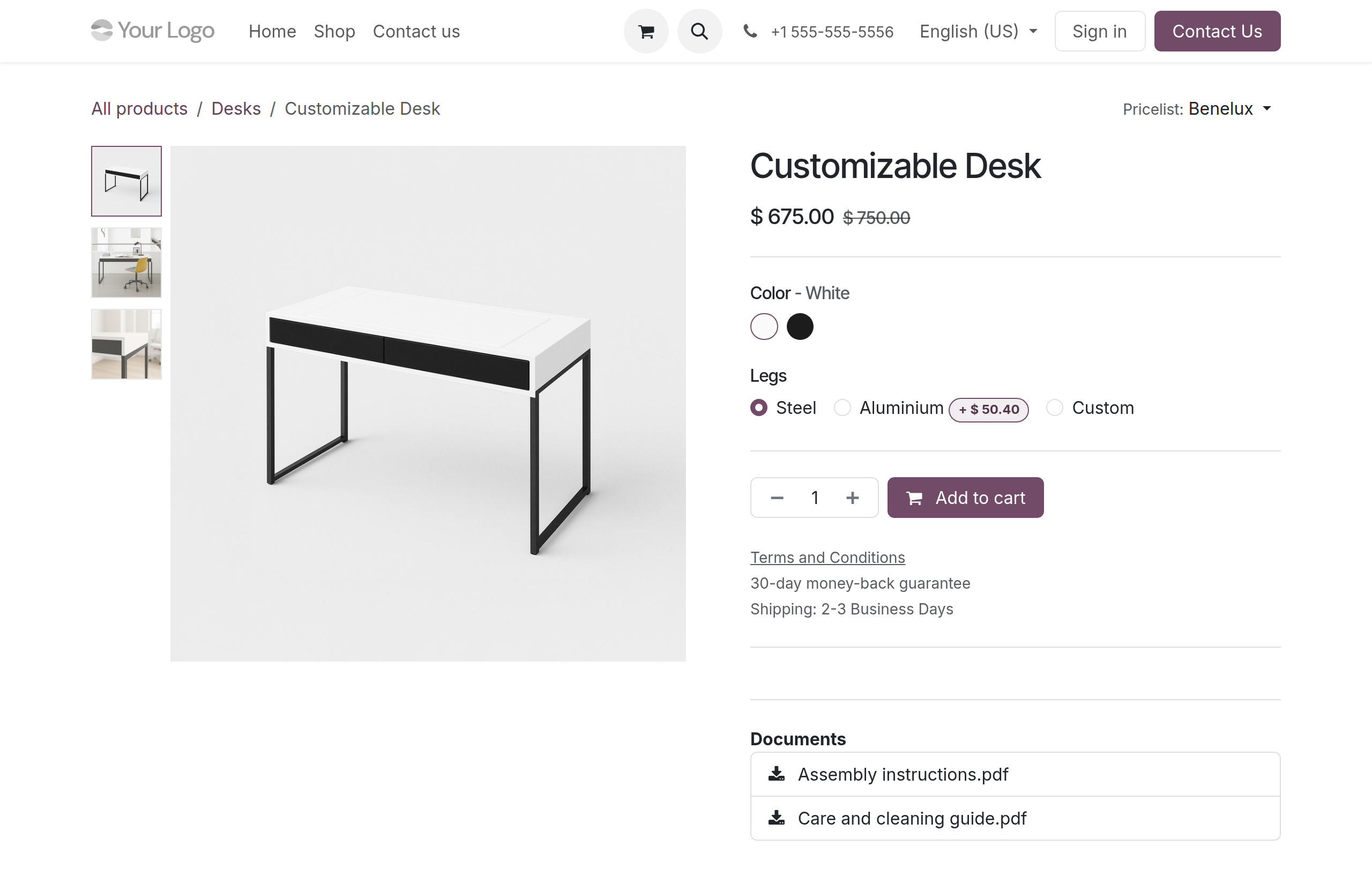
→ The product page lists only the documents your team publishes on purpose. A document marked PLM Confidential never appears there, so visitors cannot download it from the shop.
Nobody publishes a drawing by mistake
Today: protection depends on every person remembering which file is confidential, administrators included.
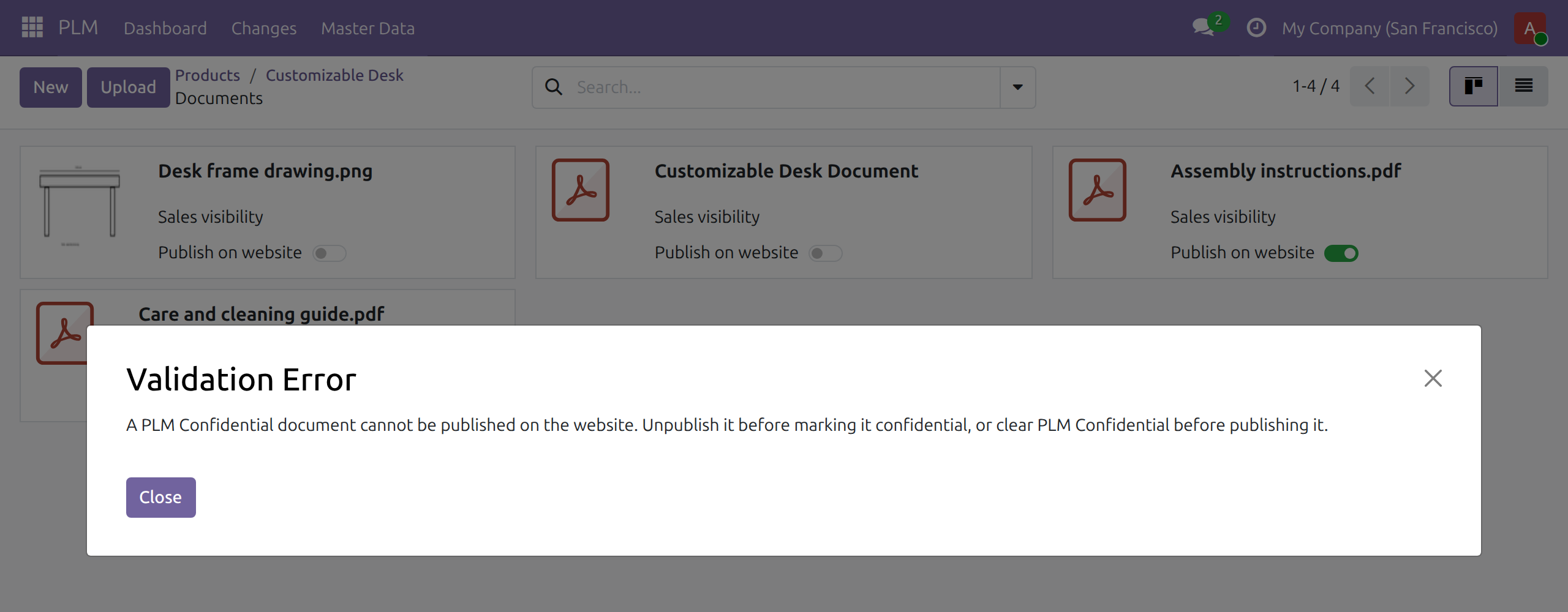
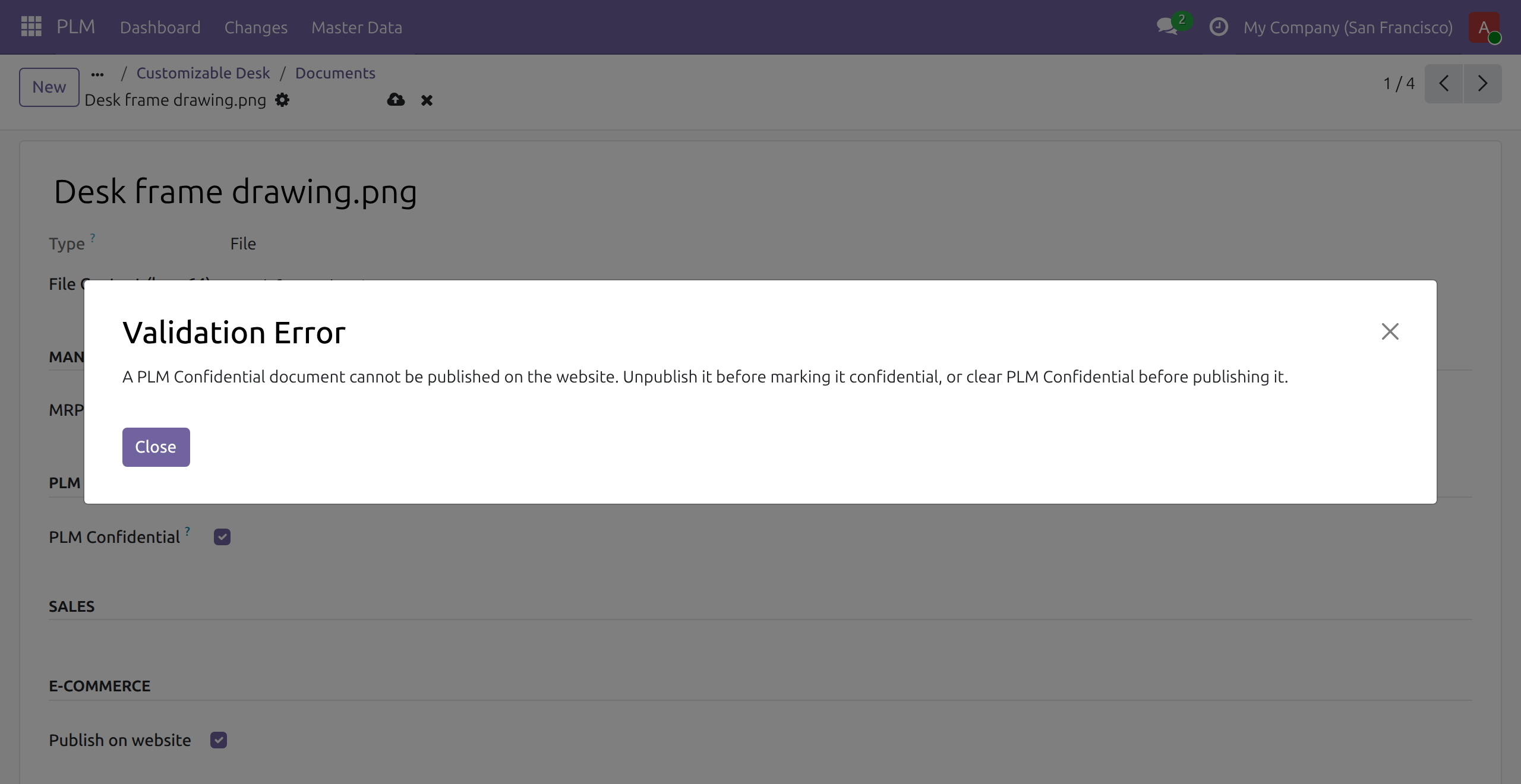
→ Saving a document that is both PLM Confidential and published is refused for every user, from either direction, with a message that says how to resolve it. The document keeps the settings it had, and a refused upload leaves no document behind.
Install on a running shop, and past exposure closes
Today: a confidential file published before anyone noticed stays public until someone finds it.
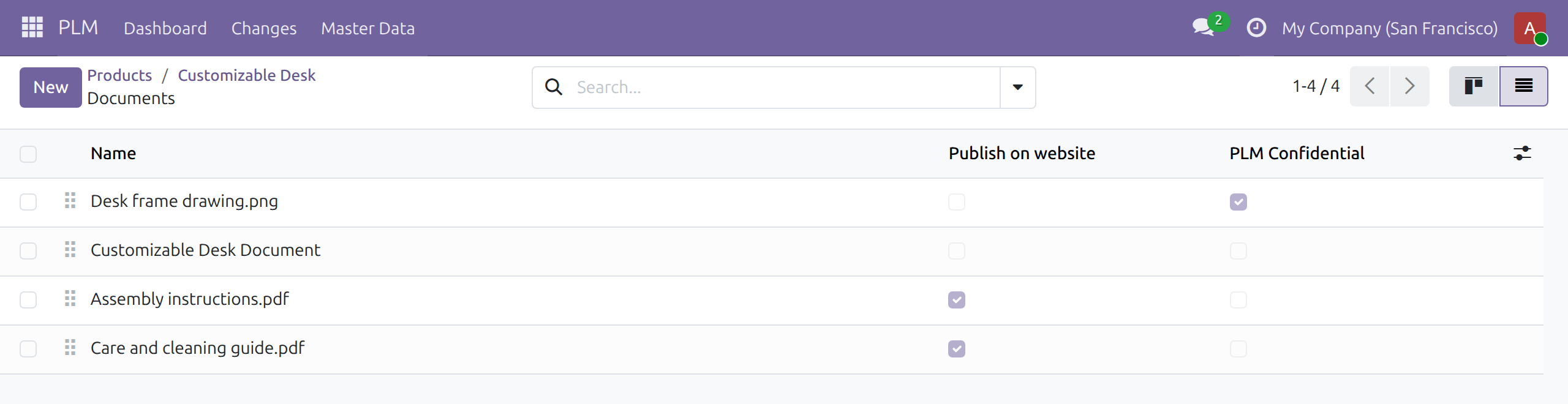
→ On installation, every document that is both PLM Confidential and published is unpublished, archived ones included. Each one stays PLM Confidential, and nothing is deleted.
Ready on day one
Installs itself
It installs as soon as Product Lifecycle and eCommerce are both installed.
The rule is on
There is no setting to switch on and none to forget.
What you set first
Give the PLM team the PLM / User access right, so they mark drawings confidential and publish the rest.
What is included
One rule between engineering and the web shop: a PLM Confidential product document is never published, enforced on every save and upload, plus a clean-up of documents already exposed when you install.
Before you decide
Can an administrator override it?
No. The rule applies to every user, PLM team and administrators included. To publish a document, clear PLM Confidential first; that choice stays visible on the document.
Does it restrict ordinary documents?
No. Publishing a document that is not PLM Confidential works as before.
What does installation change?
Only documents that are both PLM Confidential and published: they are unpublished. Their confidentiality and archive status are kept, and no document is deleted.
Where does the data go, and what if we uninstall?
Everything stays in your Odoo database; the module calls no outside service. Uninstalling changes no document, and the rule is then no longer enforced.
Which languages does it ship?
English and Vietnamese, including the refusal message.
Try it, then ask us
The Live Preview button opens a demo database; the Documentation tab walks through each role.
Pre-sales & partnership
viindoo.com/contactusTechnical support
viindoo.com/ticketTechnical requirements
- Odoo version: 19.0
- Editions: Odoo Community, Viindoo Cloud
- Required modules: Product Lifecycle (PLM), eCommerce
- License: OPL-1
- Languages: English, Vietnamese
PLM Shop Confidentiality
Note
Extends Product Lifecycle (PLM) - see its documentation: to_mrp_plm.
Audience: system administrators and the PLM team (PLM / User, PLM / Administrator) who keep engineering documents and run the web shop.
Overview
Engineering drawings and specifications marked PLM Confidential are meant for the PLM team only. The web shop can publish product documents as downloads on the product page. This module guarantees that the two never meet: a document that is PLM Confidential is never published on the website, and the product page of the shop lists only documents that are published and not confidential.
The rule applies to everyone, including members of the PLM team and administrators.
| Role | What they do | Access right to assign |
|---|---|---|
| System Administrator | Installs the module. | Administration / Settings |
| PLM engineer | Marks documents as PLM Confidential, publishes ordinary documents on the website. | PLM / User |
Setup (for the Administrator)
- Open Apps, search for Product Lifecycle (PLM) and install Product Lifecycle (PLM) and eCommerce.
- The module installs by itself as soon as both are installed. It has no setting to configure.
- Give each member of the PLM team the access right PLM / User in Settings ‣ Users & Companies ‣ Users.
On installation, every document that was both PLM Confidential and published is unpublished and stays PLM Confidential. Uninstalling the module changes no document; the rule is simply no longer enforced.
PLM engineer: keep confidential documents off the web shop
Publish an ordinary document
- Open a product, click More and then Documents.
- On the card of the document, open the menu and choose Edit.
- Leave PLM Confidential unticked, tick Publish on website in the section E-commerce, and save.
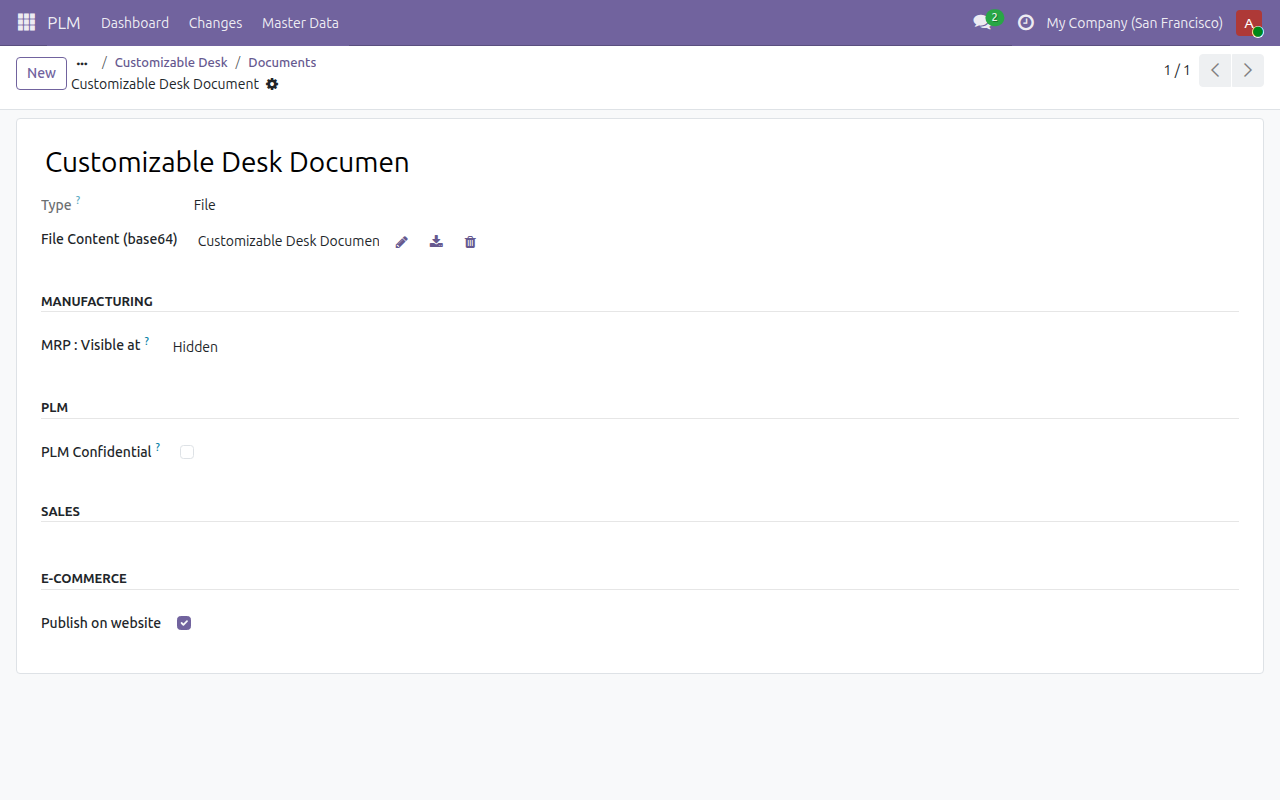
The document appears under Documents on the product page of the shop, where visitors can download it.
What happens when a document is both confidential and published
If you tick PLM Confidential on a published document, or tick Publish on website on a confidential one, saving is refused with the message "A PLM Confidential document cannot be published on the website. Unpublish it before marking it confidential, or clear PLM Confidential before publishing it." The document keeps exactly the settings it had before. A document uploaded in this state is not created.
To resolve it, unpublish the document first and then mark it confidential, or clear PLM Confidential and then publish it.
Note
A document added from a bill of materials is PLM Confidential automatically, so it cannot be published until you clear PLM Confidential. See the guide of Product Lifecycle (PLM) for how confidentiality works.
This software and associated files (the "Software") may only be used (executed, modified, executed after modifications) if you have purchased a valid license from the authors, typically via Odoo Apps, or if you have received a written agreement from the authors of the Software (see the COPYRIGHT file).
You may develop Odoo modules that use the Software as a library (typically by depending on it, importing it and using its resources), but without copying any source code or material from the Software. You may distribute those modules under the license of your choice, provided that this license is compatible with the terms of the Odoo Proprietary License (For example: LGPL, MIT, or proprietary licenses similar to this one).
It is forbidden to publish, distribute, sublicense, or sell copies of the Software or modified copies of the Software.
The above copyright notice and this permission notice must be included in all copies or substantial portions of the Software.
THE SOFTWARE IS PROVIDED "AS IS", WITHOUT WARRANTY OF ANY KIND, EXPRESS OR IMPLIED, INCLUDING BUT NOT LIMITED TO THE WARRANTIES OF MERCHANTABILITY, FITNESS FOR A PARTICULAR PURPOSE AND NONINFRINGEMENT. IN NO EVENT SHALL THE AUTHORS OR COPYRIGHT HOLDERS BE LIABLE FOR ANY CLAIM, DAMAGES OR OTHER LIABILITY, WHETHER IN AN ACTION OF CONTRACT, TORT OR OTHERWISE, ARISING FROM, OUT OF OR IN CONNECTION WITH THE SOFTWARE OR THE USE OR OTHER DEALINGS IN THE SOFTWARE.