


Work Entry & Contract Suspension
by Viindoo
| Lines of Code | 183 |
| Technical name | viin_hr_work_entry_contract_suspension |
| License | OPL-1 |
| Website | https://viindoo.com/apps/modules/19.0/viin_hr_work_entry_contract_suspension |
| Read description for | v 17.0 v 18.0 |
| Required Apps | Time Off (hr_holidays) Discuss (mail) Employees (hr) Calendar (calendar) |
| Included Dependencies | Viindoo Base Advanced HR Management HR Contracts (Viindoo) Work Entry Work Entry - Contract Viin Time-Off Viin - Holiday Work Entry Base Addendum HR Contracts Suspension Viindoo Holiday & WorkDay Manager Safe IR Metadata Proxies |
| Extensions | HR Contracts Suspension & Payroll |

Suspended days reach payroll as their own work entries
For payroll teams and HR departments that suspend labor contracts
Record contract suspension days as a dedicated work entry type for accurate payroll.
Is this you?
Suspended days show up as normal attendance, and payroll has to correct them by hand.
Payroll cannot tell a contract suspension from any other unpaid leave when it reviews the month.
Every approved suspension means someone re-keying the days into work entries.
What changes
Suspended days counted as attendance
→ Every suspended day is recorded under its own work entry type, Contract Suspension.
Suspension mixed up with other unpaid leave
→ Payroll filters and reviews suspension days separately from sick leave, paid leave and attendance.
Days re-keyed after each approval
→ The entries appear on their own as soon as the suspension request is approved.
How it works
Choose the work entry type
Time Off Administrator checks that the Contract Suspension time off type points to the right work entry type.
Adapt the type
HR Manager sets the rate and options payroll needs on the Contract Suspension work entry type.
Approve the suspension
Time Off Officer approves the request; the days are turned into work entries.
Review before payroll
HR Officer reviews the Contract Suspension entries like any other entry, then validates them.
Key Features
A work entry type for suspended days
A ready-to-use Contract Suspension type, unpaid with a 0% rate, that you can adapt to your payroll.
Linked to the time off type
Each contract suspension time off type points to its work entry type, so the link is set once.
Entries created on approval
The suspended working days become work entries without anyone creating them by hand.
Consistent configuration
The application refuses a type that is not marked as a contract suspension, so a mismatch cannot reach payroll.
Who it is for
Payroll officer
Needs suspended days to be visibly different from attendance and other leave. Gets a dedicated entry type.
HR manager
Wants to configure the treatment once. Gets one work entry type to adapt.
Time off officer
Approves suspensions and should not retype them. Gets the entries automatically.
Employee
Wants the record of the suspension to be right. Sees the entries under their own name.
Best for: HR and payroll teams that already suspend labor contracts through the Time Off app.
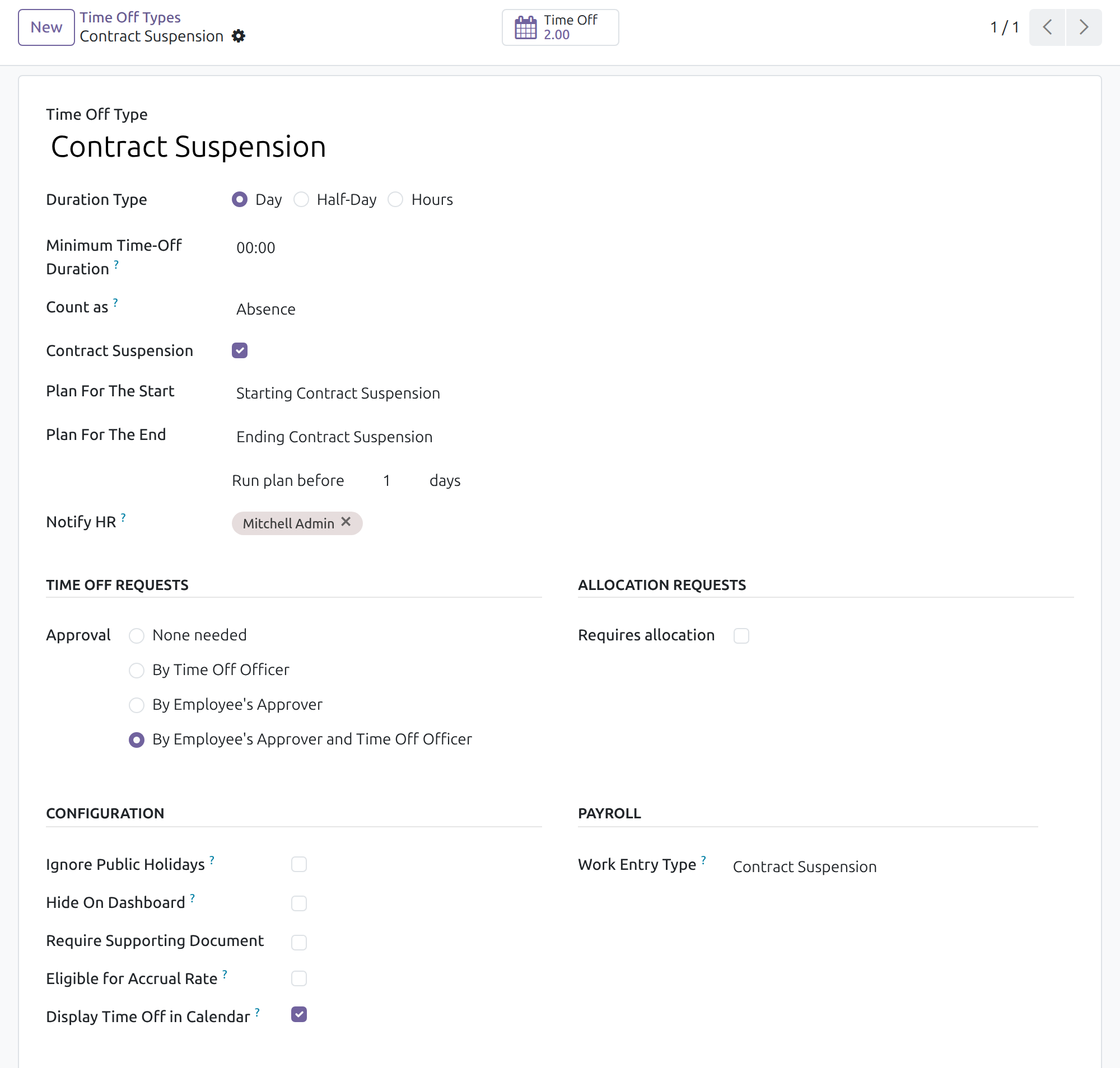
Choose the work entry type of a suspension
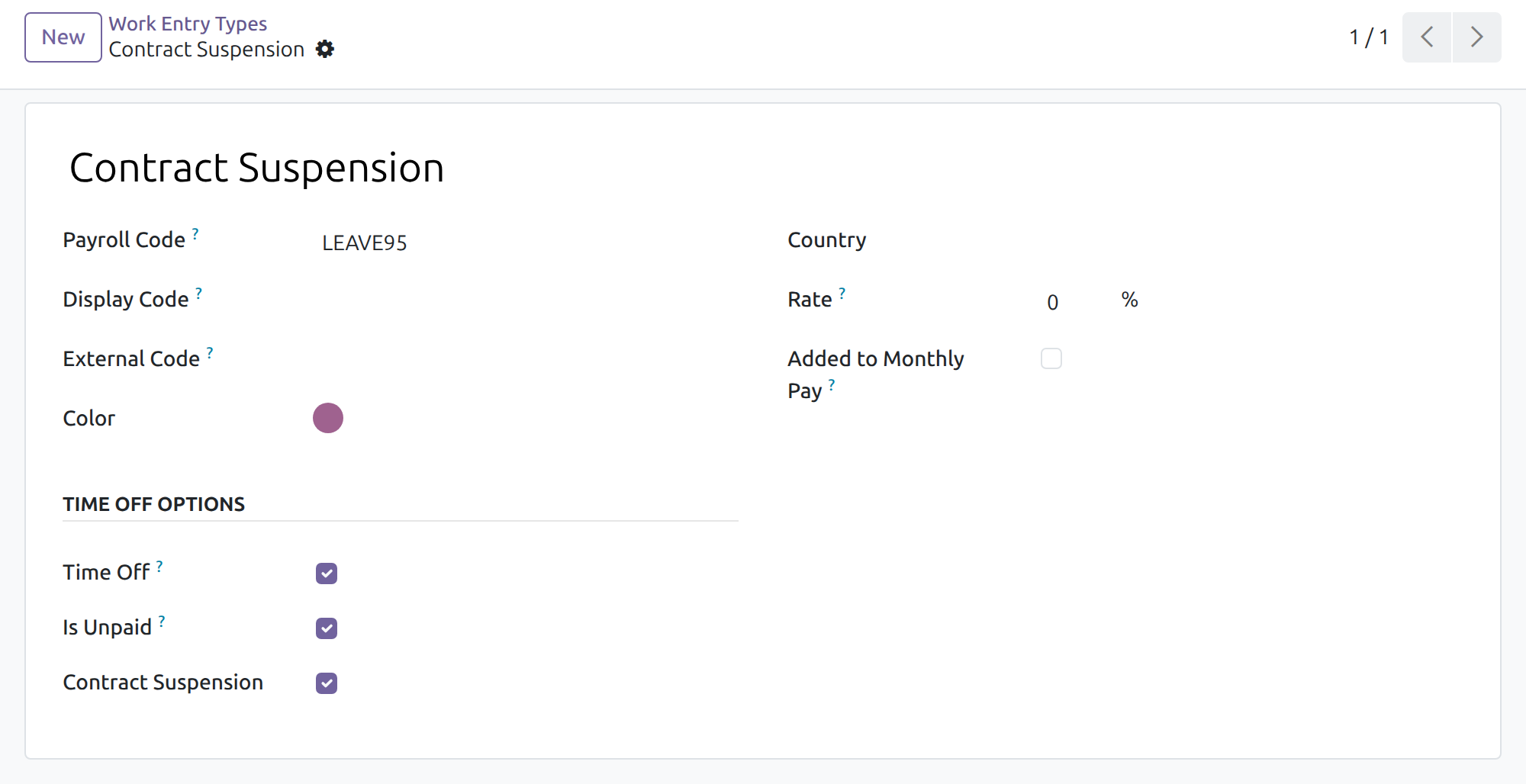
Adapt the Contract Suspension work entry type
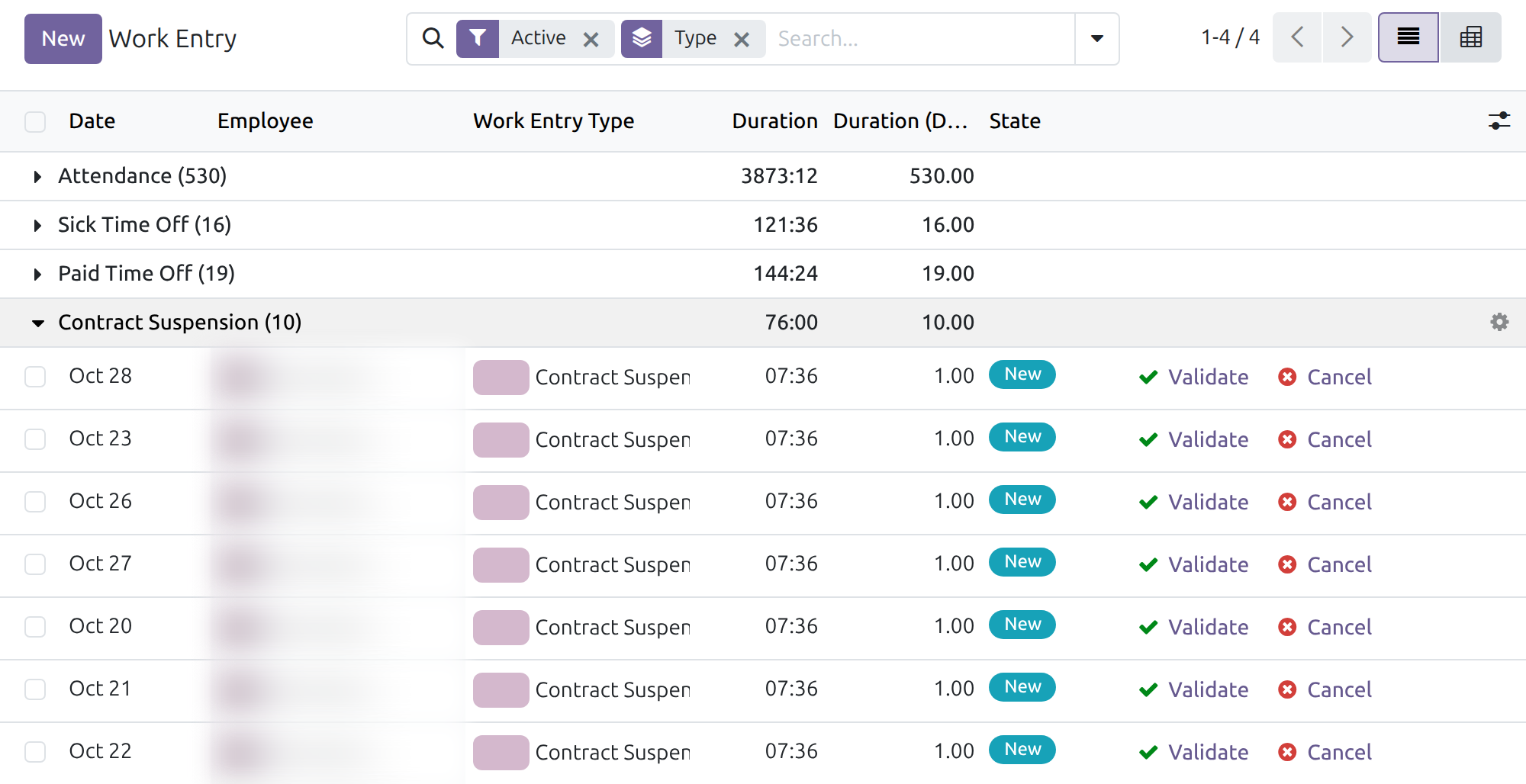
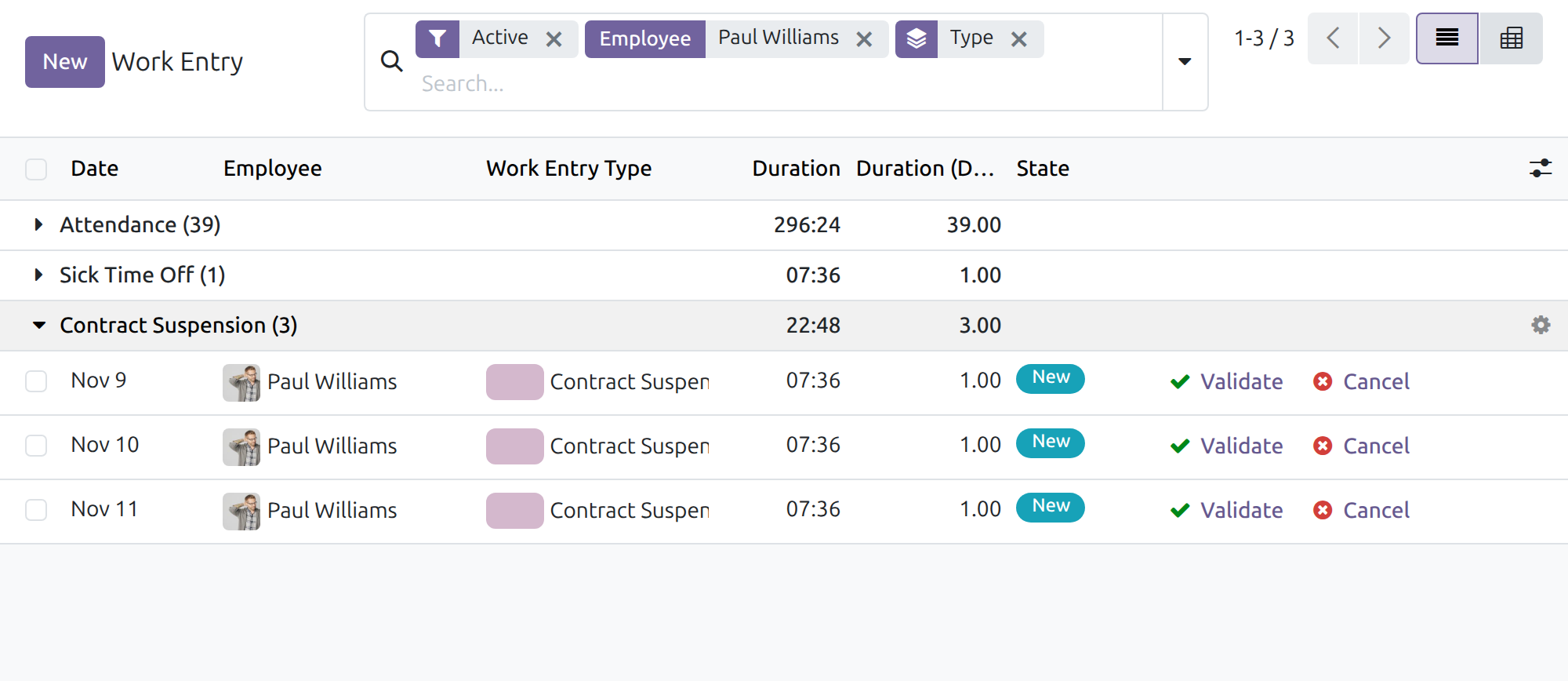
Review suspended days as work entries
Frequently Asked Questions
Does it change what an employee is paid?
No by itself. It records the suspended days under their own type; the pay follows the rate of that type and your payroll rules, which you keep up to date with your labor regulations.
Do I have to create the work entries?
No. The entries of the suspended working days appear when the suspension request is approved.
Can I have several kinds of suspension?
Yes. Each contract suspension time off type can point to its own work entry type.
What must I install first?
HR Contracts Suspension and Viin - Holiday Work Entry. Odoo installs them with this app.
How do I get help?
Open a ticket at viindoo.com/ticket. For pre-sales questions use viindoo.com/contactus.
Need help with Work Entry & Contract Suspension?
Technical Requirement
- Odoo version: 19.0
- Editions: Odoo Community
- Required modules: HR Contracts Suspension; Viin - Holiday Work Entry
- License: OPL-1
Work Entry & Contract Suspension
Note
Who this guide is for: the people who prepare payroll inputs - the Time Off Administrator and the HR Manager who set up how a contract suspension is recorded, the Time Off Officers who approve suspensions, the HR Officers who review the work entries before payroll, and the employees who can see their own entries.
Note
Extends HR Contracts Suspension - see its documentation for requesting, approving and following a suspension. This guide covers only what this module adds.
Overview
When a contract is suspended, payroll needs to know that the suspended days are neither normal working days nor ordinary paid time off. Work Entry & Contract Suspension does this by recording every suspended day as a work entry of a dedicated type, Contract Suspension, instead of counting it as attendance.
- A ready-to-use work entry type Contract Suspension is delivered. It is unpaid time off with a rate of 0%.
- Each time off type marked as a contract suspension points to one such work entry type.
- As soon as a suspension request is approved, the days it covers appear in the work entries of the employee under that type. Nobody creates them by hand.
The process, from set-up to payroll:
- The Time Off Administrator checks which work entry type the Contract Suspension time off type points to.
- The HR Manager adapts the work entry type itself when the company's payroll needs it.
- The employee requests a suspension and the Time Off Officer approves it (see the guide of HR Contracts Suspension).
- The suspended days appear as Contract Suspension work entries; the HR Officer reviews them like any other entry before payroll.
| Role | What they do | Access right to assign |
|---|---|---|
| Time Off Administrator | Chooses the work entry type of each contract suspension time off type. | Time Off / Administrator |
| HR Manager | Creates and edits work entry types, including the Contract Suspension mark. | Employees / Administrator |
| Time Off Officer | Approves suspensions; the work entries follow. | Time Off / Officer: Manage all requests |
| HR Officer | Reviews the work entries of all employees. | Employees / Officer: Manage all employees |
| Employee | Sees their own work entries (a manager also sees those of their team). | Internal user |
Setup (for the Administrator)
Installation
Open Apps, search for Work Entry & Contract Suspension and click Install. It is installed automatically when HR Contracts Suspension and the Viindoo work entry applications are present. Then give each person the access right of their role (table above) in Settings > Users & Companies > Users.
Time Off Administrator: choose the work entry type of the suspension
- Open Time Off > Configuration > Time Off Types and select Contract Suspension.
- In the Payroll section, check the field Work Entry Type. The delivered type points to the work entry type Contract Suspension.
- To create another kind of suspension, create a time off type and tick Contract Suspension. If you leave Work Entry Type empty, a work entry type of the same name is created for you and marked as a contract suspension.
Note
The work entry type of a contract suspension time off type must itself be marked as a contract suspension. Otherwise the form refuses to save with the message "The selected work entry type must be marked as a contract suspension entry."
HR Manager: adapt the work entry type
- Open Work Entries > Configuration > Work Entry Type and select Contract Suspension.
- Check the tick Contract Suspension under Time Off Options. It identifies the type as the one used for suspended days.
- Adapt what payroll needs: the payroll code, the Rate (0% in the delivered type, so a suspended day is not paid) and Is Unpaid.
Note
Pay rules for the suspended days are your company's choice and come from your labor regulations and contracts: the application only records the days under the right type. Keep the rate and the payroll rules up to date when regulations change.
Two protections keep the configuration consistent. A work entry type used by a contract suspension time off type cannot lose the Contract Suspension tick ("You cannot disable this configuration because the leave types linked to this work entry type are currently marked as contract suspension leave."). A type linked to an ordinary time off type cannot be given the tick ("You cannot enable this configuration because the leave types linked to this work entry type are not marked as contract suspension leave.").
Time Off Officer: approve the suspension
The Time Off Officer approves the Contract Suspension request exactly as described in HR Contracts Suspension: Time Off > Management > Time Off, open the request, click Approve. No further action is needed for the work entries.
HR Officer: review the suspended days as work entries
- Open Work Entries > Work Entries > Work Entries.
- Search for the employee and, in the search options, group by Type.
- Expand the group Contract Suspension.
Each working day of the approved suspension is one entry of the type Contract Suspension, with the usual duration of the employee's working day. The days outside the suspension stay Attendance. The entries are in the state New: validate them like any other entry, with Validate, once reviewed. The employee, and the employee's manager, see the same entries in the same menu.
Troubleshooting
- The suspended days still show as Attendance.
- The request must be Approved. Entries of a period are rebuilt when the approval is given; check that the time off type is the one marked Contract Suspension and that its Work Entry Type is filled.
- I cannot change the Work Entry Type of the suspension.
- Only a work entry type marked Contract Suspension can be chosen for a contract suspension time off type. Ask the HR Manager to mark it, or choose another one.
- I cannot create or edit a work entry type.
- It needs the Employees / Administrator access right. The Time Off Administrator and the Time Off Officer can read work entry types but not change them.
FAQ
- Does the suspension change the pay by itself?
- No. It records the days under the type Contract Suspension; what is paid is decided by the rate of the type and your payroll rules.
- Can I have several kinds of suspension?
- Yes. Each contract suspension time off type can point to its own work entry type.
- Where do I get help?
- Support: https://viindoo.com/ticket - to buy or ask pre-sales questions: https://viindoo.com/contactus
This software and associated files (the "Software") may only be used (executed, modified, executed after modifications) if you have purchased a valid license from the authors, typically via Odoo Apps, or if you have received a written agreement from the authors of the Software (see the COPYRIGHT file).
You may develop Odoo modules that use the Software as a library (typically by depending on it, importing it and using its resources), but without copying any source code or material from the Software. You may distribute those modules under the license of your choice, provided that this license is compatible with the terms of the Odoo Proprietary License (For example: LGPL, MIT, or proprietary licenses similar to this one).
It is forbidden to publish, distribute, sublicense, or sell copies of the Software or modified copies of the Software.
The above copyright notice and this permission notice must be included in all copies or substantial portions of the Software.
THE SOFTWARE IS PROVIDED "AS IS", WITHOUT WARRANTY OF ANY KIND, EXPRESS OR IMPLIED, INCLUDING BUT NOT LIMITED TO THE WARRANTIES OF MERCHANTABILITY, FITNESS FOR A PARTICULAR PURPOSE AND NONINFRINGEMENT. IN NO EVENT SHALL THE AUTHORS OR COPYRIGHT HOLDERS BE LIABLE FOR ANY CLAIM, DAMAGES OR OTHER LIABILITY, WHETHER IN AN ACTION OF CONTRACT, TORT OR OTHERWISE, ARISING FROM, OUT OF OR IN CONNECTION WITH THE SOFTWARE OR THE USE OR OTHER DEALINGS IN THE SOFTWARE.
