


Vietnam - Payroll for Meal Orders with Accounting
| Lines of Code | 29 |
| Technical name | l10n_vn_viin_hr_payroll_meal_account |
| License | OPL-1 |
| Website | https://viindoo.com/apps/modules/19.0/l10n_vn_viin_hr_payroll_meal_account |
| Read description for | v 13.0 v 14.0 v 15.0 v 16.0 v 17.0 v 18.0 |
| Required Apps | Time Off (hr_holidays) Invoicing (account) Discuss (mail) Calendar (calendar) Employees (hr) |
| Included Dependencies | Payroll HR Payroll Accounting Vietnam - Payroll Vietnam Payroll - Accounting Integration Employee Relatives Meal Orders Viindoo Base Vietnam Chart of Accounts - Circular 99 and 133 Accounting Foundation Advanced HR Management HR Contracts (Viindoo) Work Entry Work Entry - Contract HR Meal Order & Payroll Integration HR Accounting Viin Time-Off Viin - Holiday Work Entry Vietnam - HR Accounting Base Addendum Safe IR Metadata Proxies Viindoo Holiday & WorkDay Manager |
Meal deductions land in the right accounts on every payslip
For payroll managers and accountants of companies in Vietnam that share the cost of employee meals
Post the meal deduction to 1388 and 334 without a manual journal entry.
Is this you?
The employee repays part of each meal through the salary, and accounting rebuilds that split by hand every month.
Each payslip needs its own manual journal line for the meal deduction, and mistakes surface at month-end closing.
Payroll and accounting disagree on which account the deduction belongs to.
A new subsidiary is set up and the meal deduction has no accounts until someone remembers to configure them.
What changes
No manual meal entry
The payslip journal entry already contains the meal deduction: the employee repayment reduces Other receivables (1388) and the salary payable (334).
Accounts set from the start
The meal deduction rule receives its accounts when a Vietnamese chart of accounts is in place, with no per-payslip set-up.
Your policy still rules
The Payroll Administrator can pick other accounts on the rule; an account already chosen is never overwritten.
One clear trail
The salary payer opens the payslip, follows its journal entry and finds the meal lines labelled as such.
How it works
Order meals
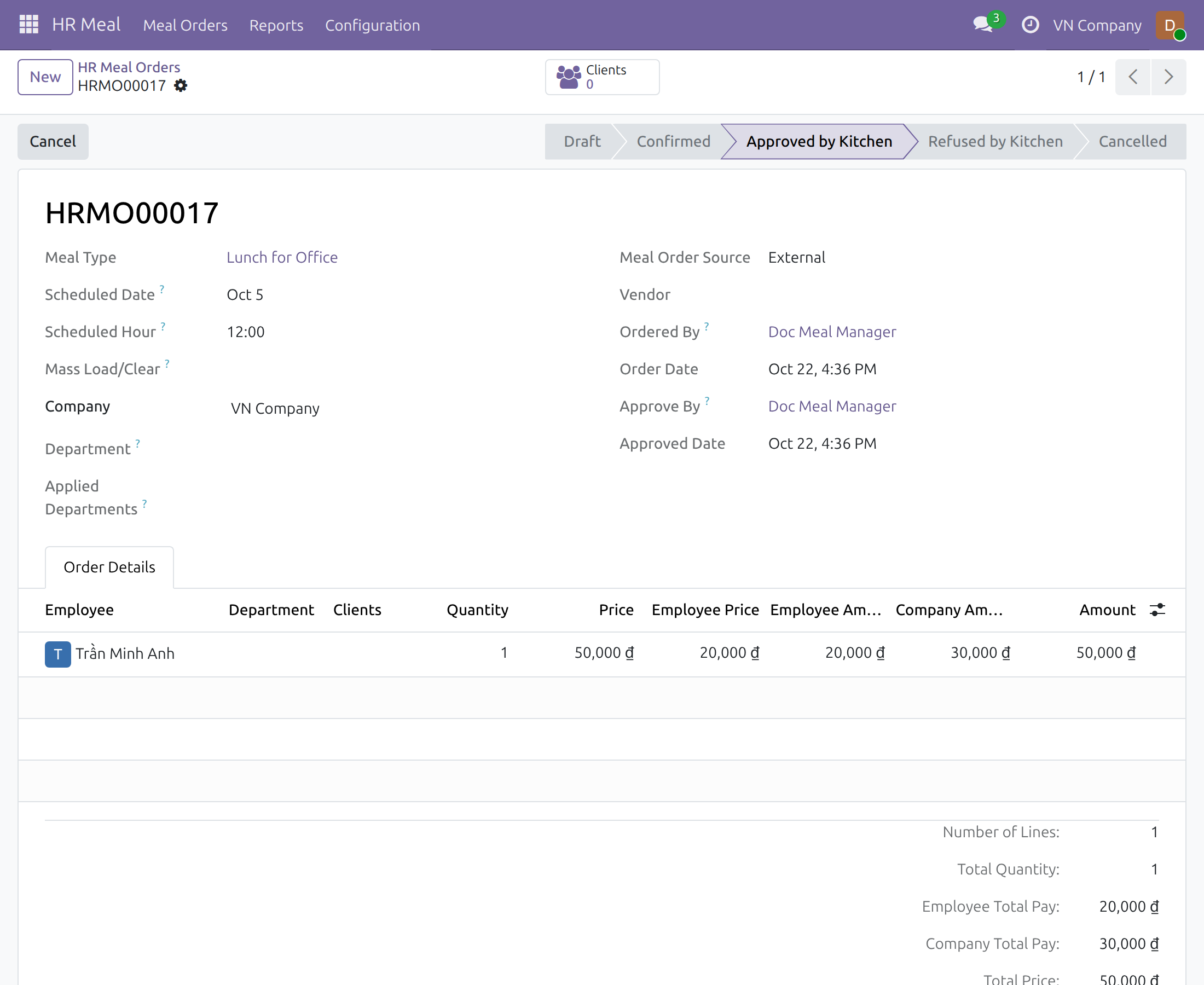
The meal orderer books meals and the meal manager approves them. Each line shows what the employee pays and what the company pays.
Compute the payslip
The Payroll Officer computes the payslip; the employee share is deducted from the net salary.
Confirm
Confirming the payslip creates the journal entry with the meal deduction on the configured accounts.
Review
The Accountant checks the entry, which posts as soon as its accounting date is reached.
Key Features
Vietnamese accounts by default
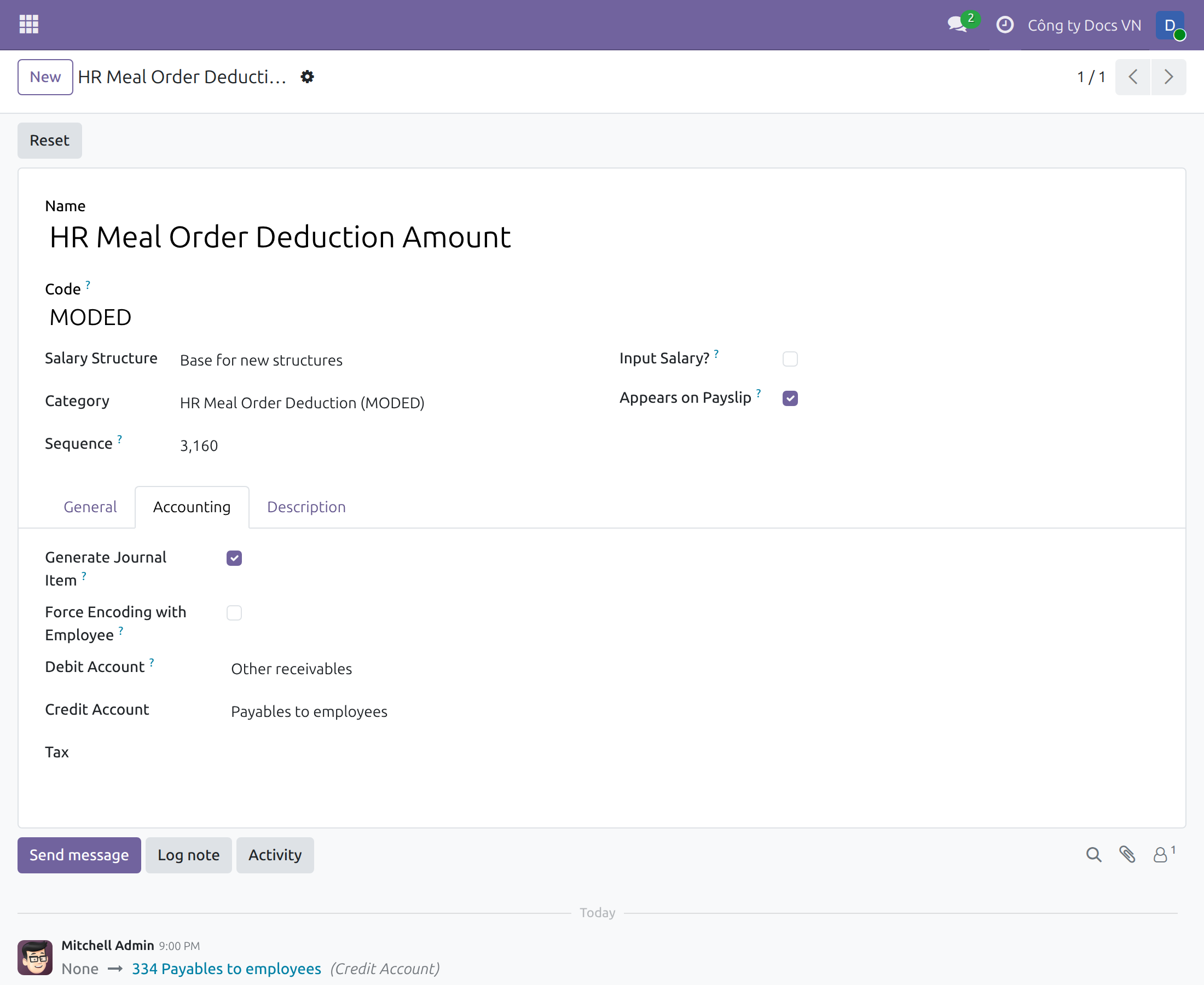
The meal deduction is debited to 1388 - Other receivables and credited to 334 - Payables to employees.
Applied for Vietnamese companies
Companies with a Vietnamese chart of accounts get the accounts on install and when the chart is loaded.
Accounts you can change
The Payroll Administrator edits the debit and credit accounts on the salary rule when company policy differs.
Respects existing choices
A rule that already has an account keeps its configuration.
Entry on every payslip
The meal deduction appears in the journal entry created when the payslip is confirmed.
Who it is for
Payroll Administrator
Checks, and if needed adjusts, the accounts of the meal deduction rule once for the whole company.
Payroll Officer
Computes and confirms payslips knowing the meal deduction will be posted correctly.
Accountant
Reviews payslip entries with the meal deduction already separated from the company expense. The accountant screens with full accounting features (Account column, Journal Items tab, accountant menus) come with the optional module Accounting & Finance (to_account_accountant).
Chief Accountant
Gets consistent treatment of meal repayments across all payslips of the company.
Best for: companies in Vietnam that pay part of employee meals and recover the employee share through payroll.
Accounts of the meal deduction rule
Employee and company shares of a meal
From the payslip to its journal entry
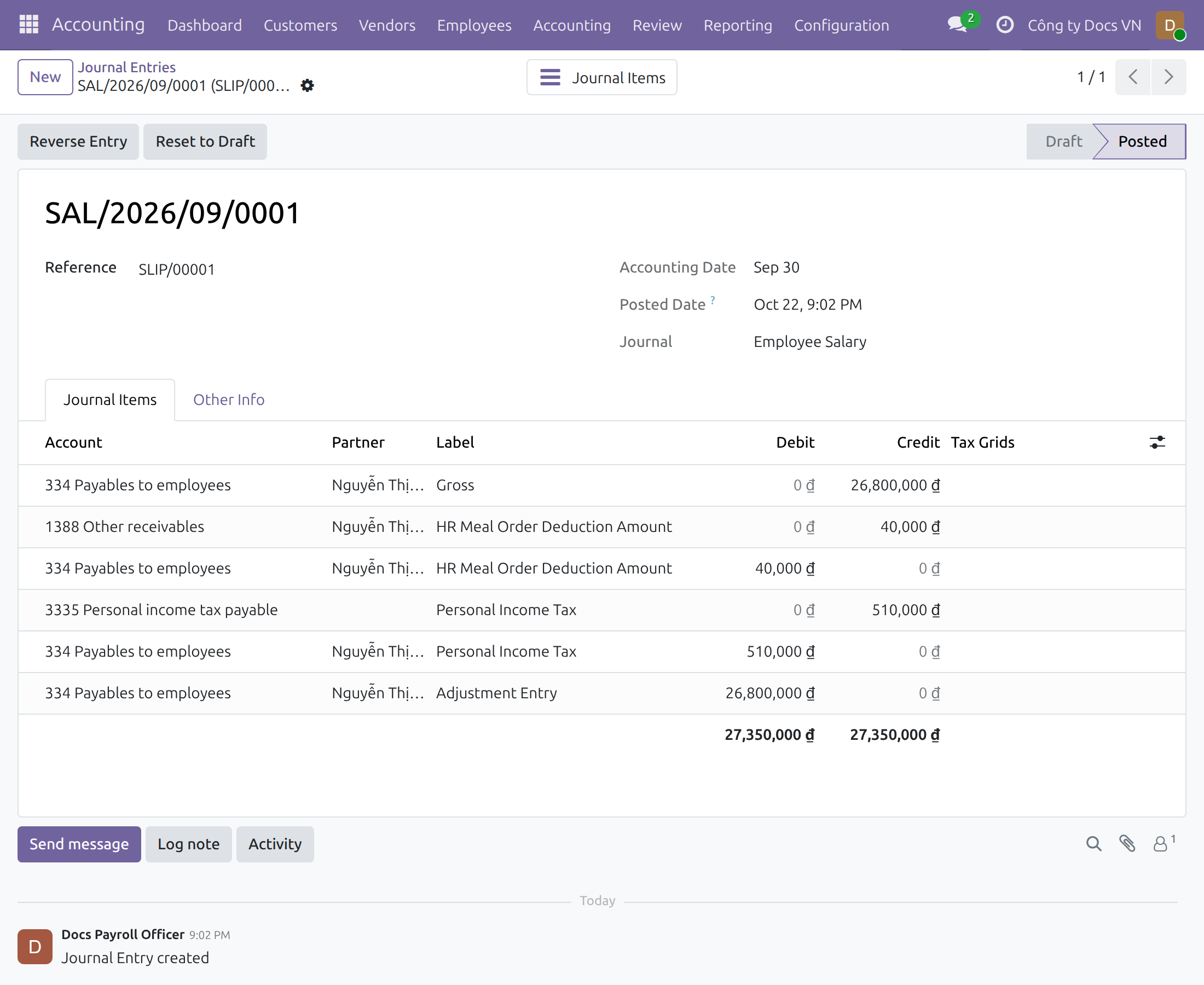
Meal deduction in the journal entry
FAQ
Which accounts are used?
Debit 1388 - Other receivables and credit 334 - Payables to employees, taken from the chart of accounts of the company.
Can we use other accounts?
Yes. The Payroll Administrator changes them on the salary rule; payslips computed afterwards use the new accounts.
What if the company has no chart of accounts yet?
The rule gets its accounts when a Vietnamese chart of accounts is loaded for the company.
Who can open the journal entry?
Users with an accounting access right. The accountant opens it from the accounting menus; a payroll user who also holds the Invoicing access right can follow it from the payslip. Payroll users without an accounting right do not see accounting data.
Is the company share of the meal in the payslip entry?
No. It is recorded with the meal vendor bill in Accounting.
Need help with Vietnam - Payroll for Meal Orders with Accounting?
Sales & Partnership
Contact SalesTechnical Support
Open a support ticketTechnical Requirement
- Odoo version: 19.0
- Edition: Community
- Required apps: Vietnam Payroll - Accounting Integration (l10n_vn_viin_hr_payroll_account), HR Meal Order & Payroll Integration (to_hr_payroll_meal)
- Optional app: Accounting & Finance (to_account_accountant) for the full accounting features shown on the accountant screens
- License: OPL-1
Vietnam - Payroll for Meal Orders with Accounting
Who this guide is for: the Odoo administrator who installs the module, the payroll manager who checks the accounts of the meal deduction, the payroll officer who computes payslips, the person who pays salaries and follows each payslip to its journal entry, and the accountant who reviews the resulting journal entry. Meal orderers and meal managers work in HR Meal as usual.
Note
Extends Vietnam - Payroll for Meal Orders - see its documentation: l10n_vn_viin_hr_payroll_meal.
Note
Extends HR Meal Order & Payroll Integration - see its documentation: to_hr_payroll_meal.
Overview
Many companies pay part of each employee's meal and take the employee's part back from the salary. Accounting then has to separate what the employee owes the company (a receivable that is settled through the salary) from what the company bears as its own expense. Doing this by hand for every payslip is slow and error-prone.
This module gives the salary rule that deducts the meals (HR Meal Order Deduction Amount) its accounts according to Vietnamese accounting, so that the payslip journal entry contains the meal deduction without any manual entry:
- Debit account: 1388 - Other receivables.
- Credit account: 334 - Payables to employees.
How it flows
- Meal orders - the meal orderer books meals and the meal manager approves them. Each line shows what the employee pays and what the company pays.
- Payslip - the payroll officer computes the payslip; the employee's part is deducted from the net salary.
- Journal entry - confirming the payslip creates the journal entry that includes the meal deduction on the accounts above; the accountant reviews it.
| Role | What they do | Access right to assign |
|---|---|---|
| Administrator | Installs the module and gives each person an access right. | Settings / Administration |
| Payroll manager | Checks, and if the company's policy requires, changes the accounts of the meal deduction rule. | Payroll / Administrator |
| Payroll officer | Computes and confirms payslips. Does not see accounting data. | Payroll / Officer |
| Salary payer | Computes payslips and follows each payslip to its journal entry. | Payroll / Officer together with Accounting / Invoicing |
| Accountant | Reviews the journal entry of the payslip. Does not see payslips or salaries. | Accounting / Administrator |
| Meal orderer / meal manager | Book and approve meals, as described in the HR Meal guide. | HR Meal / User, HR Meal / Administrator |
Setup (for the Administrator)
Install the module
- Open Apps.
- Search for Vietnam - Payroll for Meal Orders with Accounting.
- Press Install.
The module is installed together with the payroll accounting and the meal deduction modules it needs, once the company works with Vietnamese accounting.
The full accounting features - the Account column and the Journal Items tab on journal entries, and the accountant menus - come with the optional module Accounting & Finance. Install it from Apps when the accountant needs them; this guide shows the accountant's screens with it installed. The accounting application is then named Accounting; without that module it is named Invoicing.
Prepare the company
The default accounts are given to the meal deduction rule of every company that uses a Vietnamese chart of accounts, both when the module is installed and when a Vietnamese chart of accounts is loaded for a company. A company that has no chart of accounts loaded yet gets no accounts on the rule: load the Vietnamese chart in Accounting > Configuration > Settings first. A rule that already has an account keeps its own configuration.
Give each person an access right
Open Settings > Users & Companies > Users and give each user the right named in the table above.
Payroll manager: check the accounts of the meal deduction
- Open Payroll > Configuration > Payroll Entry > Salary Rules, remove the default filter if needed and open HR Meal Order Deduction Amount.
- Open the Accounting tab.
- Check that Generate Journal Item is ticked and that Debit Account is Other receivables (account 1388) and Credit Account is Payables to employees (account 334). The payroll manager sees the account names; the account codes are shown to users with accounting rights.
The accounts belong to the chart of accounts of the company, so they follow the account codes the accountant maintains. If the company's policy needs other accounts, choose them in the two fields: the payslips computed afterwards use them.
Payroll officer: compute and confirm the payslip
Meals are booked and approved in HR Meal. In the example below a meal costs 50,000 VND, the employee pays 20,000 VND and the company pays the other 30,000 VND.
- Open Payroll > Payslips > Payslips and open or create the employee's payslip.
- Press Compute Sheet. The meals of the period are listed and the line HR Meal Order Deduction Amount subtracts the employee's part from the net salary (here two meals, -40,000 VND).
- Press Confirm. The journal entry of the payslip is created.
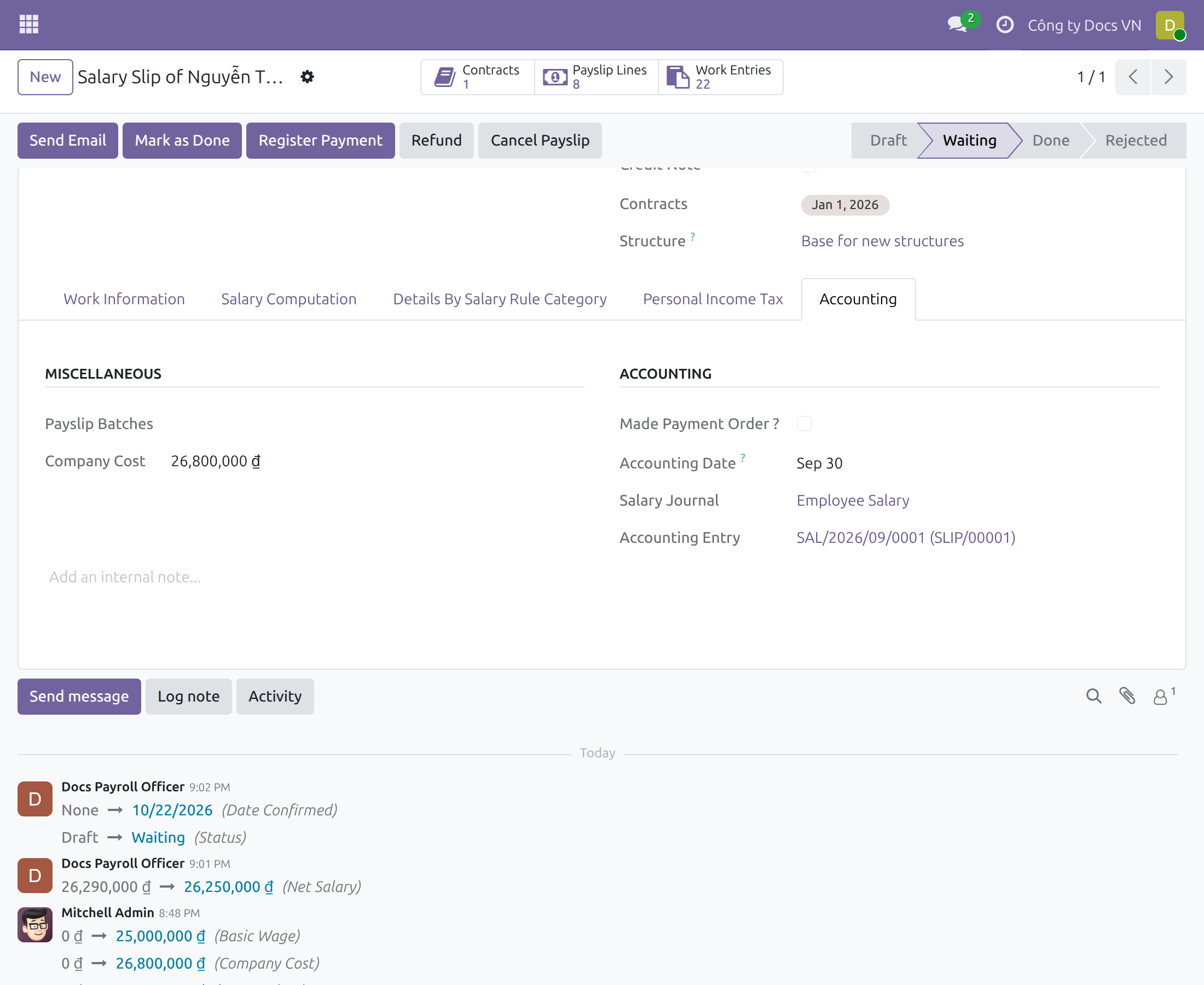
The Accounting tab of the payslip shows the accounting date and the salary journal. The Accounting Entry link to the journal entry appears for users who hold the access right Accounting / Invoicing or Accounting / Auditor - Readonly in addition to their payroll right, such as the salary payer in the screenshot. A payroll officer without an accounting right sees the tab without that link and does not see accounting data.
Opening the journal entry itself needs an accounting access right. The accountant finds the entry in the accounting menus, as described below.
Accountant: review the journal entry
- Open Accounting > Accounting > Journal Entries (the salary payer can also use the link on the payslip) and open the entry whose reference is the payslip reference, for example SLIP/00001.
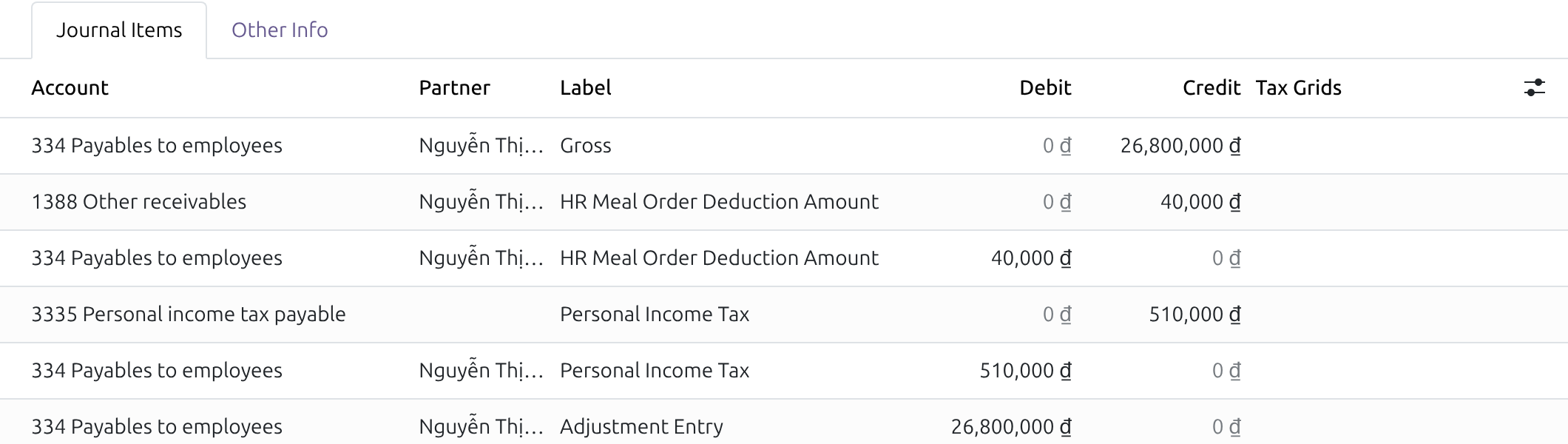
- On the Journal Items tab find the two lines labelled HR Meal Order Deduction Amount.
For the two meals of the example the meal deduction is posted as:
- Credit 1388 - Other receivables: 40,000 VND - the employee has repaid the meal advance.
- Debit 334 - Payables to employees: 40,000 VND - the salary owed to the employee is reduced.
The other lines of the entry come from the other salary rules of the payslip; payroll accounting adds an Adjustment Entry line to balance the entry. The company's own share of the meals (30,000 VND per meal here) is not part of the payslip: it is recorded with the meal vendor's bill in Accounting.
The entry is posted as soon as its accounting date has been reached. When the accounting date is still in the future, the entry stays in draft and the form announces that it posts automatically on that date.
This software and associated files (the "Software") may only be used (executed, modified, executed after modifications) if you have purchased a valid license from the authors, typically via Odoo Apps, or if you have received a written agreement from the authors of the Software (see the COPYRIGHT file).
You may develop Odoo modules that use the Software as a library (typically by depending on it, importing it and using its resources), but without copying any source code or material from the Software. You may distribute those modules under the license of your choice, provided that this license is compatible with the terms of the Odoo Proprietary License (For example: LGPL, MIT, or proprietary licenses similar to this one).
It is forbidden to publish, distribute, sublicense, or sell copies of the Software or modified copies of the Software.
The above copyright notice and this permission notice must be included in all copies or substantial portions of the Software.
THE SOFTWARE IS PROVIDED "AS IS", WITHOUT WARRANTY OF ANY KIND, EXPRESS OR IMPLIED, INCLUDING BUT NOT LIMITED TO THE WARRANTIES OF MERCHANTABILITY, FITNESS FOR A PARTICULAR PURPOSE AND NONINFRINGEMENT. IN NO EVENT SHALL THE AUTHORS OR COPYRIGHT HOLDERS BE LIABLE FOR ANY CLAIM, DAMAGES OR OTHER LIABILITY, WHETHER IN AN ACTION OF CONTRACT, TORT OR OTHERWISE, ARISING FROM, OUT OF OR IN CONNECTION WITH THE SOFTWARE OR THE USE OR OTHER DEALINGS IN THE SOFTWARE.
