Shop Floor Control - Accounting
| Lines of Code | 831 |
| Technical name | viin_mrp_workorder_account |
| License | OPL-1 |
| Website | https://viindoo.com/apps/modules/18.0/viin_mrp_workorder_account |
| Required Apps | Manufacturing (mrp) Invoicing (account) Discuss (mail) Inventory (stock) Employees (hr) |
| Included Dependencies | Advanced MRP Accounting Shop Floor Control Viindoo Manufacturing Viindoo Base Viin Warehouse Web Gantt Viin Warehouse Accounting |
Shop floor labour in your product cost, priced person by person
For manufacturers that record operator time on the shop floor
Book the labour, work in progress and analytic entries of Shop Floor Control in accounting.
Odoo 18.0 · Odoo Community · Viindoo Cloud · OPL-1
Extends Shop Floor Control - see its documentation.
What changes for your team
Labour per work order, at each person's rate
Today: operator time is recorded at the machine, then priced by hand.
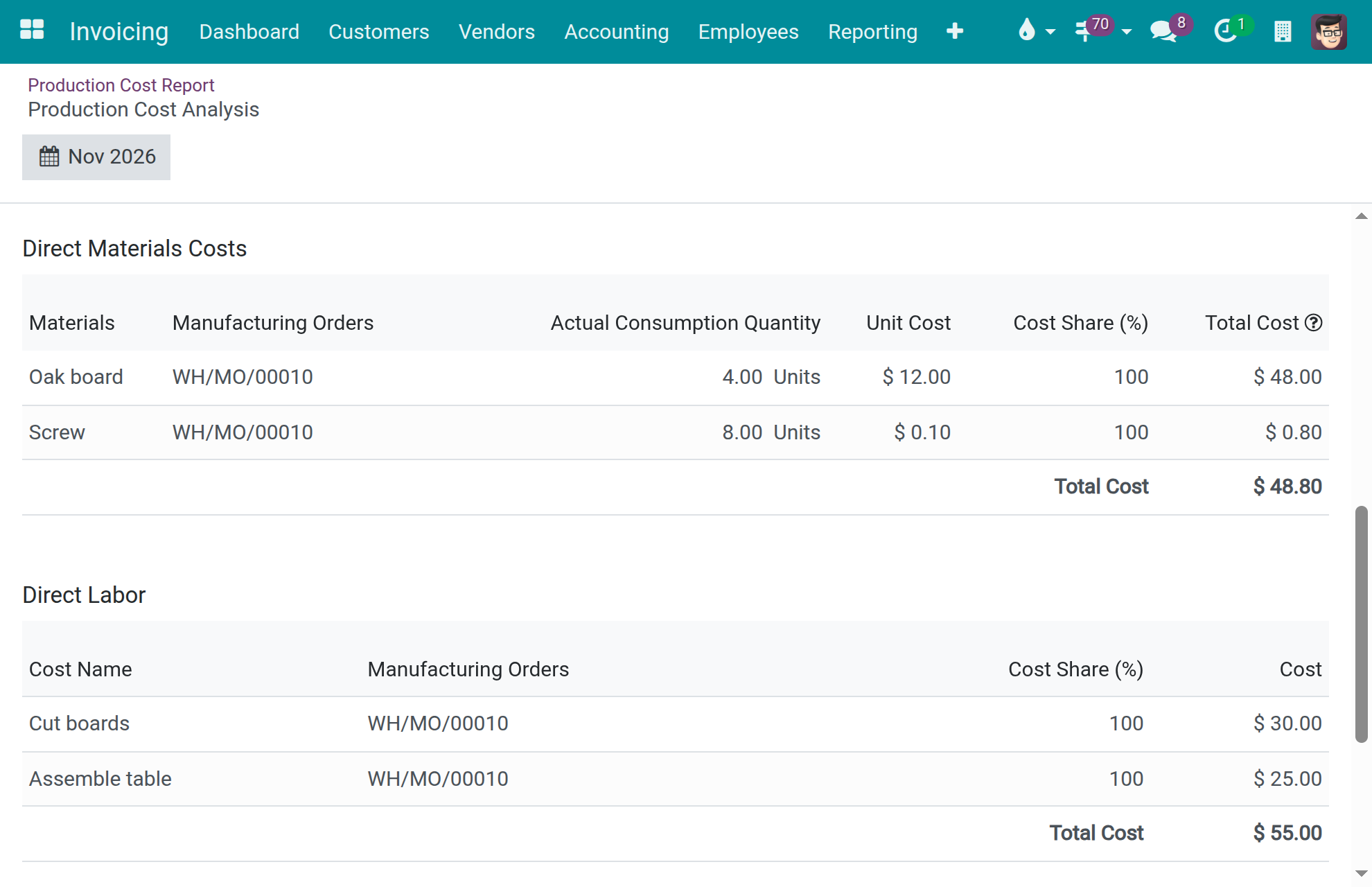
→ The Production Cost Report carries a Direct Labor column, one row per work order behind it: each time line at its employee's hourly cost, frozen when the line closes.
Work in progress per work center
Today: components between consumption and receipt are tracked outside the system.
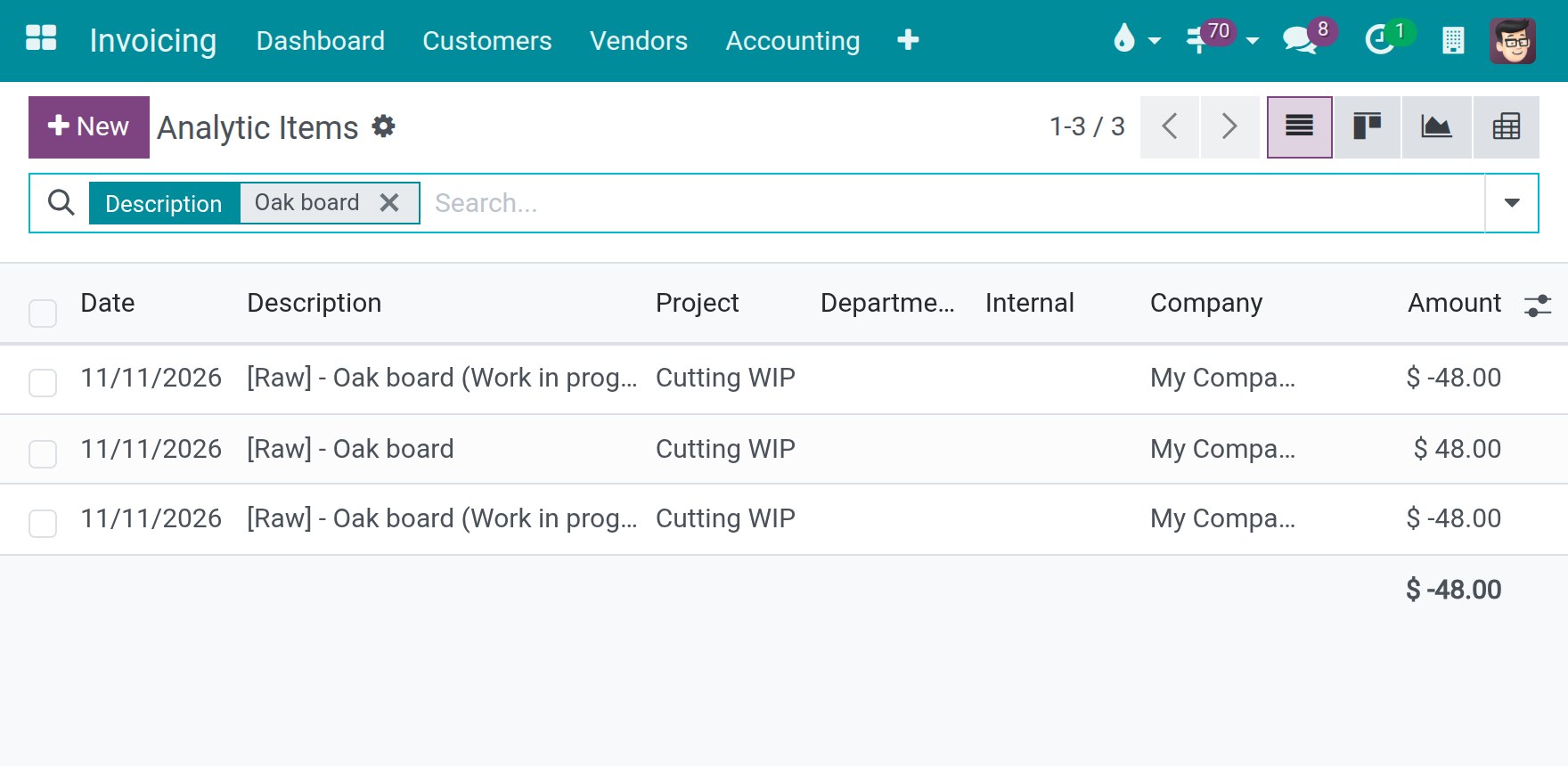
→ Each consumed component is booked on the work center's WIP analytic account and offset on receipt; the balance is what is in progress.
A period-end entry that counts each component once
Today: components posted early are credited from stock again at period end.
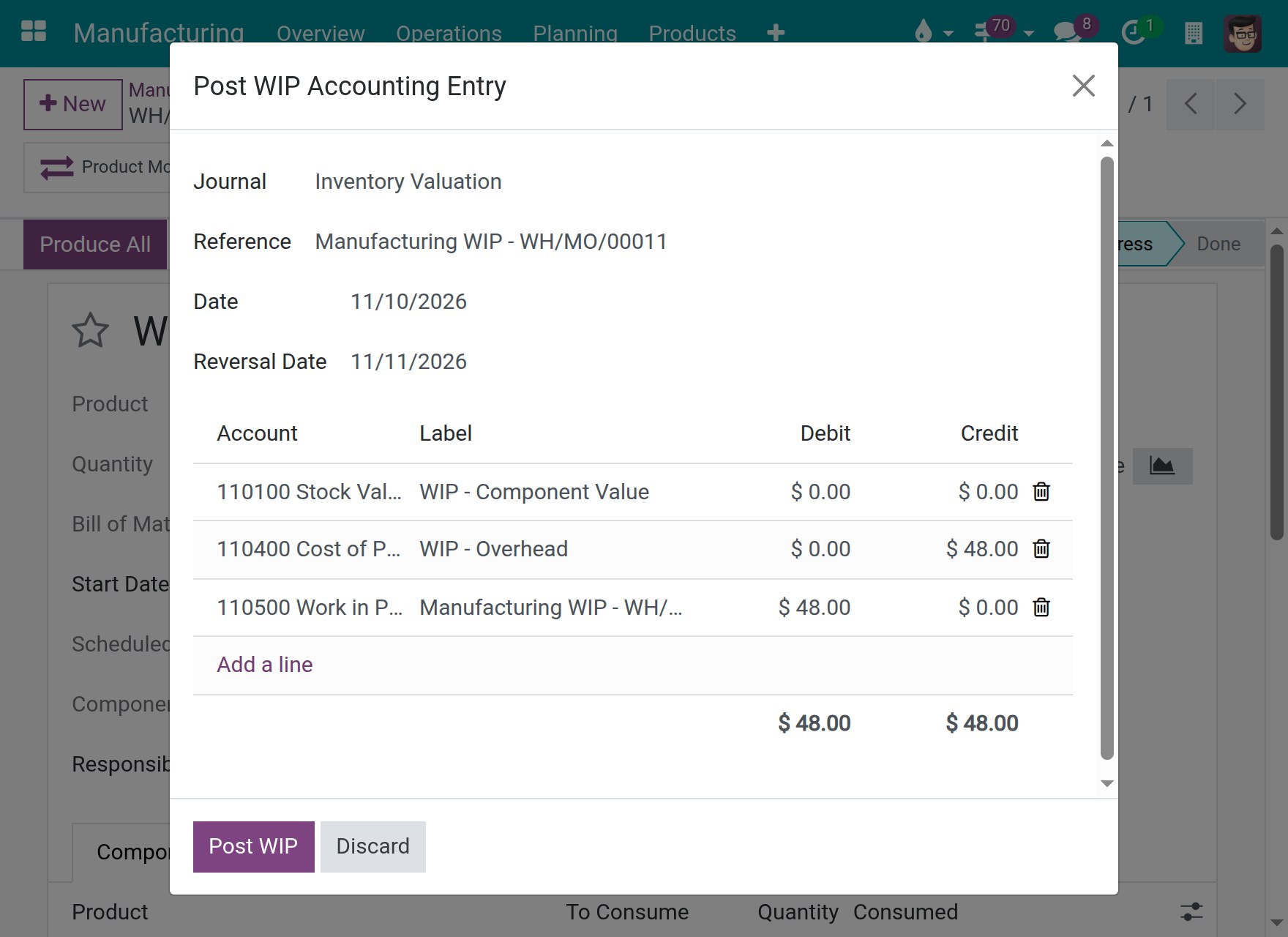
→ Post WIP Accounting Entry leaves out the components already posted with Post Consumption.
Ready on day one
Installs itself, keeps your values
It installs when both required modules are present and keeps the costs already set.
Standard cost includes the crew
Compute Price from BoM adds each operation's Employee Capacity at the work center's hourly cost per employee.
What the administrator turns on
Automatic work-in-progress entries, Analytic Accounting, and a WIP Analytic Account on each work center to track.
What is included
Everything on this page, in the reports, forms and wizards your teams already use. It adds no menu.
Before you decide
Can a pay rise re-price finished work?
No. Each time line freezes its employee's hourly cost when it closes, or the work center's rate per employee when the employee has none. A posted line keeps its booked rate.
What if a consumption is corrected after the order is done?
The relieving lines carry the opposite amount on the same analytic account, so the work center's WIP account returns to zero for that order.
When do the work-in-progress analytic lines appear?
When automatic work-in-progress entries are on and the production location's inbound and outbound accounts differ. Work centers without a WIP Analytic Account are not tracked.
Who sees the labour figures?
The Production Cost Report needs Technical / Show Accounting Features - Readonly or Show Full Accounting Features. Posting the work-in-progress entry also needs Invoicing / Administrator.
Does it assume a country's chart of accounts?
No. It uses the accounts your company configures and runs on the generic chart of accounts. Languages: English and Vietnamese.
Try it, then ask us
The Documentation tab covers the setup and each role's tasks. Live demo: v18demo-int.viindoo.com.
Pre-sales & partnership
viindoo.com/contactusTechnical support
viindoo.com/ticketTechnical requirements
- Odoo version: 18.0
- Editions: Odoo Community, Viindoo Cloud
- Required modules: Shop Floor Control, Advanced MRP Accounting
- License: OPL-1
- Languages: English, Vietnamese
Shop Floor Control - Accounting
Note
Extends Shop Floor Control - see its documentation. It also extends Advanced MRP Accounting - see its documentation.
Shop Floor Control - Accounting carries the labour credited to each employee on the shop floor into the accounts of your manufacturing orders. The direct labour of every work order appears on the Production Cost Report at the hourly cost of the employees who did the work, the work centers can track their labour and their work in progress on analytic accounts, Compute Price from BoM adds the cost of the employees of each operation, and the period-end work-in-progress entry counts each component once.
This guide is for four kinds of readers:
- Administrators install the module and turn on the accounting settings it relies on. See "Setup (for the Administrator)".
- Production managers prepare the work centers and price a product from its bill of materials. See "Tasks for the production manager".
- Cost accountants read the direct labour of finished orders and follow labour and work in progress on analytic accounts. See "Tasks for the cost accountant".
- Accountants post the period-end work-in-progress entry. See "Tasks for the accountant".
The screenshots show a sample plant. Alex Morgan is an operator with an hourly cost of 20.00, Jamie Brooks is an operator who has no hourly cost of their own, and Sam Taylor, who signs in, holds every access right described here. The plant makes a Wooden table from Oak board and Screw on the work centers Cutting and Assembly.
Overview
The labour of a work order is recorded on the shop floor, one time line per employee. This module is what turns those time lines into costs that accounting can read. The work moves through four stages:
| Stage | What happens | Who acts | Hand-off |
|---|---|---|---|
| 1 | Install the module and turn on the accounting settings | Administrator | The production manager prepares the work centers |
| 2 | Set up the work centers and price the product from its bill of materials | Production manager | The cost accountant reads the result |
| 3 | Read the labour on the Production Cost Report and the analytic items | Cost accountant | The accountant closes the period |
| 4 | Post the work-in-progress entry | Accountant |
| Role | What they do | Access right to assign |
|---|---|---|
| Administrator | Installs the module, turns on the accounting settings, assigns the access rights | Administration / Settings |
| Production manager | Edits work centers and operations, runs Compute Price from BoM | Manufacturing / Administrator |
| Cost accountant | Reads the Production Cost Report and the analytic items | Technical / Show Accounting Features - Readonly, or Technical / Show Full Accounting Features |
| Accountant | Posts the work-in-progress entry | Invoicing / Administrator and Technical / Show Full Accounting Features |
Setup (for the Administrator)
Installation
The module installs itself when Shop Floor Control and Advanced MRP Accounting are both installed. To get both from Shop Floor Control:
Open Manufacturing ‣ Configuration ‣ Settings.
In the section Operations, tick Shop Floor Control - Accounting. It installs Advanced MRP Accounting and the accounting apps it needs. The box is already ticked when the module is installed.
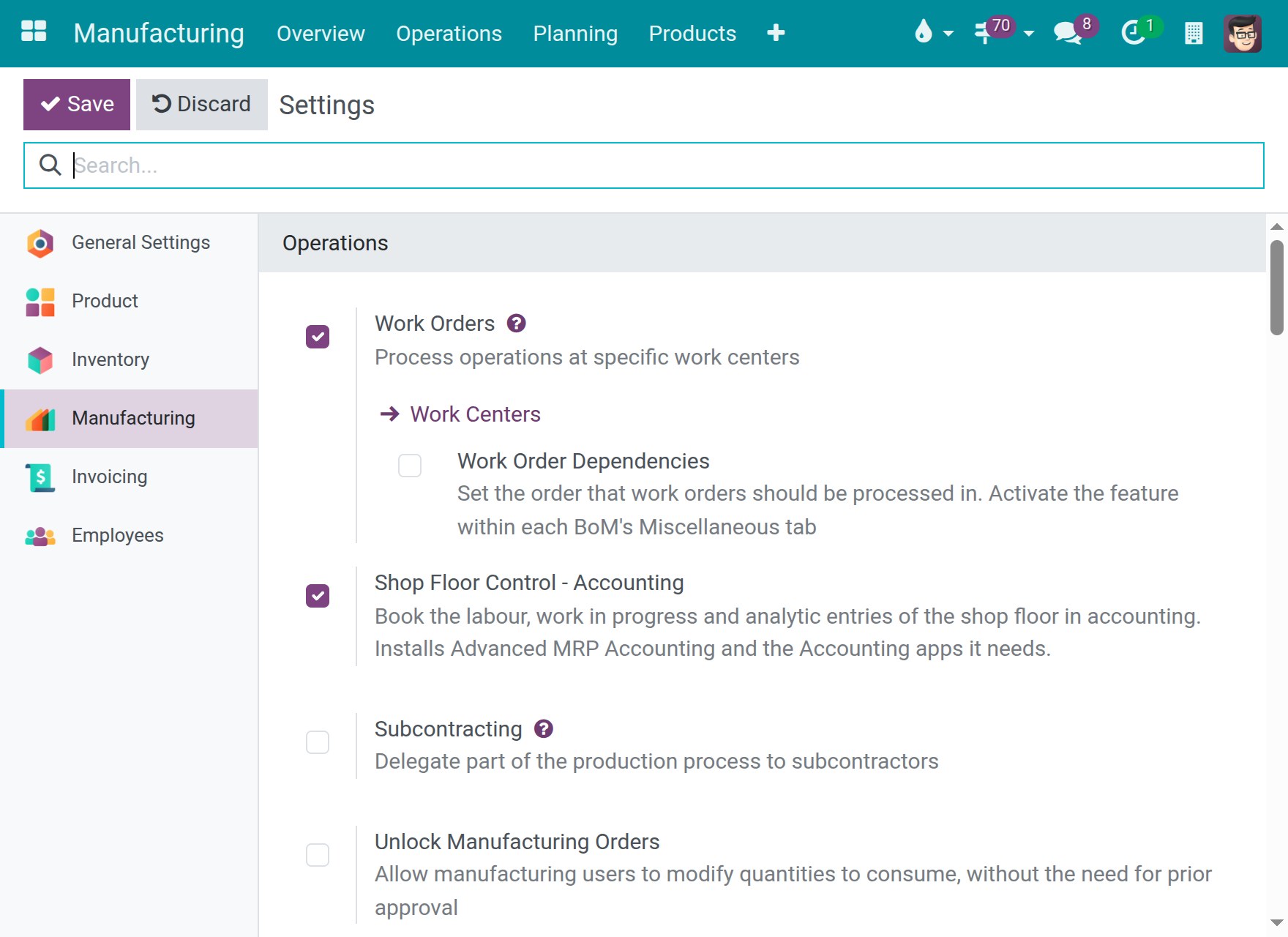
Click Save.
There is nothing to configure for people who already use these applications. Work centers keep the Direct Labor Cost Type and the WIP Analytic Account they hold, employees keep their hourly cost, and a work center that has no Direct Labor Cost Type receives the first Direct Labor cost type of its company.
Work-in-progress entries and analytic accounting
Two settings decide what the work-in-progress analytic lines of this guide show.
Open Invoicing ‣ Configuration ‣ Settings and find the section MRP Accounting.
Tick Automatically create accounting entries to work in progress. When the inbound and outbound valuation accounts of the production location resolve to different accounts (the account of the location, else the Production Account of the product category), a second entry moves each consumed component from the inbound to the outbound account. The work-in-progress analytic lines of a work center follow this second entry.
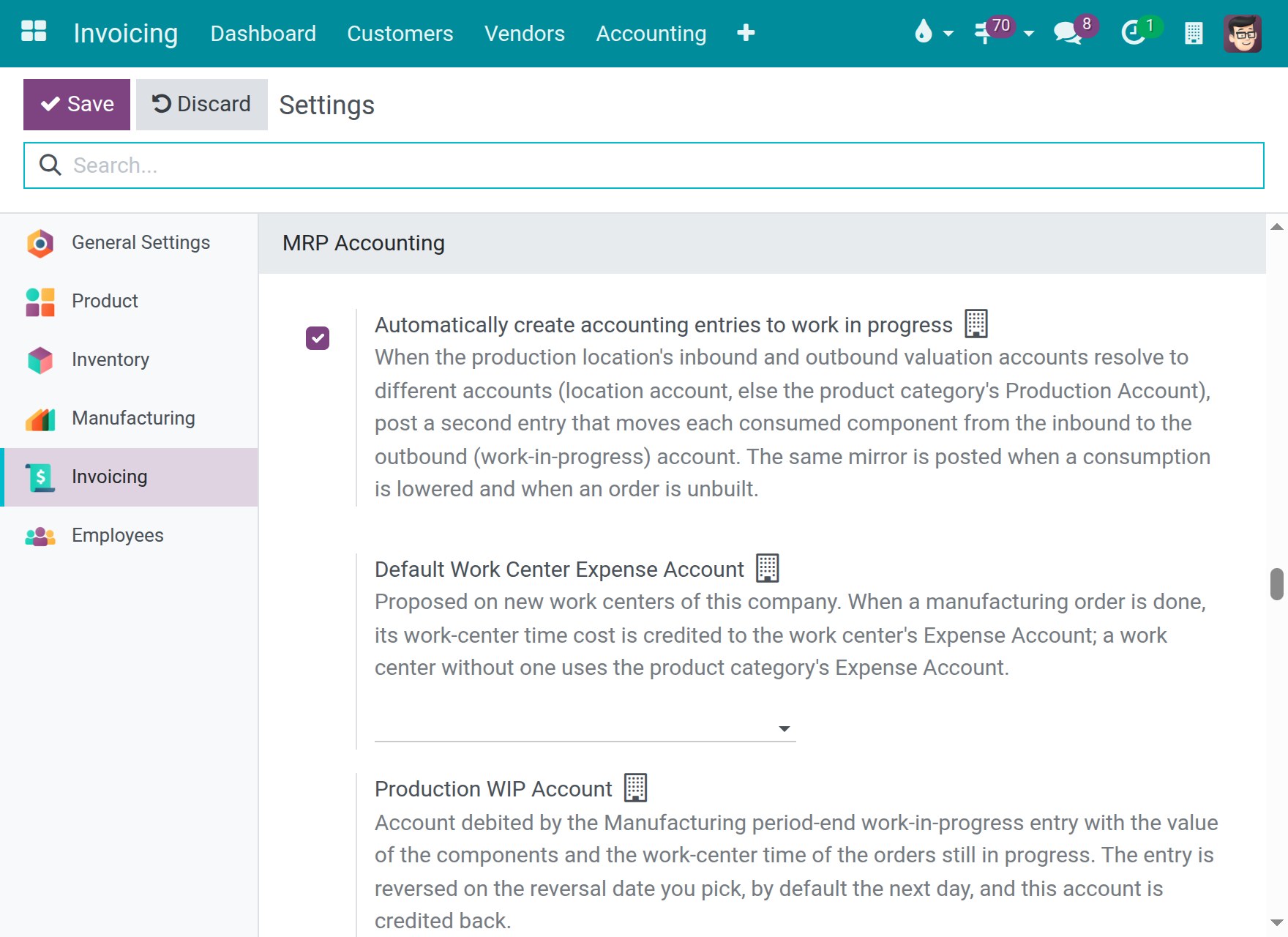
In the same section, set the Production WIP Account, the account the period-end entry debits.
In the section Analytics, tick Analytic Accounting. The fields Analytic Distribution and WIP Analytic Account of a work center appear for users who have this option.
Click Save.
Access rights
Open Settings ‣ Users & Companies ‣ Users and give each person the access right of their role, as listed in the table of the Overview. The Production Cost Report is listed for users who hold Technical / Show Accounting Features - Readonly or Technical / Show Full Accounting Features; the second includes the first. The technical access rights appear in the user form when the developer mode is on.
Tasks for the production manager
Choose where the labour of a work center is reported and tracked
Open Manufacturing ‣ Configuration ‣ Work Centers and open a work center, for example Cutting.
Scroll to Costing Information.
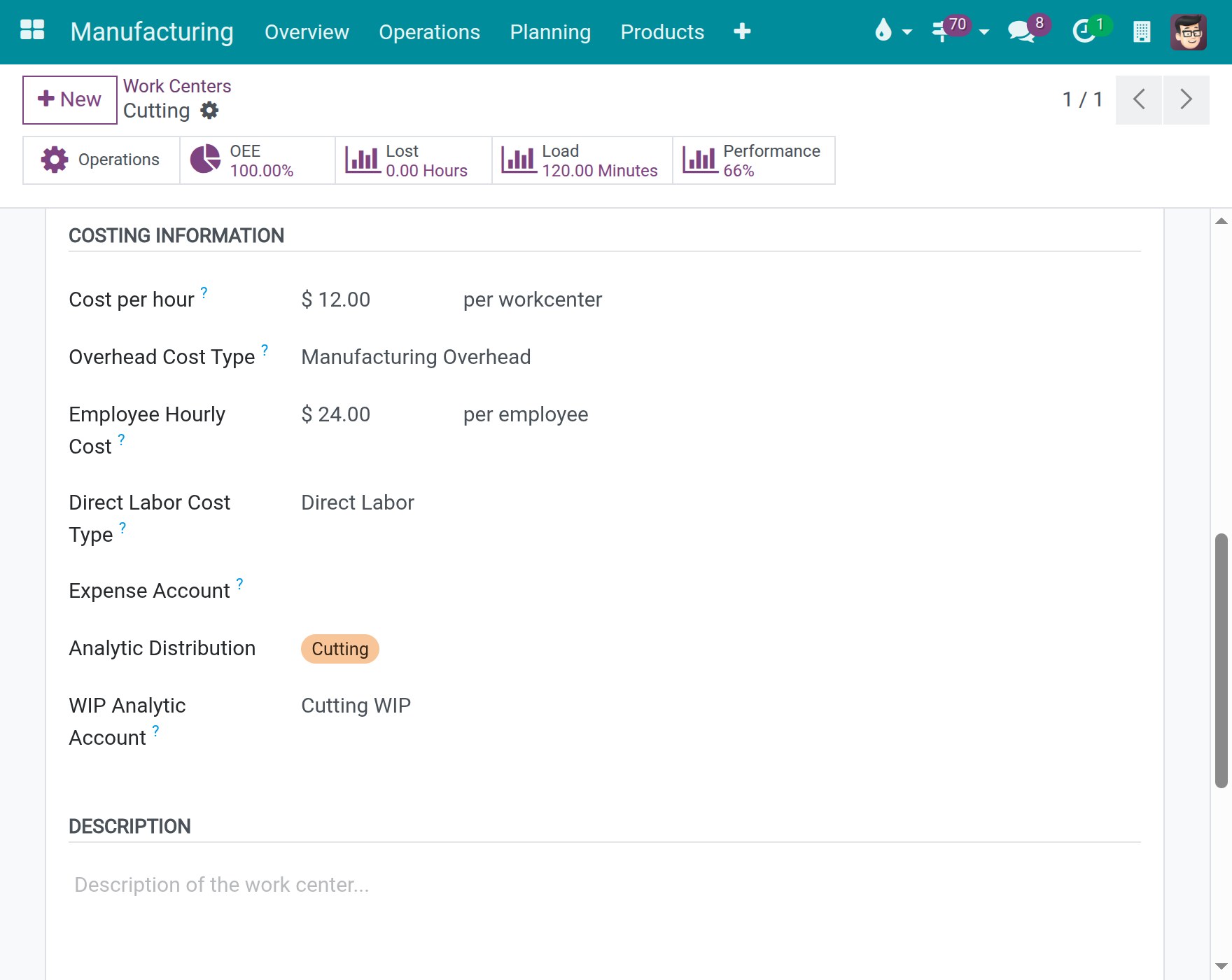
Check the fields that decide how the work center is costed:
- Cost per hour is the cost of the work center itself, and Overhead Cost Type is the column of the Production Cost Report that shows it.
- Employee Hourly Cost (per employee) is the hourly cost used for an employee who has no hourly cost of their own. It also prices the planned employees of an operation.
- Direct Labor Cost Type is the column of the Production Cost Report that shows the labour of this work center. It is Direct Labor by default. The columns are the cost classifications of Invoicing ‣ Configuration ‣ Management ‣ Classification of Manufacturing Cost.
- Analytic Distribution is the analytic account that receives the cost lines of the work center, including its labour.
- WIP Analytic Account is the analytic account that tracks the work in progress of this work center: the components it consumes, until the finished products are received. Leave it empty to not track it.
Click Save.
Price a product from its bill of materials
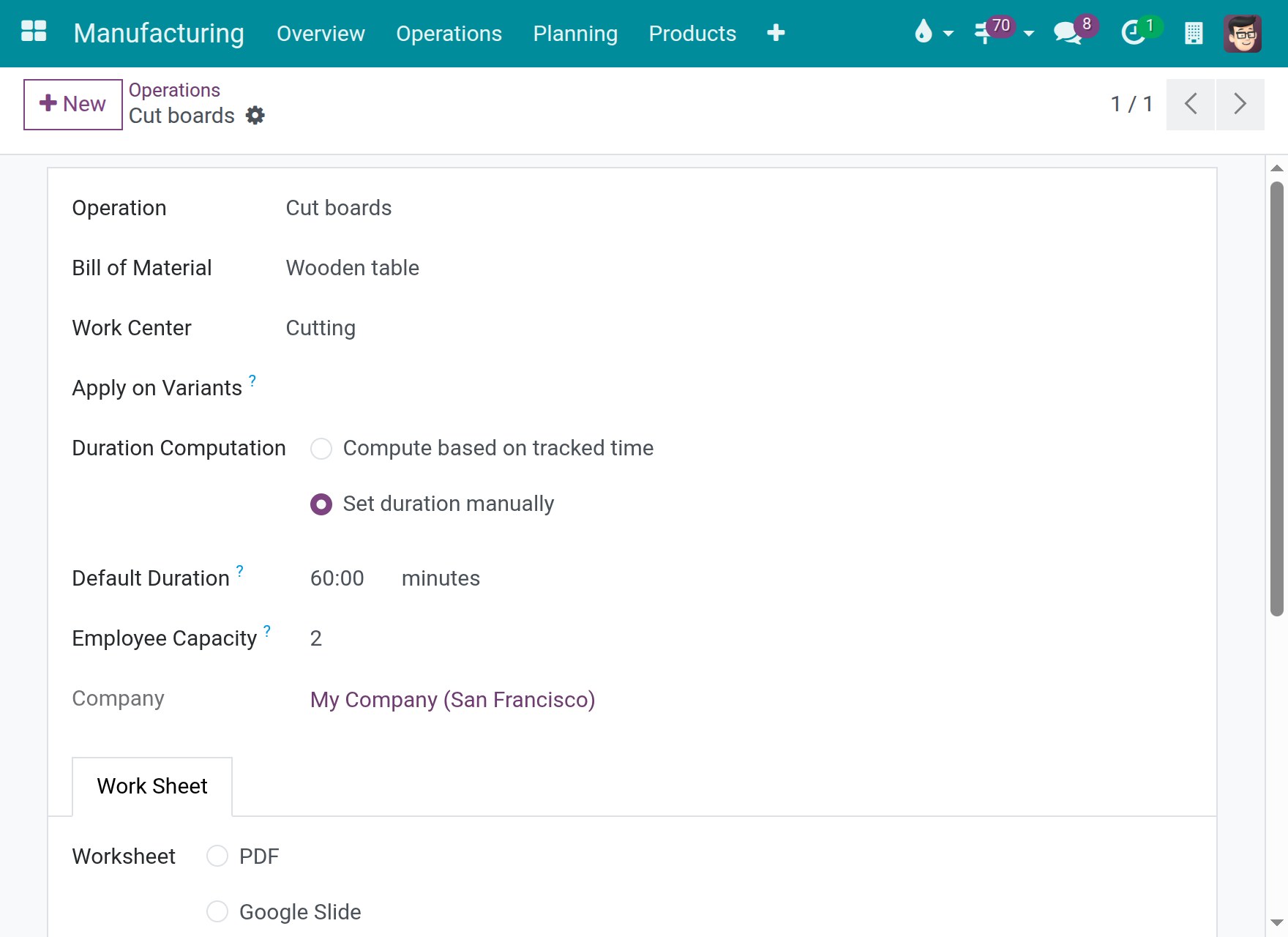
Compute Price from BoM adds the cost of the employees of each operation to the cost of the components and of the work centers. The cost of an operation per hour is the Cost per hour of its work center plus its Employee Capacity multiplied by the Employee Hourly Cost of the work center.
Open Manufacturing ‣ Configuration ‣ Operations and open an operation, for example Cut boards. Employee Capacity is the number of employees the operation needs, here 2.
Open Inventory ‣ Products ‣ Products and open the manufactured product, for example Wooden table.
Next to Cost, click Compute Price from BoM.
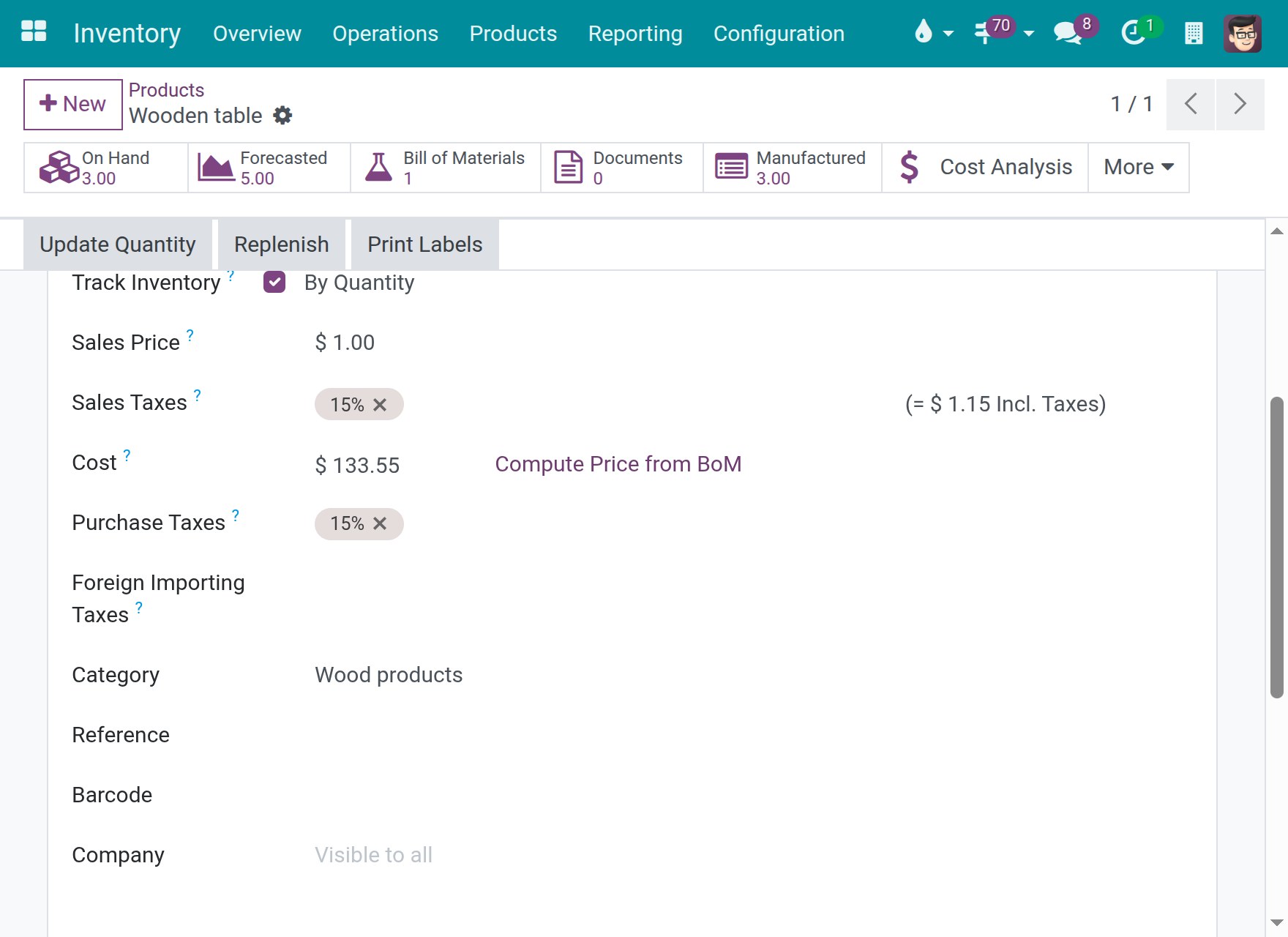
The cost of the Wooden table is 133.55:
- Components: 4 Oak board at 12.00 and 8 Screw at 0.10, 48.80.
- Cut boards, 60 minutes on Cutting: 12.00 for the work center plus 2 employees at 24.00, 60.00.
- Assemble table, 45 minutes on Assembly: 8.00 for the work center plus 1 employee at 25.00, 24.75.
Tasks for the cost accountant
Read the direct labour of finished orders
The labour of a work order is the time of each closed time line multiplied by the hourly cost of the employee credited on that line. That hourly cost is frozen when the line closes: a later change of an employee's hourly cost never re-prices work that is finished.
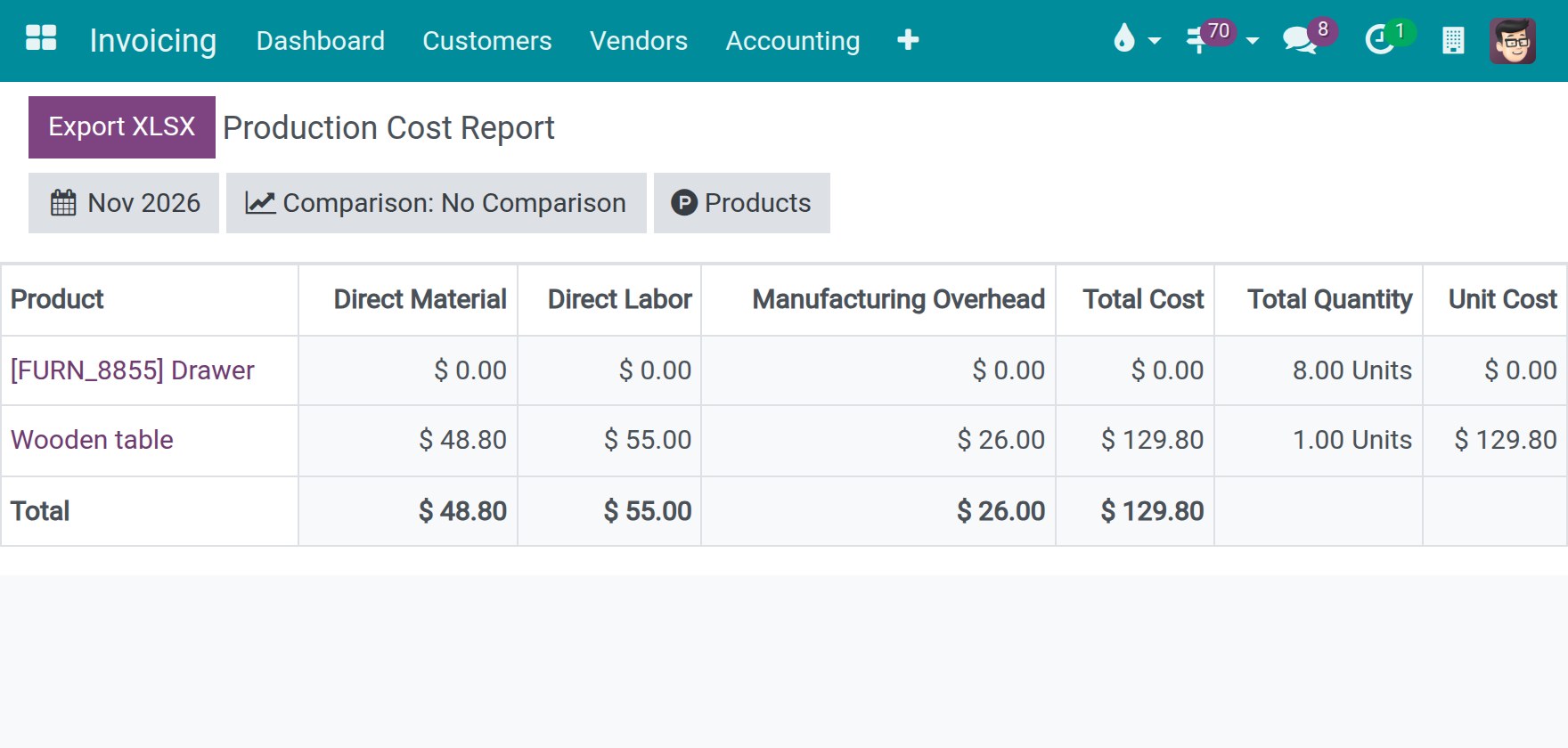
Open Invoicing ‣ Reporting ‣ Manufacturing Reports ‣ Production Cost Report. Users of Manufacturing find the same report under Manufacturing ‣ Reporting ‣ Production Cost Report.
Pick the period with the date button. The report lists the products of the orders finished in that period. The column Direct Labor is the labour of those orders.
Click a product, for example Wooden table, to open the Production Cost Analysis. In the section Direct Labor, each row is one work order of the finished order.
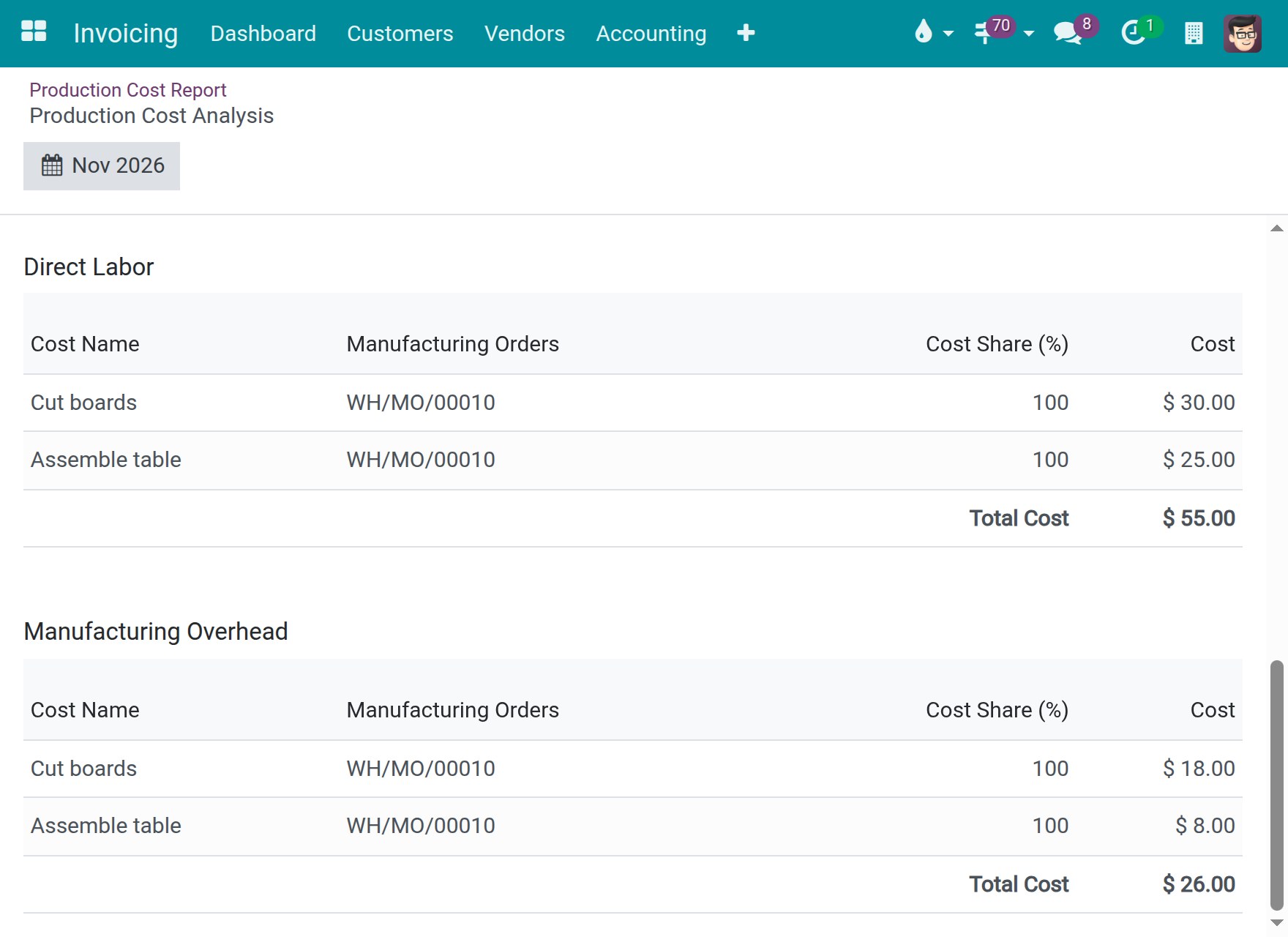
In the sample, Cut boards is 90 minutes worked by Alex Morgan at 20.00, 30.00. Assemble table is 60 minutes worked by Jamie Brooks, 25.00. The total, 55.00, is the Direct Labor column of the report. When several employees worked on a work order, the row adds each time line at the hourly cost of the employee credited on it. The cost of the work centers themselves is in the section Manufacturing Overhead, 18.00 and 8.00 in the sample.
Note
Jamie Brooks has no hourly cost of their own, so Assemble table is priced at the Employee Hourly Cost of the work center Assembly, 25.00 per employee. When an employee has no hourly cost, the time line keeps the per-employee rate of the work center, and this rate is frozen on the line when the line closes. To price an employee at their own rate, enter the Hourly Cost in the settings of the employee.
Once the cost of a work order has been posted to accounting, correcting the credited employee of one of its time lines does not re-price the line: it keeps the rate that was booked.
Follow labour and work in progress on analytic items
Open Invoicing ‣ Accounting ‣ Analytic Items. The list needs the option Analytic Accounting.
Labour in the analytic entry of the work center. When a work order is finished, its work center writes one line for it on its Analytic Distribution, named [WC] followed by the order and the operation. The amount is the cost of the work center time plus the actual labour at the frozen rates, and the quantity is the hours worked, counted once. A work center whose cost per hour is zero still receives the labour line.
Search the Description for the number of the order.
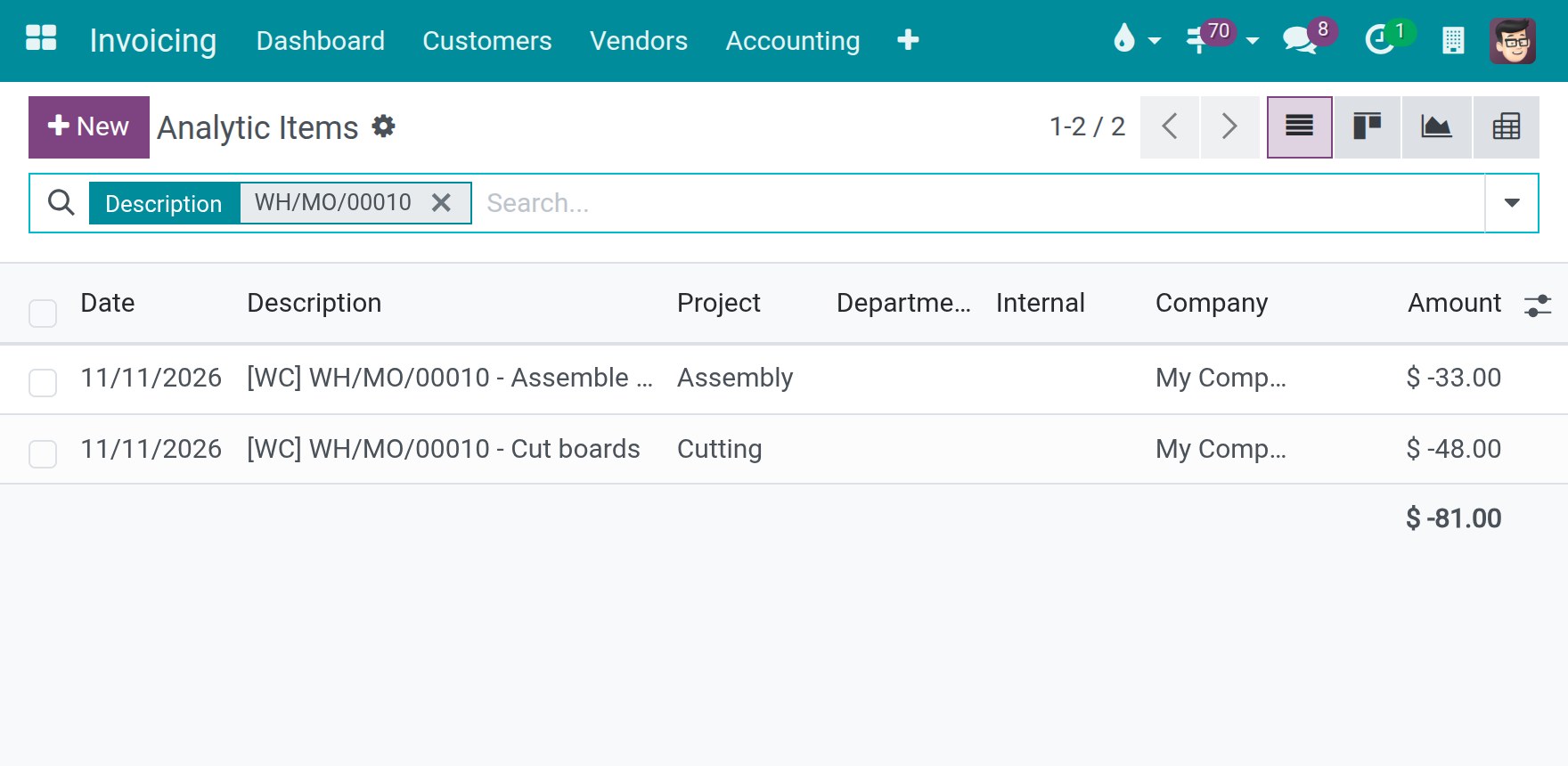
In the sample, Cut boards is -48.00 on the account Cutting: 18.00 for 1.5 hours of the work center at 12.00 plus 30.00 of labour. Assemble table is -33.00 on Assembly: 8.00 plus 25.00.
Work in progress of the work center. When a component is consumed in a work order whose work center has a WIP Analytic Account, the consumption writes a line with the name starting with [Raw] on that account, with a negative amount. When the finished product is received, a line with the opposite amount offsets it. Until the receipt, the account holds the value of the components still in progress.
Search the Description for a component, for example Oak board.
In the sample, Cutting WIP shows the consumption of a finished order (-48.00) with its offset (48.00), and the consumption of an order still in progress (-48.00). The total, -48.00, is the value in progress.
When the consumption of a finished order is corrected afterwards, the lines that relieve the work-in-progress account carry the opposite amount on the same analytic account, so that this account stays at zero for that order. The valuation layer of the correction is named "Correction of material consumption", which tells it apart from the original consumption.
These lines exist when the automatic work-in-progress entries are on and the inbound and outbound accounts of the production location are different accounts.
Tasks for the accountant
Post the period-end work-in-progress entry
The period-end entry puts the value of the orders still in progress into the work-in-progress account. A component can reach accounting earlier, with Post Consumption on its work order. The entry then leaves that component out, so it is not counted twice.
Open Manufacturing ‣ Operations ‣ Work Orders and open a work order that is in progress. Click Post Consumption to post the components already picked for it.
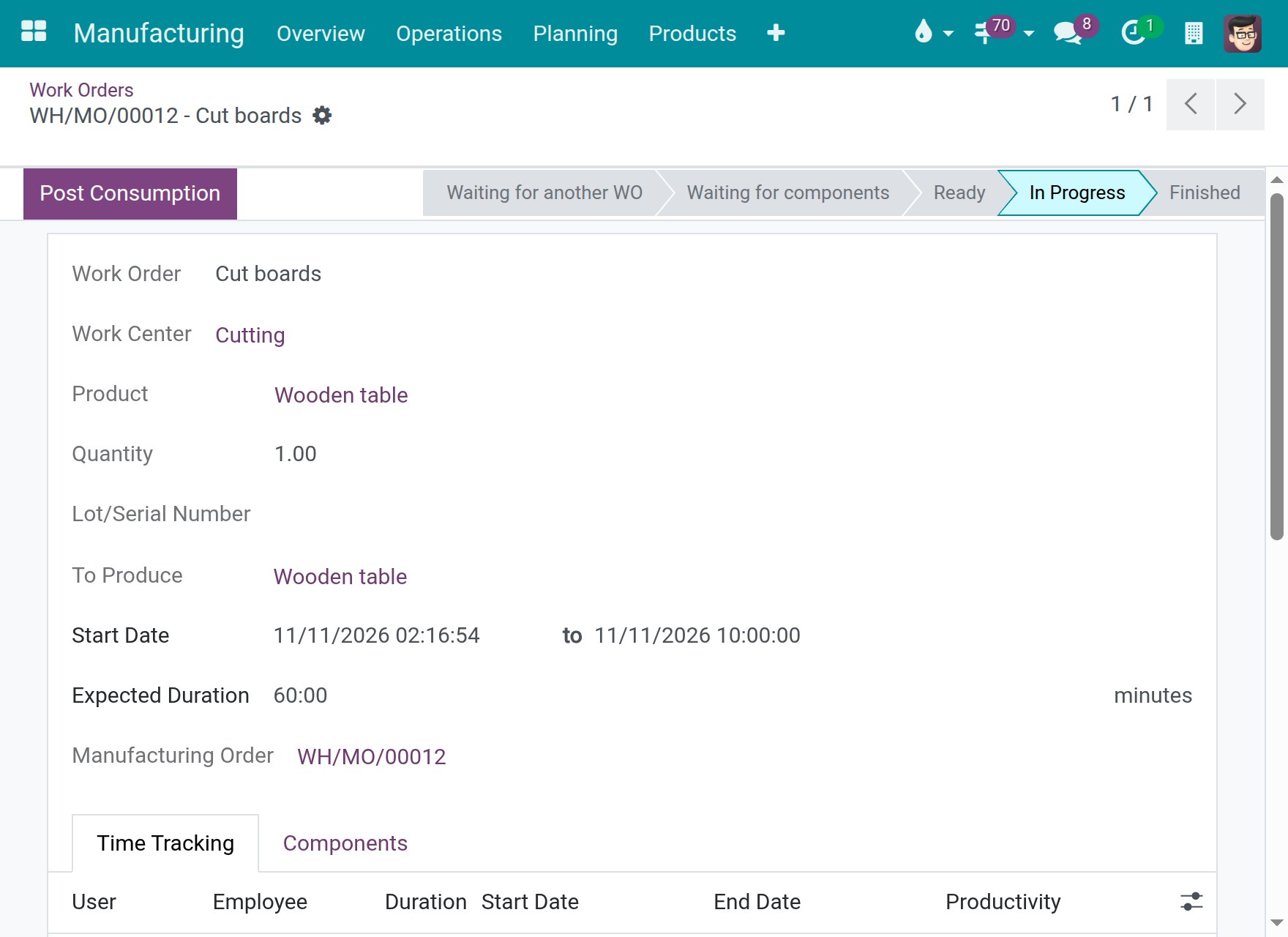
Open Manufacturing ‣ Operations ‣ Manufacturing Orders and open the order. In the gear menu, choose Post WIP Accounting Entry. The accountant needs Technical / Show Full Accounting Features.
Check the Journal, the Reference, the Date and the Reversal Date, then check the lines.
Click Post WIP. The entry is reversed on the Reversal Date, by default the next day.
In the sample, the Oak board of the order was posted with Post Consumption (48.00) and Alex Morgan has 90 minutes of closed time. The lines read:
- WIP - Component Value: 0.00. The 48.00 of components is already posted, so the stock account is not credited again.
- WIP - Overhead: credit 48.00, the work center time (18.00) plus the labour (30.00) of the closed time lines up to the date.
- Manufacturing WIP followed by the order: debit 48.00 on the work-in-progress account.
Two cases are handled in the component line:
- A component already posted with Post Consumption is taken off the credit of the stock accounts. When its posted value sits on an account other than the stock valuation account and the work-in-progress account, a line WIP - Posted Component Value moves that value into work in progress from the account that holds it.
- A component posted while the database had no stock valuation, for example before accounting was installed, never reached a stock account. It is not credited from stock either.
You can still edit the lines before you click Post WIP: the amounts and accounts are posted as typed.
This software and associated files (the "Software") may only be used (executed, modified, executed after modifications) if you have purchased a valid license from the authors, typically via Odoo Apps, or if you have received a written agreement from the authors of the Software (see the COPYRIGHT file).
You may develop Odoo modules that use the Software as a library (typically by depending on it, importing it and using its resources), but without copying any source code or material from the Software. You may distribute those modules under the license of your choice, provided that this license is compatible with the terms of the Odoo Proprietary License (For example: LGPL, MIT, or proprietary licenses similar to this one).
It is forbidden to publish, distribute, sublicense, or sell copies of the Software or modified copies of the Software.
The above copyright notice and this permission notice must be included in all copies or substantial portions of the Software.
THE SOFTWARE IS PROVIDED "AS IS", WITHOUT WARRANTY OF ANY KIND, EXPRESS OR IMPLIED, INCLUDING BUT NOT LIMITED TO THE WARRANTIES OF MERCHANTABILITY, FITNESS FOR A PARTICULAR PURPOSE AND NONINFRINGEMENT. IN NO EVENT SHALL THE AUTHORS OR COPYRIGHT HOLDERS BE LIABLE FOR ANY CLAIM, DAMAGES OR OTHER LIABILITY, WHETHER IN AN ACTION OF CONTRACT, TORT OR OTHERWISE, ARISING FROM, OUT OF OR IN CONNECTION WITH THE SOFTWARE OR THE USE OR OTHER DEALINGS IN THE SOFTWARE.