

Facebook Social Marketing
by Viindoo
| Lines of Code | 2378 |
| Technical name | viin_social_facebook |
| License | OPL-1 |
| Website | https://viindoo.com/apps/modules/17.0/viin_social_facebook |
| Read description for | v 13.0 v 14.0 v 15.0 v 16.0 v 18.0 v 19.0 |
| Required Apps | Discuss (mail) |
| Included Dependencies | Viindoo Base Social Marketing API Request Logger |
Write, approve and publish your Facebook posts, then answer the Page, without leaving Odoo
For marketing teams that run one or more Facebook Pages
Integrate the Social Marketing app with Facebook
Odoo Community · OPL-1 license · English, Vietnamese
Adds Facebook to Social Marketing.
Every call to Facebook is recorded by API Request Logger.
What changes for your team
One article, approved, then on the Page
Today the text is written in one place and retyped in Facebook, with nobody checking the files or the time.
→ The editor writes the article with its Facebook preview; the form states which files and which schedule Facebook accepts; an approver publishes it now or at the chosen time.
Messenger answered from Discuss
Today the team watches Messenger in another window and answers outside Odoo.
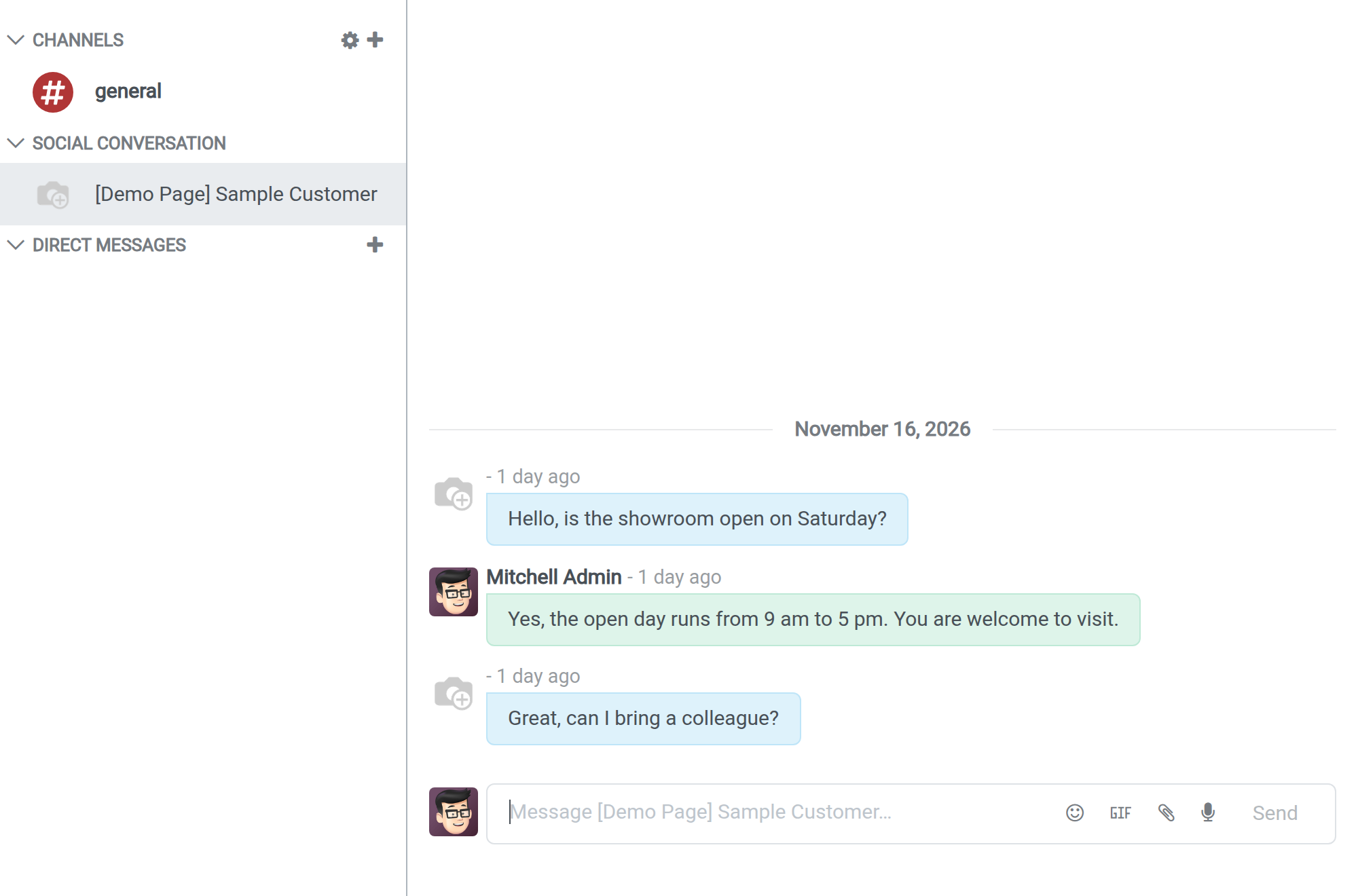
→ Each person who writes to the Page has a conversation in Discuss; the team answers there, and comments and reactions arrive as notices.
A failed post says why
Today a video that does not appear on the Page leaves nobody knowing which side refused it.
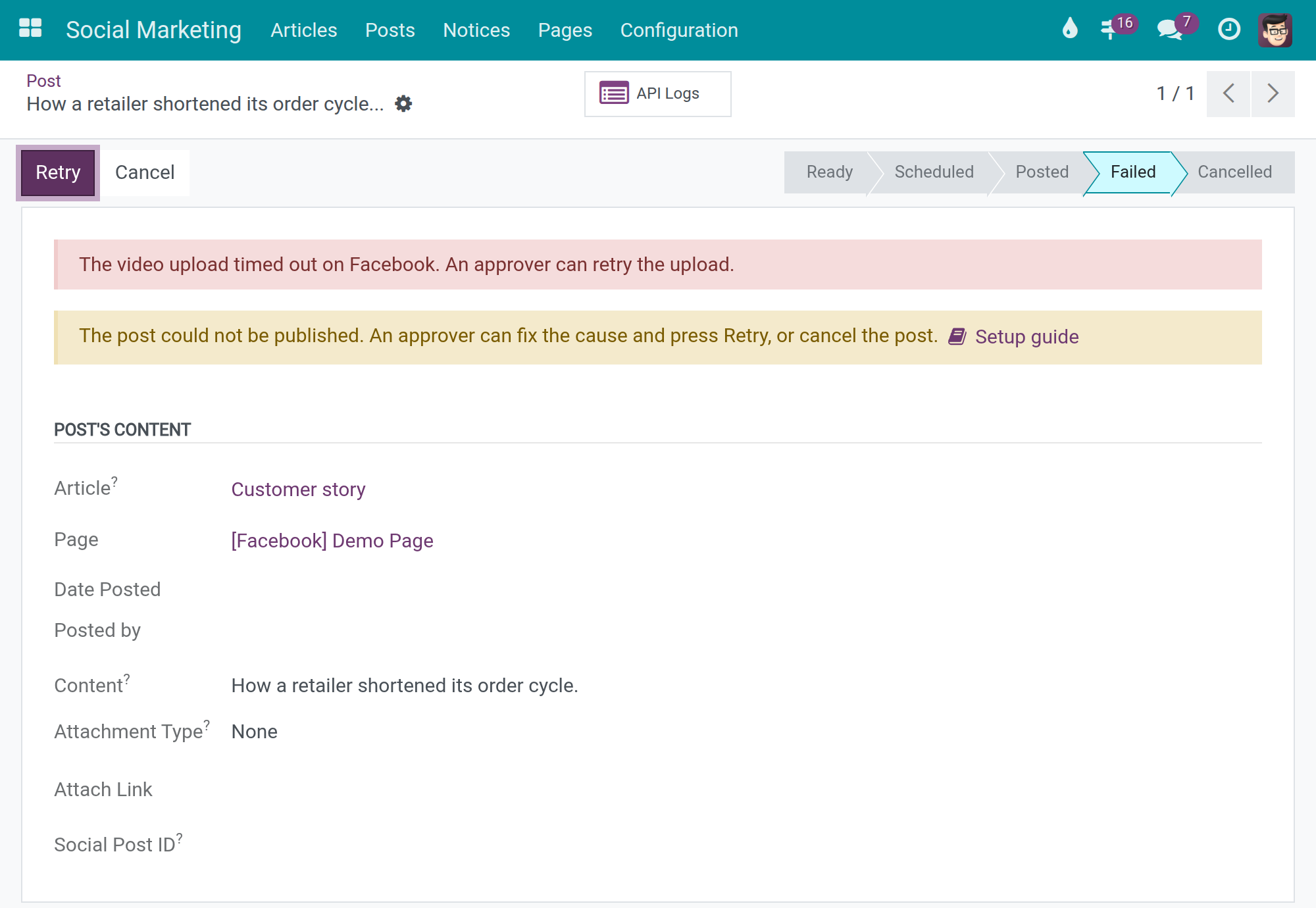
→ Videos upload in the background; a failed post shows its reason, and an approver fixes the cause and presses Retry.
What you see as an administrator
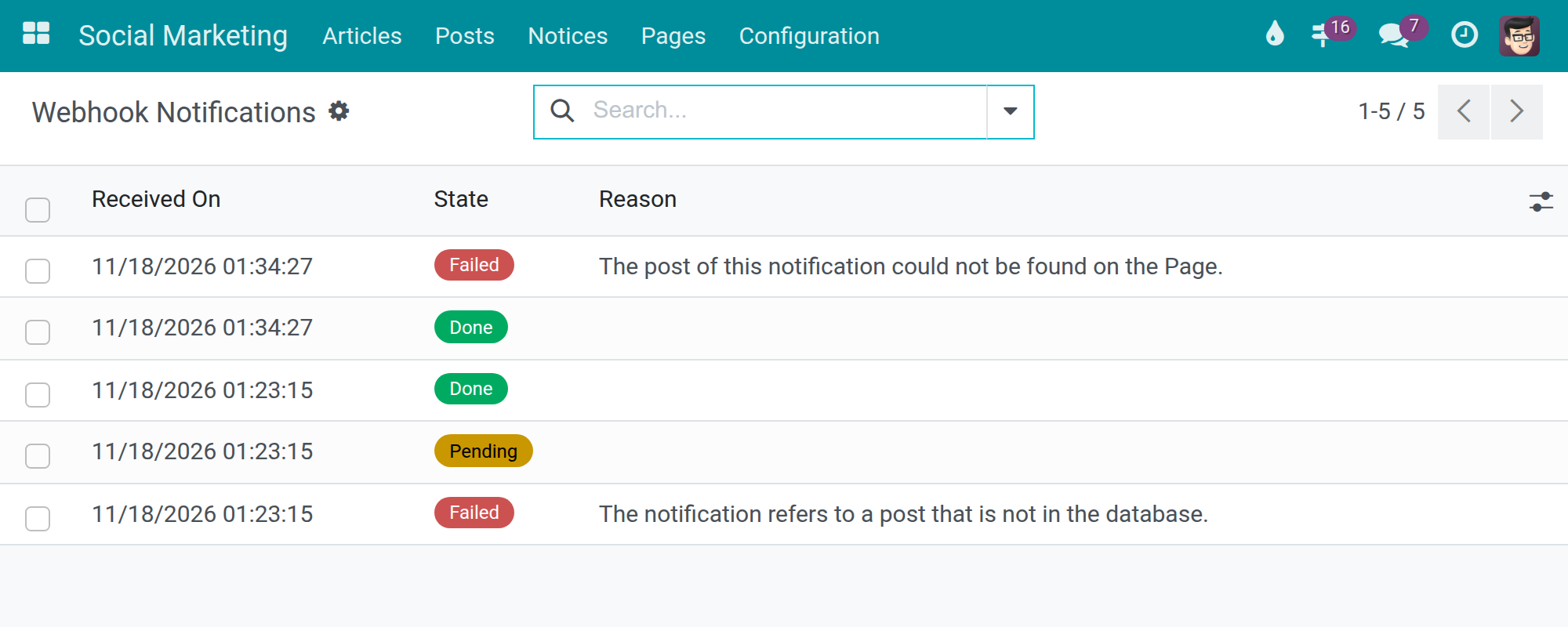
Which notification from Facebook failed, and why?
Each comment, reaction or message Facebook sends is queued with its state, attempts and failure reason.
Features
Publishing
- ✓ Text, link, photo or one-video posts to one or several Pages
- ✓ Scheduling on Facebook, from 30 minutes to 70 days ahead
- ✓ Facebook preview while writing the article
- ✓ Background video upload, with Retry after a failure
- ✓ Delete a published post from the Page
Page activity
- ✓ Recent posts synchronized, scheduled ones included; older posts on demand
- ✓ Read, add, like, hide and delete comments of a post
- ✓ Comments and reactions arrive as notices
- ✓ Posts removed on Facebook are archived, never deleted
- ✓ Page reviews, refreshed on request
Conversations and connection
- ✓ Messenger conversations in Discuss, one per person
- ✓ Webhooks registered per Page, showing only what Facebook confirms
- ✓ Failed notifications listed with their reason and a Retry button
- ✓ Calls to Facebook logged per account, Page and post
Built for daily use
- ✓ Roles: Editor writes, Approver publishes, Administrator connects
- ✓ Facebook app credentials per company
- ✓ App Secret and Verify Token visible to system administrators only
- ✓ Tokens and secrets masked in the logs
Ready on day one
The Facebook account record
Shows the Redirect URL and Webhook URL to copy into your Facebook app, and whether the account is connected.
Background jobs
Video upload and the daily archive of posts removed from Facebook run without anyone starting them.
What the administrator sets first
The App ID and App Secret of your Facebook app. Each company has its own Verify Token, which starts with a random value you may replace. Then link the account and register the webhooks of each Page.
Before you decide
What do we need on the Facebook side?
Your own Facebook app, allowed to use the Page permissions listed in the Documentation tab (Messenger needs one more). Facebook grants these permissions, not the module. Facebook sends comments and messages only to an app in Live mode, and accepts only an HTTPS address for your database.
Where does our data go?
From your Odoo server to Facebook, through your own app. No other service sits in between.
Who can publish?
Editors write and confirm articles; approvers publish, synchronize and retry; administrators connect the account and the Pages. Messenger conversations reach the members of the Page.
What happens when Facebook refuses something?
The post or notification shows Facebook's reason, and the call is in the logs. One limit is Facebook's own: the Page can reply on Messenger only within 24 hours of the person's last message.
Can several companies use it in one database?
Yes. Each company has its own Facebook app credentials and Verify Token; one Webhook URL serves them all.
Try it, then ask us
The Documentation tab walks each role through setup and daily use; the Live Preview button of this listing opens a working database.
Pre-sales & partnership
viindoo.com/contactusTechnical support
viindoo.com/ticketFacebook Social Marketing - user guide
Who this guide is for: the people who prepare and publish posts on a Facebook Page from Odoo (editors and approvers), the Social Marketing administrator who connects the Page, and the system administrator who enters the credentials of the Facebook app. It describes what each of them sees and does; it does not require any knowledge of the software's internals.
Note
Extends Social Marketing: the articles, posts, notices, webhook notification queue and the general rules of publishing are described in the Social Marketing documentation. The call history behind the API Logs button is provided by API Request Logger. This guide covers what is specific to Facebook.
Overview
Facebook Social Marketing publishes the articles of Social Marketing on Facebook Pages (text, link, photos or one video), keeps the posts of the Page in Odoo, brings the comments, reactions and Messenger messages of the Page to Odoo, and lets the team answer them.
| Role | What they do | Access right to assign |
|---|---|---|
| System administrator | Enters the App ID, App Secret and Verify Token of the Facebook app; reads the history of calls to Facebook | Settings: Administration / Settings |
| Social Marketing administrator | Links the Facebook account, registers the webhooks of each Page, reads the notifications received from Facebook | Social Marketing: Administrator |
| Editor | Writes articles for Facebook, reads and answers Messenger conversations | Social Marketing: Editor |
| Approver | Publishes articles, retries failed video posts, synchronizes the posts of a Page | Social Marketing: Approver |
The process: the administrators connect the Page once; an editor writes and confirms an article; an approver publishes it; Facebook answers (Posted or Failed); comments and messages sent to the Page come back to Odoo.
Setup (for the administrators)
Install the module
- Open Apps, search for Facebook Social Marketing and press Install. It requires Social Marketing.
- In Social Marketing ‣ Configuration ‣ Settings, open the Social Media tab. The Facebook block shows Enable Social Facebook; tick it to publish on Facebook.
Facebook app permissions
The Facebook app must be allowed to use these permissions: public_profile and email (identify the account that links the Pages), pages_show_list (list the Pages), pages_read_engagement and pages_read_user_content (read posts, comments and reactions), pages_manage_posts (publish posts), publish_video (publish videos), pages_manage_engagement (answer and moderate comments), pages_manage_metadata (register the webhooks) and, to work with Messenger, pages_messaging. Facebook delivers the notifications of a Page (comments, reactions, messages) only to an app that is in Live mode; an app still in Development mode receives only the test notifications sent from its dashboard.
Enter the credentials of the Facebook app (system administrator)
- Open Social Marketing ‣ Configuration ‣ Settings and the Social Media tab.
- In the block Facebook App, fill App ID and App Secret. Both are found in the App settings > Basic page of your app in Meta for Developers; the documentation icon next to the block title opens that site and the Setup guide button opens step-by-step instructions.
- Each company has its own Verify Token field; a new company starts with a random value. You can replace it with any value you like, as long as the same value is typed in the Facebook app when you declare the Webhook URL (next section).
- Press Save.
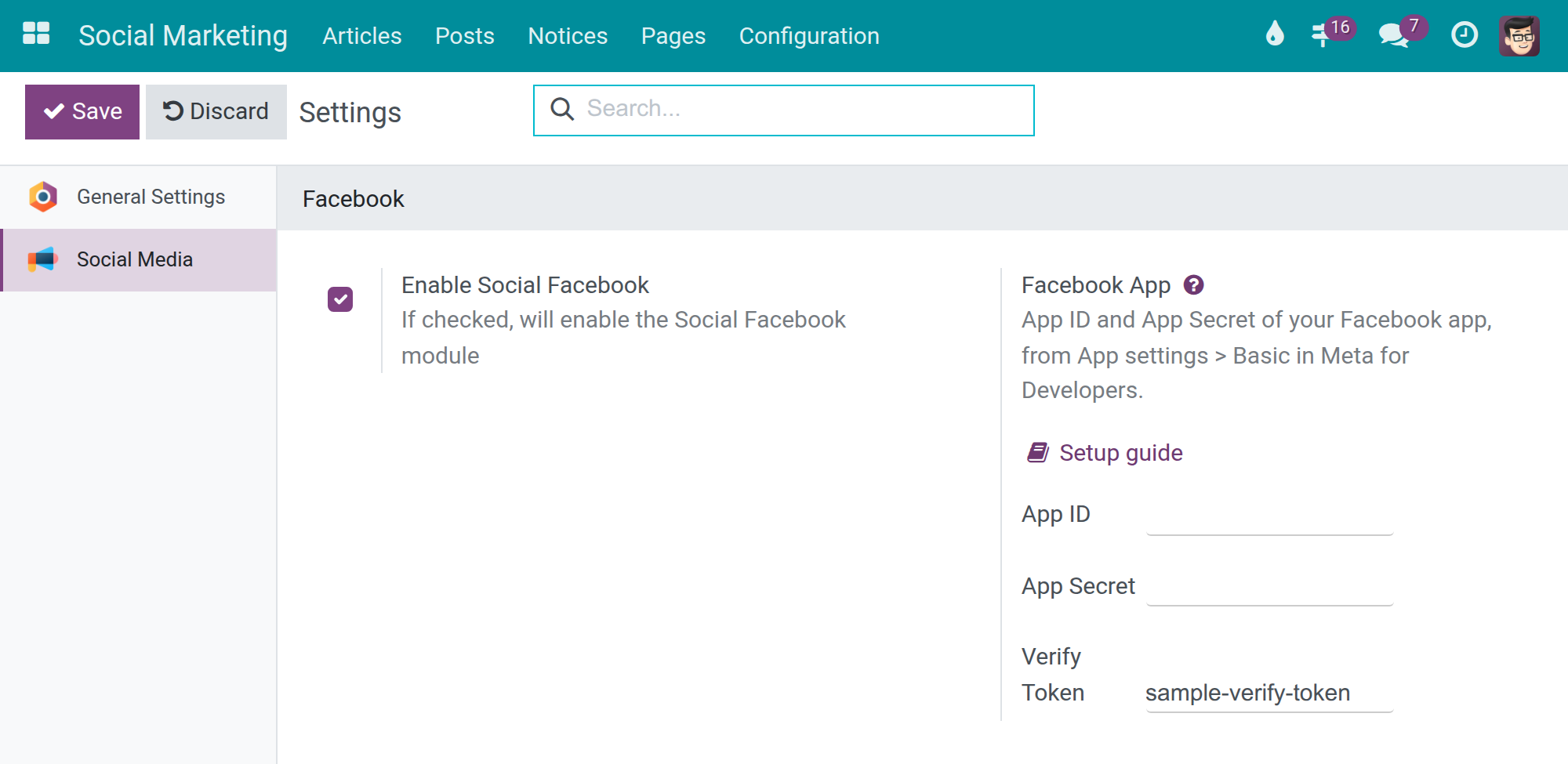
The App Secret and the Verify Token are visible only to system administrators.
Declare the addresses and link the account (Social Marketing administrator)
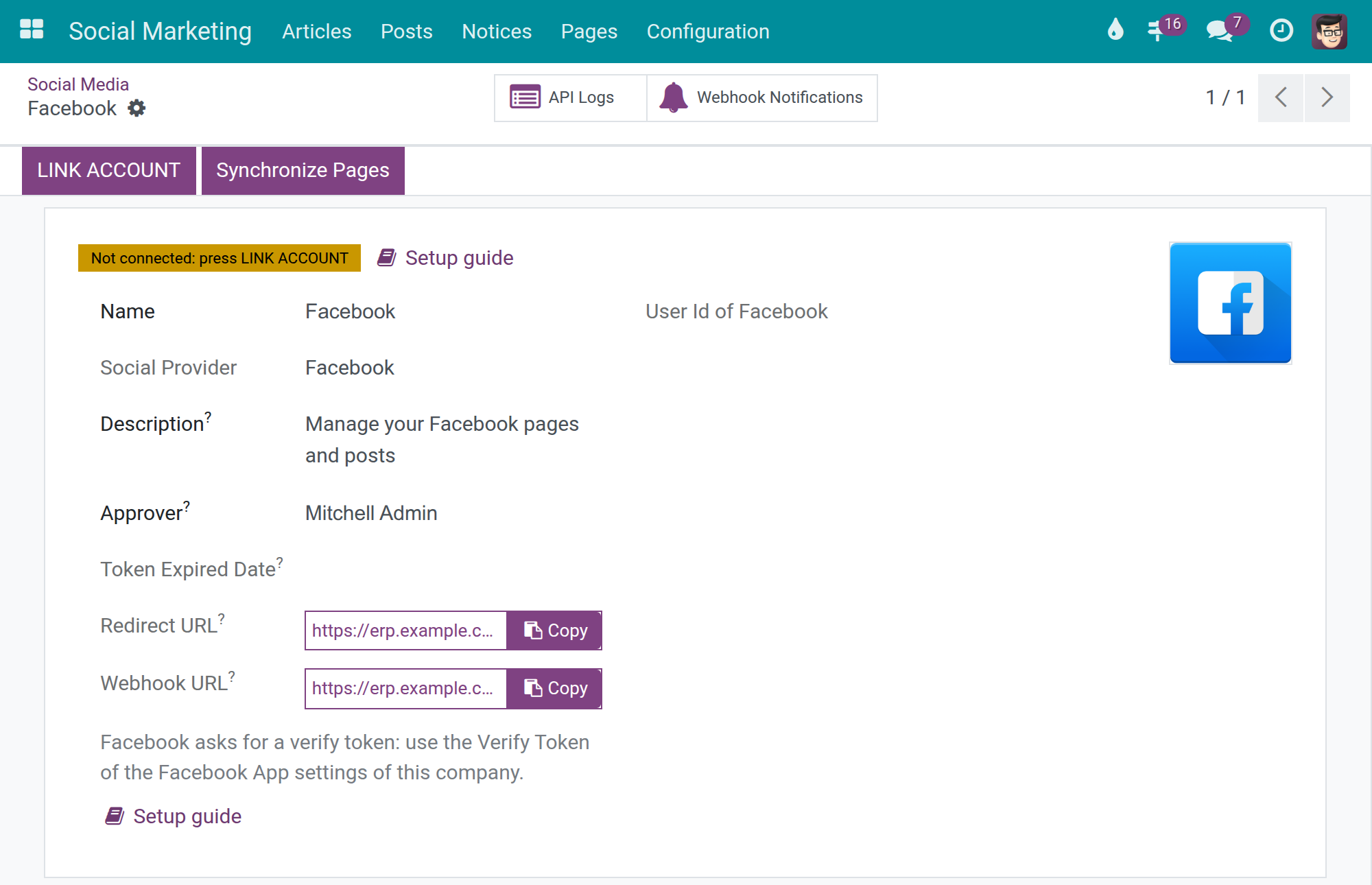
- Open Social Marketing ‣ Configuration ‣ Social Media and select Facebook.
- Press the copy button of Redirect URL and paste it into the Facebook app, as a valid OAuth redirect address, before the next step.
- Press the copy button of Webhook URL and paste it into the webhook settings of the Facebook app. Facebook asks for a verify token: type the Verify Token of the settings of this company. One Webhook URL serves all companies of the database.
- Press LINK ACCOUNT and accept the permissions on the Facebook page that opens, then Synchronize Pages to read the Pages the account manages.
The record shows a yellow badge Not connected: press LINK ACCOUNT, or a green badge Connected once the account is linked; the Setup guide button next to the badge opens the instructions. Facebook accepts only HTTPS addresses: when the public address of the database is not HTTPS a warning is shown at the top of the record (see the Social Marketing documentation).
Register the webhooks of a Page
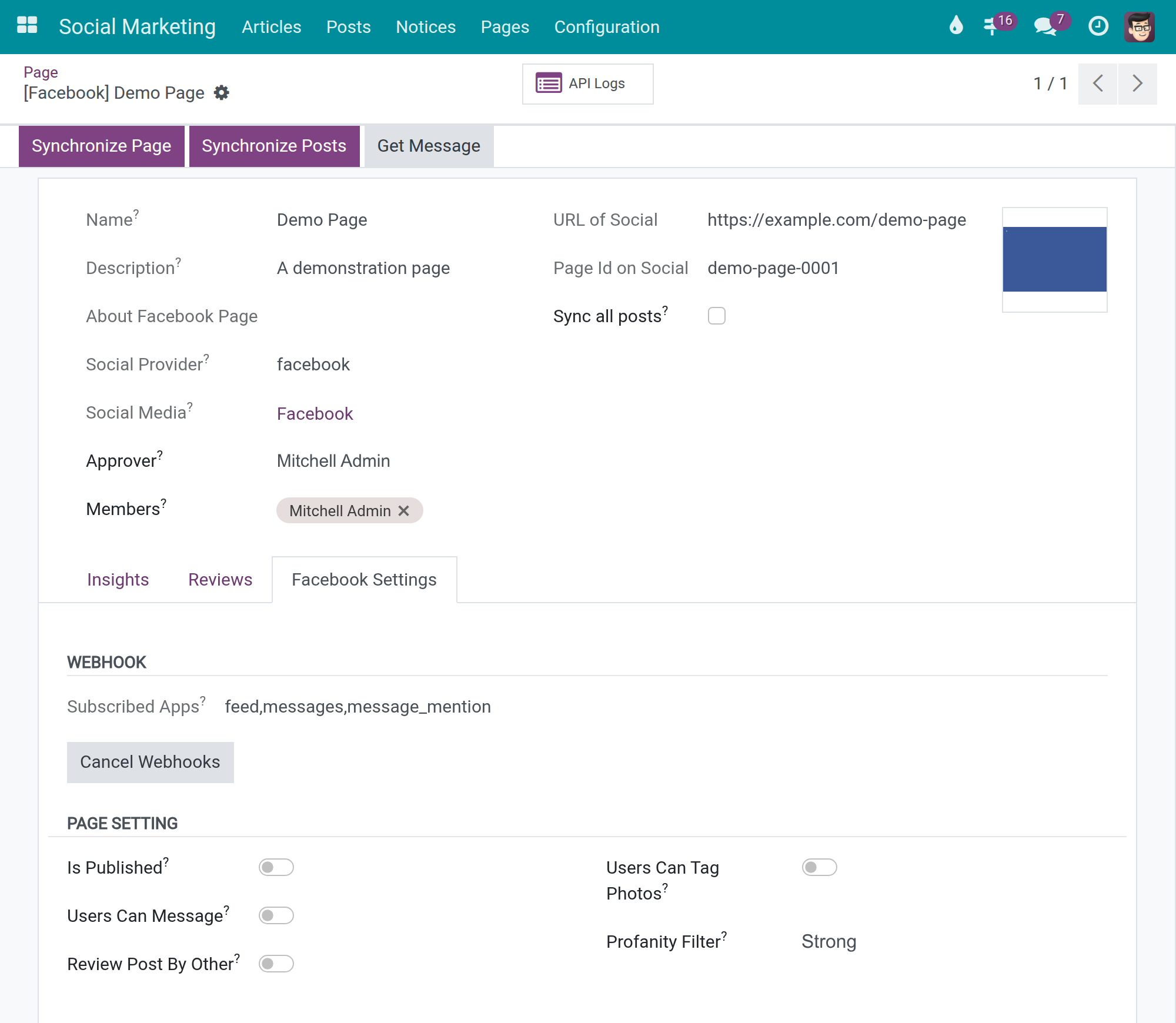
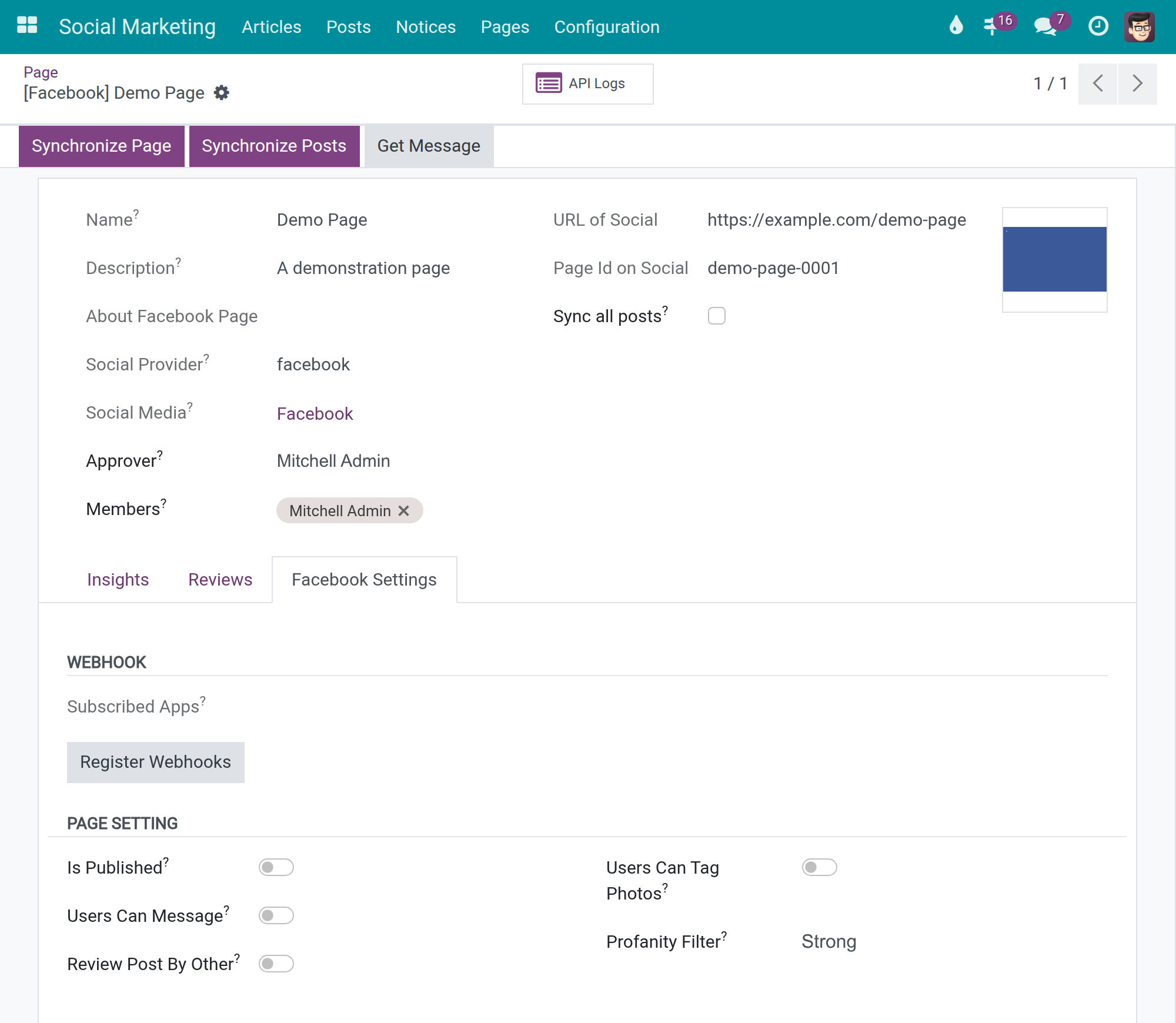
Open Social Marketing ‣ Pages, select the Page and open the tab Facebook Settings. The field Subscribed Apps lists only what Facebook itself confirms:
- Empty: Facebook sends nothing about this Page to Odoo - no comment, reaction or message arrives. Press Register Webhooks. If Facebook refuses, Odoo shows the reason given by Facebook; correct it (for example the permission or the mode of the app) and press the button again.
- Filled (for example feed, messages, message_mention): Facebook sends the notifications of the Page to Odoo. Cancel Webhooks stops them.
Linking the account or pressing Synchronize Pages also registers a new Page. A Page whose webhooks you cancelled stays cancelled.
Editor: write articles for Facebook
The general steps to write, confirm and publish an article are in the Social Marketing documentation. When a chosen page is a Facebook Page, the article form adds the following.
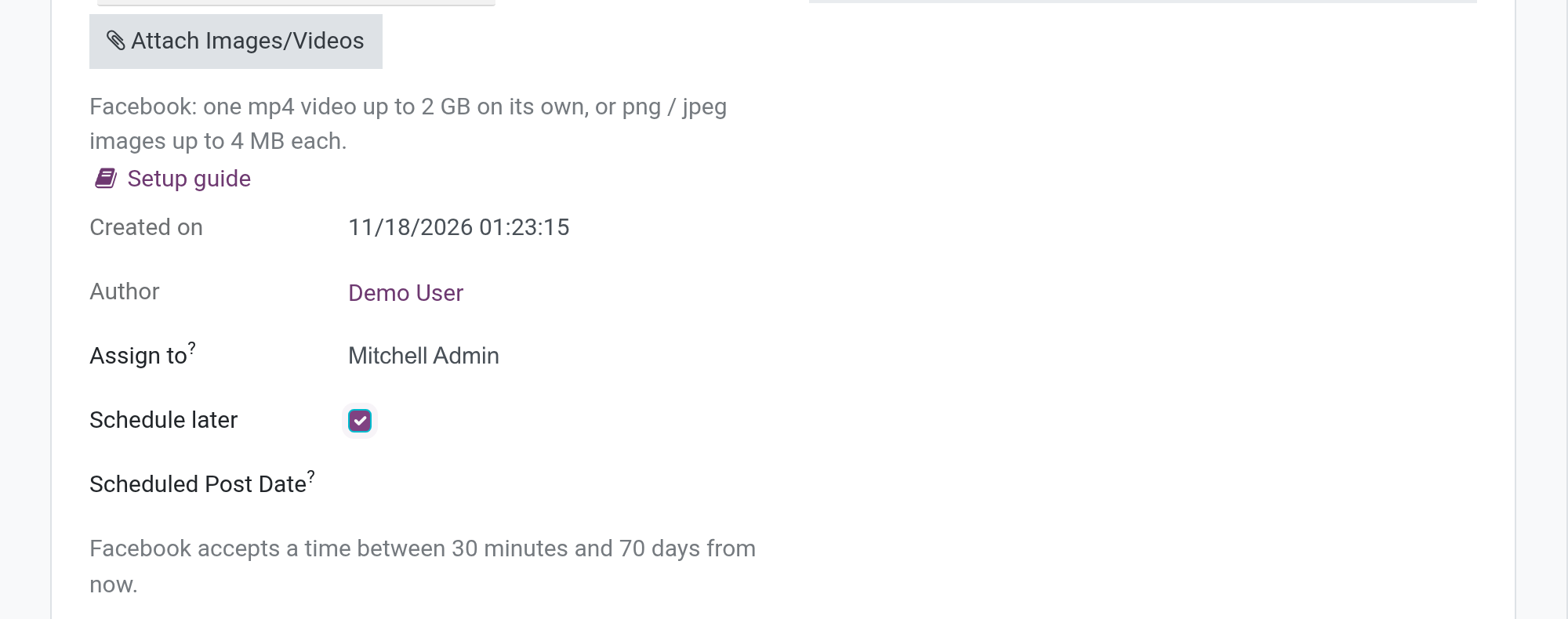
- Under the attachments, the line Facebook: one mp4 video up to 2 GB on its own, or png / jpeg images up to 4 MB each. A video must be the only file of the article. Another format, a second file next to a video or a file over the limit is refused when you confirm, with a message that says which file and why. The Setup guide button below opens the detailed rules.
- Schedule later and Scheduled Post Date publish at a given time. Under the date, the line Facebook accepts a time between 30 minutes and 70 days from now. gives the accepted range. Turning on Schedule later or typing the date never shows an error box.
- The Facebook preview on the right shows how the post looks on the Page: your text, the first image, and the time (the current time until a date is typed, then the scheduled date). The picture is shown also while the article is not yet saved.
Approver: publish and follow the posts
Publish
Open a confirmed article and press Post on Social Media. Each Facebook Page chosen gets one post. A text, link or photo post is sent at once (or scheduled on Facebook when Schedule later is on). A video is sent in the background, in several steps, so that you can keep working.
States of a Facebook post
| State | Meaning |
|---|---|
| Ready | Waiting to be published. |
| Scheduled | Facebook will publish the post at the chosen time. |
| Uploading | The video is being sent to Facebook in the background. A scheduled action sends it every five minutes. |
| Publishing | The video is sent and Facebook is processing it. The state changes by itself once Facebook answers. |
| Posted | The post is on the Page. View on Social opens it. |
| Failed | Facebook or Odoo could not publish. The Failure Reason is shown at the top of the post. |
| Cancelled | The post was dropped. |
A post that is being published cannot be cancelled, edited or deleted; wait for Posted or Failed. A post already on the Page cannot be cancelled: use Delete Post, which also removes it from Facebook.
When a video post fails
- Open the post and read the Failure Reason. Typical reasons are shown in Facebook's words or in plain sentences, for example: the connection to the Page has expired or lacks the permission to publish (link the account again); the video is too large or too long; the video format is not accepted (select an mp4 video); the upload timed out; the video was blocked by the content policy of Facebook; the scheduled time came too close while the video was uploading (cancel the post and publish again with a later time).
- When the reason says that Facebook did not confirm the end of the upload and names a video, the video may already be on the Page: check the Page before retrying.
- Fix the cause and press Retry (approvers only), or press Cancel to give up. The upload starts again.
The people concerned (author, assignee and the person who asked to publish) are notified. The API Logs button of the post shows what Facebook answered (see the system administrator's chapter).
Synchronize the posts of a Page
On the Page (Social Marketing ‣ Pages):
- Synchronize Posts reads the 100 most recent posts of the Page, including the posts scheduled on Facebook. A video published from Odoo stays one single post linked to its article; the same video is never duplicated or archived by a synchronization. If Facebook refuses the reading of one Page, a readable message is shown.
- Synchronize Old Posts appears only when older posts remain; each press reads up to 500 older posts. The option Sync all posts of the Page lets a daily scheduled action read them progressively.
Posts removed on Facebook
A post that you delete on Facebook, or move to its trash, is archived in Odoo - never deleted - and its state does not change. A daily scheduled action, Social: Archive Posts Removed from Facebook, checks every Page after reading its whole list of posts and scheduled posts; a Page that cannot be read is skipped and the other Pages are still checked. An archived post that Facebook lists again becomes active again.
Reviews of the Page
The tab Reviews of the Page lists the reviews people left on the Page. Refresh reads them from Facebook and View on Page opens the reviews on Facebook.
Messenger conversations
Editors (and above) who are members of the Page receive its Messenger conversations.
- On the Page, press Get Message: Odoo reads the 25 most recent conversations (only the user assigned to the Page or a manager can do it). New messages also arrive by themselves once the webhooks are registered.
- Open Discuss. The conversations are in the category Social Conversation, one per person.
- Type your answer in the conversation and press Send.
A conversation appears without a picture when Facebook refuses to give the picture or the name details of the person; it can still be read and answered.
Facebook accepts a reply from the Page only within 24 hours of the person's last message to the Page. Otherwise the message is refused: Odoo shows Facebook's own words, followed by Facebook accepts a reply from the Page only within 24 hours of the person's last message to the Page. The reply was not sent and is not saved in this conversation. The reply is not kept in the conversation. Files cannot be sent in a reply. Names and messages written by people on Facebook are shown as plain text.
Troubleshooting
- Subscribed Apps is empty / nothing arrives from Facebook: press Register Webhooks and read the reason Facebook gives if it refuses. Check that the app is in Live mode and that the Webhook URL and the Verify Token were declared in the Facebook app.
- LINK ACCOUNT says the connection could not be verified: press LINK ACCOUNT again. When the message says it failed, the system administrator reads the reason in API Logs.
- A video post is Failed: read the Failure Reason, fix, press Retry.
- A reply to a Messenger conversation is refused: the person's last message is older than 24 hours.
- A post disappeared from the list: it was deleted or trashed on Facebook and is archived.
FAQ
Which Facebook files can I publish? One mp4 video of up to 2 GB on its own, or png / jpeg images of up to 4 MB each.
How far ahead can I schedule? From 30 minutes up to 70 days from now.
Who can retry a failed post? Approvers and administrators.
Is a post deleted on Facebook deleted in Odoo? No, it is archived.
This software and associated files (the "Software") may only be used (executed, modified, executed after modifications) if you have purchased a valid license from the authors, typically via Odoo Apps, or if you have received a written agreement from the authors of the Software (see the COPYRIGHT file).
You may develop Odoo modules that use the Software as a library (typically by depending on it, importing it and using its resources), but without copying any source code or material from the Software. You may distribute those modules under the license of your choice, provided that this license is compatible with the terms of the Odoo Proprietary License (For example: LGPL, MIT, or proprietary licenses similar to this one).
It is forbidden to publish, distribute, sublicense, or sell copies of the Software or modified copies of the Software.
The above copyright notice and this permission notice must be included in all copies or substantial portions of the Software.
THE SOFTWARE IS PROVIDED "AS IS", WITHOUT WARRANTY OF ANY KIND, EXPRESS OR IMPLIED, INCLUDING BUT NOT LIMITED TO THE WARRANTIES OF MERCHANTABILITY, FITNESS FOR A PARTICULAR PURPOSE AND NONINFRINGEMENT. IN NO EVENT SHALL THE AUTHORS OR COPYRIGHT HOLDERS BE LIABLE FOR ANY CLAIM, DAMAGES OR OTHER LIABILITY, WHETHER IN AN ACTION OF CONTRACT, TORT OR OTHERWISE, ARISING FROM, OUT OF OR IN CONNECTION WITH THE SOFTWARE OR THE USE OR OTHER DEALINGS IN THE SOFTWARE.
Social Marketing administrator and system administrator: notifications and call history
Webhook notifications
On the Facebook record, the Webhook Notifications button lists the notifications Facebook sent to Odoo. States: Pending (waiting; processed again automatically), Done (processed) and Failed (after five unsuccessful attempts, with the Failure Reason). Select a failed notification and press Retry once the cause is fixed (Social Marketing administrators only); it is processed again in the background. Comments and messages reach Odoo after a short delay for that reason.
API Logs
When a connection, a publication or a synchronization fails, the system administrator opens the API Logs button of the Facebook record, of the Page or of the post. It lists the calls made to Facebook with the HTTP method, the response status, the error message and the duration; a failed call is logged even though the user's action was cancelled. Tokens, codes and secrets are masked in the address, the request and the answer.