| Lines of Code | 4681 |
| Technical name | viin_account_reconciliation |
| License | LGPL-3 |
| Website | https://viindoo.com/apps/app/18.0/viin_account_reconciliation |
| Read description for | v 14.0 v 15.0 v 16.0 v 17.0 |
| Required Apps | Invoicing (account) Discuss (mail) |

Account Reconciliation Widget
Account Reconciliation Widget and Functions for bank statement reconciliation and journal items reconciliation
In accounting management, controlling cash flow and payments plays an important role. When a business has a high volume of transactions, misunderstandings between the accounting, treasury, and cashier departments can easily occur.
Key Features
Built natively on Odoo/Viindoo to streamline real business operations:
Bank Statement and Cash Register Management
Manage the opening and closing balances of bank statements to detect discrepancies in recorded transaction details.
Bank Statement Entry Reconciliation
- Reconcile accounting entries with bank statement transactions and recorded payments.
- Record direct payments made via cash or bank transfers.
Manual Reconciliation and Reversal of Journal Entry Reconciliation
- Support manual reconciliation.
- Allow cancellation of reconciliations between journal entries.
Benefits
Detect and resolve discrepancies between accounting records and actual transactions promptly.
Minimize errors in recording and reconciling accounting transactions, bank statements, and cash flow.
Closely monitor the opening and closing balances of cash and bank accounts.
Provide a clear and transparent financial overview through detailed reconciliation of accounting entries and bank statements.
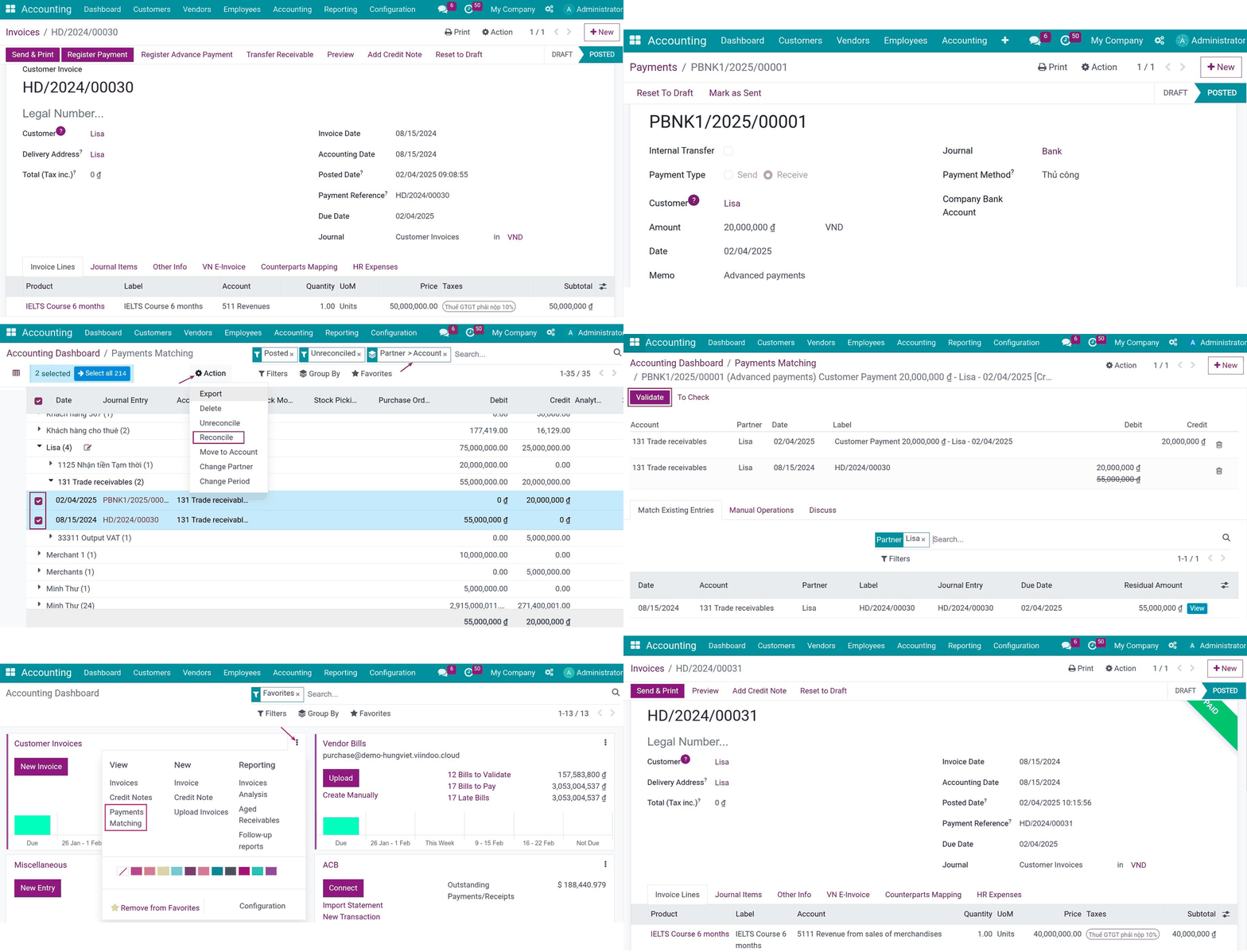
Customer invoice
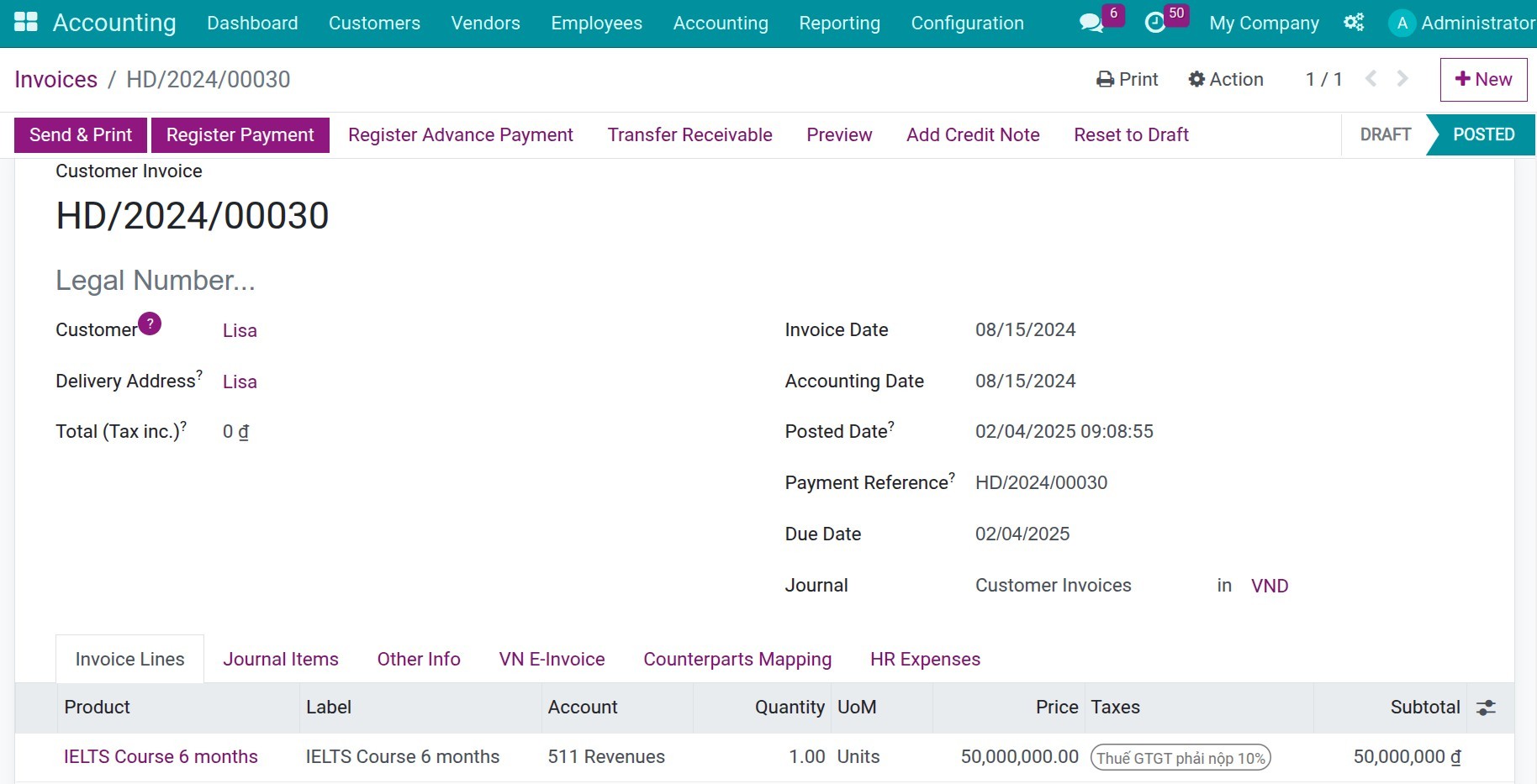
Create stand-alone payment
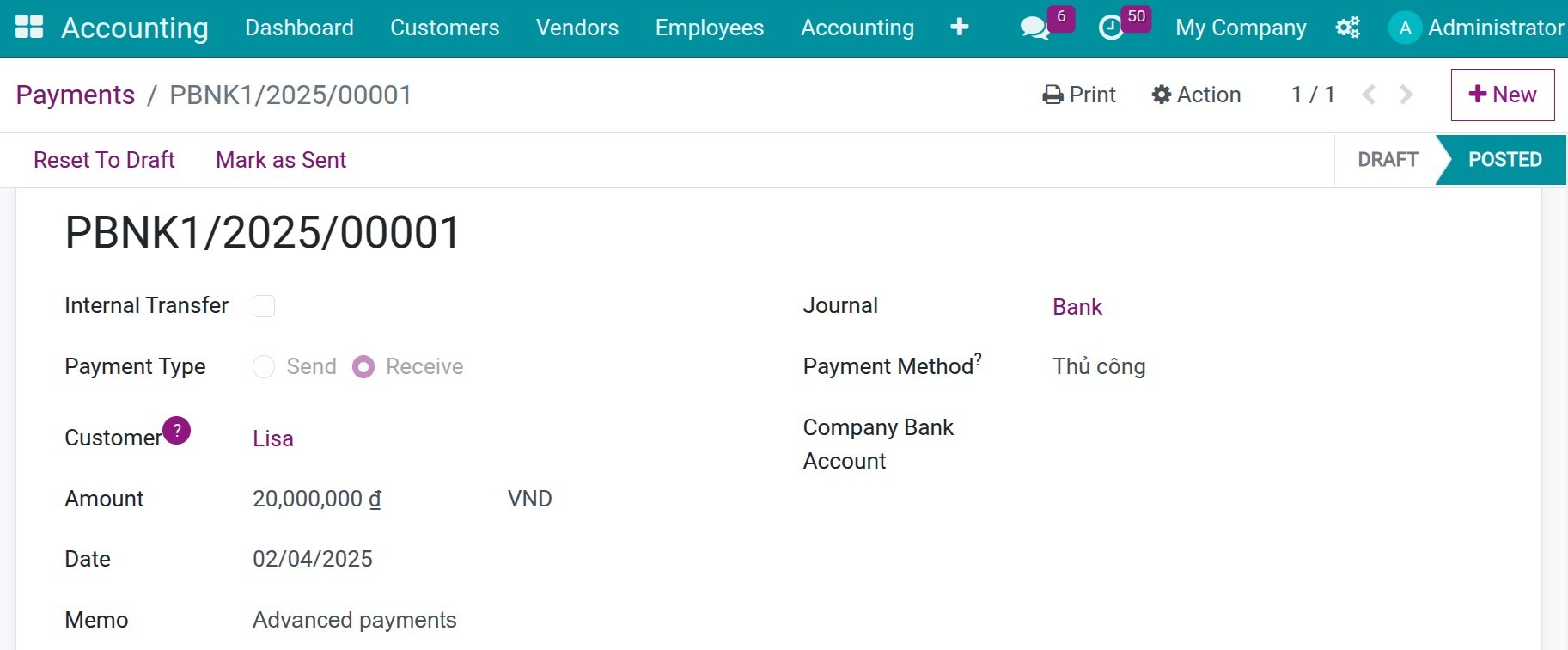
Reconciliation between customer's invoices and their payments.
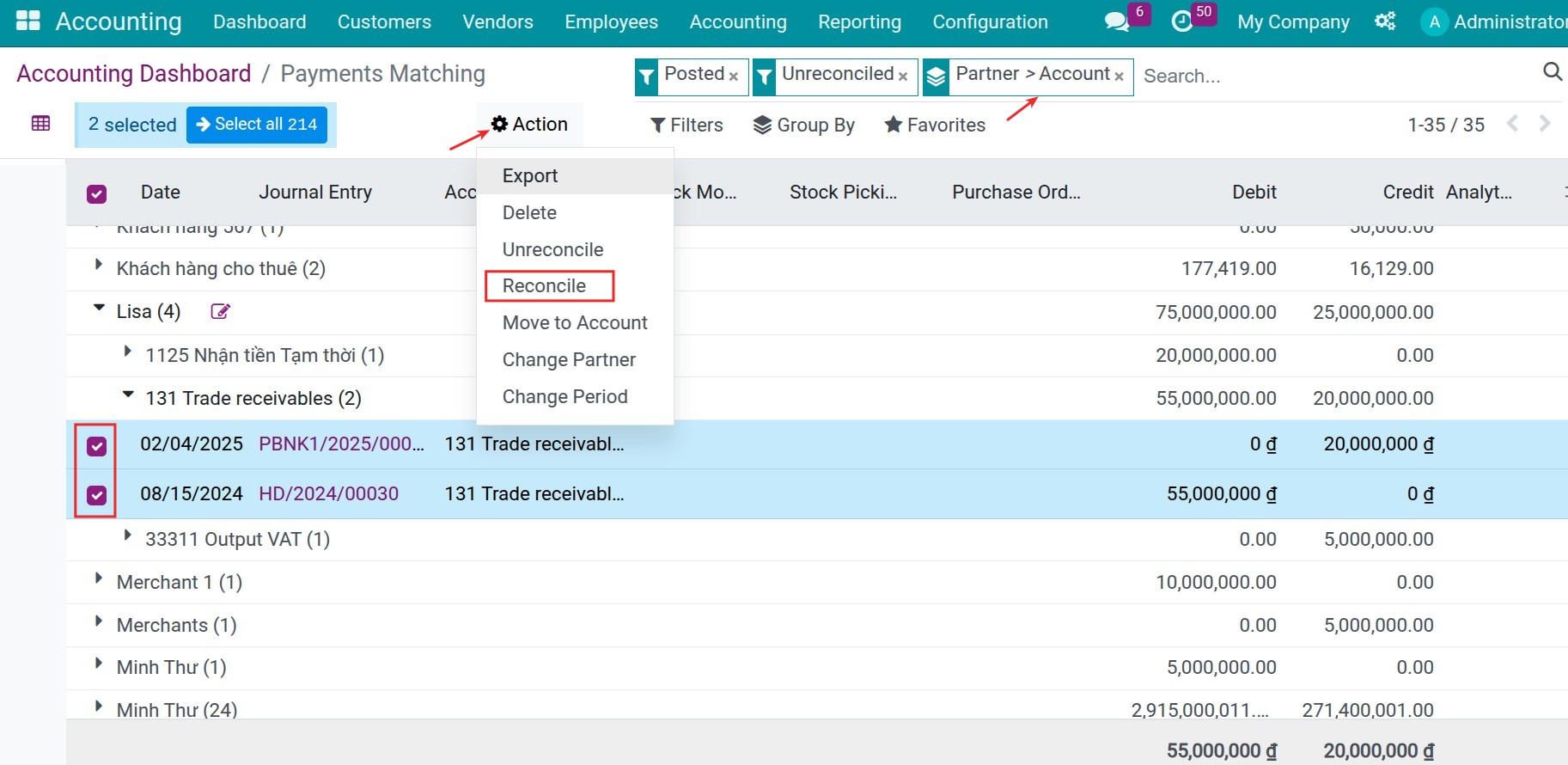
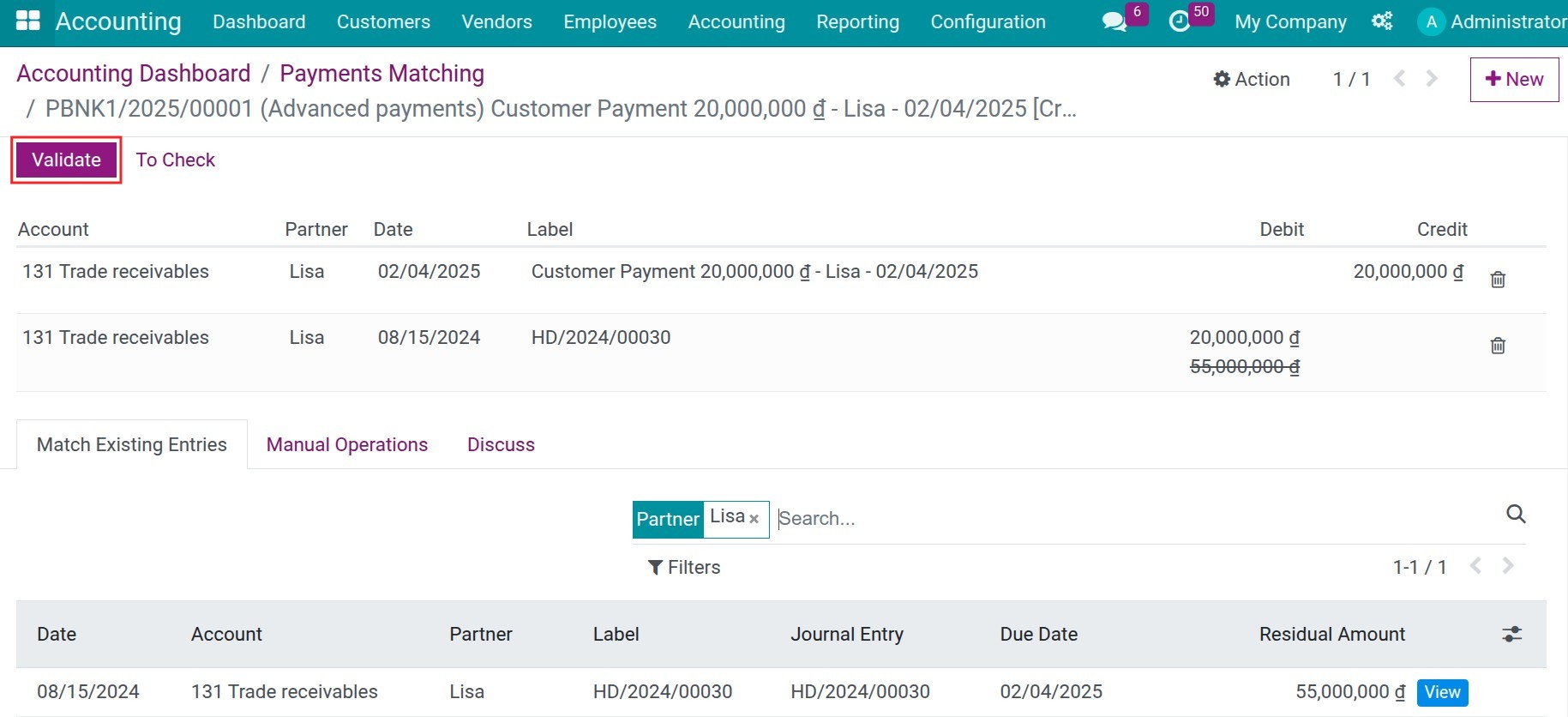
Reconciliation between customer's invoices and their payments.
Reconciliation between customer's invoices and their payments.
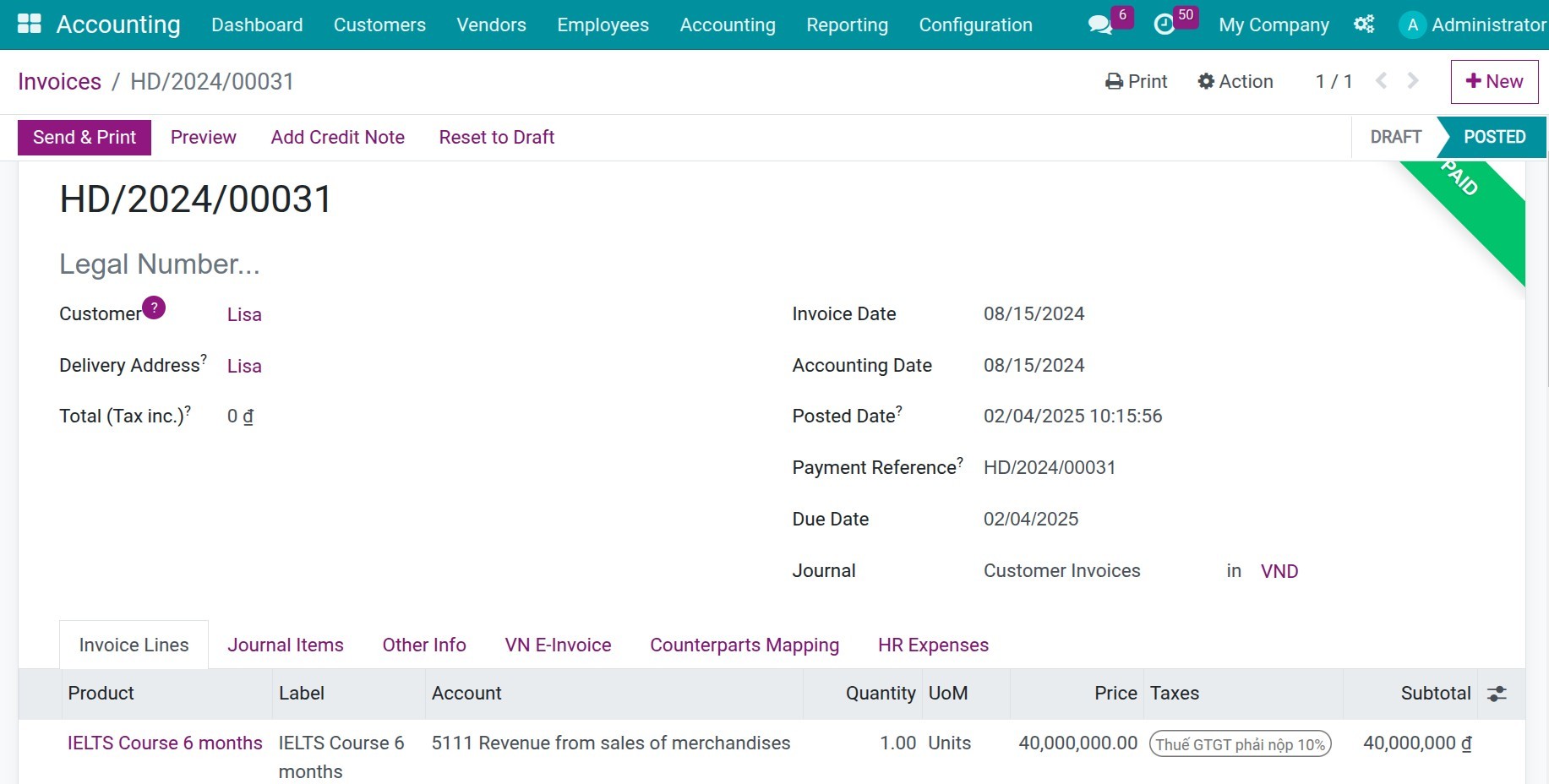
Paid invoice
See Account Reconciliation Widget in Action
See how this module solves real business problems in a working Viindoo environment.
Need help with Account Reconciliation Widget?
For questions, implementation support, or consulting services, contact Viindoo.
Pre-Sales & Partnership
When contacting us, please include:
- Odoo/Viindoo version (CE/EE).
- Number of users and business scope.
- Other modules currently in use.
Technical Support
For faster troubleshooting, please provide:
- Order number or app reference.
- Odoo/Viindoo version & edition.
- Steps to reproduce the issue.
- Screenshots/logs if available.
Technical Requirement
Changes log
We continuously improve this module. Recent updates from the official Viindoo repository:
- 2026-03-24 Fixed Reset reconcile_lines_widget_info data when move lines are missing.
- 2025-11-26 Improved Skip unreconciled transactions without reconcile models.
- 2025-11-06 Fixed Record missing error.
- 2025-06-23 Improved Automatically reconcile when match reconcile model.
- 2025-02-04 Fixed Update App documentation.
- 2025-06-23 Fixed Filter domain reconcile model.
Works Great With These Modules
Extend Account Reconciliation Widget with complementary Viindoo apps:
Account Bank Statement Import
Import bank statements in CSV and XLSX
Module viin_account_bank_statement_importAccount Counterpart - Account Reconciliation
The bridge module between Account Counterpart and Account Reconciliation
Module viin_account_counterpart_reconciliationWho Should Use This Module?
Built for teams that need this capability fully integrated into their Odoo/Viindoo stack.
Executives & Business Owners
Need clear visibility into operations and a stack that scales without bespoke development.
Operations / Department Leaders
Want to streamline daily workflows, remove manual handoffs, and keep data consistent across teams.
Implementers & Odoo Partners
Looking for production-ready Viindoo modules to deliver projects faster and at lower risk.
Installation
- Navigate to Apps.
- Search with keyword viin_account_reconciliation.
- Press Install.
Instruction
Instruction video: Account Reconciliation Widget
Reconciliation between invoices and payments
1. Create an invoice and record a payment independently.
You can create a customer invoice from many views, such as on a sale order.
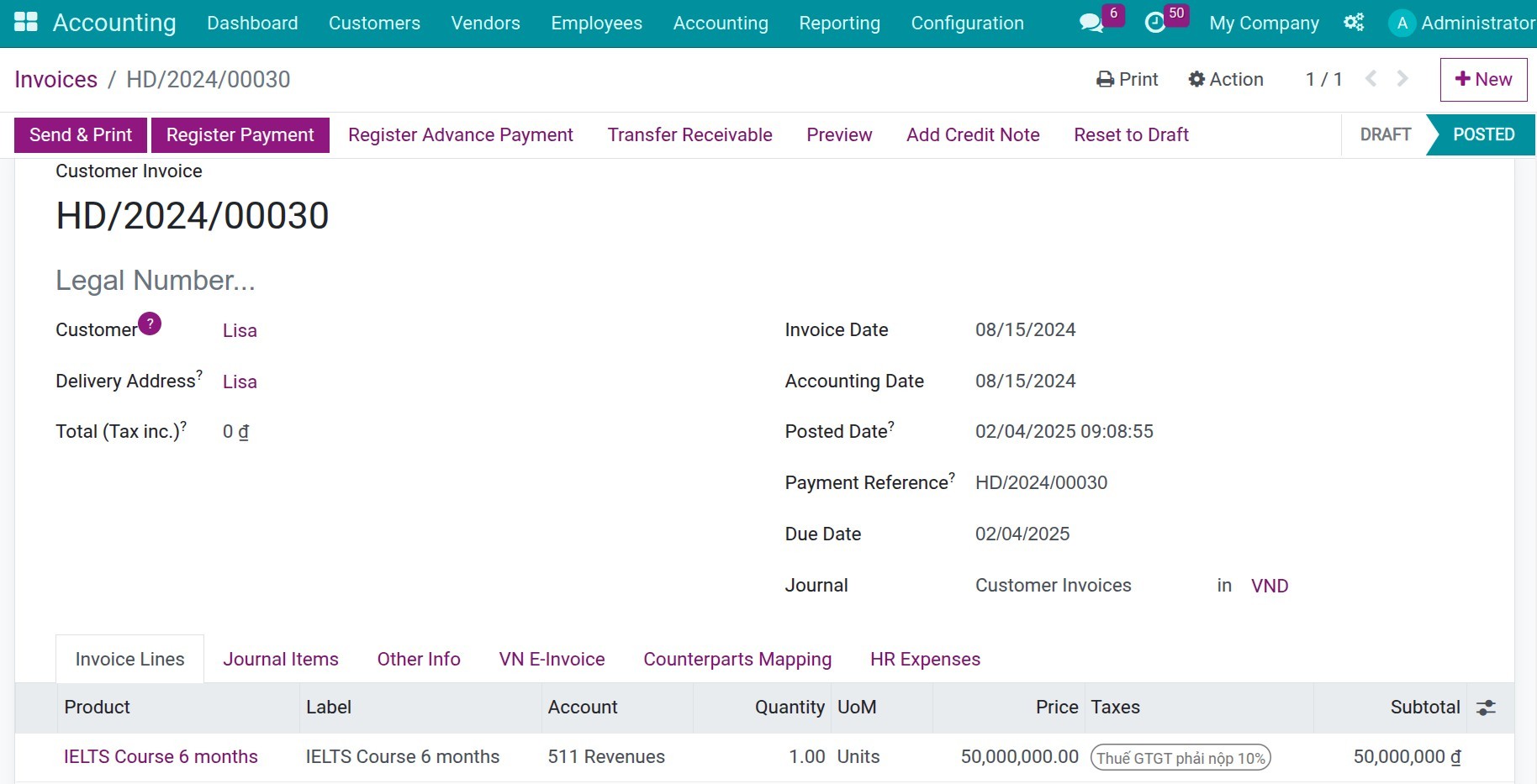
In some situations, you need to create a stand-alone payment, for example, customer's payments in advance or over payments, etc.
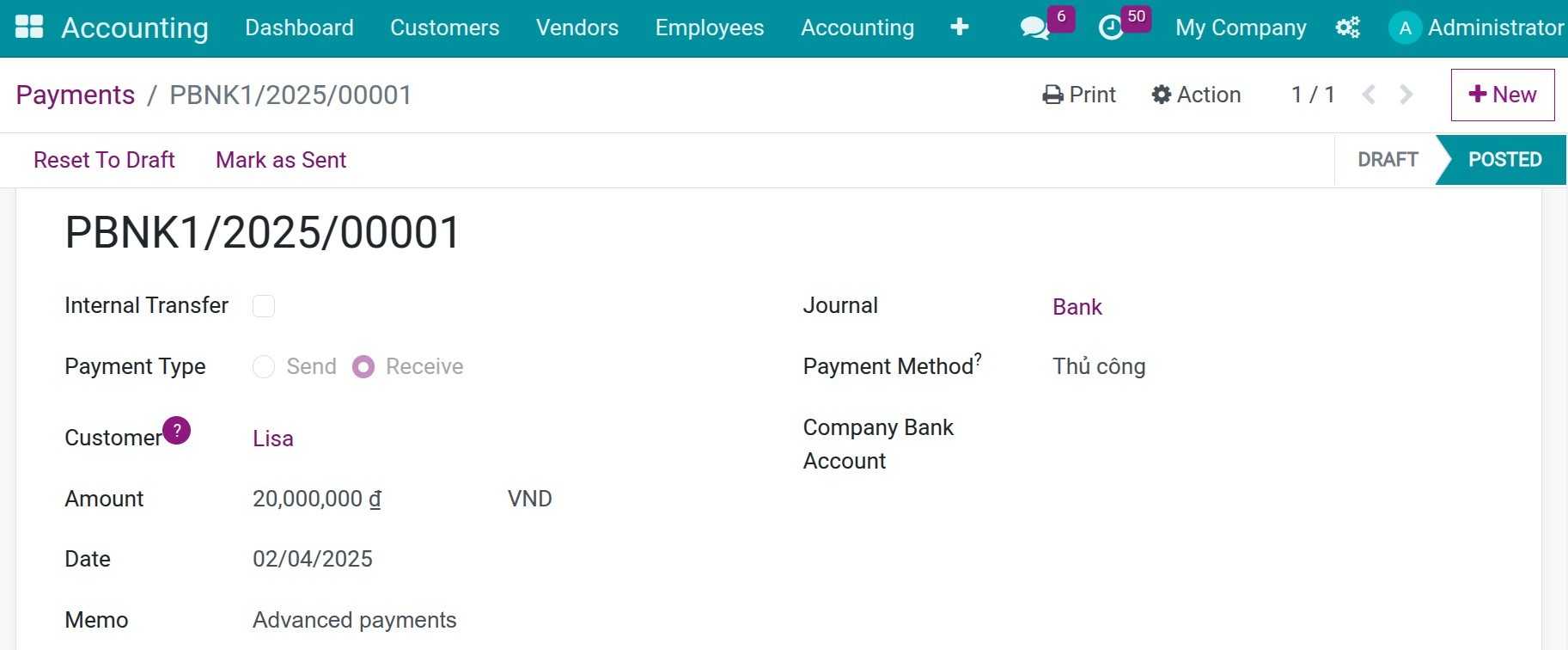
2. Reconciliation.
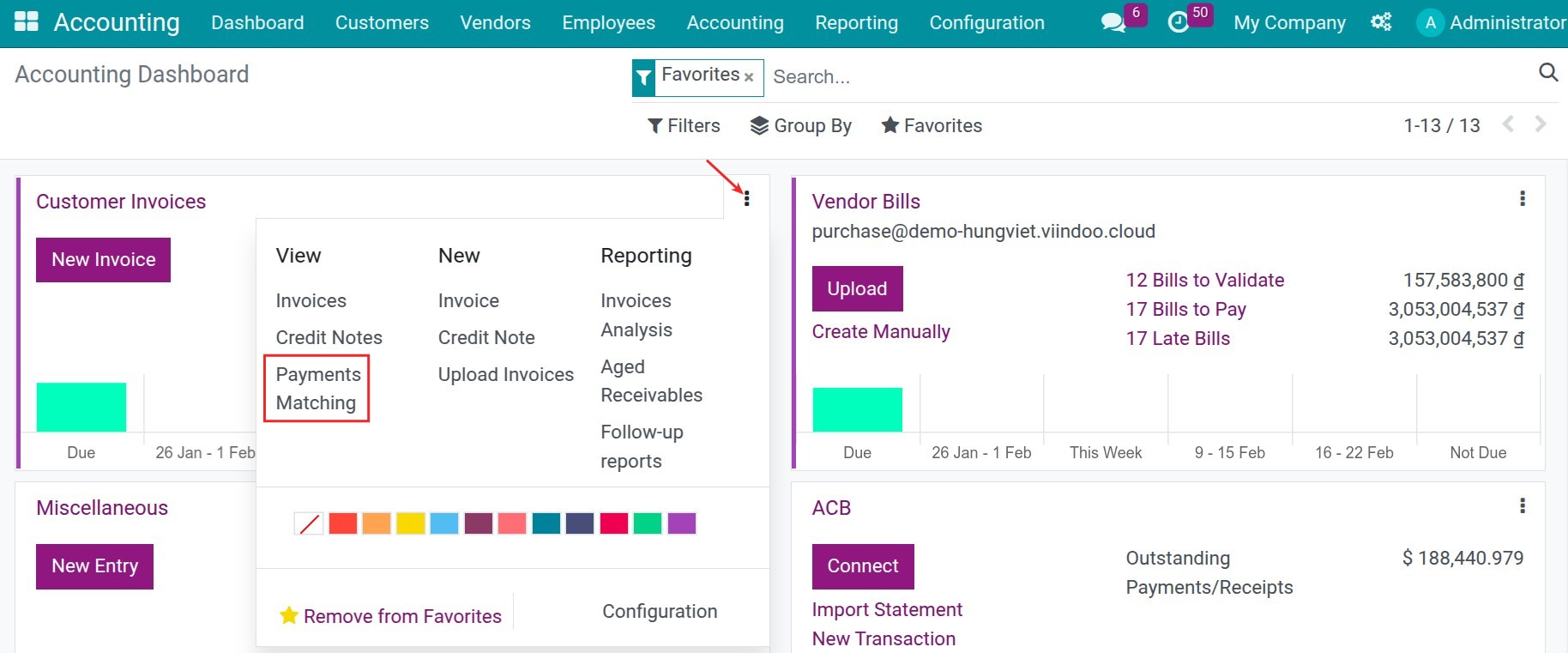
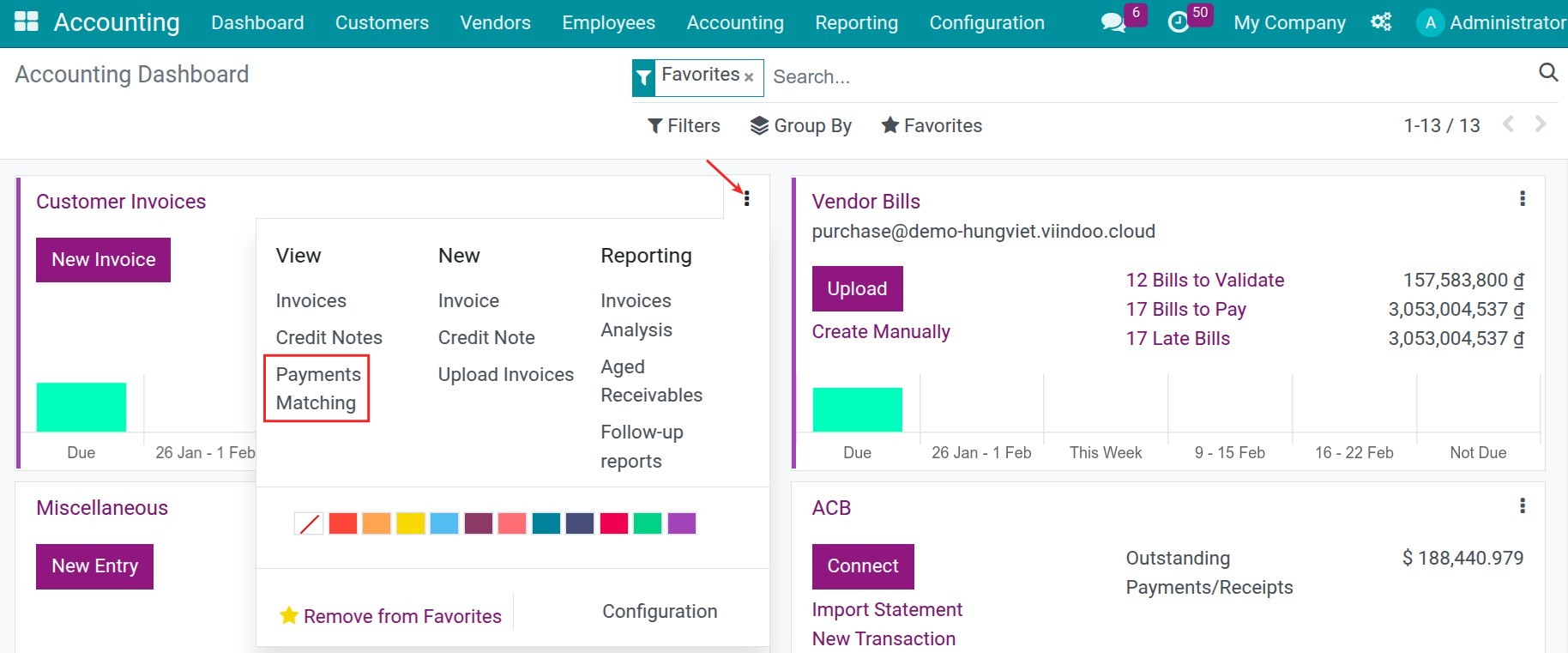
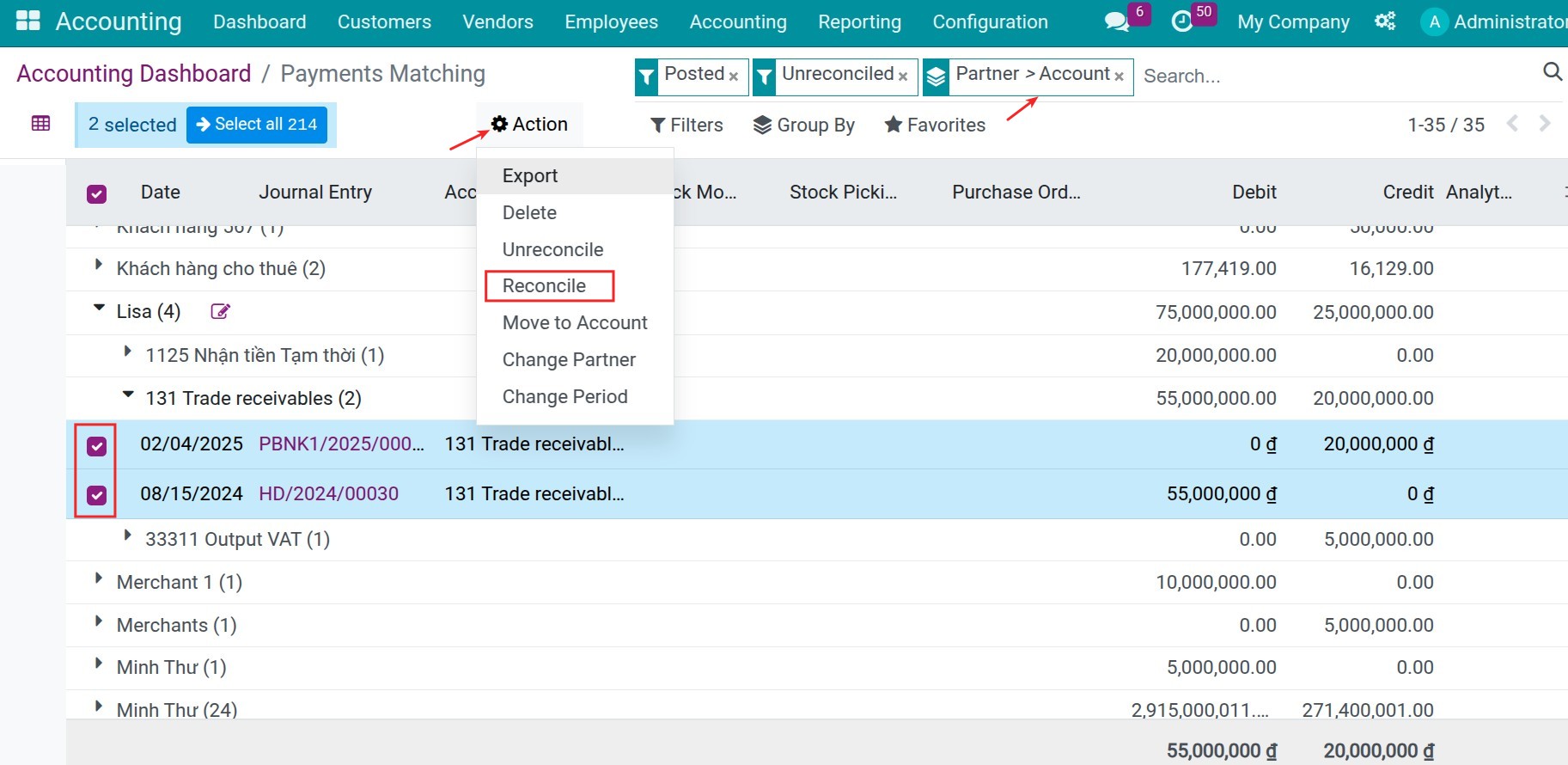
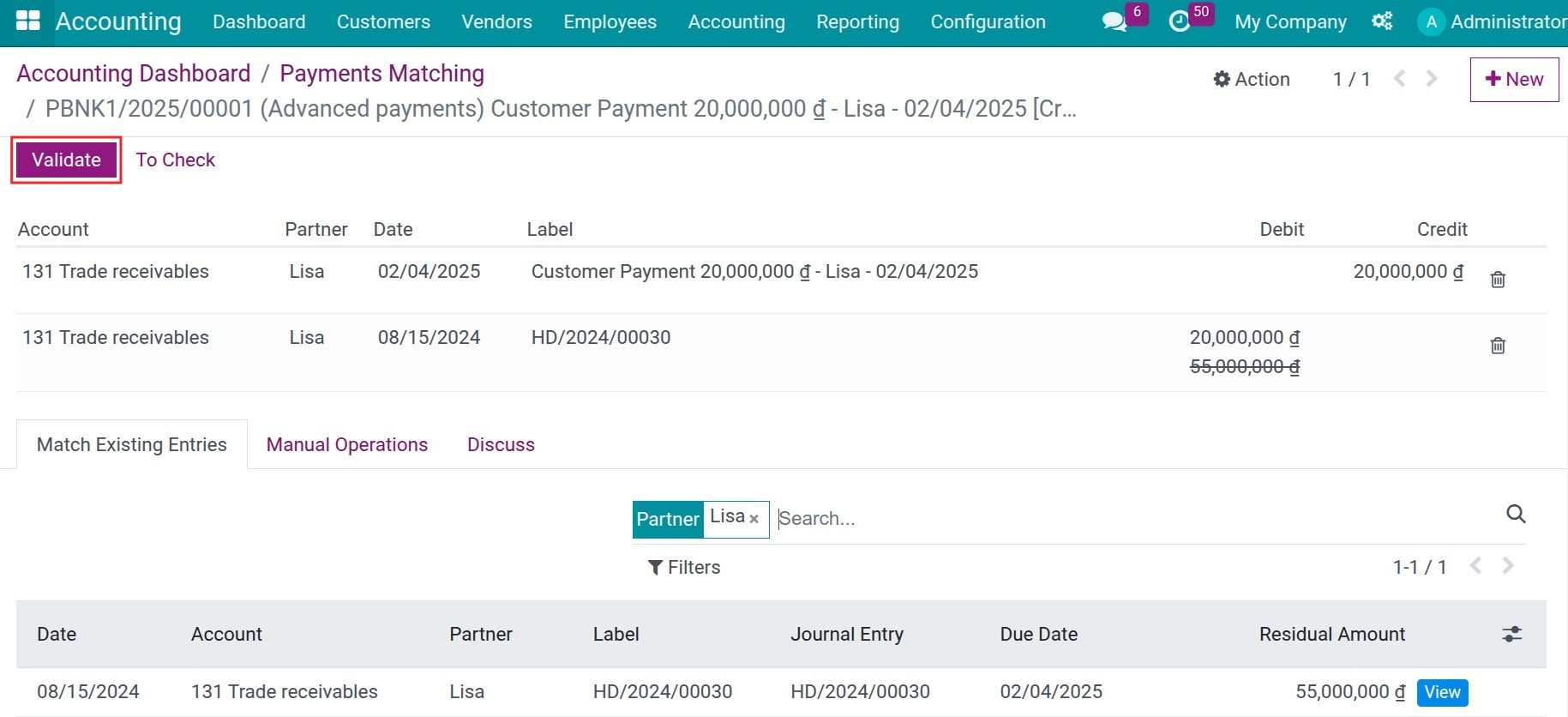
Go to Dashboard, choose Customer Invoices journal, then choose Payments Maching. You can use Group By or Filter to search the needed accounts, choose them, then press Action > Reconcile:
Bank reconciliation
1. Create an invoice and record a payment by bank.
You can directly register payment on the interface of invoice.
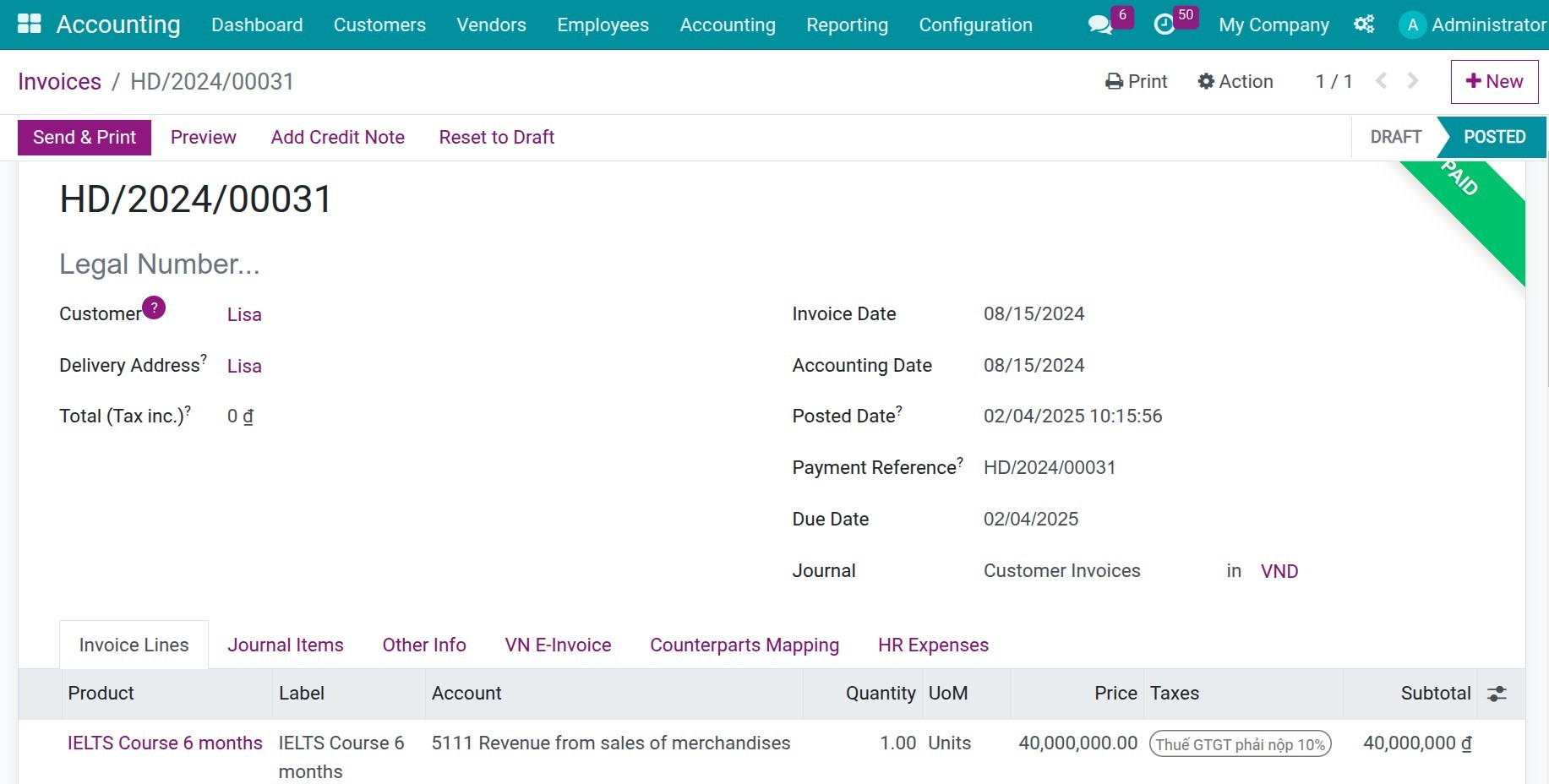
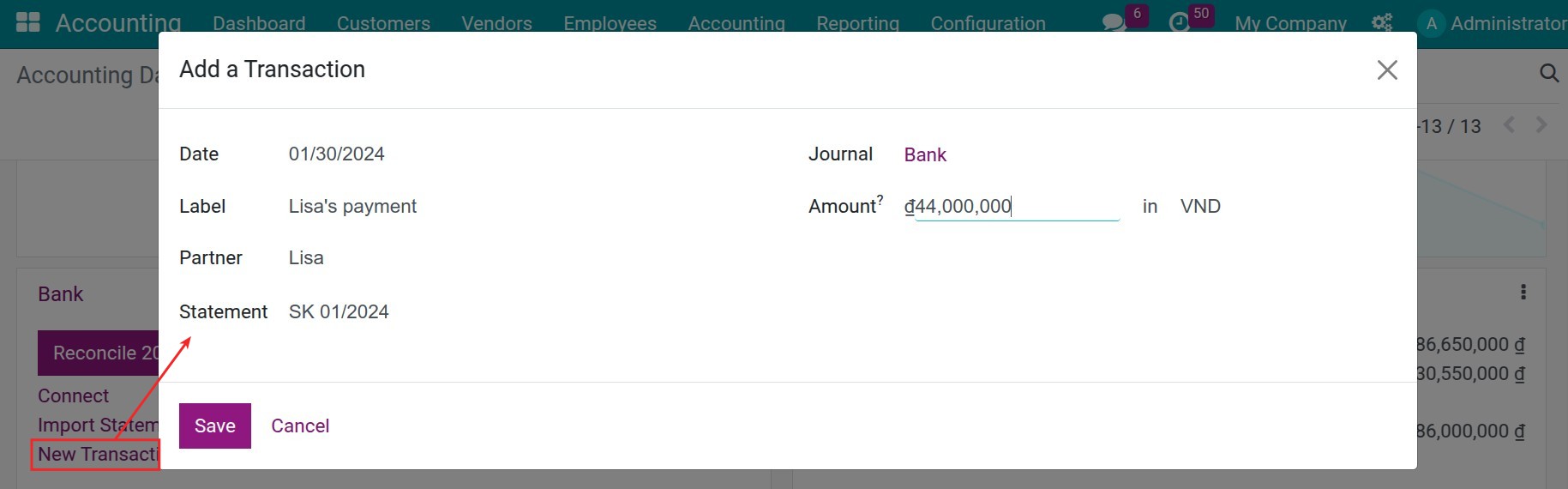
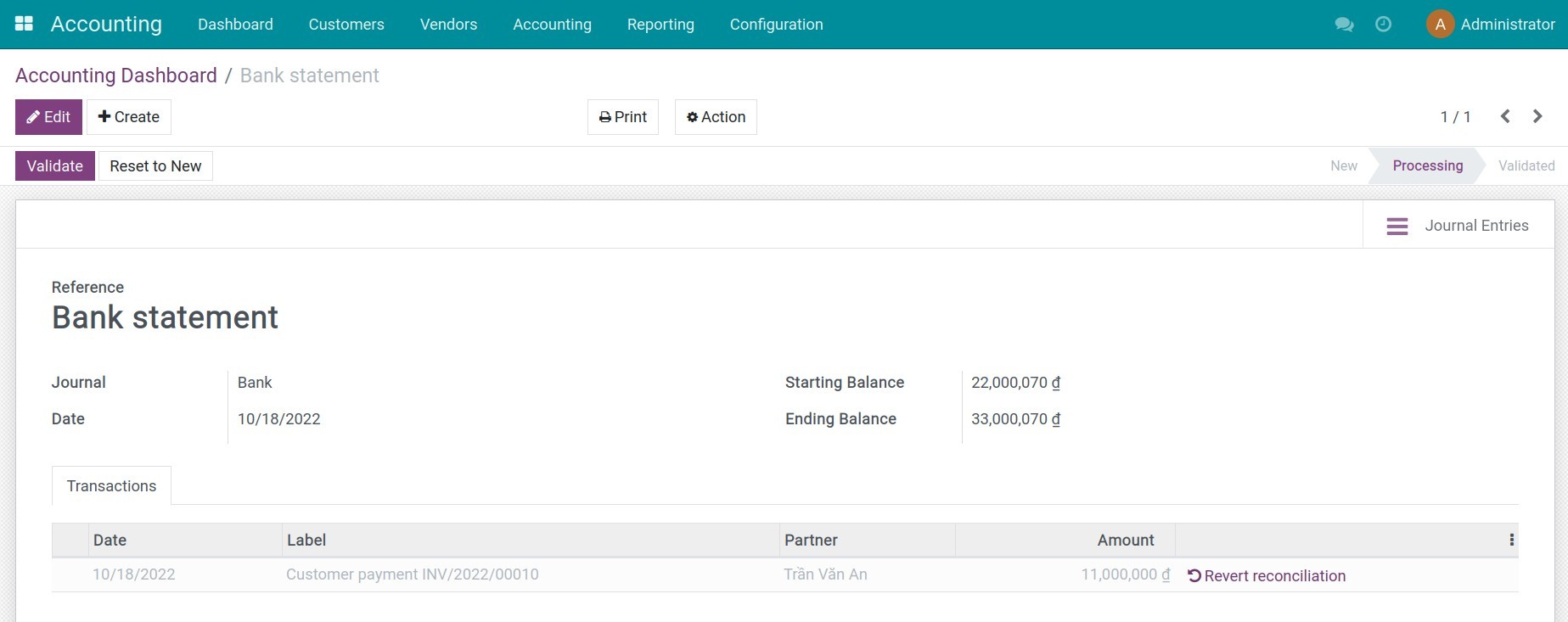
2. Create a bank statement and proceed to the bank reconciliation.
In the Accounting Software, create the bank statements and process the bank reconciliation.
This is an unofficial translation of the GNU Lesser General Public License into Vietnamese. It was not published by the Free Software Foundation,
and does not legally state the distribution terms for software that uses the GNU LGPL - only the original English text of the GNU LGPL does
that. However, we hope that this translation will help language speakers understand the GNU LGPL better.
GNU LESSER GENERAL PUBLIC LICENSE
Version 3, 29 June
2007
Copyright (C) 2007 Free Software Foundation, Inc. <https://fsf.org/>
Everyone is permitted to copy and distribute verbatim copies of this license document, but changing it is not allowed.
This version of the GNU Lesser General Public License incorporates the terms and conditions of version 3 of the GNU General Public License,
supplemented by the additional permissions listed below.
0. Additional Definitions.
As used herein,"this License" refers to version 3 of the GNU Lesser General Public License, and the "GNU GPL" refers to version 3 of
the GNU "General" Public License.
"The Library" refers to a covered work governed by this License, other than an Application or a Combined Work as defined below.
An "Application" is any work that makes use of an interface provided by the Library, but which is not otherwise based on the Library.
Defining a subclass of a class defined by the Library is deemed a mode of using an interface provided by the Library.
A "Combined Work" is a work produced by combining or linking an Application with the Library. The particular version of the Library
with which the Combined Work was made is also called the "Linked Version".
The "Minimal Corresponding Source" for a Combined Work means the Corresponding Source for the Combined Work, excluding any source code
for portions of the Combined Work that, considered in isolation, are based on the Application, and not on the Linked Version.
The "Corresponding Application Code" for a Combined Work means the object code and/or source code for the Application, including any data
and utility programs needed for reproducing the Combined Work from the Application, but excluding the System Libraries of the Combined Work.
1. Exception to Section 3 of the GNU GPL.
You may convey a covered work under sections 3 and 4 of this License without being bound by section 3 of the GNU GPL.
2. Conveying Modified Versions.
If you modify a copy of the Library, and, in your modifications, a facility refers to a function or data to be supplied by an Application that
uses the facility (other than as an argument passed when the facility is invoked), then you may convey a copy of the modified version:
a) under this License, provided that you make a good faith effort to ensure that, in the event an Application does not supply the function or data, the facility still
operates, and performs whatever part of its purpose remains meaningful, or
b) under the GNU GPL, with none of the additional permissions of this License applicable to that copy.
3. Object Code Incorporating Material from Library Header Files.
The object code form of an Application may incorporate material from a header file that is part of the Library. You may convey such
object code under terms of your choice, provided that, if the incorporated material is not limited to numerical parameters, data structure
layouts and accessors, or small macros, inline functions and templates (ten or fewer lines in length), you do both of the following:
a) Give prominent notice with each copy of the object code that the Library is used in it and that the Library and its use are covered by this License.
b) Accompany the object code with a copy of the GNU GPL and this license document.
4. Combined Works.
You may convey a Combined Work under terms of your choice that, taken together, effectively do not restrict modification of the portions of the
Library contained in the Combined Work and reverse engineering for debugging such modifications, if you also do each of the following:
a) Give prominent notice with each copy of the Combined Work that the Library is used in it and that the Library and its use are covered by this License.
b) Accompany the Combined Work with a copy of the GNU GPL and this license document.
c) For a Combined Work that displays copyright notices during execution, include the copyright notice for the Library among these notices,
as well as a reference directing the user to the copies of the GNU GPL and this license document.
d) Do one of the following:
0) Convey the Minimal Corresponding Source under the terms of this License, and the Corresponding Application Code in a form suitable for, and
under terms that permit, the user to recombine or relink the Application with a modified version of the Linked Version to produce a modified
Combined Work, in the manner specified by section 6 of the GNU GPL for conveying Corresponding Source.
1) Use a suitable shared library mechanism for linking with the Library. A suitable mechanism is one that (a) uses at run time a copy of the
Library already present on the user's computer system, and (b) will operate properly with a modified version of the Library
that is interface-compatible with the Linked Version.
e) Provide Installation Information, but only if you would otherwise be required to provide such information under section 6 of the
GNU GPL, and only to the extent that such information is necessary to install and execute a modified version of the Combined Work produced by
recombining or relinking the Application with a modified version of the Linked Version. (If you use option 4d0, the Installation Information
must accompany the Minimal Corresponding Source and Corresponding Application Code. If you use option 4d1, you must provide the Installation
Information in the manner specified by section 6 of the GNU GPL for conveying Corresponding Source.)
5. Combined Libraries.
You may place library facilities that are a work based on the Library side by side in a single library together with other library facilities that
are not Applications and are not covered by this License, and convey such a combined library under terms of your choice, if you do both of
the following:
a)Accompany the combined library with a copy of the same work based on the Library, uncombined with any other library facilities,
conveyed under the terms of this License.
b) Give prominent notice with the combined library that part of it is a work based on the Library, and explaining where to find the accompanying
uncombined form of the same work.
6. Revised Versions of the GNU Lesser General Public License.
The Free Software Foundation may publish revised and/or new versions of the GNU Lesser General Public License from time to time. Such new
versions will be similar in spirit to the present version, but may differ in detail to address new problems or concerns.
Each version is given a distinguishing version number. If the Library as you received it specifies that a certain numbered
version of the GNU Lesser General Public License "or any later version" applies to it, you have the option of following the terms and
conditions either of that published version or of any later version published by the Free Software Foundation. If the Library as you
received it does not specify a version number of the GNU Lesser General Public License, you may choose any version of the GNU Lesser
General Public License ever published by the Free Software Foundation.
If the Library as you received it specifies that a proxy can decide whether future versions of the GNU Lesser General Public License shall
apply, that proxy's public statement of acceptance of any version is permanent authorization for you to choose that version for the Library.