Viindoo Brain - Warehouse
by Viindoo
| Lines of Code | 463 |
| Technical name | viin_brain_stock |
| License | OPL-1 |
| Website | https://viindoo.com/apps/app/17.0/viin_brain_stock |
| Read description for | |
| Required Apps | Discuss (mail) Inventory (stock) |
| Included Dependencies | Viindoo Brain |
| Extensions | Viindoo Brain - Knowledge Suite |

Receive, dispatch and count the same way on every shift, with notes one click from each transfer
For warehouse teams that keep their procedures in Brain
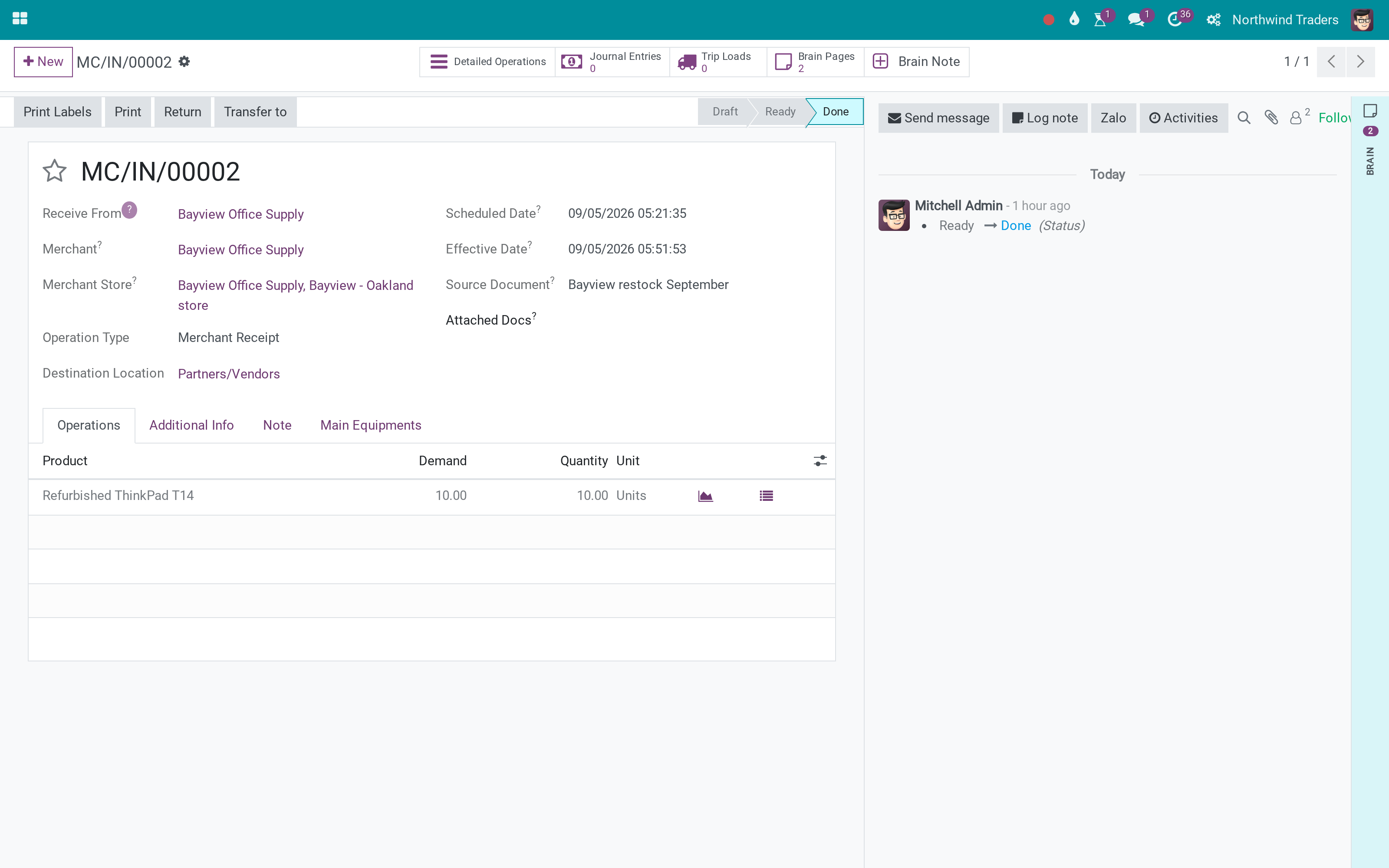
A ready Warehouse Knowledge Space in Brain, and Brain Note on the transfer form
17.0 · Community, Viindoo Cloud · OPL-1
Extends Viindoo Brain.
What changes for your team
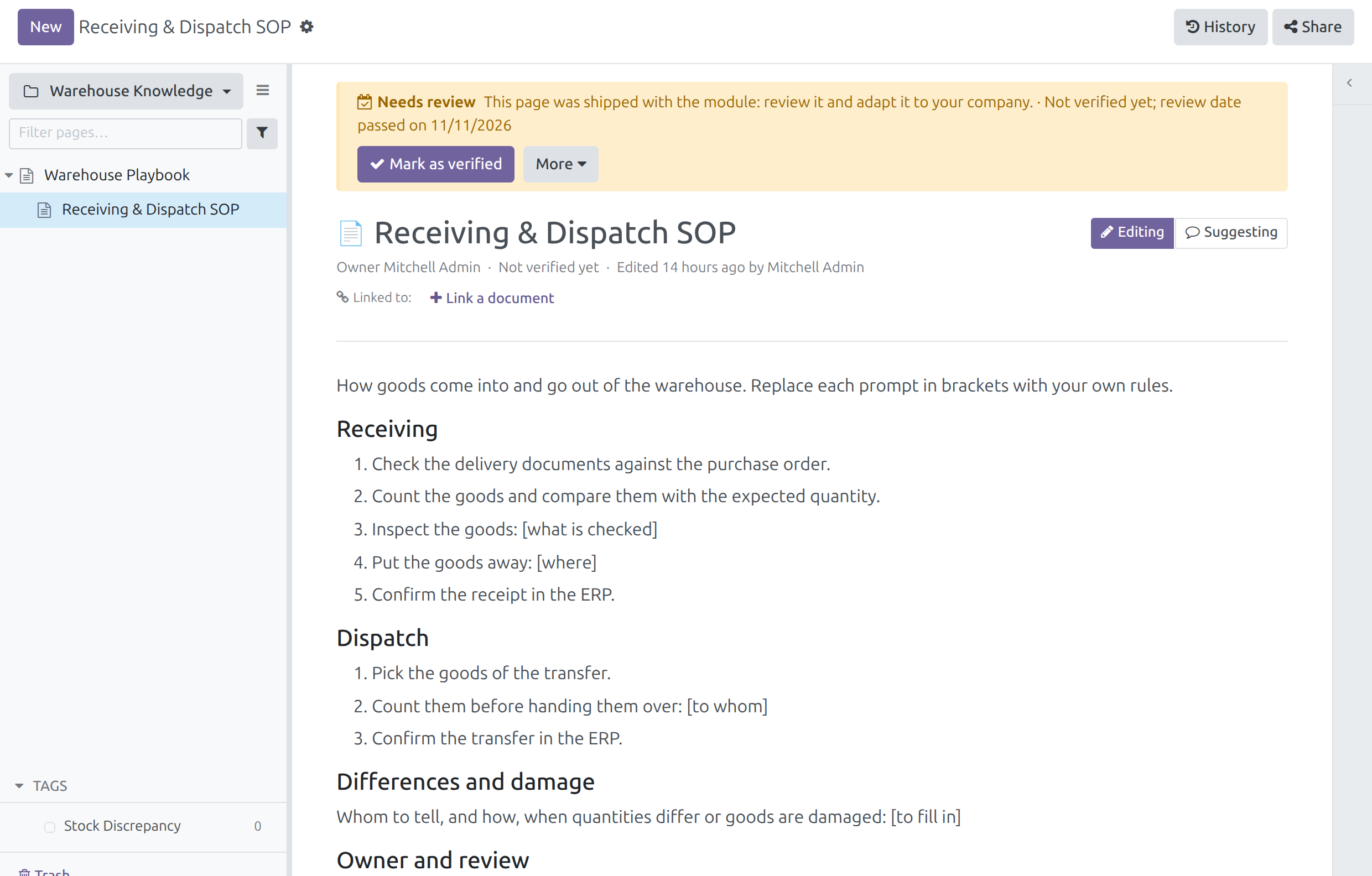
Every shift works from one procedure
How goods are checked at receipt and before dispatch differs from one person to the next.
→ The Warehouse Knowledge Space opens with two starting pages, Warehouse Playbook and Receiving & Dispatch SOP: steps, headings and bracketed prompts your team replaces with its own rules.
Counts are written up the same way
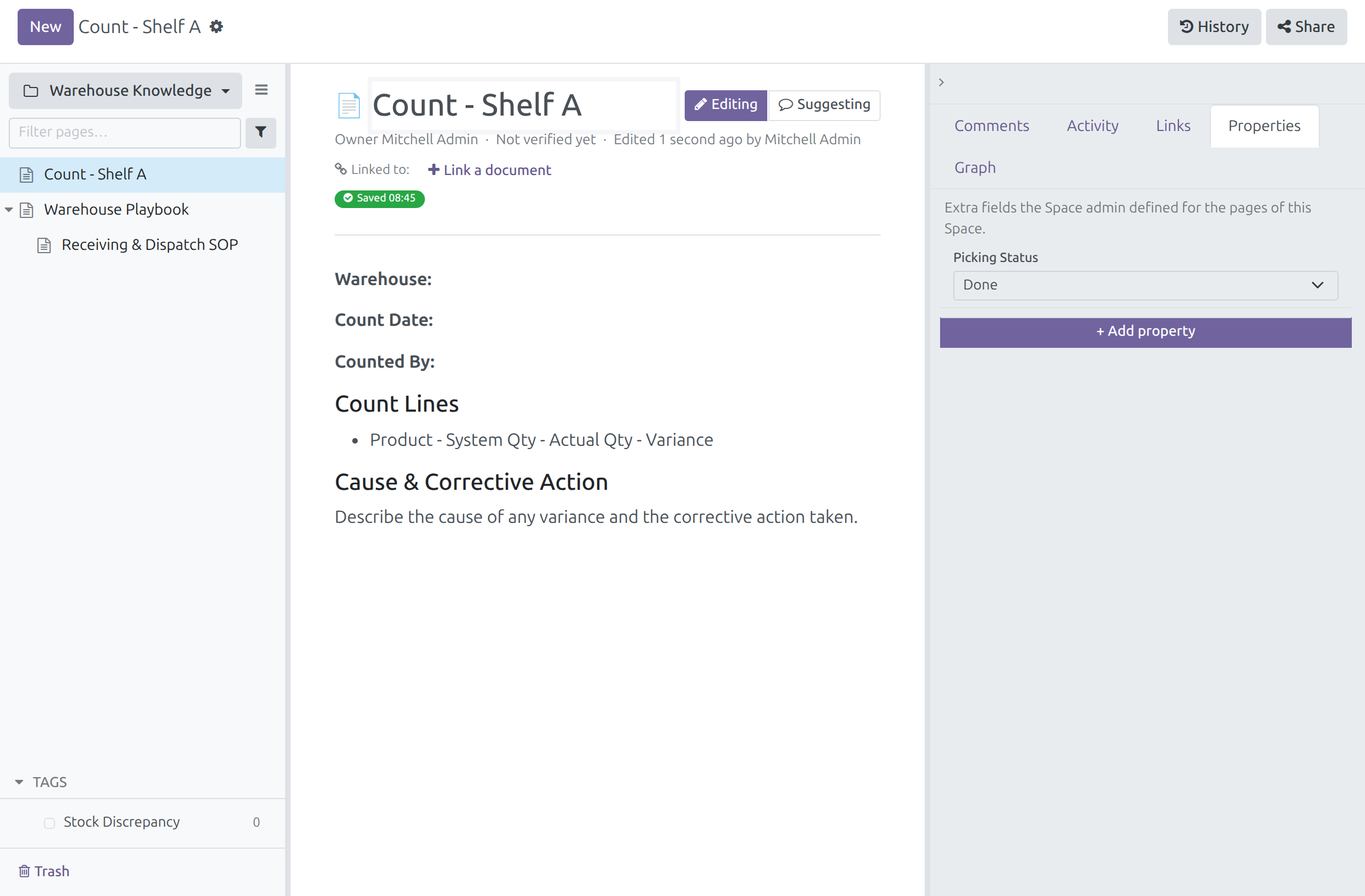
Each count is reported differently, so discrepancies are hard to follow up.
→ The Space carries an Inventory Count Note template, a Picking Status property (To Do, In Progress, Done) and a Stock Discrepancy tag.
A note about a transfer starts on the transfer
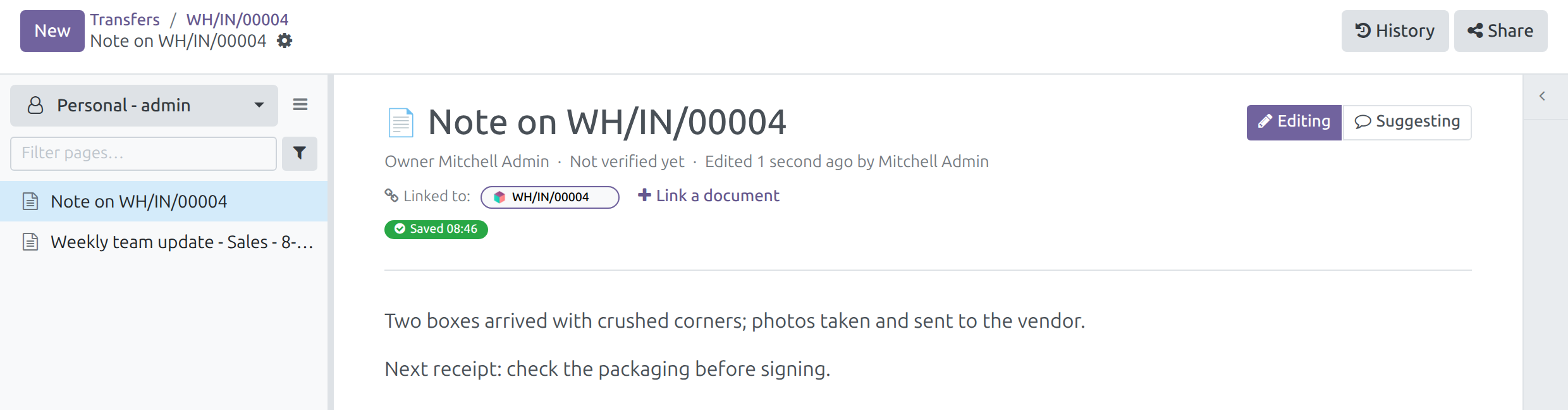
A damaged delivery is reported in chat and never reaches the receipt.
→ Brain Note on the transfer form opens a new page titled after the transfer and linked to it, in your personal Space; the breadcrumb leads back. Brain Pages beside it counts the pages you can read that mention or link the transfer.
Ready on day one
Installs by itself
When Brain and the Inventory app are both installed. There is nothing to configure.
In every company
Each company gets its own Warehouse Knowledge Space, companies created later included.
Your first step
Replace the bracketed prompts with your own rules, and add the people who will edit the Space as Editors.
What is included
The Warehouse Knowledge Space with its two starting pages, template, property and tag, and the Brain Note button on the transfer form. The pages themselves, the Brain Pages count and the side panel come with Brain.
Also available
Viindoo Brain - Knowledge Suite
Brain with every app connector, this one included, and the AI co-author, in one install.
Before you decide
Doesn't Brain already show pages on every form?
Yes. Brain shows a Brain Pages count and a side panel on any form with a chatter. This module adds the Warehouse Knowledge Space and puts a Brain Note button on the transfer form, beside Brain Pages.
Does it change how transfers work?
No. It adds no step to a transfer and changes no stock move or status.
Who can read the Warehouse Knowledge Space?
Everyone with the Inventory user right reads it. People you add to the Space with the Editor or Space admin role can edit it. A note made from a transfer starts in its author's personal Space.
Will an update overwrite our pages?
No. The Space, its pages, template, property and tag are created once; later updates leave them as your team made them.
Which languages are included?
English and Vietnamese. Each company's starting pages are written in the company's language when its Space is created; the property and tag names are in English.
Talk to us
Questions before you buy go to pre-sales; questions once it runs go to support.
Pre-sales & partnership
viindoo.com/contactusTechnical support
viindoo.com/ticketTechnical requirements
- Version: 17.0
- Editions: Community, Viindoo Cloud
- Required modules: Viindoo Brain, Inventory
- License: OPL-1
- Languages: English, Vietnamese
This software and associated files (the "Software") may only be used (executed, modified, executed after modifications) if you have purchased a valid license from the authors, typically via Odoo Apps, or if you have received a written agreement from the authors of the Software (see the COPYRIGHT file).
You may develop Odoo modules that use the Software as a library (typically by depending on it, importing it and using its resources), but without copying any source code or material from the Software. You may distribute those modules under the license of your choice, provided that this license is compatible with the terms of the Odoo Proprietary License (For example: LGPL, MIT, or proprietary licenses similar to this one).
It is forbidden to publish, distribute, sublicense, or sell copies of the Software or modified copies of the Software.
The above copyright notice and this permission notice must be included in all copies or substantial portions of the Software.
THE SOFTWARE IS PROVIDED "AS IS", WITHOUT WARRANTY OF ANY KIND, EXPRESS OR IMPLIED, INCLUDING BUT NOT LIMITED TO THE WARRANTIES OF MERCHANTABILITY, FITNESS FOR A PARTICULAR PURPOSE AND NONINFRINGEMENT. IN NO EVENT SHALL THE AUTHORS OR COPYRIGHT HOLDERS BE LIABLE FOR ANY CLAIM, DAMAGES OR OTHER LIABILITY, WHETHER IN AN ACTION OF CONTRACT, TORT OR OTHERWISE, ARISING FROM, OUT OF OR IN CONNECTION WITH THE SOFTWARE OR THE USE OR OTHER DEALINGS IN THE SOFTWARE.