

Payroll
| Lines of Code | 11535 |
| Technical name | to_hr_payroll |
| License | OPL-1 |
| Website | https://viindoo.com/apps/modules/17.0/to_hr_payroll |
| Read description for | v 13.0 v 14.0 v 15.0 v 16.0 v 18.0 v 19.0 |
| Required Apps | Time Off (hr_holidays) Discuss (mail) Employees (hr) Calendar (calendar) Employee Contracts (hr_contract) |
| Included Dependencies | Employee Relatives Viindoo Base HR Contracts (Viindoo) Advanced HR Management Work Entry Base Addendum Work Entry - Contract Viin Time-Off Viindoo Holiday & WorkDay Manager Viin - Holiday Work Entry |
| Extensions | HR Payroll Accounting Vietnam - Payroll Payroll Attendance Payroll Timesheet Integrator Overtime Payroll HR Meal Order & Payroll Integration Payroll By Administrative Regions Documents - Payroll Activate Payroll Features HR Contracts Suspension & Payroll Payroll Payment ACB bank Templates |

Payroll that closes the month, not just prints payslips
Contracts, work entries, statutory contributions and personal income tax in one engine - so a payslip shows gross, every deduction, the employer's own cost, and a net figure you can defend line by line.
Payroll (technical name to_hr_payroll) is an Odoo 17.0 app for Odoo Community and Odoo Enterprise and Viindoo Cloud, built for payroll officer, hr manager, accountant, employee.
At a Glance
The facts of Payroll, version 1.5.6, in one place. Published by Viindoo.
Key Features
This is the payroll engine behind Viindoo HR: salary structures and rules you can read and change, contribution registers per employee for each statutory scheme, a personal income tax table with its own deductions, and a monthly batch that takes a whole company from work entries to validated payslips. It is built for payroll that has to survive an audit - every amount on a payslip traces back to a rule, a register or a work entry, and the employer's share is computed and reported beside the employee's.
Contribution history, not just a rate
Every change to a contribution base or rate is written as a dated history line. When an inspector asks why March deducted a different amount from April, the answer is a record, not a memory.
Personal income tax with its own table
Progressive brackets and the deductions that apply are configuration, not code. Withholding commitments are recorded for the employees entitled to them.
Reports on validated payroll
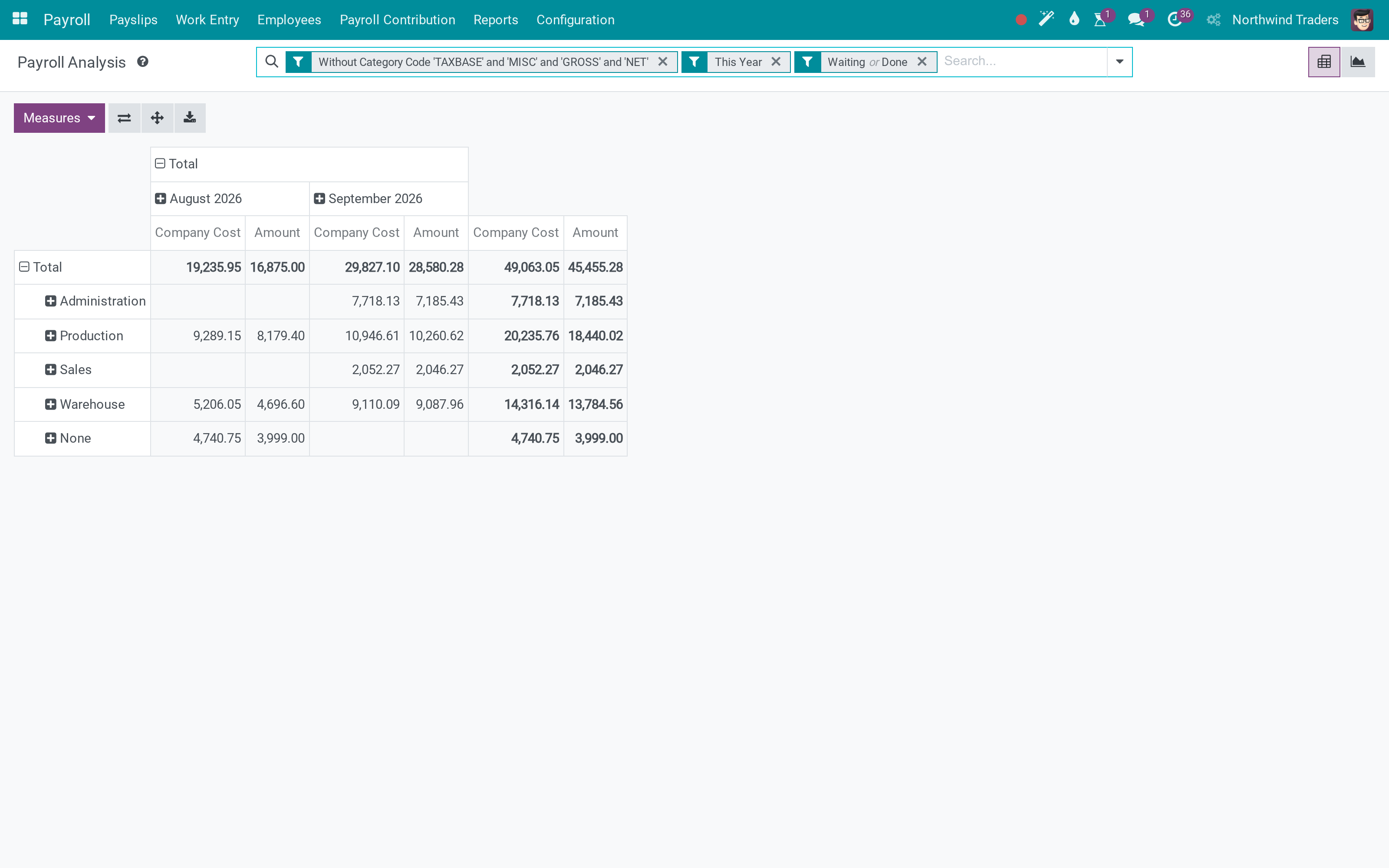
Payroll, contributions and income tax each have their own analysis view, filtered by default to payslips that are waiting or done, so a draft month never inflates a report.
Allowances as templates
Travel, phone, meal, responsibility and attendance allowances are templates you attach to a contract or a job, instead of a rule rewritten per employee.
How It Works
Five steps from an employment contract to payslips a payroll officer can defend, on real data.
Put the contract on a salary structure
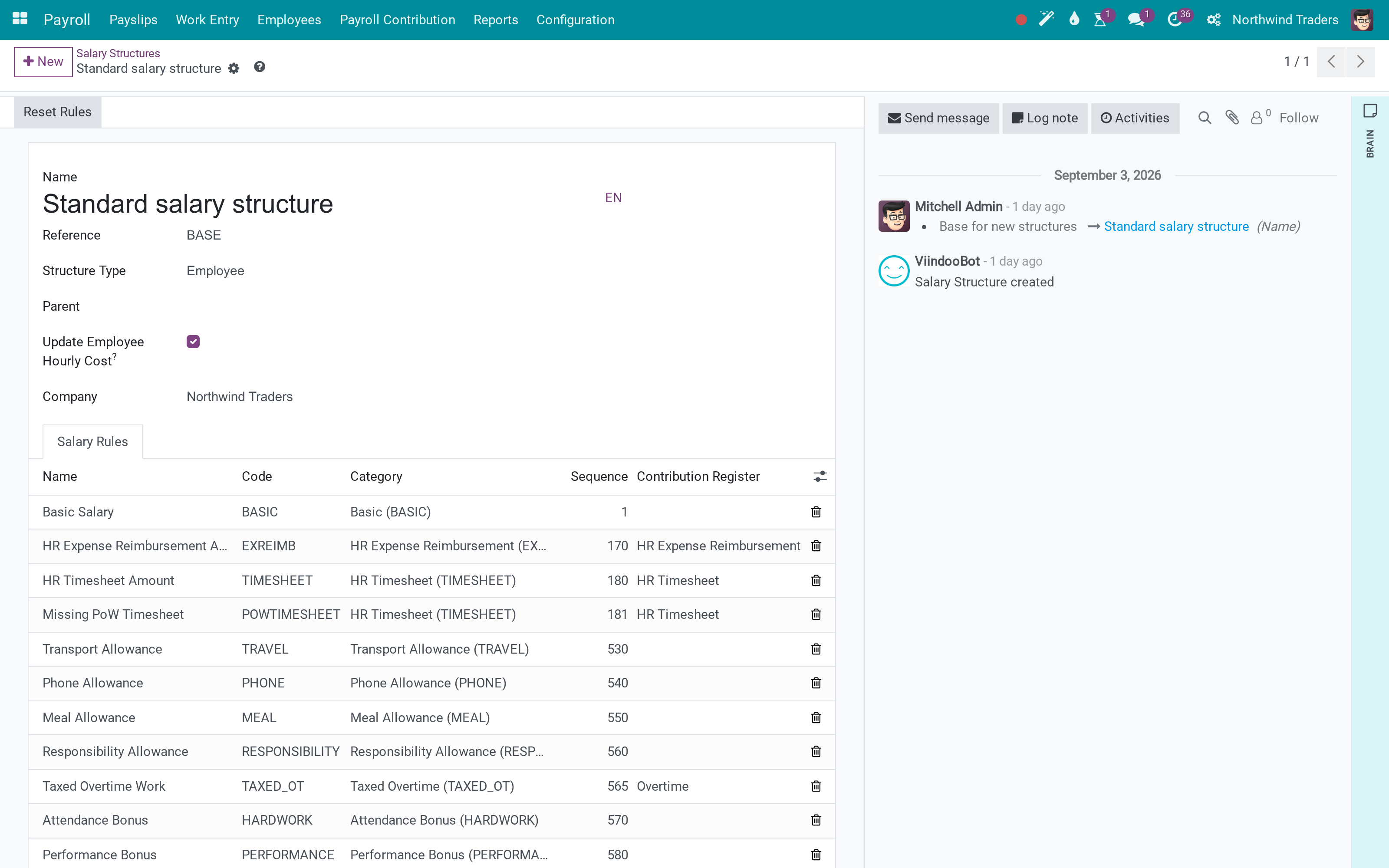
A contract carries a wage, a salary computation mode - by day or by hour - and the salary structure that decides which rules run. Without that structure the payslip has nothing to compute, so this is the first thing to get right for each contract.
Open a contribution register for each scheme
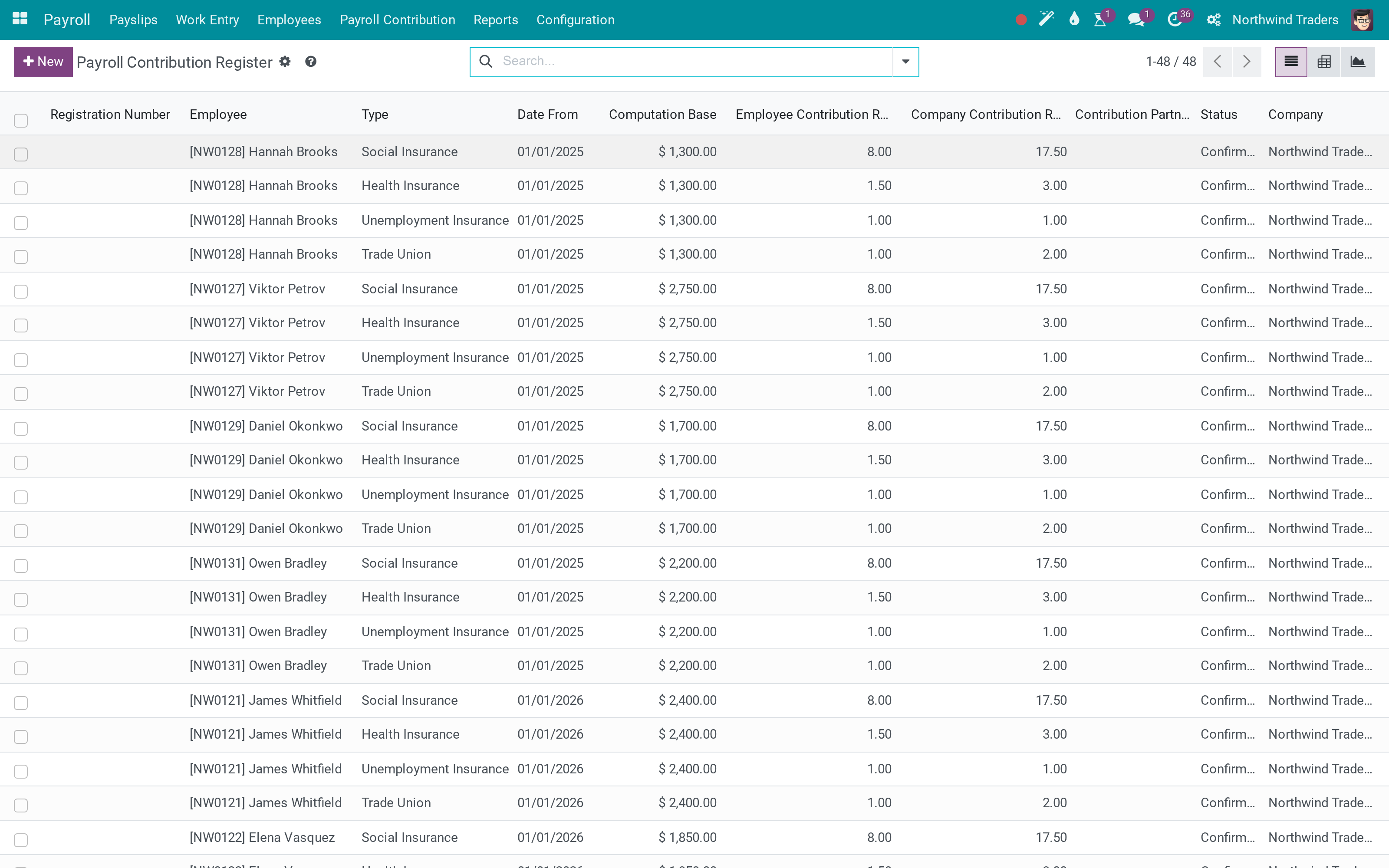
Social insurance, health insurance, unemployment insurance, union dues - each one is a register on the employee, with the base the contribution is computed on and both rates. Confirming a register writes a history entry, and it is that history the payslip reads, so the deduction on a payslip can always be traced to the base that applied in that month.
Bring the work entries in and validate them
Work entries come from the working schedule, from time off, and - with the attendance apps - from the clock on the wall. Validate them before you generate: the payslip's worked-days lines are what the Basic rule multiplies, and a payslip generated before its work entries exist stays empty.
Compute the batch and read the payslip
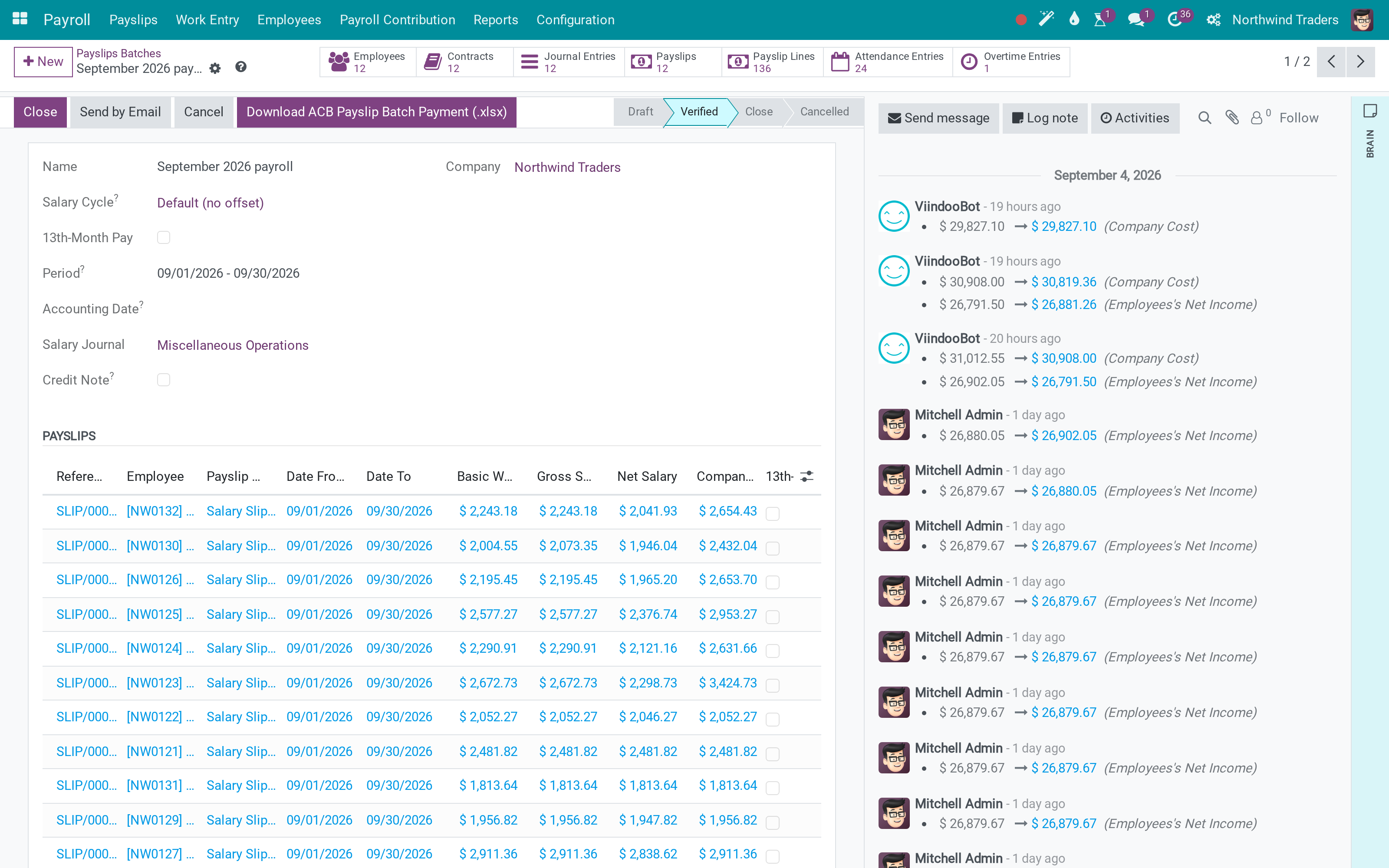
The batch computes every payslip at once and shows basic wage, gross, net and company cost per employee, with column totals. Each payslip breaks the same figures down: gross, the employee's four contributions, the employer's own contributions, the tax base after deductions, the income tax, and the net.
Verify, send, and report
Payslips move Draft to Waiting to Done, so a month can be reviewed before it is closed. Once validated, the payroll analysis, the contribution analysis and the personal income tax analysis report on the same records - no export, no second spreadsheet.
What You Get
Salary structures made of ordered rules, each with its own condition and Python or fixed amount, grouped in categories that roll up to Basic, Gross, Taxable base and Net
A contribution register per employee per scheme, with its own base, employee rate and company rate, and a history of every change to the base - which is what a social-insurance inspection actually asks for
Personal income tax computed from a bracket table with the deductions the employee is entitled to, kept as its own record so the tax base is auditable
Monthly batches: generate for every running contract, check for duplicate payslips, compute the batch, verify, then send the payslips by email
Work entries drive the amounts: a payslip warns when its work entries are missing, unvalidated or in conflict, before you compute
Thirteenth-month pay, refunds and salary cycles with an offset, for companies whose payroll month is not the calendar month
More Screens
Everything below was taken on a database seeded with real business data, on this series - not a mock-up and not a screenshot from an older version.
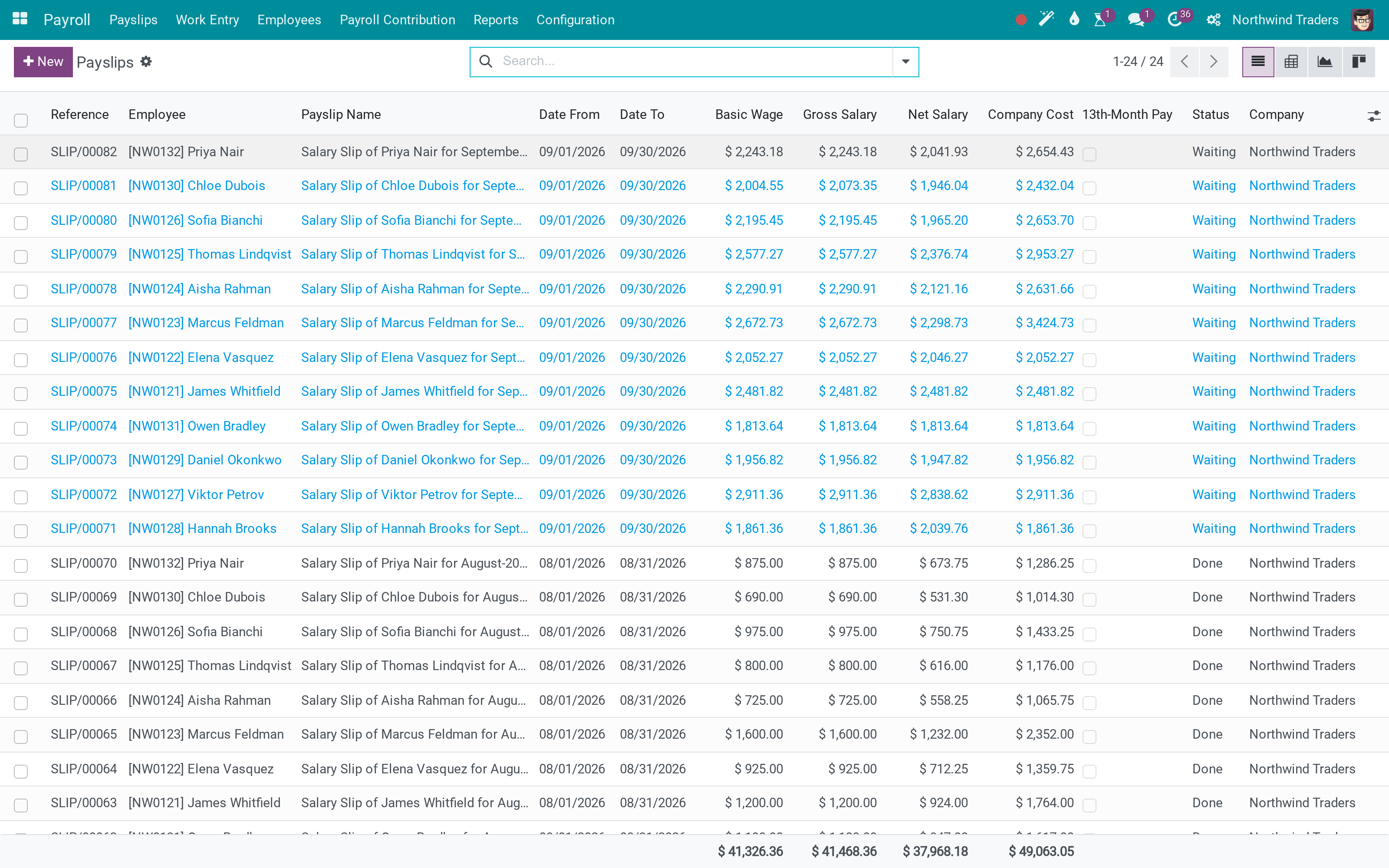
Every payslip of the month with gross, net and company cost, and the totals underneath
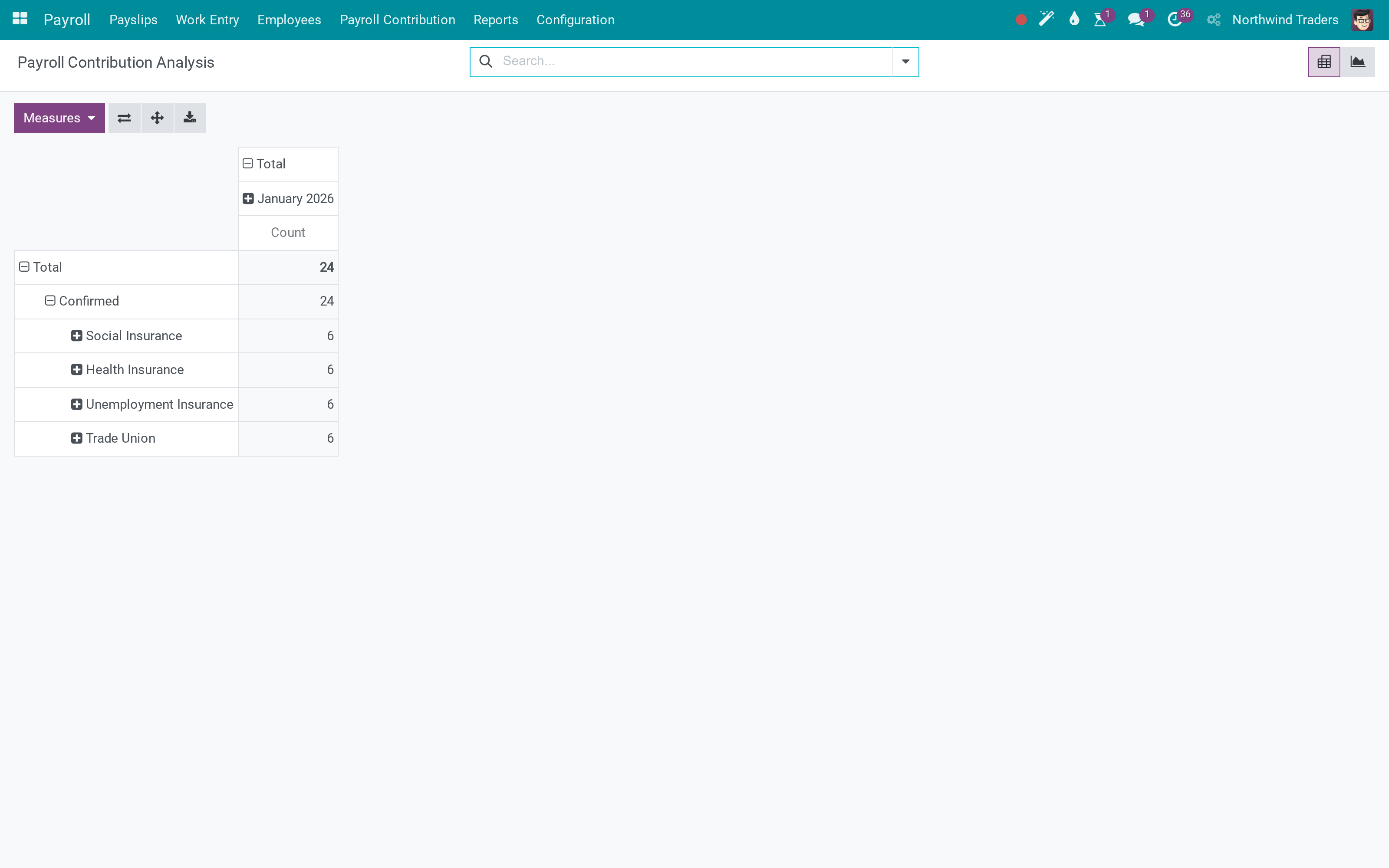
Contribution analysis: what the employee paid and what the company paid
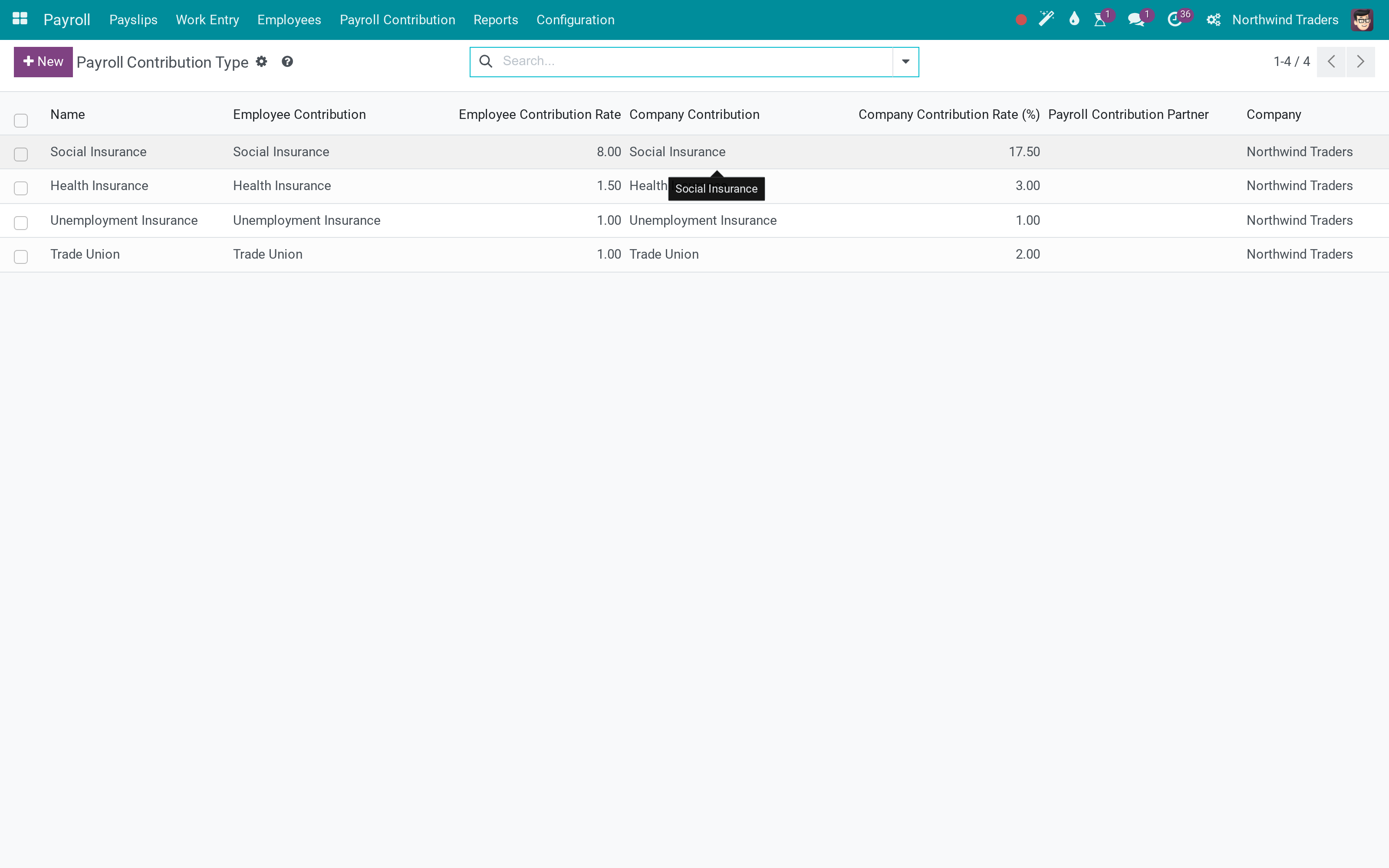
Contribution schemes, each with its own rates and computation block
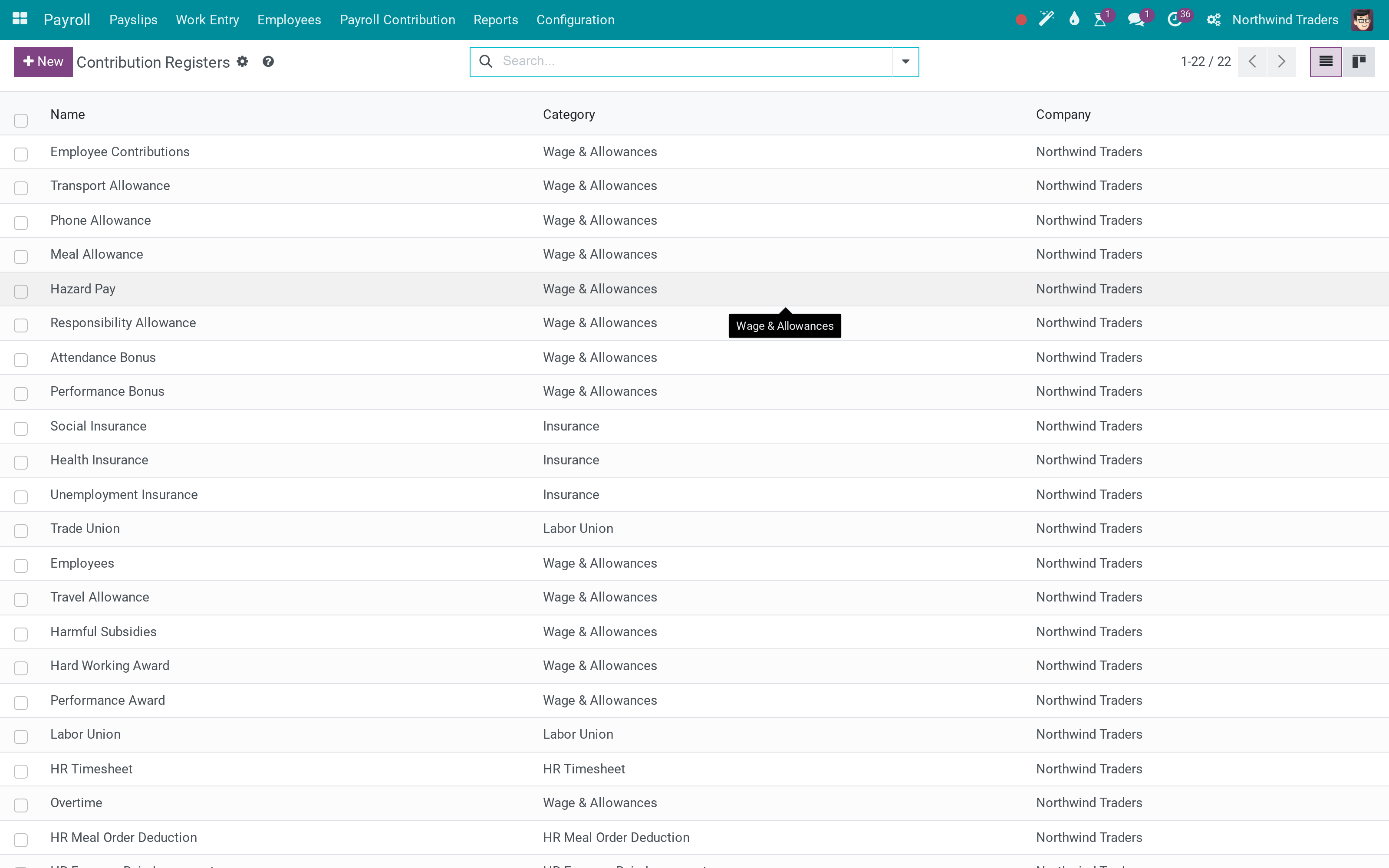
Contribution registers grouped by scheme
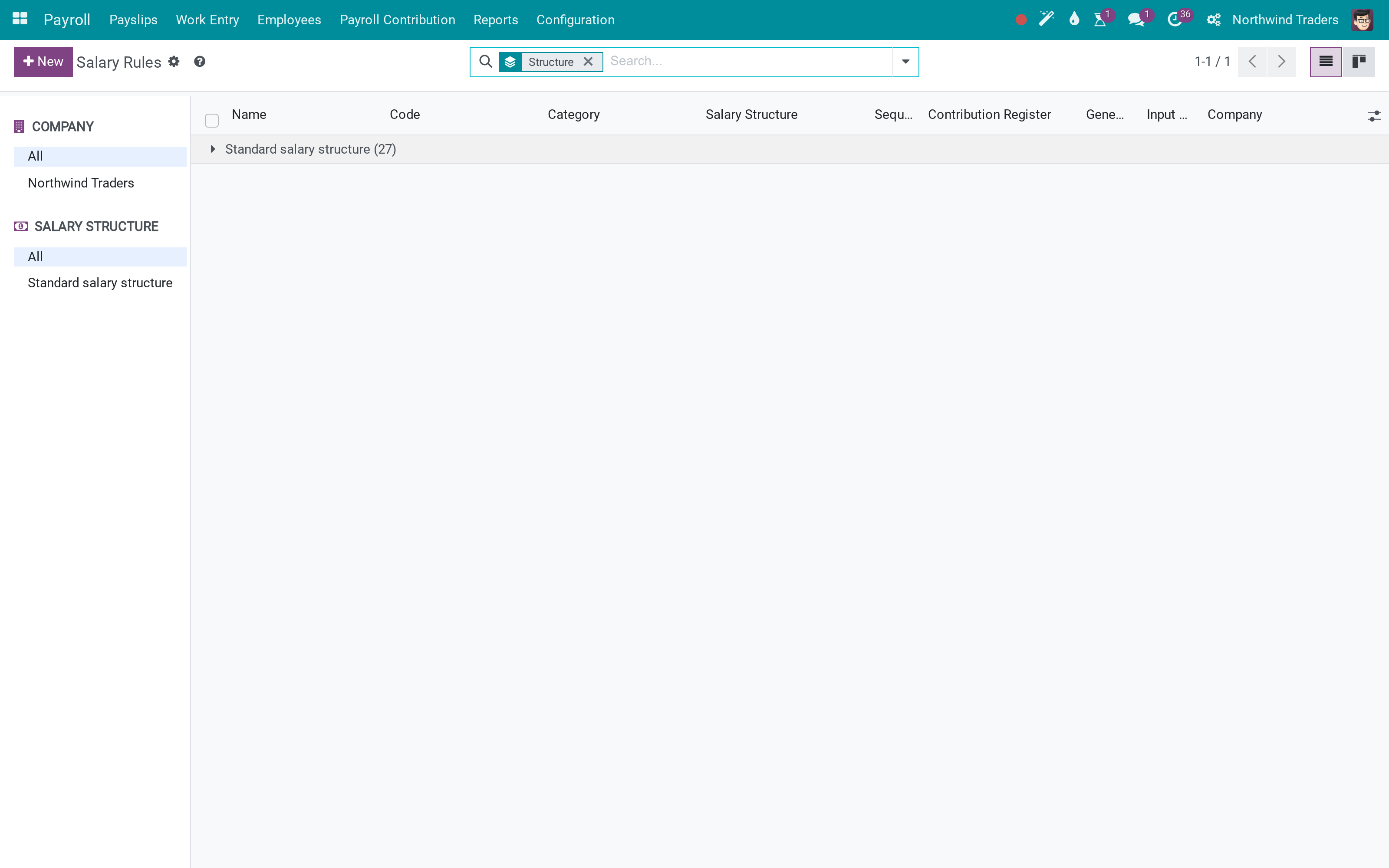
Salary rules, ordered, each with its own condition
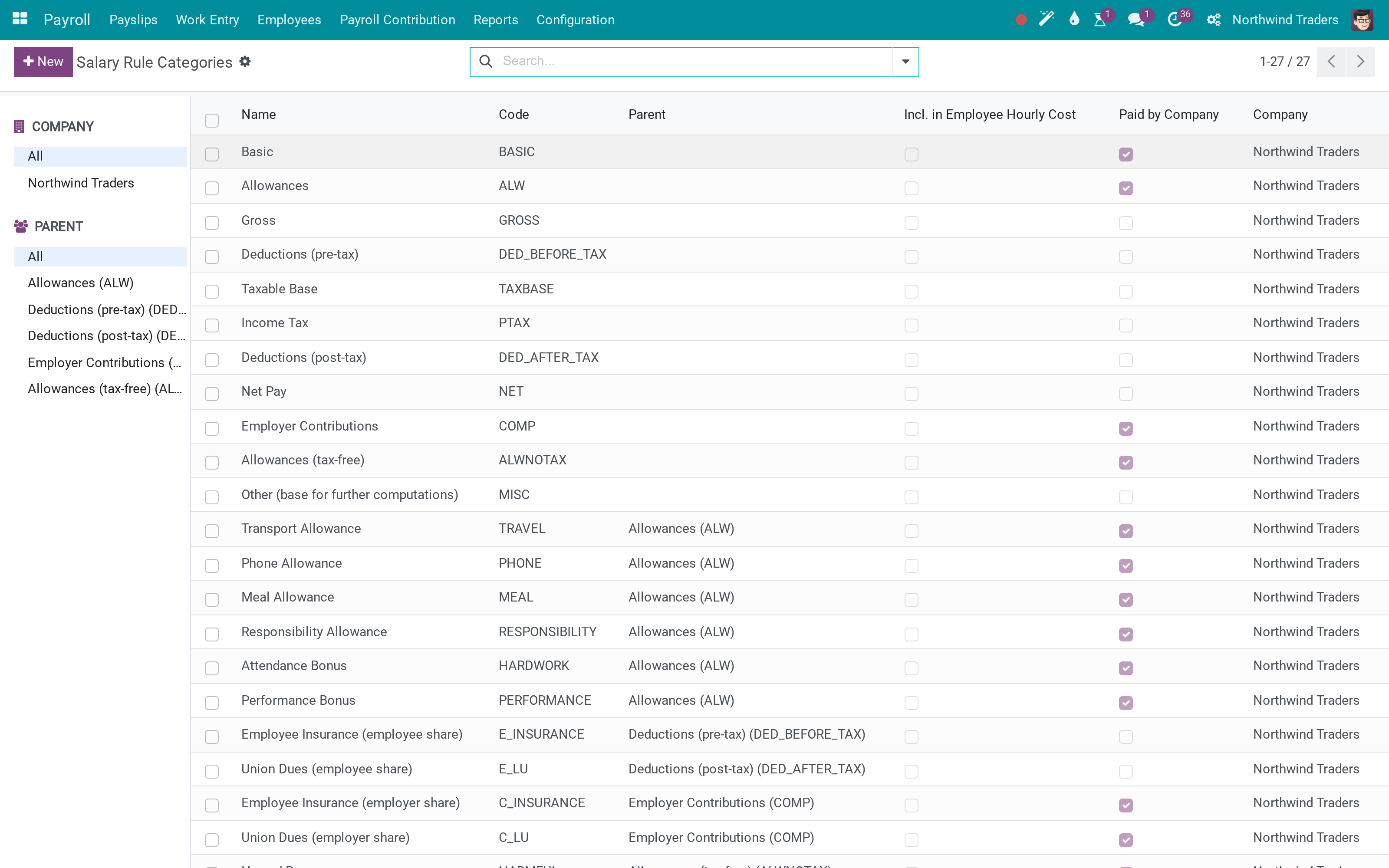
Rule categories that roll up into Basic, Gross, Taxable base and Net
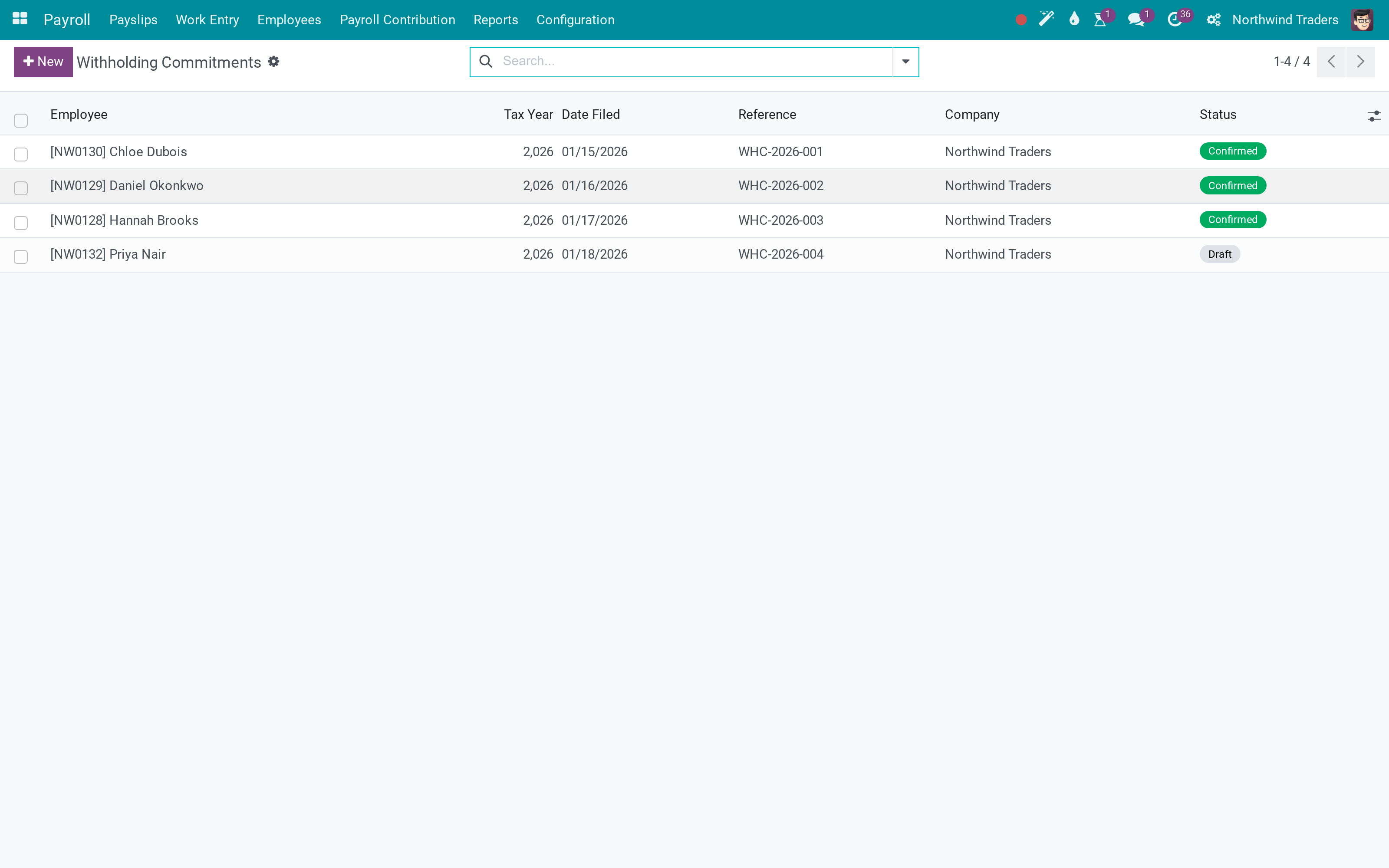
Withholding commitments recorded per employee
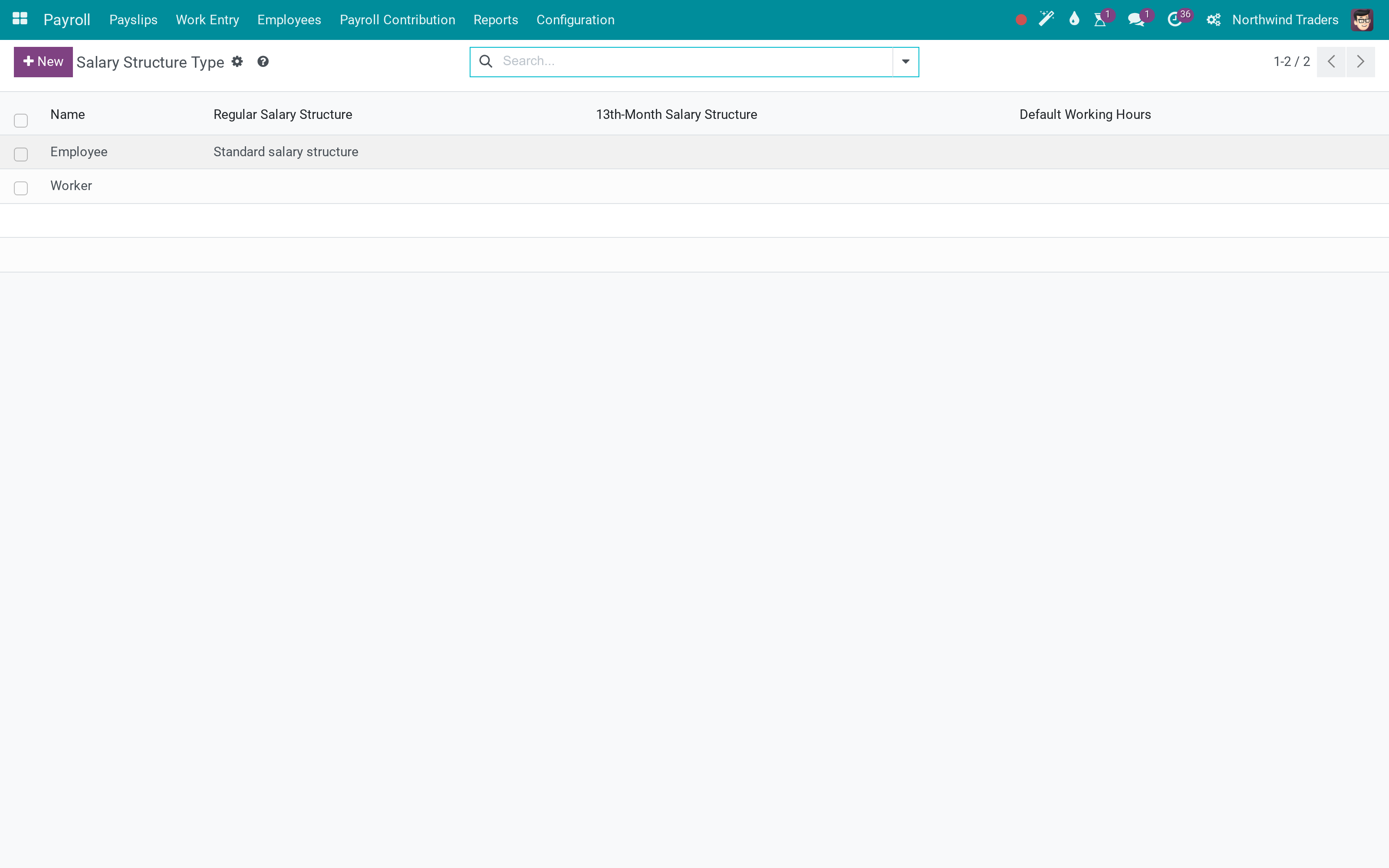
Structure types, so office staff and workers can be paid on different rules
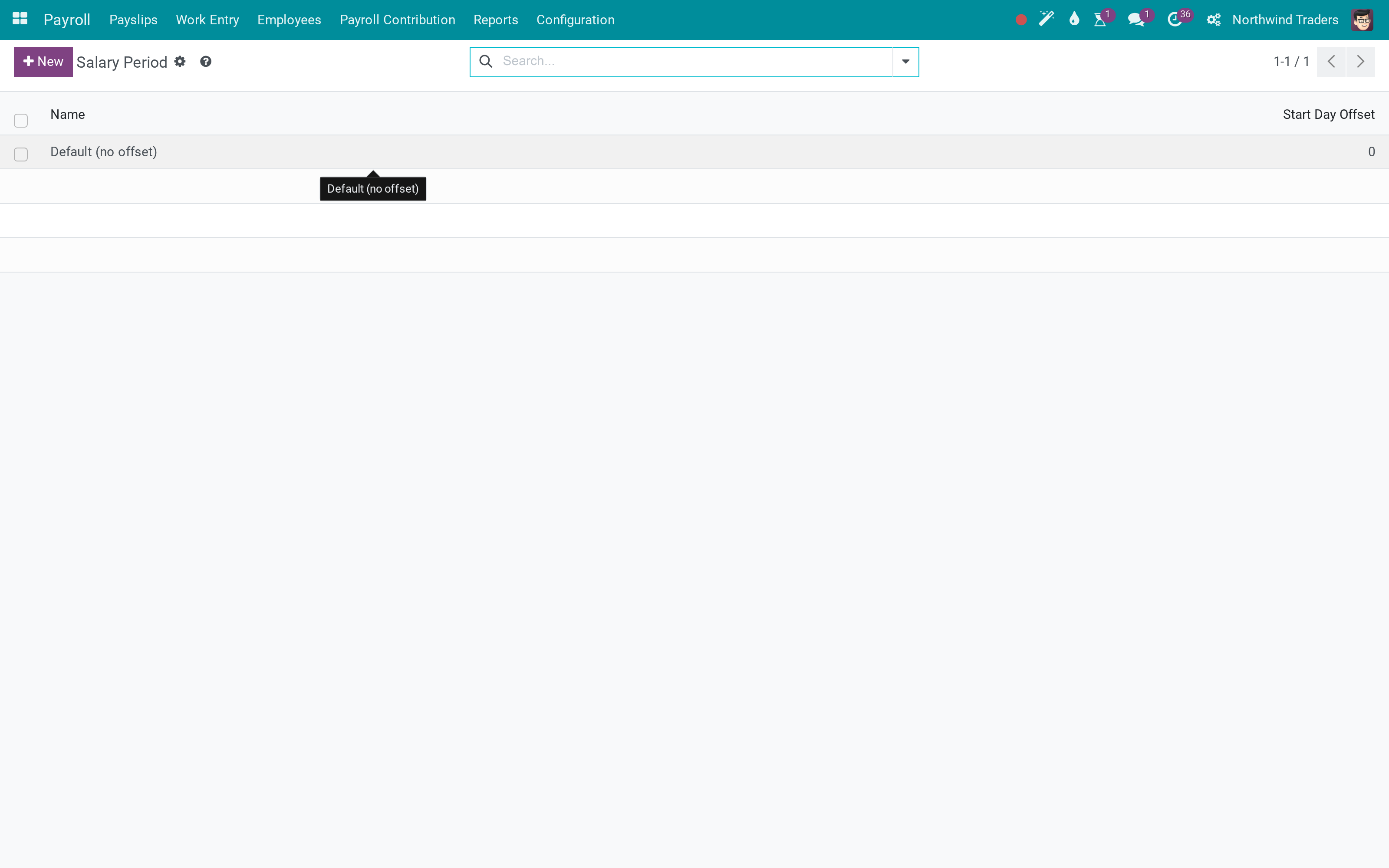
Salary cycles for a payroll month that does not start on the 1st
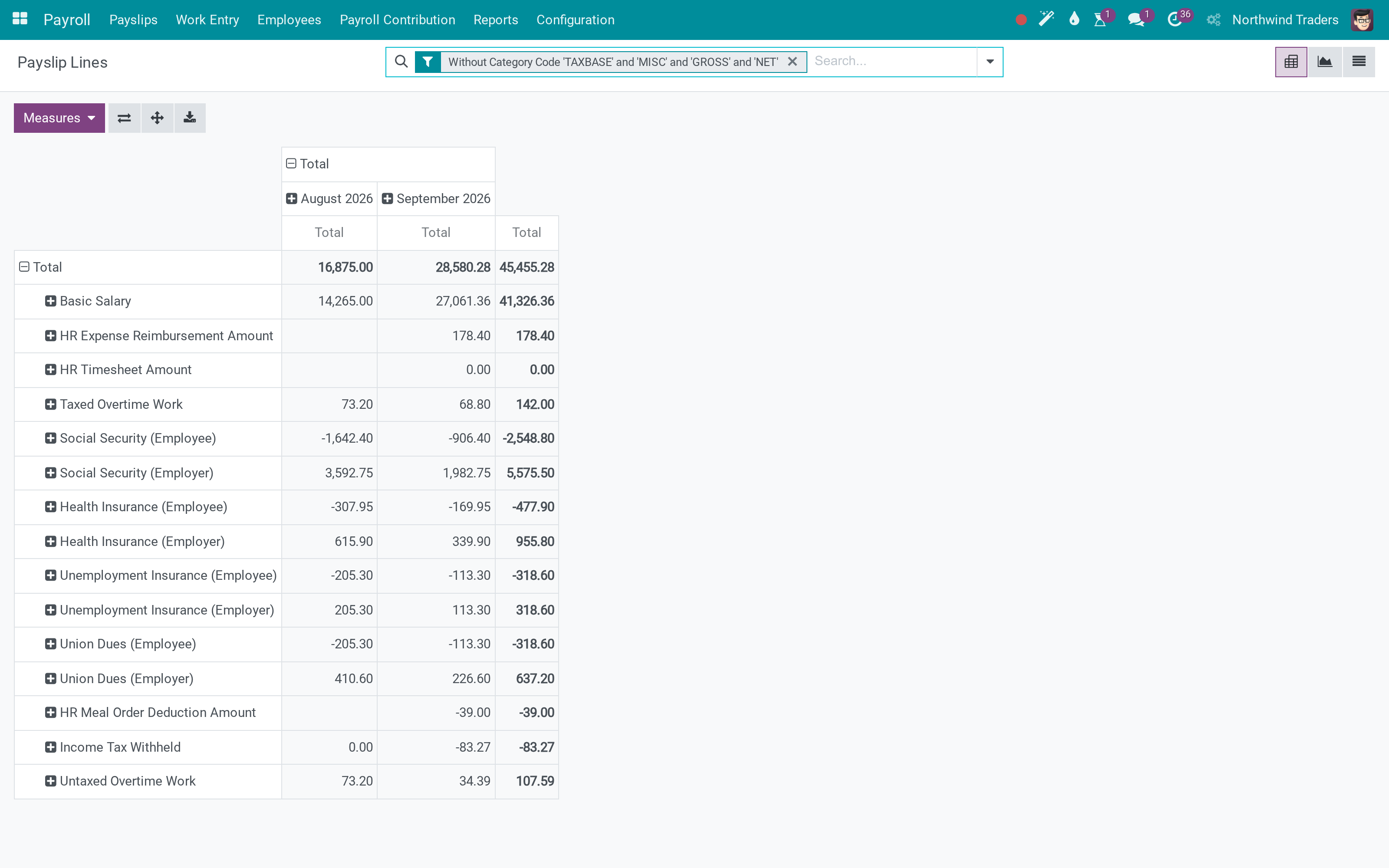
Payslip lines across the company, searchable like any other record
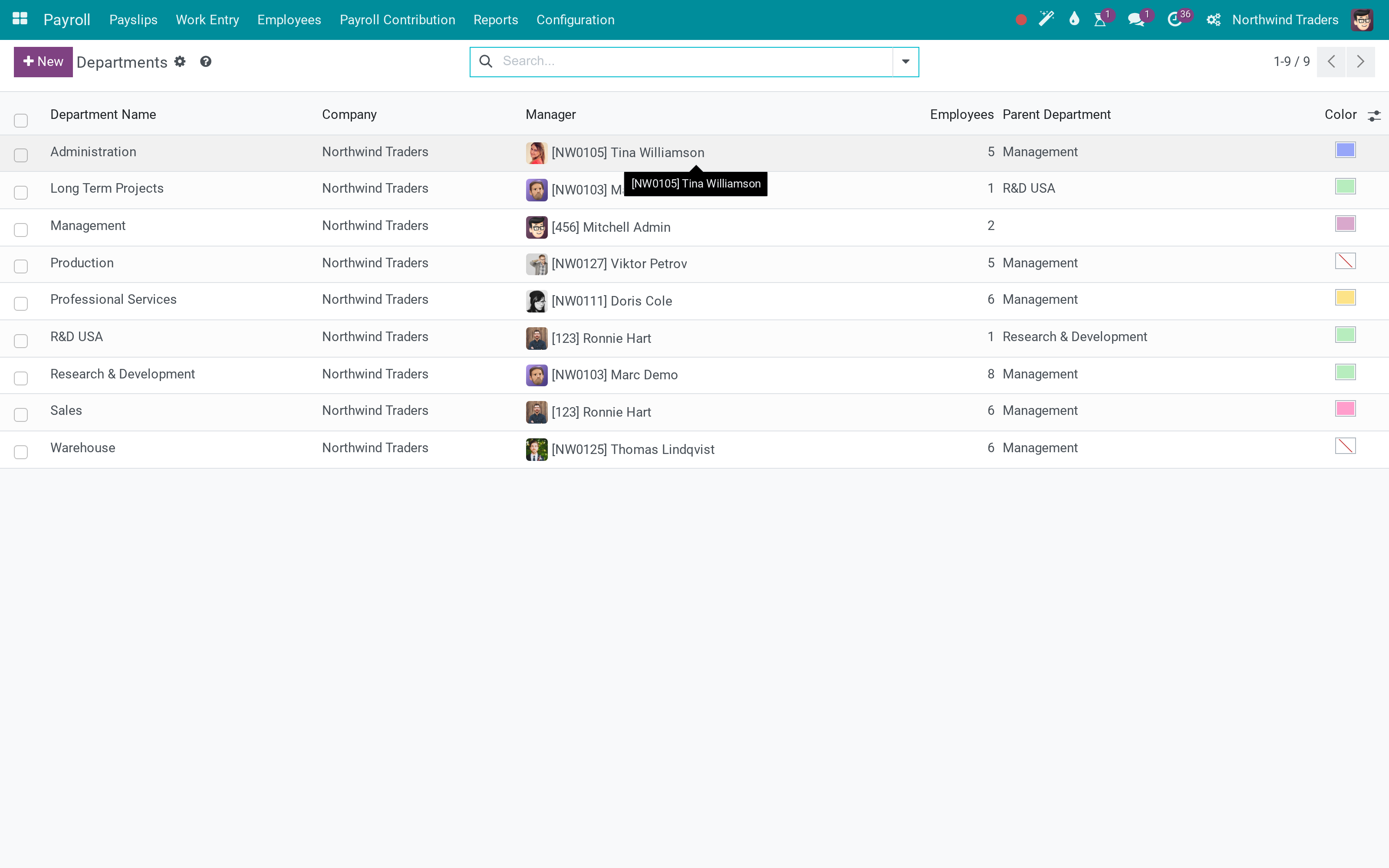
Departments, which the payroll analysis groups by
What This App Does Not Do
Read this before you buy. Everything below is something the app deliberately leaves to another app or to you.
The engine, the tax table and the contribution registers are here; the rates, brackets and rules for your country are configuration. Viindoo publishes a Vietnamese package on top of this app; other countries are yours to set up or ours to build with you.
Salary journal entries come from the payroll accounting app, which builds on this one.
Work entries can come from the working schedule and time off out of the box. Attendance machines, timesheets and overtime each have their own app that feeds work entries into this one.
It pays for the time that was worked and approved; deciding who works when is planning, and lives elsewhere.
It stays at zero rather than guessing. Check the structure on the contract before running the month - and see the readiness note in our documentation.
A contribution history line with no end date is not yet in the analysis report; the register list and the history list show it from day one.
Who Should Use Payroll?
Payroll officer
Runs the month: generates the batch, resolves work-entry warnings, computes, verifies, and sends payslips.
HR manager
Keeps contracts, salary structures and contribution registers in step with reality - hires, raises, suspensions.
Accountant
Reads the payroll analysis and the contribution reports, and posts the salary journal (with the payroll accounting app).
Employee
Receives the payslip by email and sees the same gross, deductions and net that HR sees.
Frequently Asked Questions
What does Payroll do?
Contracts, work entries, statutory contributions and personal income tax in one engine - so a payslip shows gross, every deduction, the employer's own cost, and a net figure you can defend line by line.
What does Payroll not do?
It does not ship a country's rules ready-made. The engine, the tax table and the contribution registers are here; the rates, brackets and rules for your country are configuration. Viindoo publishes a Vietnamese package on top of this app; other countries are yours to set up or ours to build with you. It does not post to the general ledger on its own. Salary journal entries come from the payroll accounting app, which builds on this one. It does not read your clocks by itself. Work entries can come from the working schedule and time off out of the box. Attendance machines, timesheets and overtime each have their own app that feeds work entries into this one. It does not plan shifts. It pays for the time that was worked and approved; deciding who works when is planning, and lives elsewhere. A payslip whose contract has no salary structure computes to nothing. It stays at zero rather than guessing. Check the structure on the contract before running the month - and see the readiness note in our documentation. Contribution analysis counts closed contribution periods. A contribution history line with no end date is not yet in the analysis report; the register list and the history list show it from day one.
Who is Payroll for?
Payroll officer: Runs the month: generates the batch, resolves work-entry warnings, computes, verifies, and sends payslips. HR manager: Keeps contracts, salary structures and contribution registers in step with reality - hires, raises, suspensions. Accountant: Reads the payroll analysis and the contribution reports, and posts the salary journal (with the payroll accounting app). Employee: Receives the payslip by email and sees the same gross, deductions and net that HR sees.
Which Odoo version and editions does it support?
Odoo 17.0 - Odoo Community, Odoo Enterprise, Viindoo Cloud. Upgrades to a newer Odoo series are a separate purchase for that series.
What does it depend on?
It installs on top of: to_base, viin_hr, viin_hr_contract, to_hr_employee_relative, viin_hr_work_entry_contract, viin_hr_work_entry_holidays. Odoo installs them with it.
How do I set it up?
Five steps from an employment contract to payslips a payroll officer can defend, on real data.
Can I try it before buying?
Yes - the Live Preview button at the top of this page opens the module's own screen on a working database.
How do I get support?
Write to apps.support@viindoo.com with your Odoo version and the technical name to_hr_payroll; pre-sales questions go to sales@viindoo.com.
See Payroll in Action
Payroll that closes the month, not just prints payslips
Need help with Payroll?
For questions, implementation support, or consulting services, contact Viindoo.
Pre-Sales & Partnership
sales@viindoo.comWhen contacting us, please include:
- Odoo/Viindoo version (Odoo CE / Viindoo Editions).
- Number of users and business scope.
- Other modules currently in use.
Technical Support
apps.support@viindoo.comFor faster troubleshooting, please provide:
- Order number or app reference.
- Odoo/Viindoo version & edition.
- Steps to reproduce the issue.
- Screenshots/logs if available.
Upgrades to a newer Odoo series are a separate purchase for that series.
Technical Requirement
Changes log
1.5.6 - Latest on the 17.0 line
- Contribution registers keep a full history of base and rate changes, and payslips read the history rather than the current value.
- Work-entry warnings on the payslip: missing, unvalidated and conflicting entries are flagged before you compute.
- Duplicate-payslip check on the batch, so a month cannot be generated twice by accident.
- Thirteenth-month pay computed from the year's average, with its own salary structure.
2025-2026 - Performance on real payrolls
- Batch computation reworked to avoid recomputing fields that did not change.
- Payslip line deletion moved to a single statement, which is what made large batches slow.
- Contribution and tax analysis views read from stored fields instead of recomputing per row.
Installation
- Navigate to Apps;
- Search with keyword to_hr_payroll;
- Press Install.
Instruction
Instruction video: Payroll
1. Initial configurations for payroll
- Salary cycle: The salary cycle of the business. The default will be from the beginning to the end of the current month. You can create a new one in case your company has a different Salary cycle. Example: Salary cycle from the 25th of this month to the next 25th.
- Salary Structure: A salary structure is a set of rules used to determine how much employees will be paid. The system allows the creation of many salary structures such as salary structure for the office department, salary structure for the production department, etc.
- Salary rule: Salary rules are also understood as calculation formulas for items on payslips. The system has automatically added a set of basic salary rules.
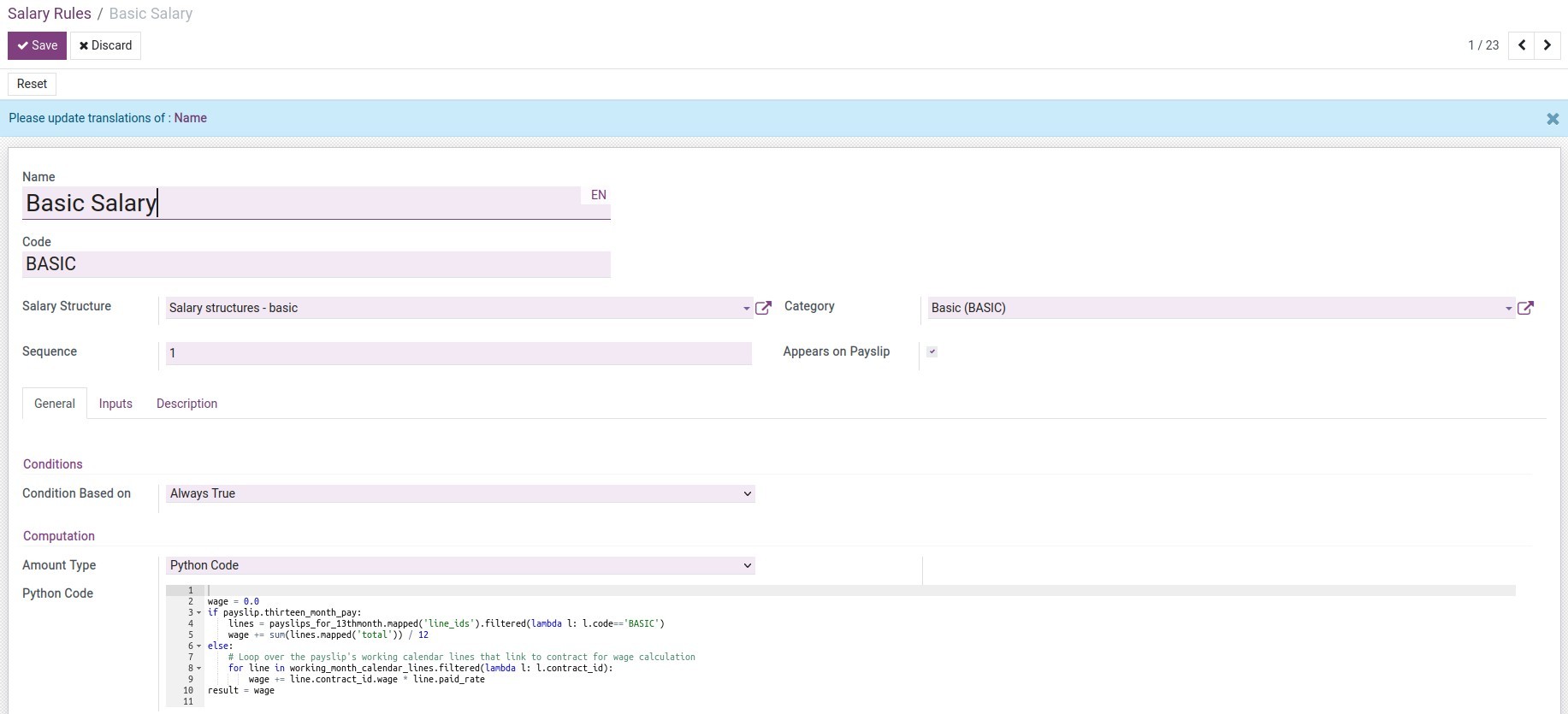
- Personal tax rule: Rules for calculating Personal Income Tax.

A personal tax rule now also carries a Withholding Regime: either Standard Payroll (the rule is selected from the employee's contract, as before) or Detached Payment - a flat rate applied to income paid once none of the employee's labour contracts is in force any more, for example a payment settled after the contract has ended. A Detached Payment rule also has a Withholding Threshold per Payment and an Effective Period (start and end date) - both are plain data on the rule itself, so the rate, the threshold, or the effective date can be corrected at any time without a new release.
This module ships no Detached Payment rule for any country by itself, so nothing changes for any company until someone configures one. Only one Detached Payment rule can be in force per country at a time: saving a second one whose effective period overlaps the first is refused with an error naming the existing rule. To schedule a rate change ahead of a fixed date, set the outgoing rule's end date, then create the incoming rule starting the next day - consecutive, non-overlapping rules are allowed on purpose.
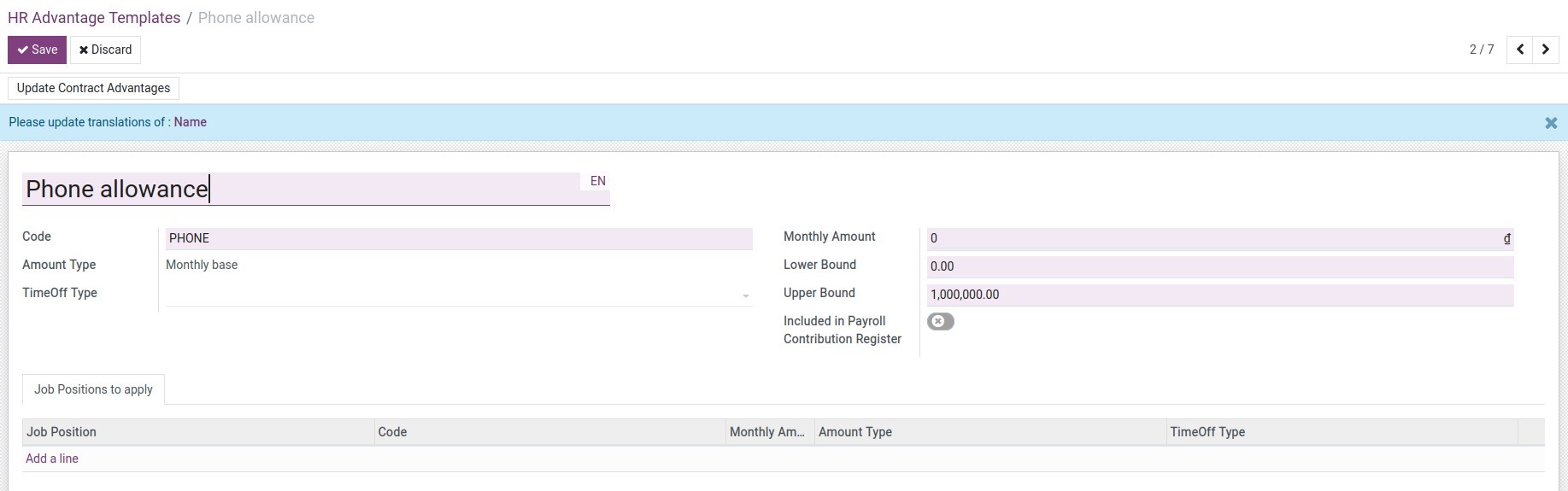
- HR Advantage Templates: Allowances for employees according to company policy. For example Harmful Subsidies, Hard Working Award, Performance Award, etc.
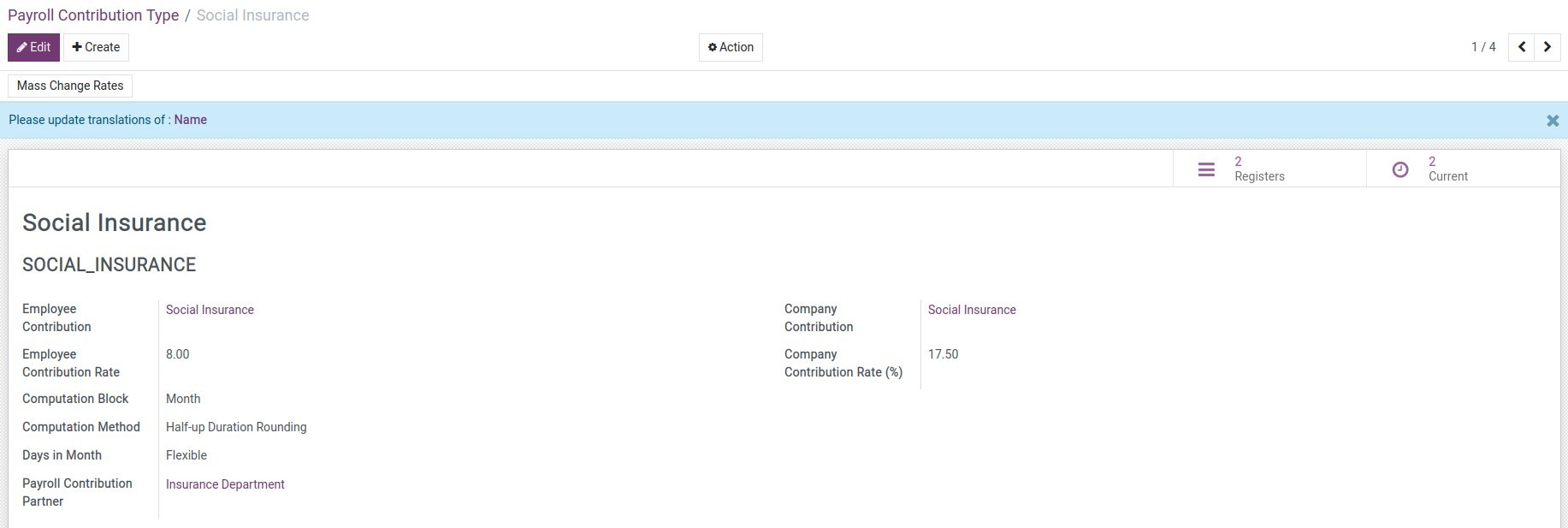
- Payroll Contribution Register: Deductions from salaries of Employees and Enterprises.
- Contribution Registers/Contribution Register Category: Helps to classify contributions by entities involved in salary formation such as Employees, insurance agencies, unions, etc.
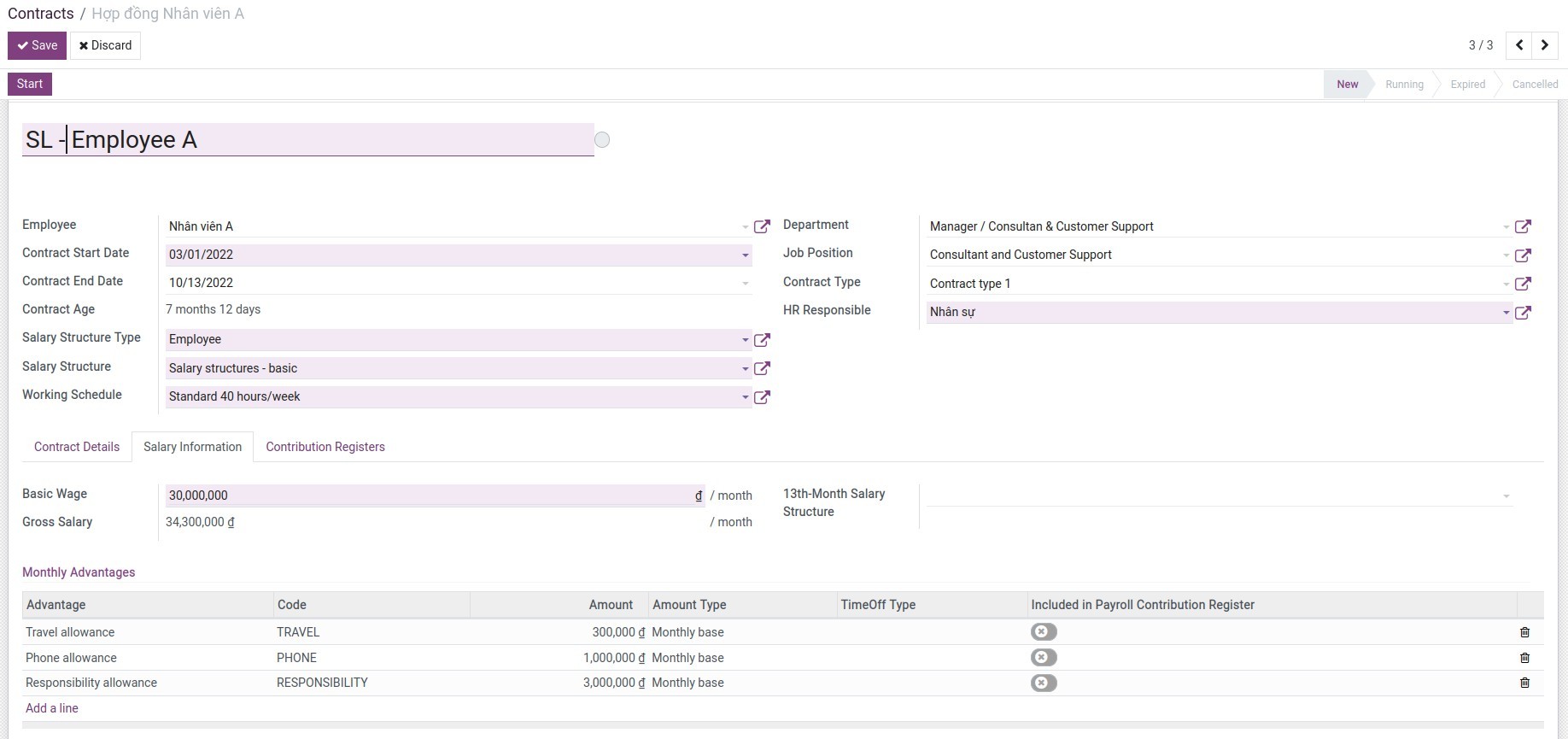
2. Set up information on employee contract
After completing the configuration in step 1, you need to set this information on the employee contract:
Go to Payroll ‣ Employees ‣ Contracts, create a new employee contract:
3. Create Payslips Batches & Payslips
Go to Payroll ‣ Payslips ‣ Payslips to create payslips for each employee:
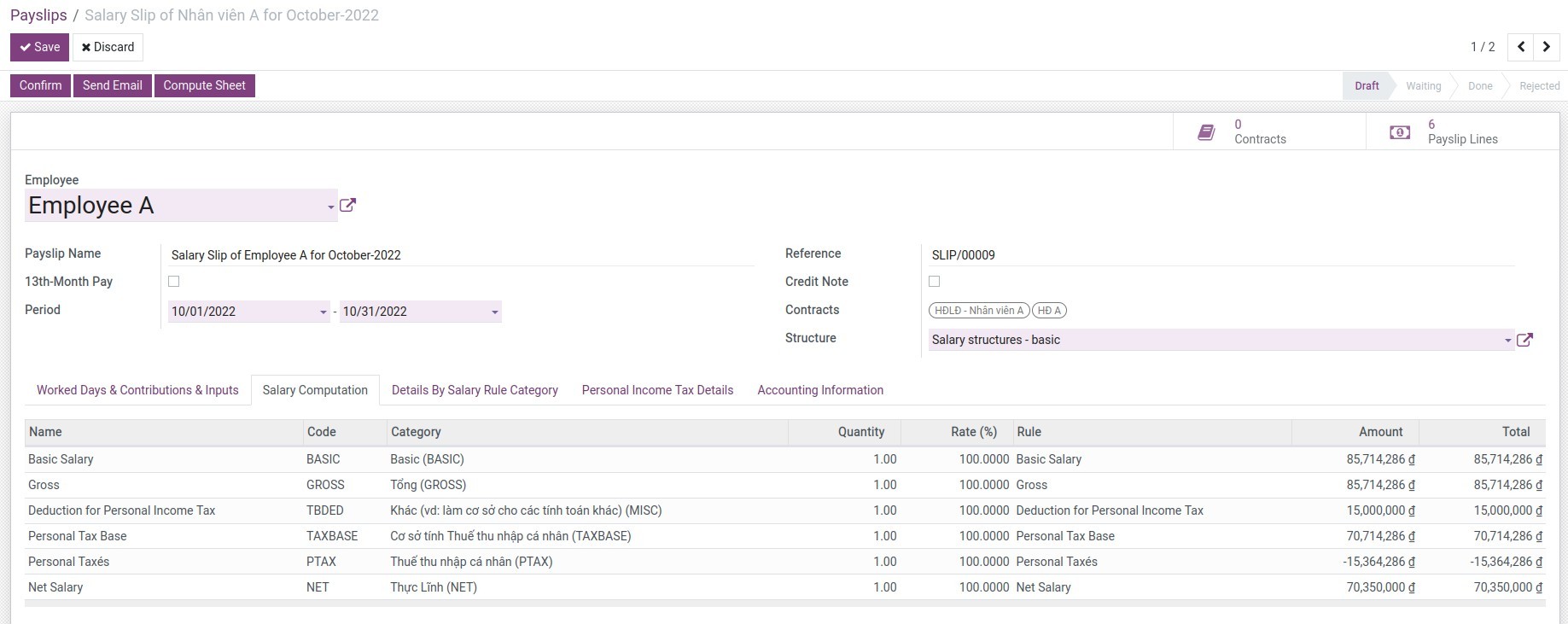
Every payslip now carries a Payment Date - the date the income is actually disbursed, not the payslip period - because that is the date that decides which tax rule applies. It defaults from the payslip batch's end date or from the payslip's own period, and can be edited by hand. If, on the Payment Date, none of the employee's labour contracts is in force any more, the payslip is marked Detached Payment. Nothing changes for a payslip whose contract is still open on the Payment Date - it is taxed on the progressive table exactly as before.
The withholding threshold is checked per PAYMENT EVENT, not per payslip: every payslip paid to the same employee, in the same company, on the same Payment Date is added together and compared with the threshold. If the total reaches it, every payslip in that group is withheld - splitting one payment into several payslips dated the same day does not avoid withholding.
On the Personal Income Tax tab, the Withholding Reason field explains in plain language why a payslip is taxed the way it is, in this order:
- a tax rule picked by hand (Tax Rule Set Manually ticked) always wins;
- otherwise, a labour contract still in force on the Payment Date is used, as before;
- otherwise, a confirmed withholding commitment (see below) blocks withholding entirely;
- otherwise, the payment is withheld once it reaches the threshold, or when the employee explicitly asked for it (Withholding Requested ticked) even below the threshold.
To pick the tax rule for one payslip by hand, tick Tax Rule Set Manually: the automatic selection then stops overwriting the Personal Income Tax Policy and the Tax Rule on that payslip, including every time Compute Sheet is clicked again. Untick it to hand the choice back to the system. A duplicated payslip never inherits this override, so review the tax rule on any duplicate.
Warning
Severance pay is fully tax-exempt by law once a labour contract ends. If it is entered as ordinary income, this feature will withhold 10% of it - the opposite of what the law requires, and a compliance risk. Record any such allowance through the Allowance (tax exemption) category (technical code ALWNOTAX) instead of ordinary income, so it is excluded from the taxable base before withholding is even considered.
Or go to Payroll ‣ Payslips ‣ Payslips Batches to create payslips batches for departments or the company:
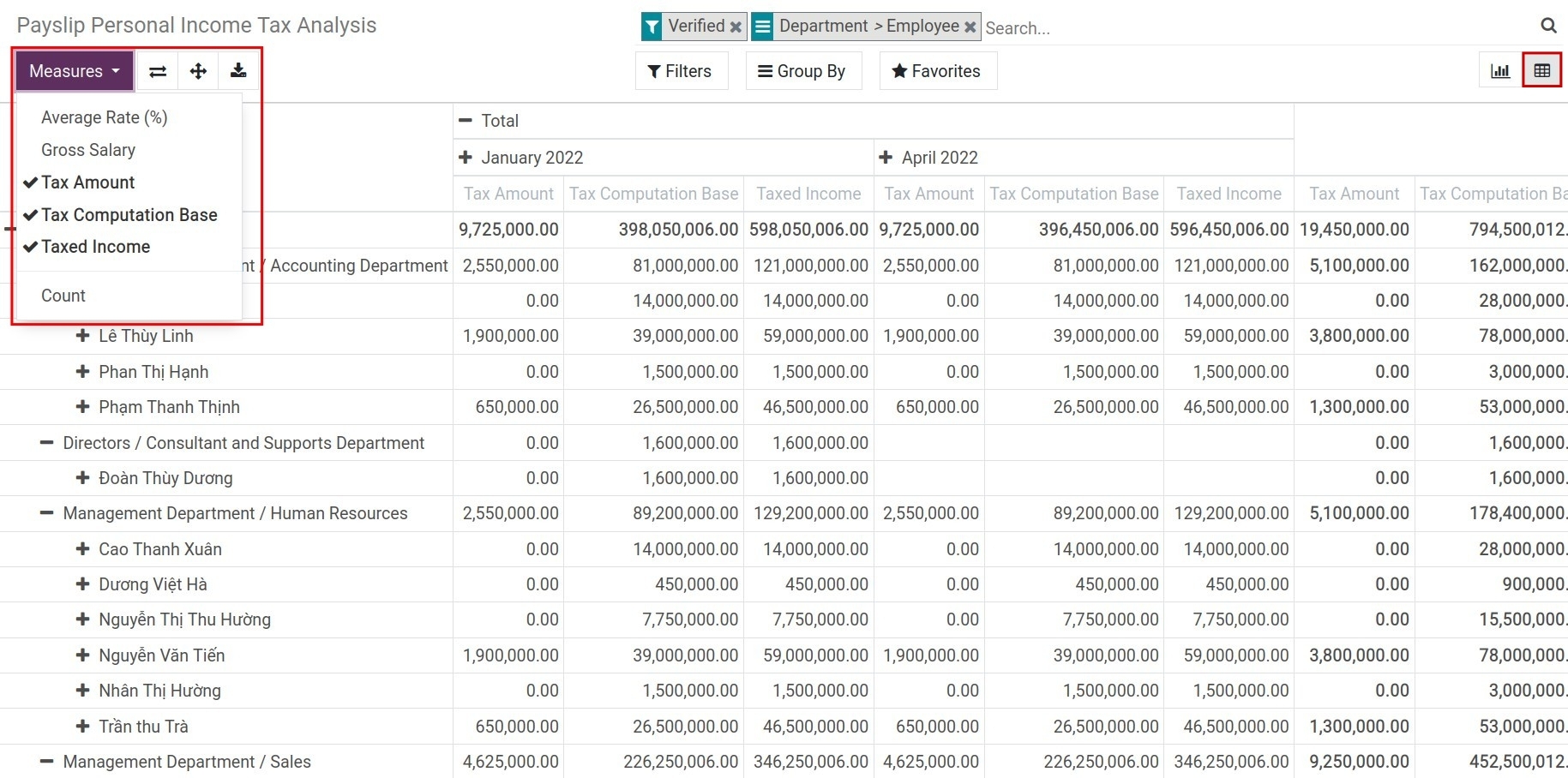
4. View analysis report
Go to Payroll ‣ Reports ‣ Payroll Analysis to view payroll analysis report:.
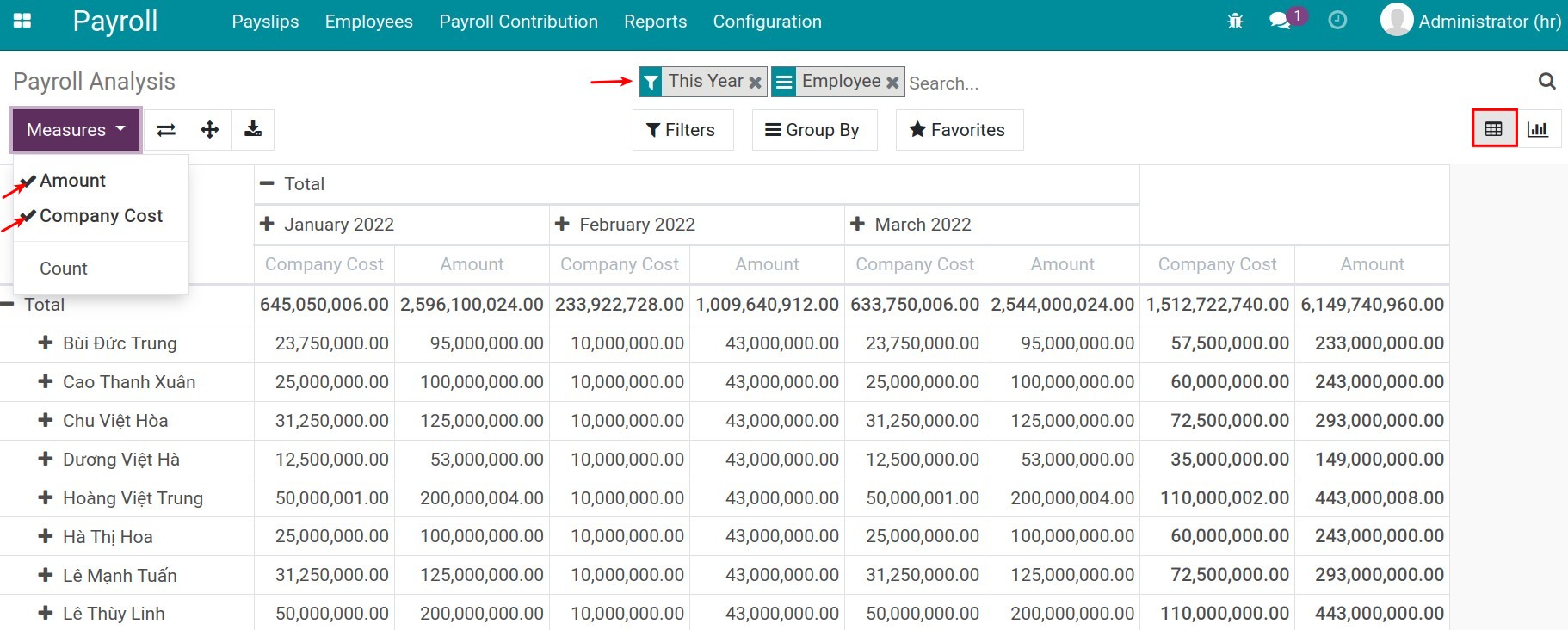
Go to Payroll ‣ Reports ‣ Payroll Contribution History to see analysis of payroll contribution history::
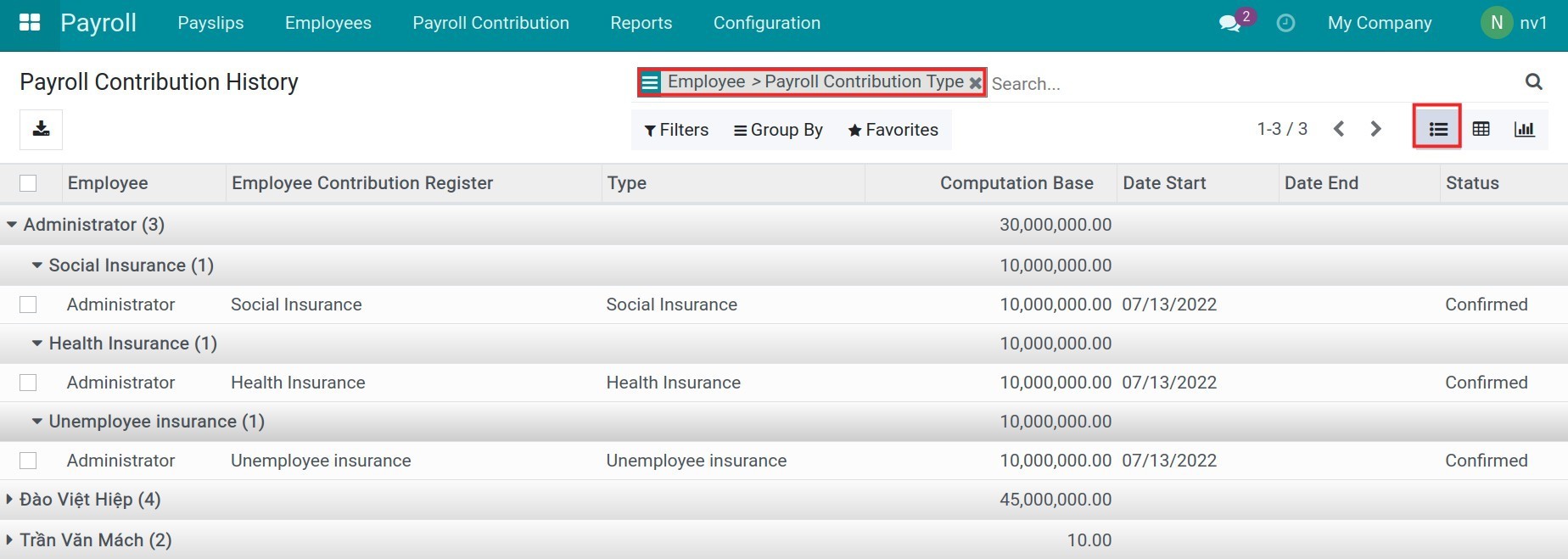
Go to Payroll ‣ Reports ‣ Payslip Personal Income Tax Analysis to view Personal Income Tax Analysis Report:
5. Register a personal tax withholding commitment
An employee who expects their taxable income for the year to stay under the threshold can file a written commitment asking not to be withheld on detached payments for that tax year. Go to Payroll ‣ Configuration ‣ Withholding Commitments, click New, select the Employee and the Tax Year, then click Confirm. Only a Confirmed commitment blocks withholding - a Draft or Cancelled one has no effect, and withholding proceeds as usual.

This software and associated files (the "Software") may only be used (executed, modified, executed after modifications) if you have purchased a valid license from the authors, typically via Odoo Apps, or if you have received a written agreement from the authors of the Software (see the COPYRIGHT file).
You may develop Odoo modules that use the Software as a library (typically by depending on it, importing it and using its resources), but without copying any source code or material from the Software. You may distribute those modules under the license of your choice, provided that this license is compatible with the terms of the Odoo Proprietary License (For example: LGPL, MIT, or proprietary licenses similar to this one).
It is forbidden to publish, distribute, sublicense, or sell copies of the Software or modified copies of the Software.
The above copyright notice and this permission notice must be included in all copies or substantial portions of the Software.
THE SOFTWARE IS PROVIDED "AS IS", WITHOUT WARRANTY OF ANY KIND, EXPRESS OR IMPLIED, INCLUDING BUT NOT LIMITED TO THE WARRANTIES OF MERCHANTABILITY, FITNESS FOR A PARTICULAR PURPOSE AND NONINFRINGEMENT. IN NO EVENT SHALL THE AUTHORS OR COPYRIGHT HOLDERS BE LIABLE FOR ANY CLAIM, DAMAGES OR OTHER LIABILITY, WHETHER IN AN ACTION OF CONTRACT, TORT OR OTHERWISE, ARISING FROM, OUT OF OR IN CONNECTION WITH THE SOFTWARE OR THE USE OR OTHER DEALINGS IN THE SOFTWARE.
