Stock Transfer Addresses
by Viindoo
| Lines of Code | 441 |
| Technical name | viin_transfer_address |
| License | OPL-1 |
| Website | https://viindoo.com/apps/modules/19.0/viin_transfer_address |
| Read description for | v 15.0 v 16.0 v 17.0 v 18.0 |
| Required Apps | Discuss (mail) Inventory (stock) |
| Included Dependencies | Viindoo Base |
| Extensions | Fleet Pickup and Delivery Planning |
Find every transfer by the place it leaves from or goes to
For warehouse and dispatch teams that look up receipts, deliveries and internal transfers by address
Find stock transfers by the street, city, state or zip of the contact and by the from and to addresses of the transfer
Odoo 19.0 · Community and Enterprise · OPL-1
What changes for your team
A city, a street or a zip code is enough to find the transfer
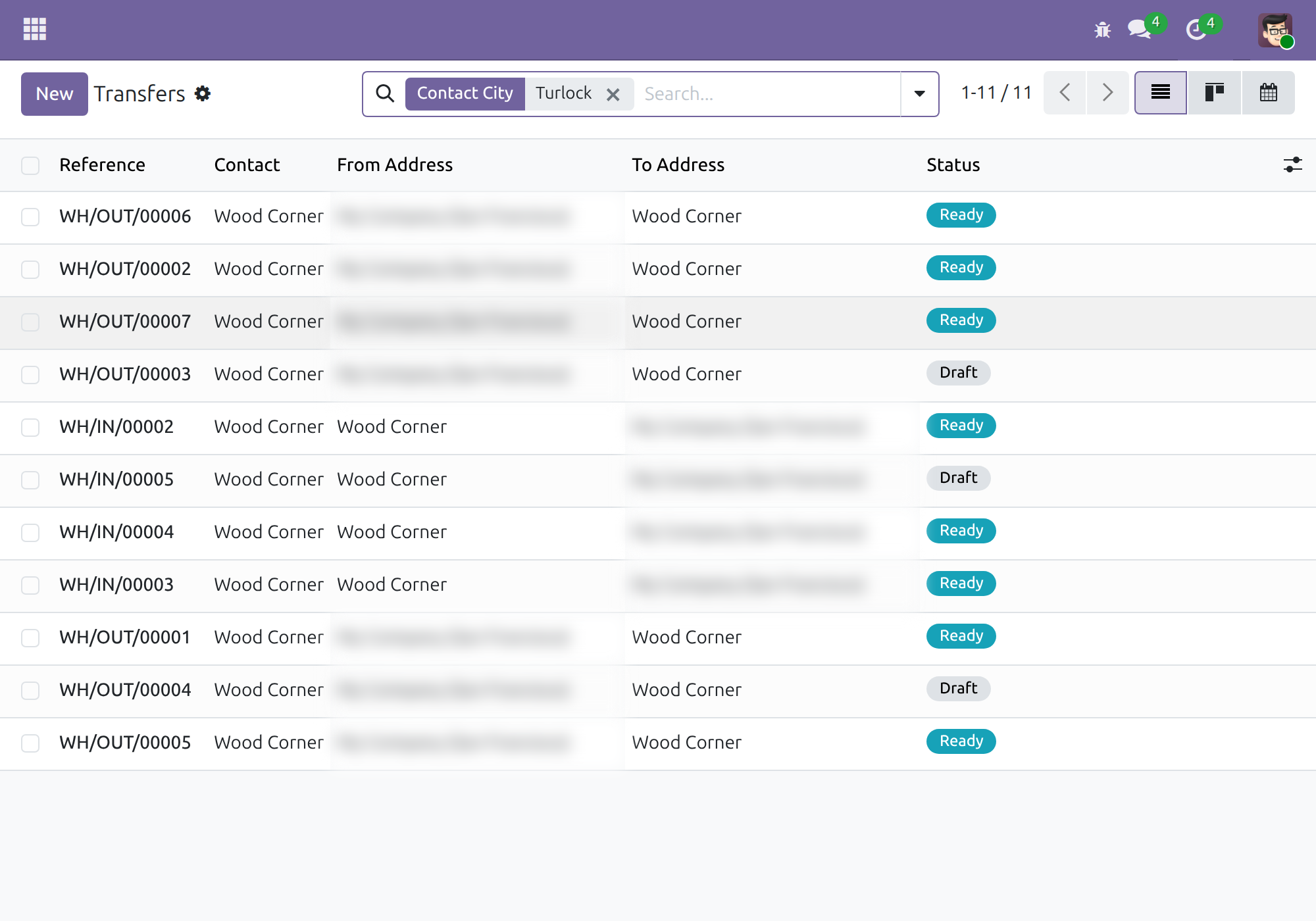
Today, finding the deliveries for one town means opening transfers one by one to read the address of each customer.
→ Type the town in the Transfers search and pick Contact City: only the transfers whose contact is there remain. Street, second street line, zip code and state work the same way.
One search covers receipts, deliveries and internal moves
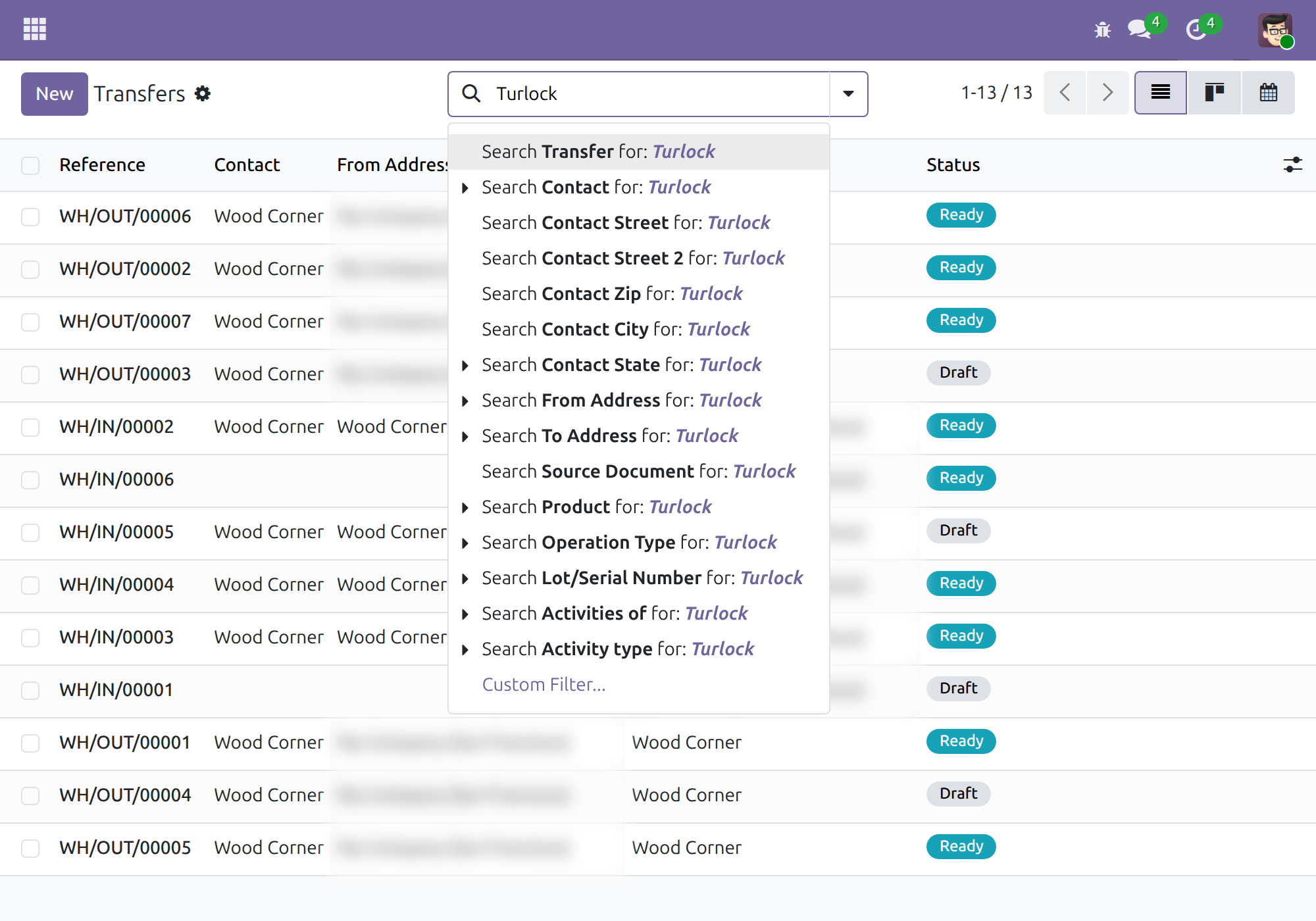
Today, what arrives at a site and what leaves it sit in separate lists by operation type.
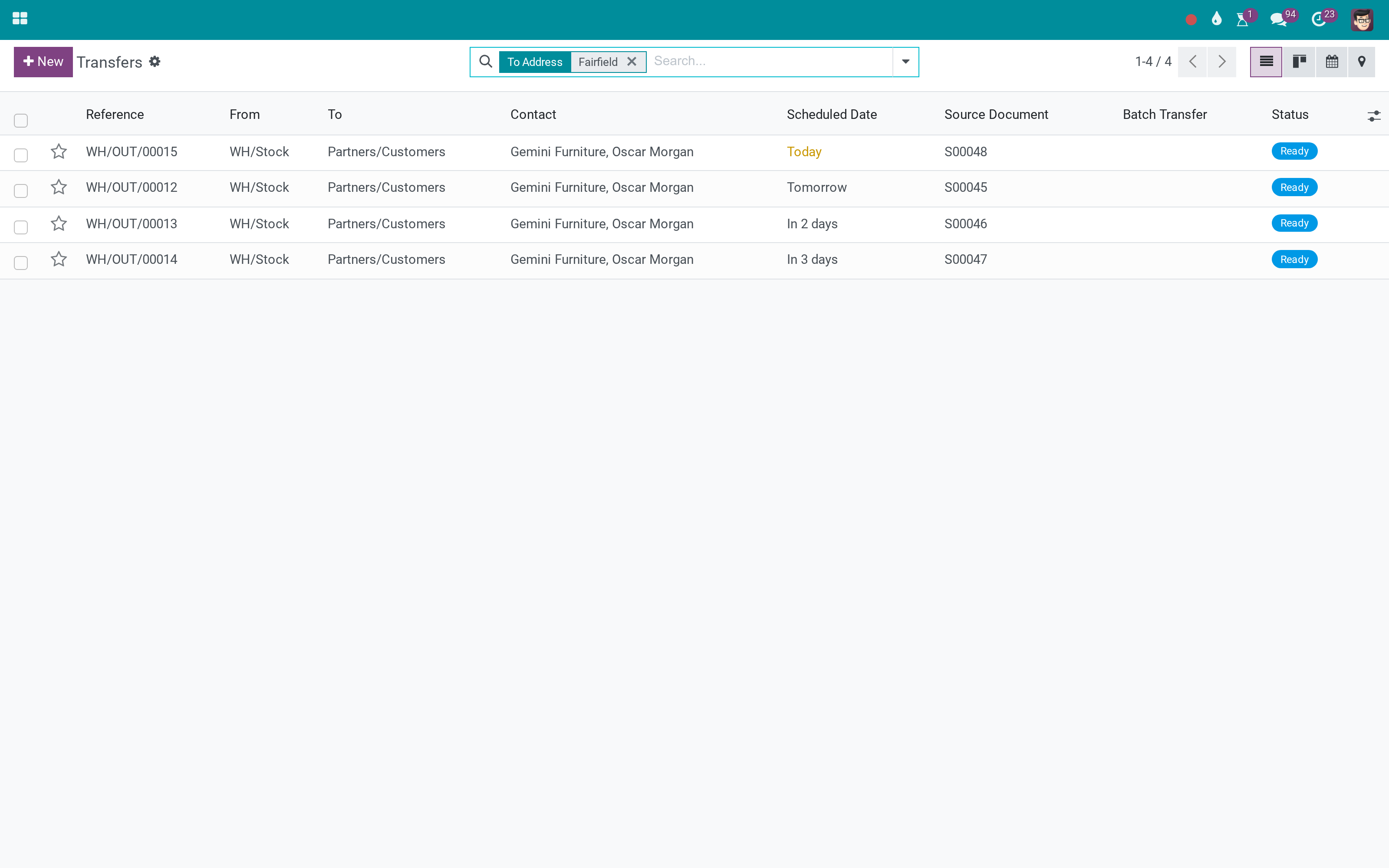
→ Search by From Address or To Address: a place matches by its name, street, city or state, and the result holds every transfer leaving from or arriving at it, whatever its type.
Each transfer states where goods come from and where they go
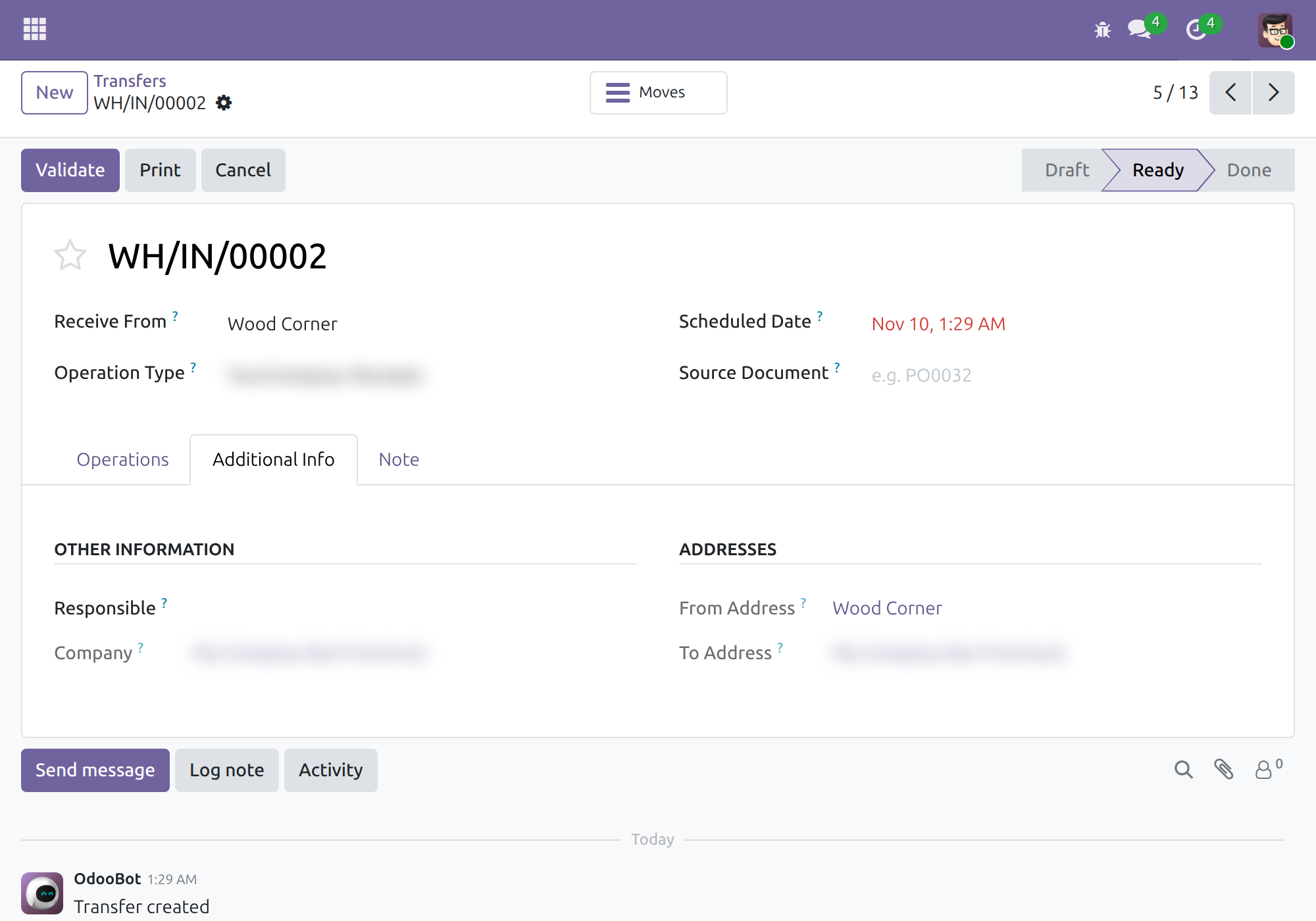
Today, the direction of a transfer is worked out from its operation type and its warehouse.
→ Every transfer carries both addresses, filled in from the contact and the warehouse address, and kept up to date when they change. Nobody types them.
Ready on day one
Your existing transfers
Transfers recorded before installation receive their addresses during installation, so the first search already finds them.
The screens your team knows
No new menu: the address options appear in the search of the Transfers lists every Inventory user already works in.
Set up first
Give each warehouse its address and keep contact addresses complete: the transfer addresses come from them.
What is included
Search by the street, second street line, zip code, city and state of the contact; From Address and To Address on every receipt, delivery and internal transfer, with a search for each; the addresses on the transfer form and as optional list columns.
Before you decide
Does any of our data leave the database?
No. The addresses come from the contacts and warehouses already in your database, and no outside service is called.
Who sees what?
Every Inventory user gets the address search options. The two address fields on the transfer form and list show in developer mode only. The module adds no access right and no menu.
What if a transfer has no contact?
The address that depends on it stays empty, as does one that depends on a warehouse without an address. Filling in the contact or the warehouse address updates the transfer. The From Address and To Address search does not match on zip code; Contact Zip does.
Which languages does it ship in?
English and Vietnamese.
What does it take to run it?
Inventory and Viindoo Base. The module installs on its own once both are present, and it does not change how transfers are created or validated.
Try it, then ask us
Read the Documentation tab of this listing, open the Live Preview, or watch the video above.
Pre-sales & partnership
viindoo.com/contactusTechnical support
viindoo.com/ticketTechnical requirements
- Odoo version: 19.0
- Editions: Community, Enterprise
- Required modules: Inventory, Viindoo Base
- License: OPL-1
- Languages: English, Vietnamese
Stock Transfer Addresses
Note
This guide is for warehouse operators, who look up receipts, deliveries and internal transfers, and for the administrator who installs the module. It explains how to find a transfer by the address of its contact or by the place the goods leave from and arrive at.
Overview
A transfer in Inventory names a contact, but not always the place the goods travel between. Stock Transfer Addresses gives every transfer two addresses, From Address and To Address, filled in automatically, and adds address criteria to the search of the Transfers list. A warehouse operator can then answer questions such as "which deliveries go to a customer in this city?" or "what is due at this warehouse?" without opening each transfer.
The module needs Inventory and is installed together with it as soon as its other required module is present.
| Role | What they do | Access right to assign |
|---|---|---|
| Administrator | Installs the module and turns on developer mode where the addresses must be visible on the transfer form and list. | Role / Administrator |
| Warehouse operator | Searches receipts, deliveries and internal transfers by address. | Inventory / User |
How the two addresses are filled in
The addresses follow the type of transfer and are kept up to date when the contact, the operation type or the warehouse change:
| Type of transfer | From Address | To Address |
|---|---|---|
| Receipt | The contact of the transfer (the supplier) | The address of the warehouse |
| Delivery | The address of the warehouse | The contact of the transfer (the customer) |
| Internal transfer | The address of the warehouse that owns the source location | The address of the warehouse that owns the destination location |
The address of a warehouse is the Address field of that warehouse. An address stays empty when its source is empty, for example a receipt without a contact has no From Address.
Setup (for the Administrator)
Installation
- Open Apps, search for Stock Transfer Addresses and click Install.
- Existing transfers receive their From Address and To Address at installation, so searches also find the transfers created before.
Show the addresses on the transfers
The search options work for every Inventory user. The two address fields themselves are technical information shown only in developer mode:
- Activate developer mode (Settings, then Activate the developer mode).
- Open Inventory ‣ Operations ‣ Transfers and choose Receipts, Deliveries or Internal.
- In the list, click the column selector at the right of the header and tick From Address and To Address.
- Open a transfer and click its Additional Info tab: the Addresses block shows both addresses.
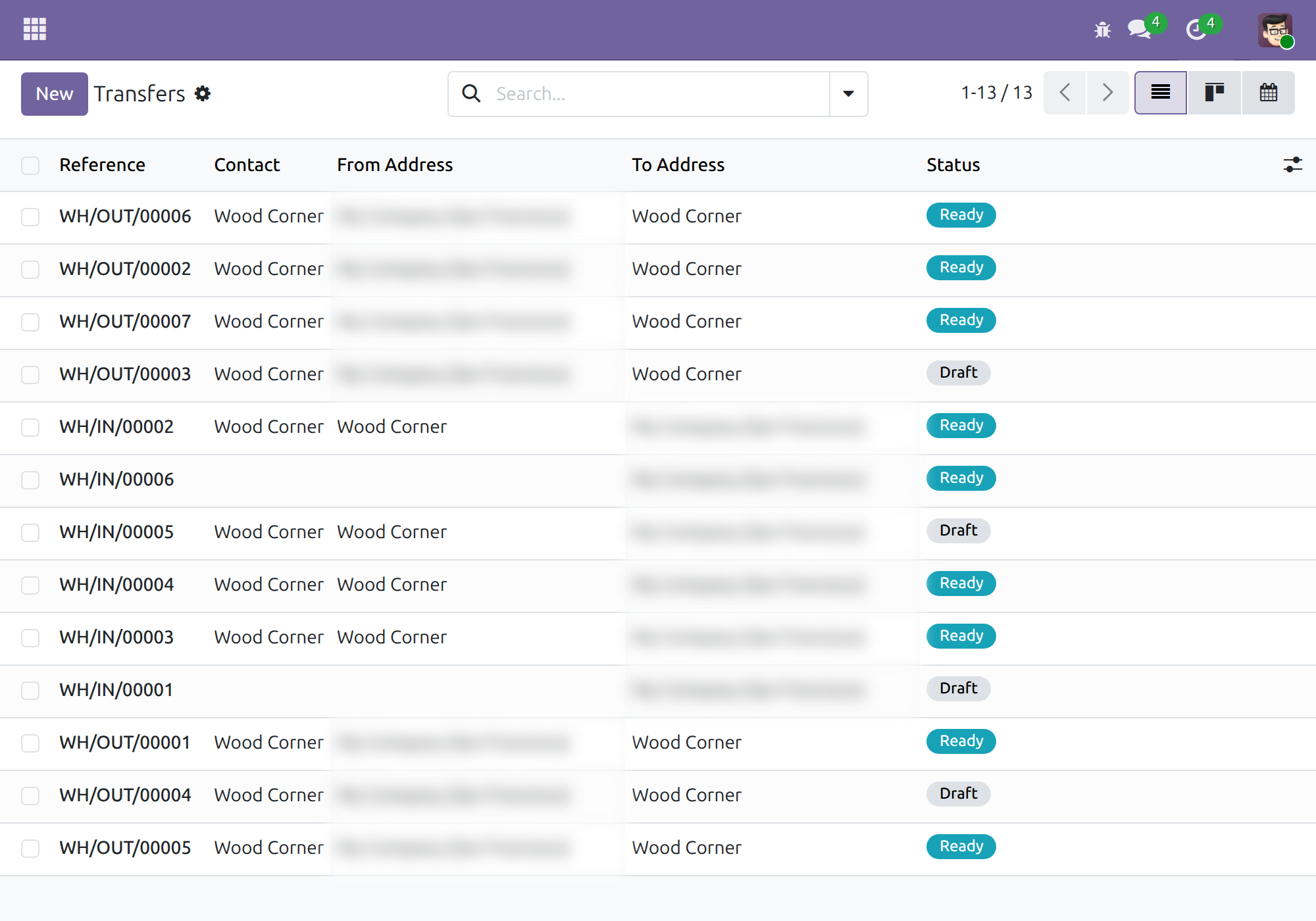
The addresses are read-only: they are computed from the transfer.
Warehouse operator: find transfers by address
Search by the address of the contact
- Open Inventory ‣ Operations ‣ Transfers and choose Receipts, Deliveries or Internal.
- Click in the search box and type a word, for example the name of a city.
- In the list of proposals, click Search Contact City for: .... The other proposals work the same way: Contact Street, Contact Street 2, Contact Zip and Contact State.
Only the transfers whose contact has that city remain. Combine several criteria, for example a city and a zip code, by searching again: criteria on different fields narrow the result.
Search by the place goods leave from or arrive at
- Open the Transfers list as above and type a word, for example a city or a street.
- Click Search From Address for: ... to keep the transfers leaving from a matching place, or Search To Address for: ... for the transfers arriving at one.
A place matches when its name, its street, its second street line, its city or its state matches the word. Because the addresses cover receipts, deliveries and internal transfers alike, one search finds every transfer that goes to or from a site, whatever its type.
Troubleshooting
- I do not see From Address or To Address on the transfer.
- They are shown in developer mode only. Activate it as described in the setup. The search proposals do not depend on developer mode.
- A transfer has an empty From Address or To Address.
- The address is empty when its source is empty: a receipt or delivery without a contact, or a warehouse without an address. Fill in the contact or the Address of the warehouse and the transfer is updated.
This software and associated files (the "Software") may only be used (executed, modified, executed after modifications) if you have purchased a valid license from the authors, typically via Odoo Apps, or if you have received a written agreement from the authors of the Software (see the COPYRIGHT file).
You may develop Odoo modules that use the Software as a library (typically by depending on it, importing it and using its resources), but without copying any source code or material from the Software. You may distribute those modules under the license of your choice, provided that this license is compatible with the terms of the Odoo Proprietary License (For example: LGPL, MIT, or proprietary licenses similar to this one).
It is forbidden to publish, distribute, sublicense, or sell copies of the Software or modified copies of the Software.
The above copyright notice and this permission notice must be included in all copies or substantial portions of the Software.
THE SOFTWARE IS PROVIDED "AS IS", WITHOUT WARRANTY OF ANY KIND, EXPRESS OR IMPLIED, INCLUDING BUT NOT LIMITED TO THE WARRANTIES OF MERCHANTABILITY, FITNESS FOR A PARTICULAR PURPOSE AND NONINFRINGEMENT. IN NO EVENT SHALL THE AUTHORS OR COPYRIGHT HOLDERS BE LIABLE FOR ANY CLAIM, DAMAGES OR OTHER LIABILITY, WHETHER IN AN ACTION OF CONTRACT, TORT OR OTHERWISE, ARISING FROM, OUT OF OR IN CONNECTION WITH THE SOFTWARE OR THE USE OR OTHER DEALINGS IN THE SOFTWARE.