Unbuild Valuation by Cost Percentage
| Lines of Code | 618 |
| Technical name | to_mrp_bom_stock_value |
| License | OPL-1 |
| Website | https://viindoo.com/apps/modules/19.0/to_mrp_bom_stock_value |
| Read description for | v 11.0 v 12.0 v 13.0 v 14.0 v 15.0 v 16.0 v 17.0 v 18.0 |
| Required Apps | Manufacturing (mrp) Invoicing (account) Discuss (mail) Inventory (stock) |
| Included Dependencies | BoM Component Cost Percentage |

Parts taken back from an unbuild return to stock at the value your Bill of Materials gives them
For companies that dismantle products and value their stock at FIFO or average cost
Value the components received back by an unbuild order by the Cost Percentage of the BoM lines.
Community Edition, Enterprise Edition · OPL-1 · English, Vietnamese
Puts to work the unbuild cost percentages of BoM Component Cost Percentage.
What changes for your team
The split is decided once, on the BoM
Today: after each unbuild, the cost accountant works out what every part is worth and corrects the values by hand.
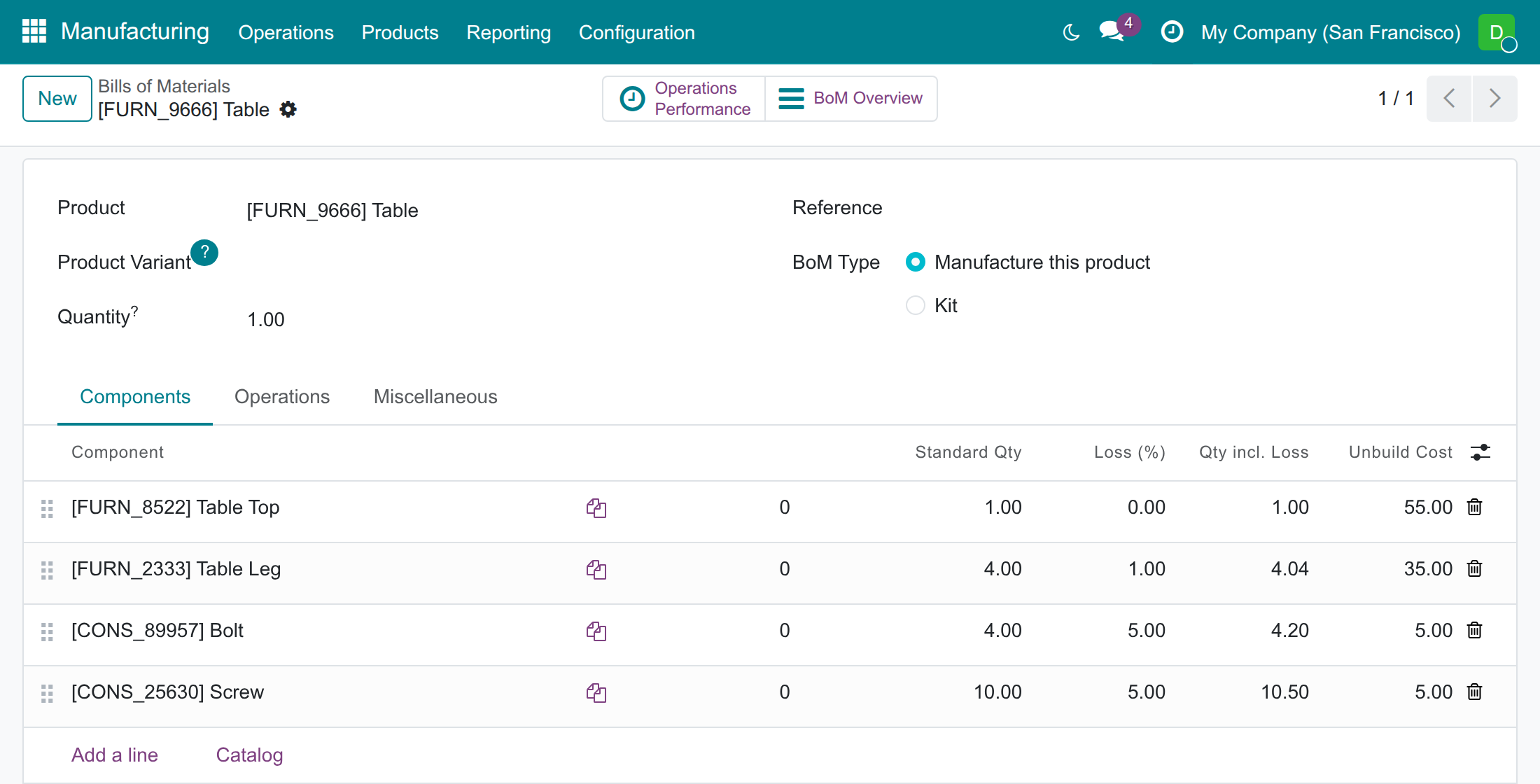
→ Each line of the Bill of Materials carries its unbuild cost percentage, and every unbuild of that product follows it.
Unbuilding stays the same job
Today: a costing rule that asks the warehouse to work differently is the first one skipped.
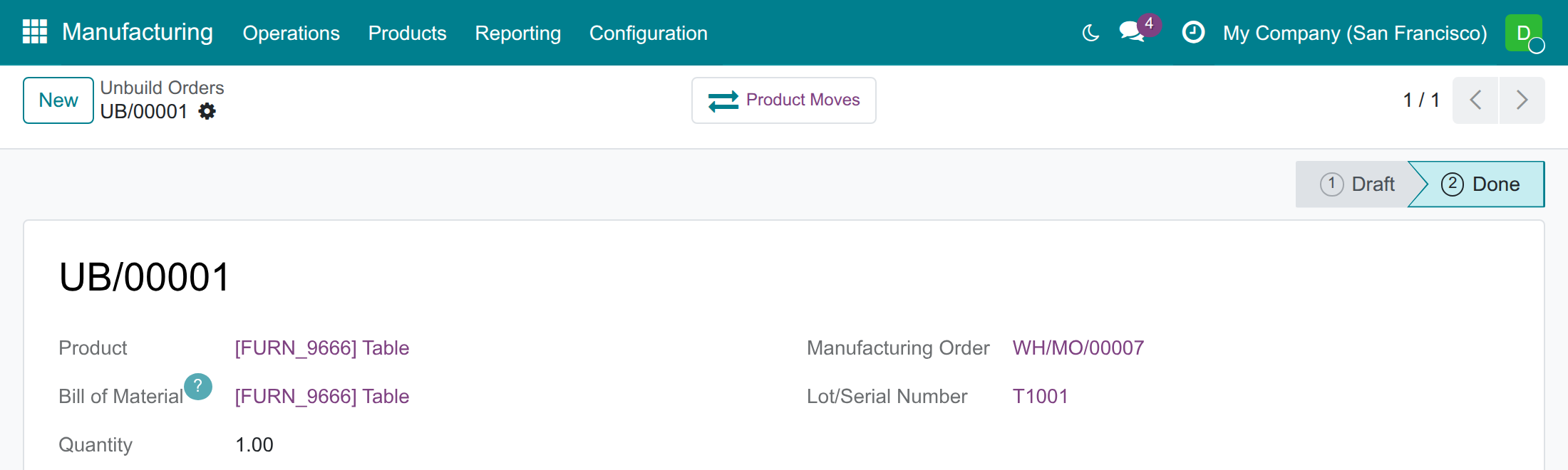
→ The person who unbuilds uses the usual unbuild order, linked to its manufacturing order or not; the values are set when it is done.
Recovered parts carry their share into the valuation
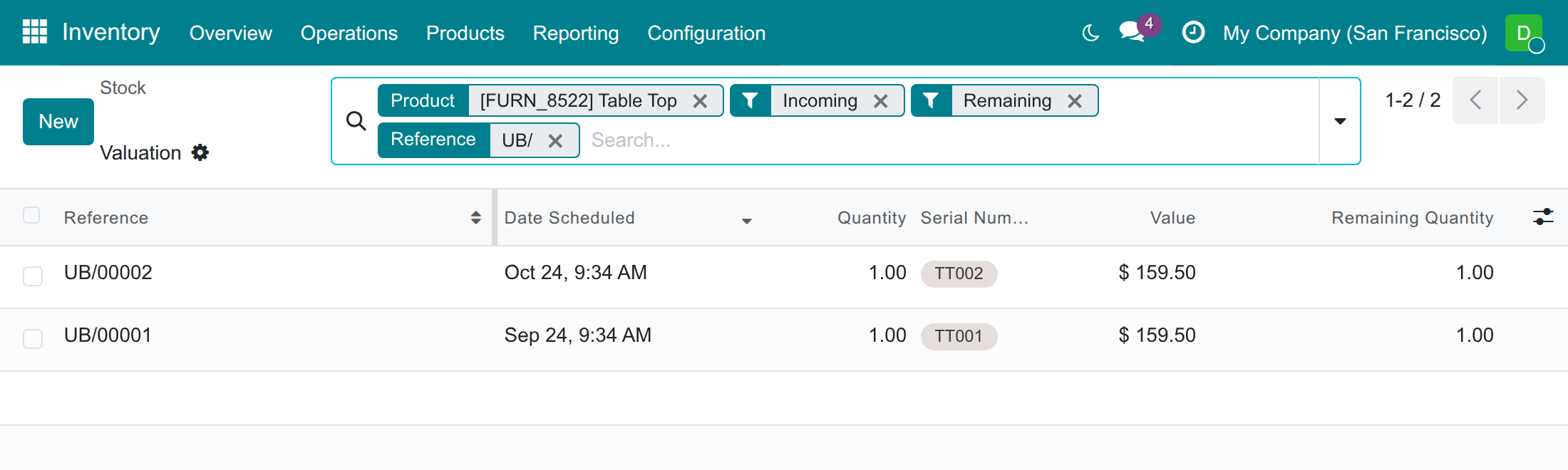
Today: a part comes back at its current cost, whatever the product it was taken from was worth.
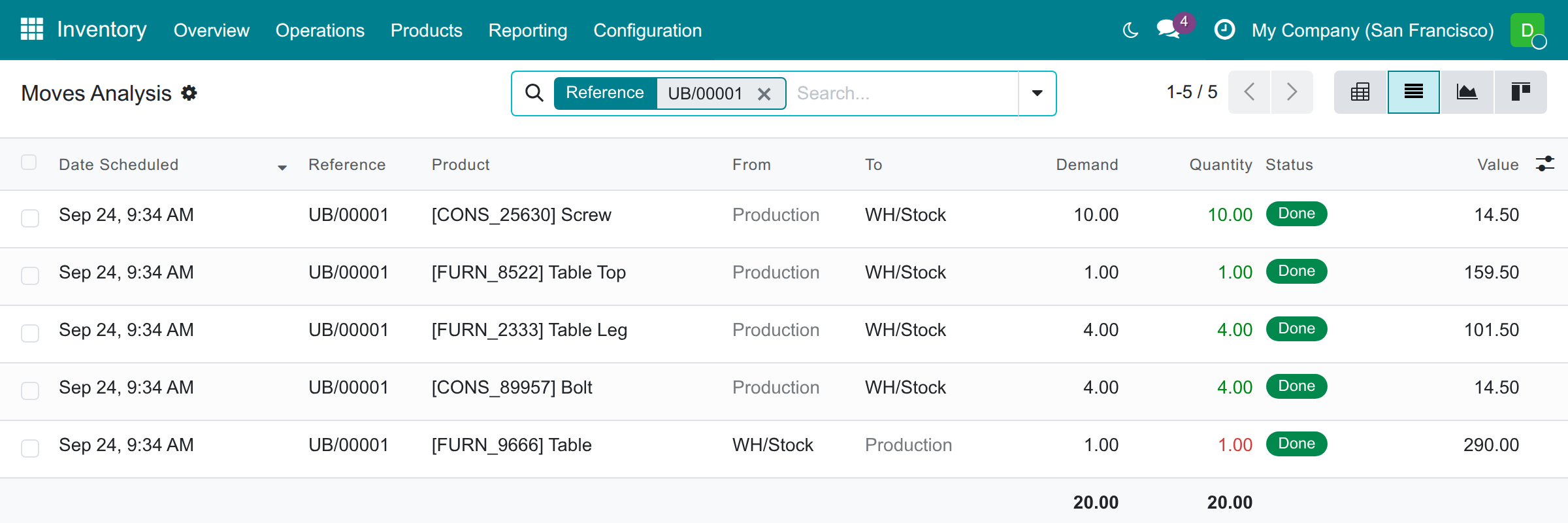
→ Each part enters stock valuation at its share of what the unbuild took out: here a Table Top at 159.50 of a 290.00 table.
Features
Sharing the value
- ✓ Shares the value of the product and by-products taken out of stock
- ✓ Deducts first the parts received that are not on the BoM
- ✓ Each BoM line receives its own percentage
- ✓ A kit line is split among its components by their current value
- ✓ A part not received passes its share to the other lines
Where it applies
- ✓ Unbuild orders with or without their manufacturing order
- ✓ Components valued at FIFO or average cost
- ✓ Components at standard price keep their standard cost
- ✓ A BoM with every percentage at 0 keeps the usual valuation
- ✓ Parts returned to their owner's consignment stock take no share
Keeping control
- ✓ A value set by hand on a stock move always prevails
- ✓ Each part's value description names the unbuild and the BoM
- ✓ No part ever receives a negative value
Built for daily use
- ✓ No new menu, screen or access right to learn
- ✓ The value is the same whoever validates the unbuild
- ✓ Installs on its own where both base apps are present
Ready on day one
A worked example on a demo database
The Table's BoM splits 55, 35, 5 and 5 percent among its parts, and its unbuild orders show the values that result.
What the administrator sets first
FIFO or average cost on the components' product categories, and a percentage on each BoM line, the lines adding up to 100.
Before you decide
Does it change how manufacturing values the finished product?
No. Only the components an unbuild order receives back are valued by the percentages; production and its costing stay as they are.
What happens on a BoM without percentages?
When every line is at 0, the unbuild keeps the usual Odoo valuation of its components.
Can we still correct a value?
Yes. A value set by hand on a stock move always prevails over the percentages.
Does the total received always equal the value taken out?
Not in two cases. A component at standard price keeps its standard cost, and its share goes to no other part. A product that does not track inventory has no stock value, so its share leaves the stock value with no accounting entry.
What must be installed?
BoM Component Cost Percentage and WMS Accounting, installed with it. No extra Python package or server program.
Try it, then ask us
The Documentation tab walks the cost accountant and the administrator through the setup and the worked example. Live demo: v19demo-int.viindoo.com/web#action=mrp.mrp_unbuild
Pre-sales & partnership
viindoo.com/contactusTechnical support
viindoo.com/ticketUnbuild Valuation by Cost Percentage
For cost accountants and inventory valuation users, and for the administrator who installs the app.
Note
This module extends BoM Component Cost Percentage - see its documentation: BoM Component Cost Percentage.
Overview
When a manufactured or purchased product is dismantled, the cost accountant has to know what each component that returns to stock is worth. This module answers that without any manual calculation: when an unbuild order is done, the value of the product taken out of stock is shared among the components received back, by the Cost Percentage (Unbuild) (%) set on each line of the Bill of Materials (BoM).
The person who creates the unbuild order does nothing differently. The value of each component appears on its stock move as soon as the order is done, whether or not the unbuild order is linked to a manufacturing order.
The rules at a glance:
- The value shared is the value of the products the unbuild takes out of stock (the finished product and its by-products), less the value of the components received that belong to no line of the BoM.
- Each BoM line receives its percentage of that value. A component on a kit line receives its part of the line's share in proportion to its own current value.
- A component valued at Standard Price keeps its standard cost.
- A BoM whose percentages are all 0 keeps the usual Odoo valuation of the components.
- A value you set by hand on a stock move always prevails.
Setup (for the Administrator)
Installation
- Open Apps.
- Search for Unbuild Valuation by Cost Percentage.
- Select Install.
The module installs on its own on a database that has both the BoM Component Cost Percentage app and the WMS Accounting app. On a database where both are already installed, install it from Apps as above.
Configuration
- Set the costing method of the components' product category to First In First Out (FIFO) or Average Cost (AVCO): open the product category and set Costing Method. A component valued at Standard Price keeps its standard cost.
- On the BoM of the product, give each component line its Cost Percentage (Unbuild) (%) (shown in the component list under the short heading Unbuild Cost), so that the percentages of all the lines add up to 100. See the next section.
Valuing the components of an unbuild order
Set the cost percentages on the Bill of Materials
- Go to Manufacturing > Products > Bills of Materials and open the BoM of the product.
- On the Components tab, fill in Unbuild Cost on each line. In the example, the Table gives 55 % to the Table Top, 35 % to the Table Leg and 5 % each to the Bolt and the Screw.
Unbuild the product
- Go to Manufacturing > Operations > Unbuild Orders and select New, or open a done manufacturing order and select Unbuild.
- Choose the product, its Bill of Material and the quantity, then select Unbuild.
The order moves to Done. The Product Moves button lists the stock moves it created.
Read the value of each component
- Go to Inventory > Reporting > Moves Analysis and switch to the list view.
- Search by Reference for the number of the unbuild order, and show the Value column from the column selector at the right of the list header.
In the example, one Table worth 290.00 is unbuilt. The components receive:
| Component | Percentage | Value |
|---|---|---|
| Table Top | 55 % | 159.50 |
| Table Leg | 35 % | 101.50 |
| Bolt | 5 % | 14.50 |
| Screw | 5 % | 14.50 |
The value of the Table Top and of the Table Leg returns to the stock value. The Bolt and the Screw are products that do not track inventory (Track Inventory is off), so they have no stock value: their share of 29.00 leaves the stock value and no accounting entry is made for it.
This software and associated files (the "Software") may only be used (executed, modified, executed after modifications) if you have purchased a valid license from the authors, typically via Odoo Apps, or if you have received a written agreement from the authors of the Software (see the COPYRIGHT file).
You may develop Odoo modules that use the Software as a library (typically by depending on it, importing it and using its resources), but without copying any source code or material from the Software. You may distribute those modules under the license of your choice, provided that this license is compatible with the terms of the Odoo Proprietary License (For example: LGPL, MIT, or proprietary licenses similar to this one).
It is forbidden to publish, distribute, sublicense, or sell copies of the Software or modified copies of the Software.
The above copyright notice and this permission notice must be included in all copies or substantial portions of the Software.
THE SOFTWARE IS PROVIDED "AS IS", WITHOUT WARRANTY OF ANY KIND, EXPRESS OR IMPLIED, INCLUDING BUT NOT LIMITED TO THE WARRANTIES OF MERCHANTABILITY, FITNESS FOR A PARTICULAR PURPOSE AND NONINFRINGEMENT. IN NO EVENT SHALL THE AUTHORS OR COPYRIGHT HOLDERS BE LIABLE FOR ANY CLAIM, DAMAGES OR OTHER LIABILITY, WHETHER IN AN ACTION OF CONTRACT, TORT OR OTHERWISE, ARISING FROM, OUT OF OR IN CONNECTION WITH THE SOFTWARE OR THE USE OR OTHER DEALINGS IN THE SOFTWARE.