

Advanced Bank Currency Rates
| Lines of Code | 709 |
| Technical name | to_bank_currency_rate |
| License | OPL-1 |
| Website | https://viindoo.com/apps/modules/19.0/to_bank_currency_rate |
| Read description for | v 12.0 v 13.0 v 14.0 v 15.0 v 16.0 v 17.0 v 18.0 |
| Required Apps | Invoicing (account) Discuss (mail) |
| Included Dependencies | Viindoo Base |
| Extensions | Foreign Trade & Logistics Currency Rate |
Book foreign-currency bills and payments at the rate your bank really applied
For finance teams of Vietnamese import/export companies and of international companies, on any chart of accounts
Currency conversion at your bank's own buy, sell and transfer rates.
Is this you?
Your bank buys dollars from you at one rate and sells them to you at another, but your books keep a single rate per day.
You work with several banks, and each one publishes its own rates.
The amount in your accounts on a foreign-currency payment never quite matches what the bank statement shows.
Someone retypes the exchange rate on every document, and it differs from one person to the next.
The value declared to customs and the amount you really transferred rarely agree.
What changes
One rate per day, whatever the bank
→ Record the buy, transfer and sell rate of each bank for each day, and let every document take the right one.
Several banks, several sets of rates
→ Choose a Main Bank for each company, and let each bank journal use the rates of its own bank.
Accounts that drift from the statement
→ Convert each payment at the rate of the bank that paid or received it, so the entry follows the bank.
Rates retyped on every document
→ Pick the currency and post: nobody types a rate, and the rate used is shown on the document.
Customs value out of step with the transfer
→ Add Foreign Trade & Logistics Currency Rate and customs declarations take the Transfer Rate of your banks.
How it works
Banks and Main Bank
The Administrator creates the banks and chooses the Main Bank of each company, then hands over to the chief accountant.
Bank rates
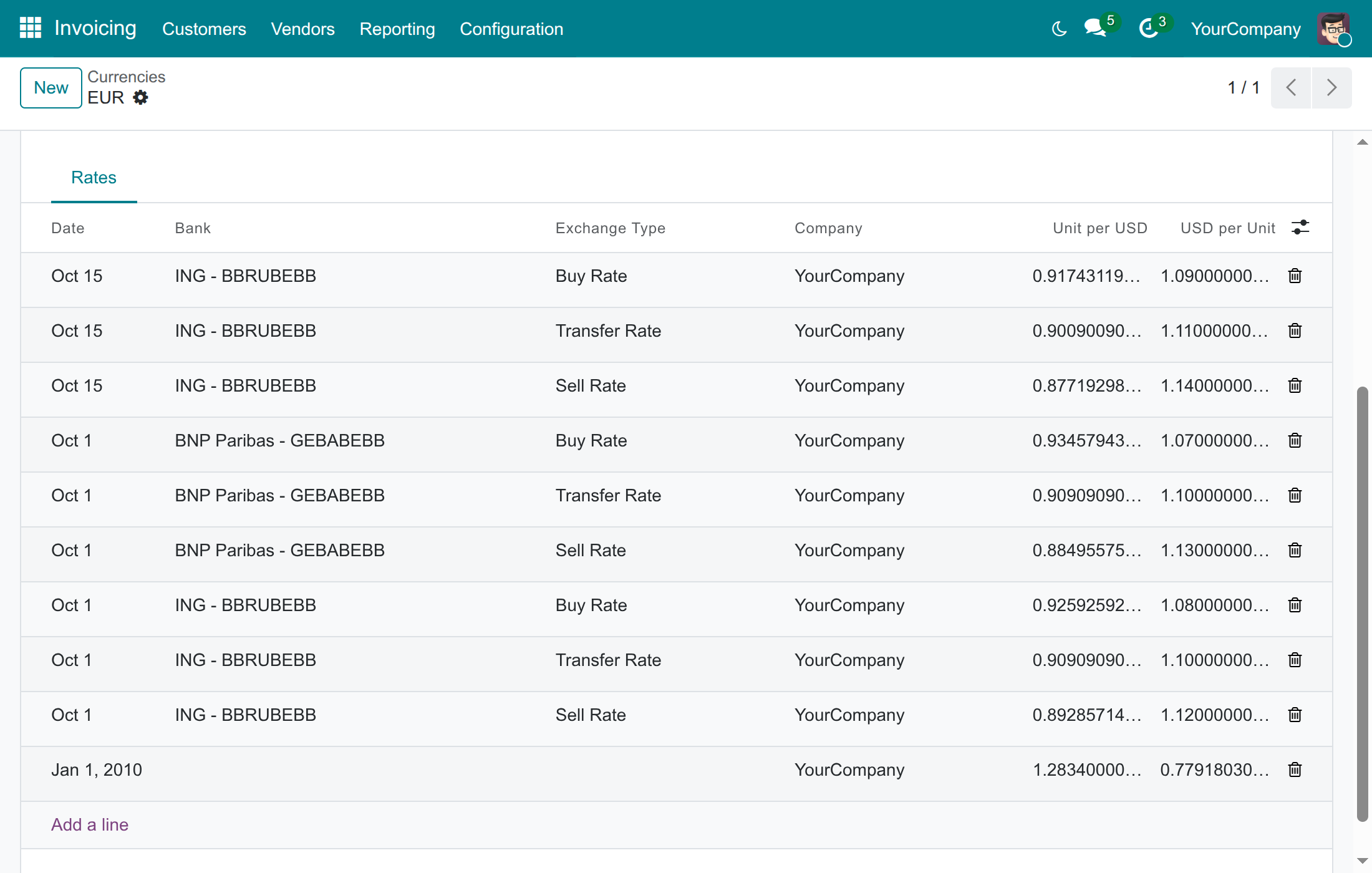
The chief accountant enters the buy, transfer and sell rates of each bank and links each bank journal to its bank, then hands over to the accountants.
Documents
The accountants post bills, invoices and payments in foreign currency. The bank rate applies by itself.
Key Features
Buy, transfer and sell rates per bank
Enter the rates exactly as each bank publishes them, one set per currency and per day.
A Main Bank per company
Set it once in the accounting settings. A branch can have its own, or follow its parent company.
The right side of the spread
Vendor bills take the sell rate and customer invoices the buy rate, credit notes included.
Payments follow the bank that paid
A payment sent takes the sell rate and a payment received the buy rate of its bank journal's bank.
A safe fallback
No rate for that bank on that day? The Main Bank's rate applies, then the latest rate on record.
Statements, transfers and copies too
Bank statement lines, transfers between your own banks and duplicated entries follow the same bank rates.
Who it is for
Chief accountant
Needs accounts that agree with the bank. Enters each bank's rates once and sees them applied everywhere.
Accountant
Is tired of looking up and typing rates. Picks the currency, posts, and reads the rate used on the document.
Administrator
Wants a short setup: one bank list, one Main Bank per company, and an access right per person.
Import/export finance team
Needs the Transfer Rate its bank applied, and customs declarations that follow it (with the Foreign Trade & Logistics Currency Rate add-on).
Best for: companies that buy or sell in foreign currencies through one or more banks, whether they keep their books in VND or in another currency.
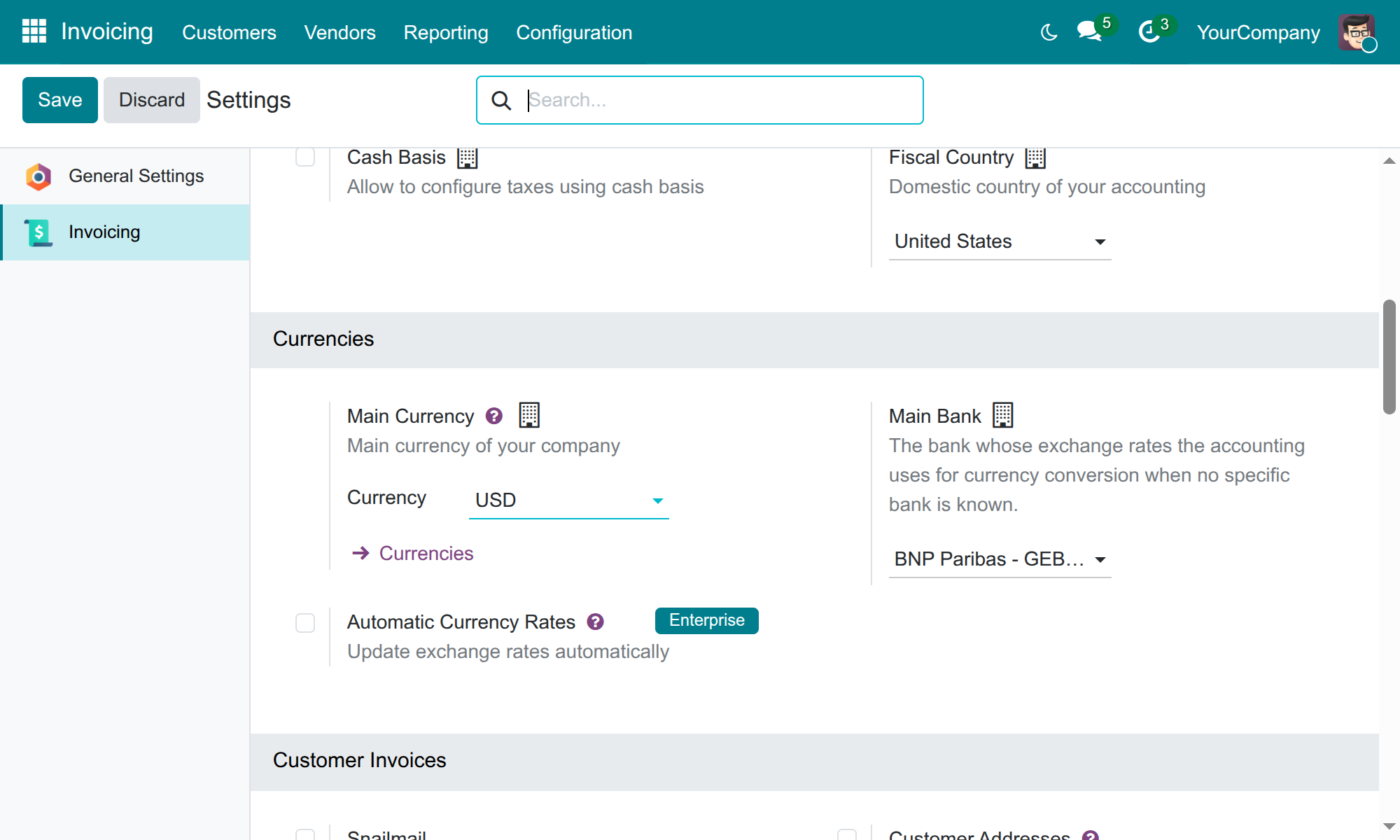
Choose the Main Bank of each company
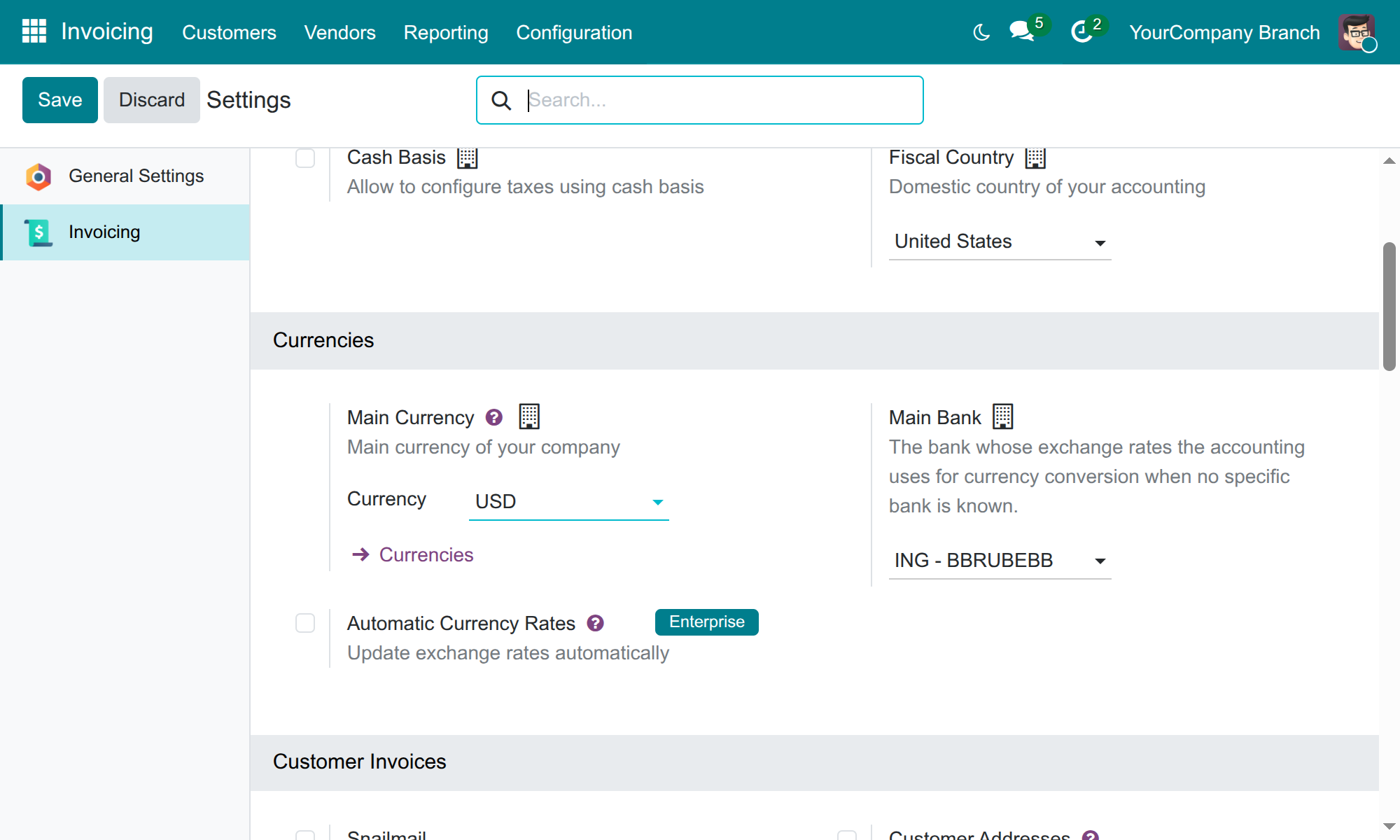
Give a branch its own bank
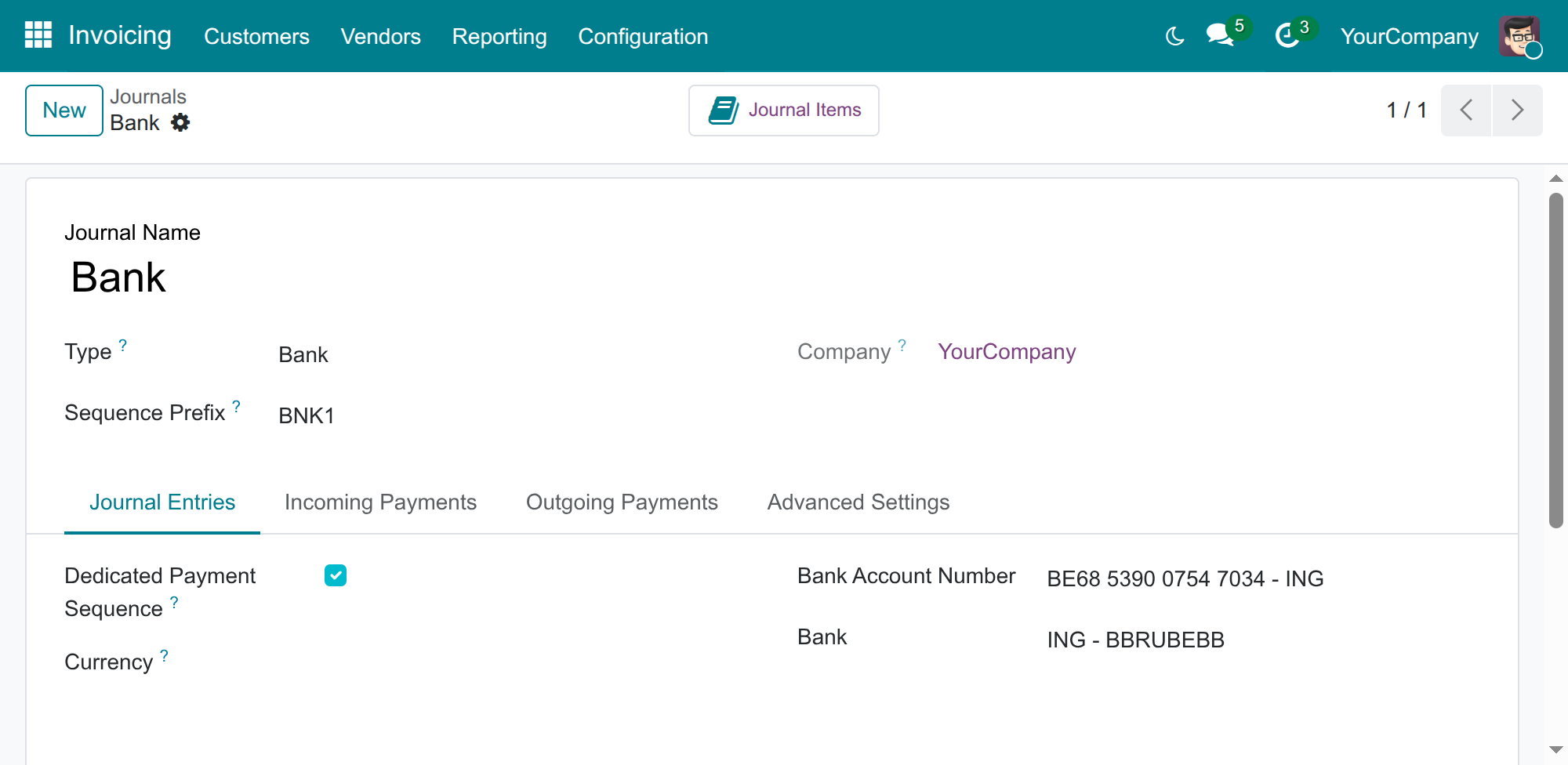
Link each bank journal to its bank
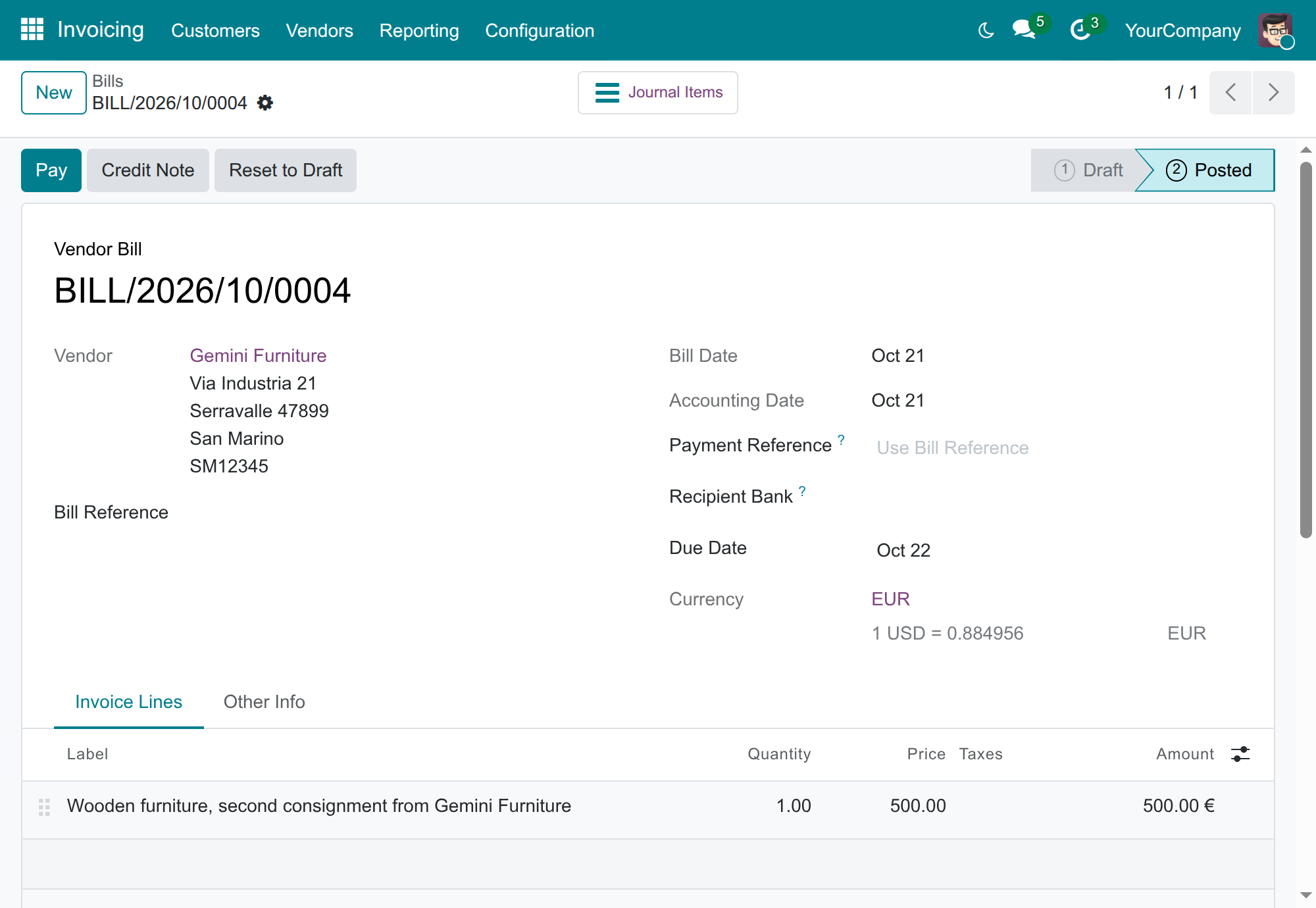
Post a vendor bill and read the rate it used
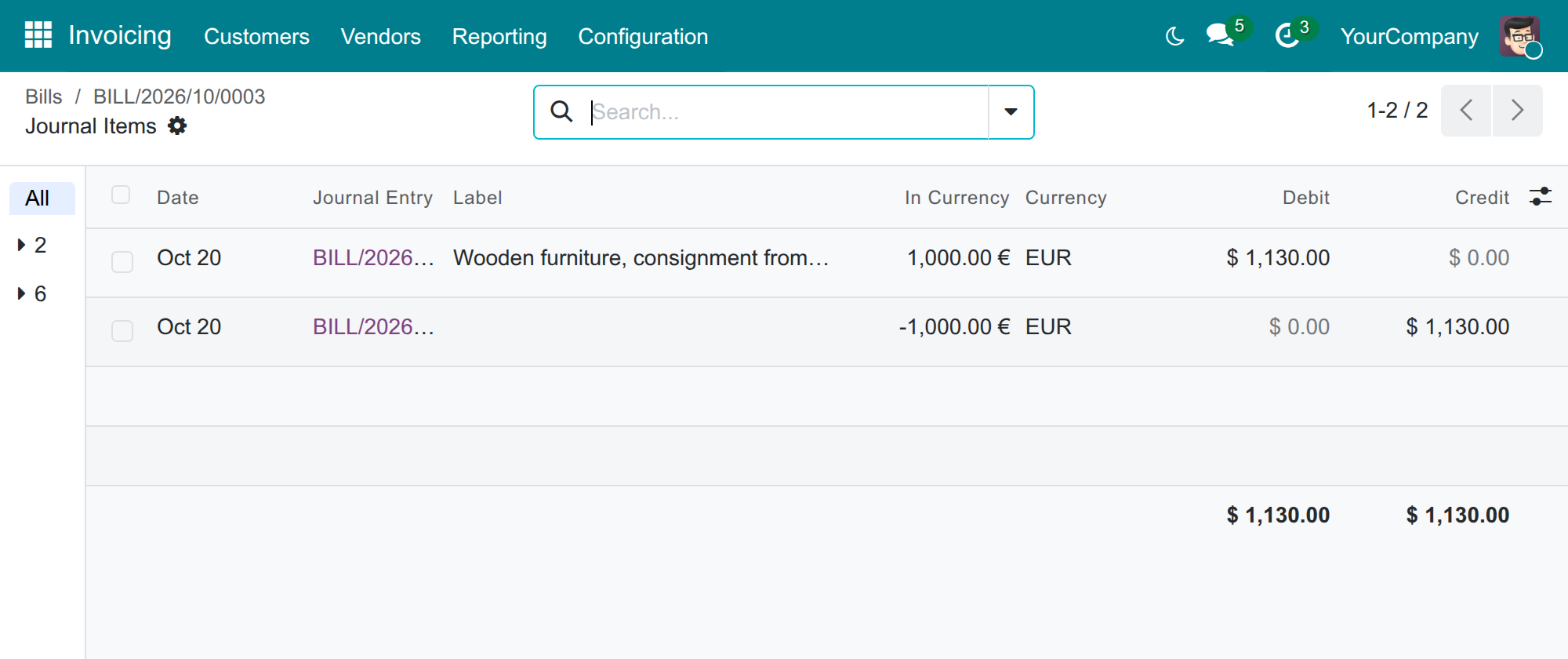
See the converted amounts of the bill
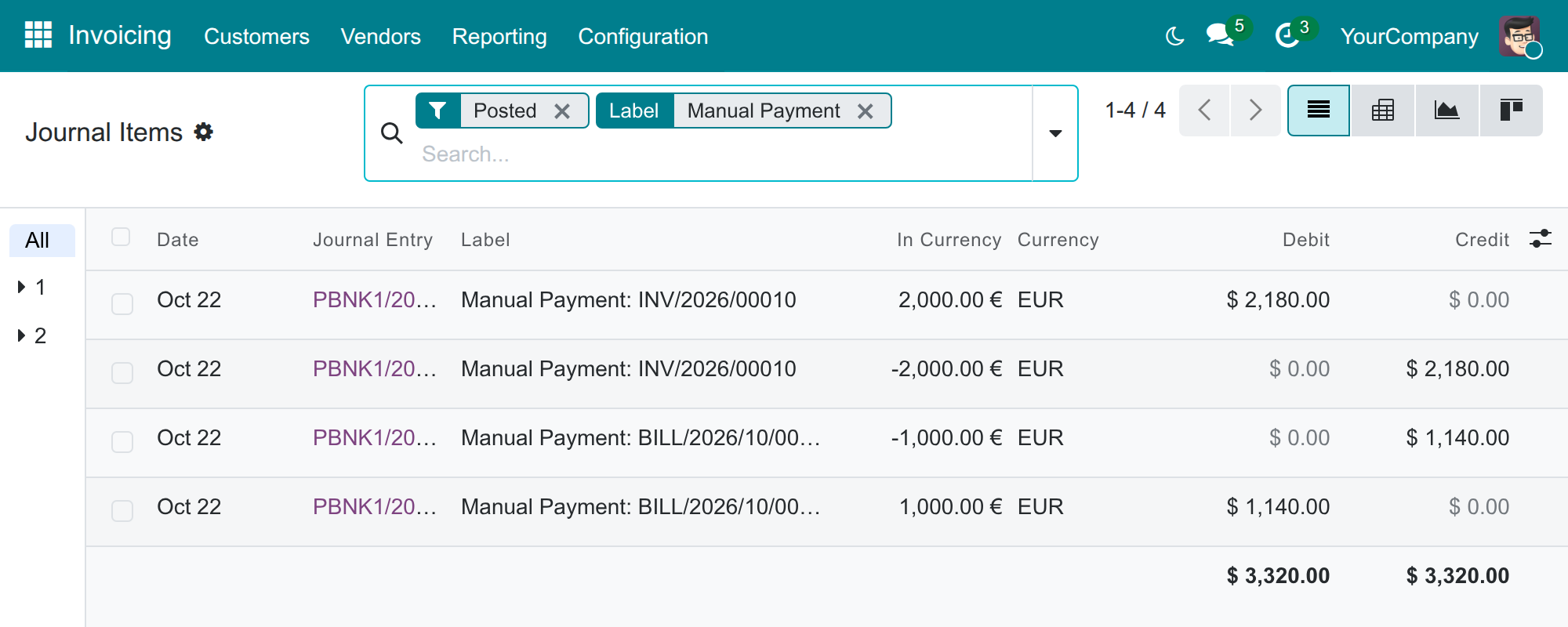
Pay and get paid at the rate of the bank involved
See Advanced Bank Currency Rates in Action
Frequently Asked Questions
Does it download the bank rates for me?
No. Your chief accountant enters the rates as the bank publishes them. The bank form carries a switch for an automatic update, but the provider that would fetch the rates has to come from another application.
Which rate does each document take?
Vendor bills the sell rate, customer invoices the buy rate, payments sent the sell rate and payments received the buy rate. The transfer rate serves payments between two foreign currencies and, with the Foreign Trade & Logistics Currency Rate add-on, customs declarations.
What if a bank has no rate for the day?
The Main Bank's rate of the same type is used, then the latest rate of the currency dated on or before the document. Only a currency with no rate at all before the document date is converted one to one, so enter your rates before you post.
Does it work if we keep our books in VND?
Yes. The screens and steps are the same whatever your company currency is, and the application does not depend on a chart of accounts.
Do posted documents change when I add or edit a rate?
No. The converted amounts are fixed on the entry when it is posted.
Where do I find the step-by-step guide?
In the Documentation tab of this page, in English and in Vietnamese.
Which add-on applies these rates to customs declarations?
Foreign Trade & Logistics Currency Rate. Customs declarations then take the Transfer Rate of your banks.
Need help with Advanced Bank Currency Rates?
Technical Support
apps.support@viindoo.comTechnical Requirement
- Odoo version: 19.0
- Editions: Odoo Community, Odoo Enterprise
- Required modules: Accounting (Invoicing) and Viindoo Base, installed with it
- License: OPL-1
Advanced Bank Currency Rates
Who this guide is for. Chief accountants and accountants who record purchases, sales and payments in foreign currencies, and the Administrator who sets the application up.
The examples use a company that keeps its books in USD, buys and sells in EUR and works with two banks, ING and BNP Paribas. A company that keeps its books in VND, or in any other currency, follows the same steps and sees the same screens.
Note
In the screenshots the accounting application is labelled Invoicing. It carries the name Accounting when your database uses the full Accounting application.
Overview
The problem
A bank does not work with a single exchange rate. It buys foreign currency from you at one rate and sells it to you at another, and every bank publishes its own. Standard Odoo keeps one rate per currency and per day, so the amount booked for a bill or a payment can differ from what the bank really applied.
What the application does
Advanced Bank Currency Rates lets you record, for each currency and each day, the Buy Rate, the Sell Rate and the Transfer Rate of every bank. You also choose a Main Bank for the company. When you post a vendor bill, a customer invoice or a payment in a foreign currency, the system picks the rate of the right bank and the right type for the document date, and converts the amounts for you. Nobody has to type a rate on the document.
The process in three stages
- The Administrator creates the banks and chooses the Main Bank of each company, then hands over to the chief accountant.
- The chief accountant enters the buy, transfer and sell rates of each bank and links each bank journal to its bank, then hands over to the accountants.
- The accountants post bills, invoices and payments in foreign currency. The bank rate applies by itself.
| Role | What they do | Access right to assign |
|---|---|---|
| Administrator | Installs the application, creates banks, chooses the Main Bank of each company and gives each person their access right. | Role / Administrator |
| Chief accountant | Keeps the bank rates up to date and links each bank journal to its bank. | Accounting / Administrator |
| Accountant | Records bills, invoices and payments in foreign currency. | Accounting / Invoicing |
Which rate each document takes
The rates are the bank's own: its Buy Rate is the rate at which the bank buys foreign currency from you, which is what you get when you receive money. Its Sell Rate is the rate at which the bank sells foreign currency to you, which is what you pay when you send money.
| Document | Rate type | Bank |
|---|---|---|
| Vendor bill, vendor credit note | Sell Rate | The Main Bank |
| Customer invoice, customer credit note, sales receipt | Buy Rate | The Main Bank |
| Payment you send | Sell Rate | The bank of the paying journal, otherwise the Main Bank |
| Payment you receive | Buy Rate | The bank of the receiving journal, otherwise the Main Bank |
| Bank statement line: money received | Buy Rate | The bank of the statement journal, otherwise the Main Bank |
| Bank statement line: money paid out | Sell Rate | The bank of the statement journal, otherwise the Main Bank |
| Amount proposed by the Pay dialog when the payment currency and the document currency are two different foreign currencies | Transfer Rate | The bank of the paying or receiving journal, otherwise the Main Bank |
Note
Customs declarations also use these rates. The application Foreign Trade & Logistics Currency Rate makes customs declarations take the Transfer Rate of your banks, so the value declared to customs follows the rate you entered here.
Setup (for the Administrator)
Install the application
- Open Apps.
- Search for Advanced Bank Currency Rates.
- Click Install. The accounting application it relies on is installed with it.
- Install the Contacts application too if you do not have it yet: the list of banks lives there.
Activate the foreign currencies
- Open Invoicing ‣ Configuration ‣ Accounting ‣ Currencies.
- Switch Active on for each foreign currency you trade in, for example EUR. Activating a second currency turns multi-currency on for every internal user.
Create the banks
- Open Contacts ‣ Configuration ‣ Bank Accounts ‣ Banks and click New.
- Fill in the Name and the Bank Identifier Code of the bank, then save.
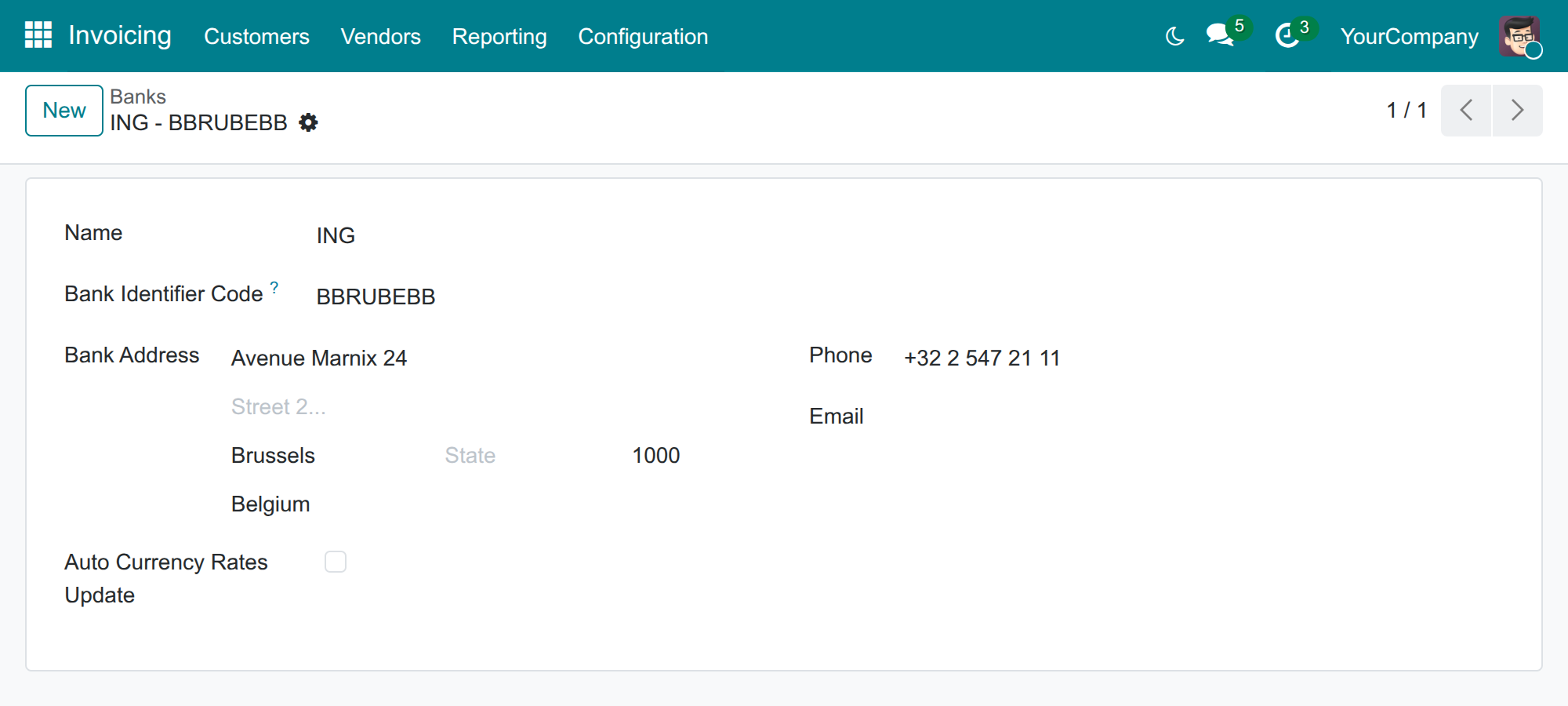
The bank form also carries an Auto Currency Rates Update box. Leave it unticked. Ticking it asks for an Auto Currency Rates Update Service Provider, and the application does not supply any: a provider comes from another application, so with none installed the bank cannot be saved while the box is ticked. Rates are entered by hand, as the chief accountant section below explains.
Choose the Main Bank
The Main Bank is the bank whose rates the company uses when no specific bank is known, for example on a vendor bill or a customer invoice.
- Open Invoicing ‣ Configuration ‣ Settings.
- In the Currencies block, pick the bank in Main Bank, for example BNP Paribas.
- Click Save.
Leave Main Bank empty if you do not want a bank to decide: the system then applies, to each document, the latest rate dated on or before its date, whatever the bank and the rate type.
Give a branch its own Main Bank
Each company has its own Main Bank. A branch that has none takes the Main Bank of its parent company.
- Select the branch in the company switcher at the top right of the screen.
- Open Invoicing ‣ Configuration ‣ Settings and pick the bank in Main Bank, then click Save.
Documents of that branch then convert at the rates of the branch's bank. In the example, the same EUR 1,000 vendor bill dated 20 October is booked at USD 1,130.00 in the parent company (Main Bank BNP Paribas) and at USD 1,140.00 in the branch (Main Bank ING).
Assign the access rights
- Open Settings ‣ Users & Companies ‣ Users and open the person.
- Set the Accounting access right to Administrator for the chief accountant, and to Invoicing for the accountants.
Chief accountant: keep the bank rates up to date
Enter a bank's rates
Do this each time a bank publishes new rates. Enter the rates exactly as the bank publishes them: one line for its buying rate, one for its transfer rate and one for its selling rate.
- Open Invoicing ‣ Configuration ‣ Accounting ‣ Currencies and open the currency, for example EUR.
- In the Rates tab, click Add a line.
- Fill in the Date, the Bank and the Exchange Type: Buy Rate, Transfer Rate or Sell Rate.
- Fill in the rate. The column named after your main currency (here USD per Unit) says how many USD one EUR is worth; Odoo fills in the other column.
- Save.
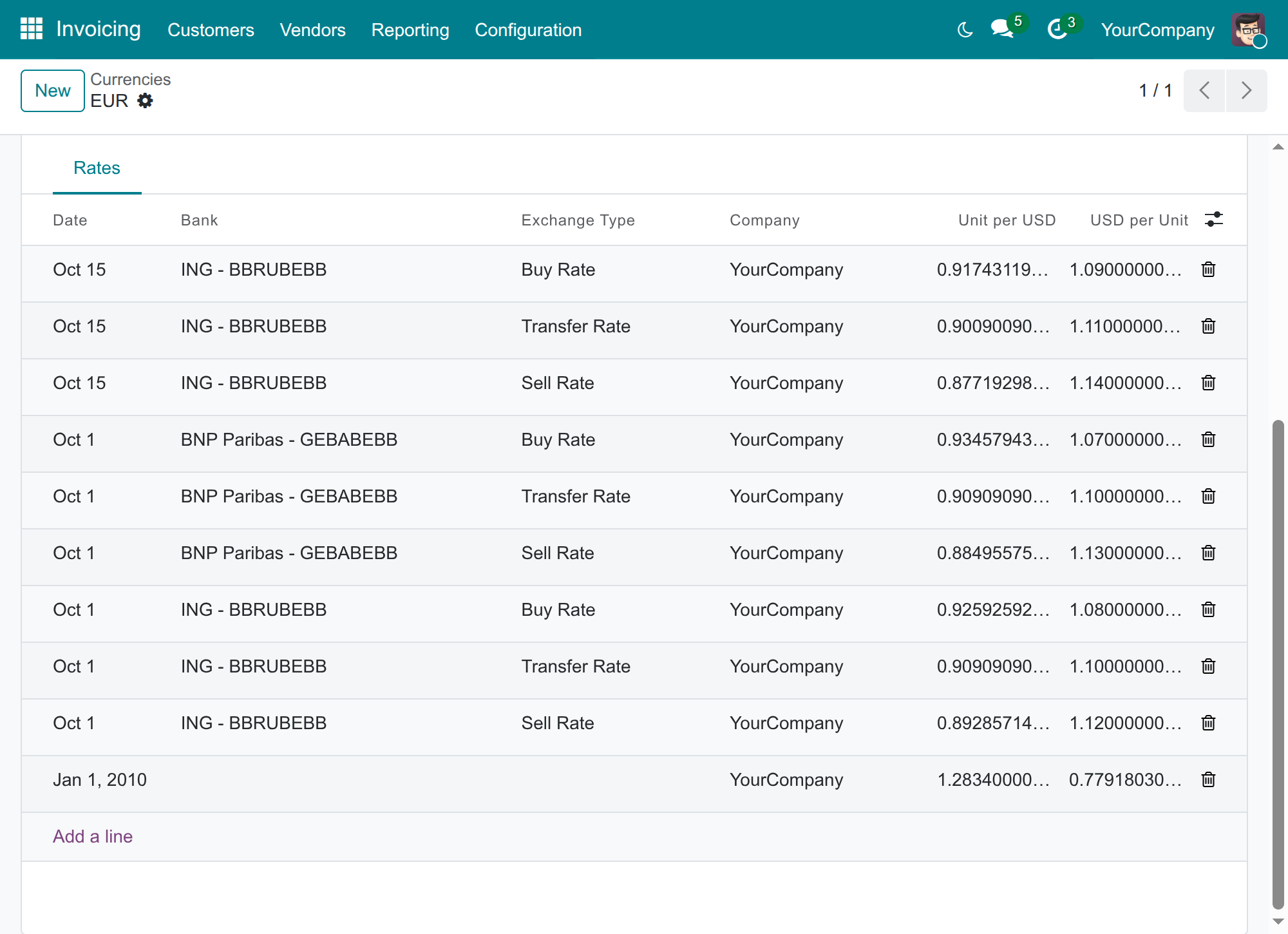
A few rules to keep in mind:
- The Bank is required as soon as an Exchange Type is chosen.
- There is one rate per day for each currency, bank and exchange type. Two banks, or two types, can have a rate on the same day.
- A line with no bank and no exchange type is a plain rate. It is kept as the last resort when no bank rate fits.
- On the list of rates you can search and group by Bank and by Exchange Type.
Link a bank journal to its bank
A payment or a bank statement line uses the rates of the bank of its journal. Tell the system which bank each bank journal belongs to.
- Open Invoicing ‣ Configuration ‣ Accounting ‣ Journals and open the bank journal.
- In the Journal Entries tab, pick the Bank Account Number of the company. The Bank shown below it is the bank whose rates the journal uses.
- Save.
How the system picks a rate
For every conversion the system works out the bank and the rate type from the document (see the table in the overview), then looks, in this order, for:
- The rate of that bank and that type with the latest date on or before the document date.
- If that bank has none, the rate of the Main Bank for the same type.
- If there is still none, the latest rate of the currency dated on or before the document date, whatever its bank or type.
- If the currency has no rate dated on or before the document date at all, a bank being involved, the amounts are converted one to one. With no bank involved, the earliest rate on record is used.
Enter the rates before you post the documents they apply to. The posted amounts are fixed on the entry at posting time.
Note
The Unit per USD column of the Currencies list shows the latest rate of the Main Bank, whatever its type. It is a reference value, not the rate a given bill or payment takes.
Accountant: record documents in foreign currency
You type nothing special. Choose the foreign currency on the document, as usual: the system applies the bank rate.
Post a vendor bill
- Open Invoicing ‣ Vendors ‣ Bills and click New.
- Pick the vendor, set the Currency to EUR, fill in the Bill Date and the lines, then click Confirm.
- Read the rate under Currency: it says how many EUR one USD is worth at the bank rate of the bill date. A vendor bill takes the Sell Rate of the Main Bank.
To see the converted amounts, click Journal Items at the top of the bill. The bill of EUR 1,000 dated 20 October is booked at USD 1,130.00, which is the Sell Rate of 1.13 that BNP Paribas published on 1 October.
Post a customer invoice
- Open Invoicing ‣ Customers ‣ Invoices and click New.
- Pick the customer, set the Currency to EUR, fill in the Invoice Date and the lines, then click Confirm.
- A customer invoice takes the Buy Rate of the Main Bank. The invoice of EUR 2,000 dated 20 October is booked at USD 2,140.00, the Buy Rate of 1.07 of BNP Paribas.
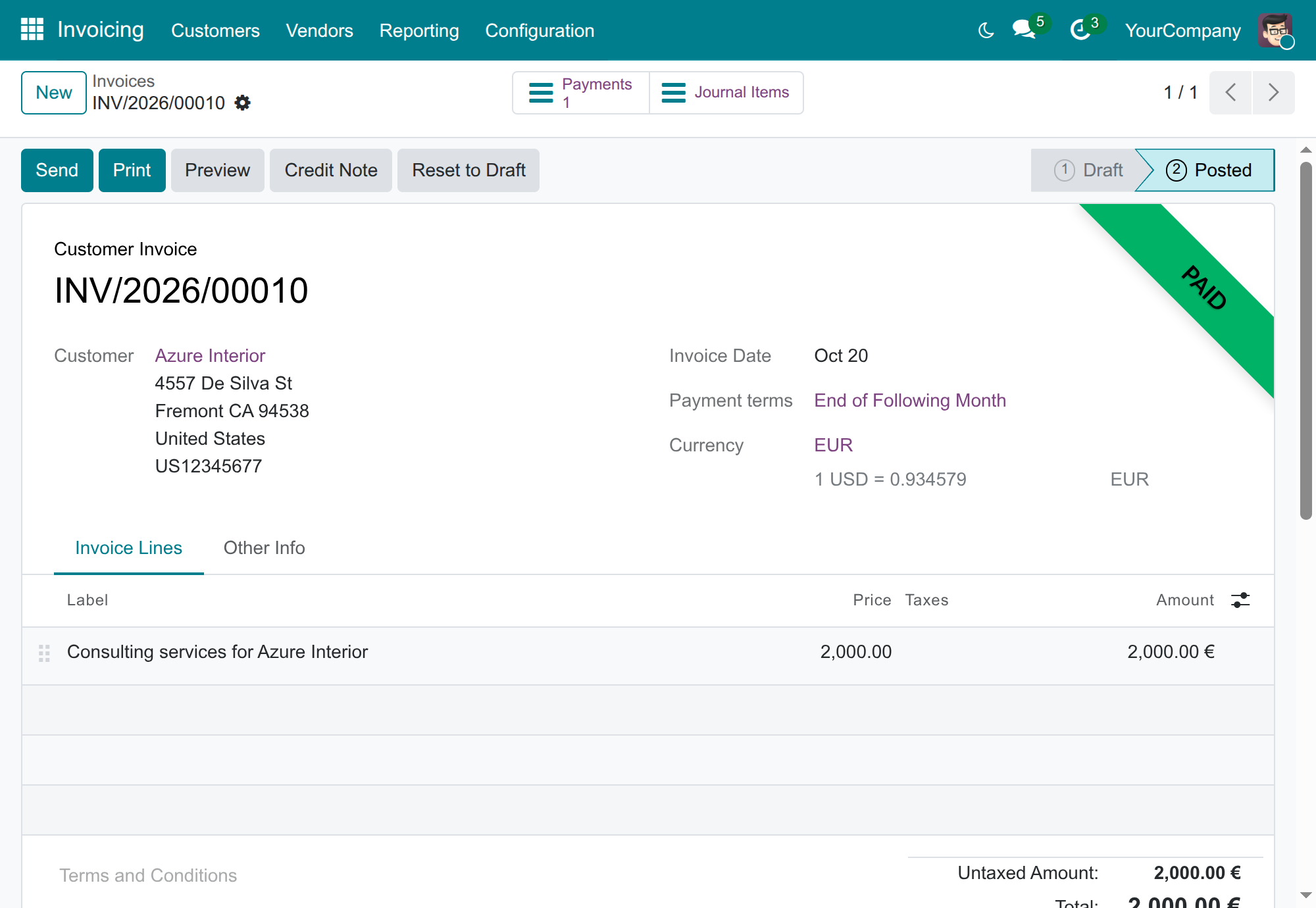
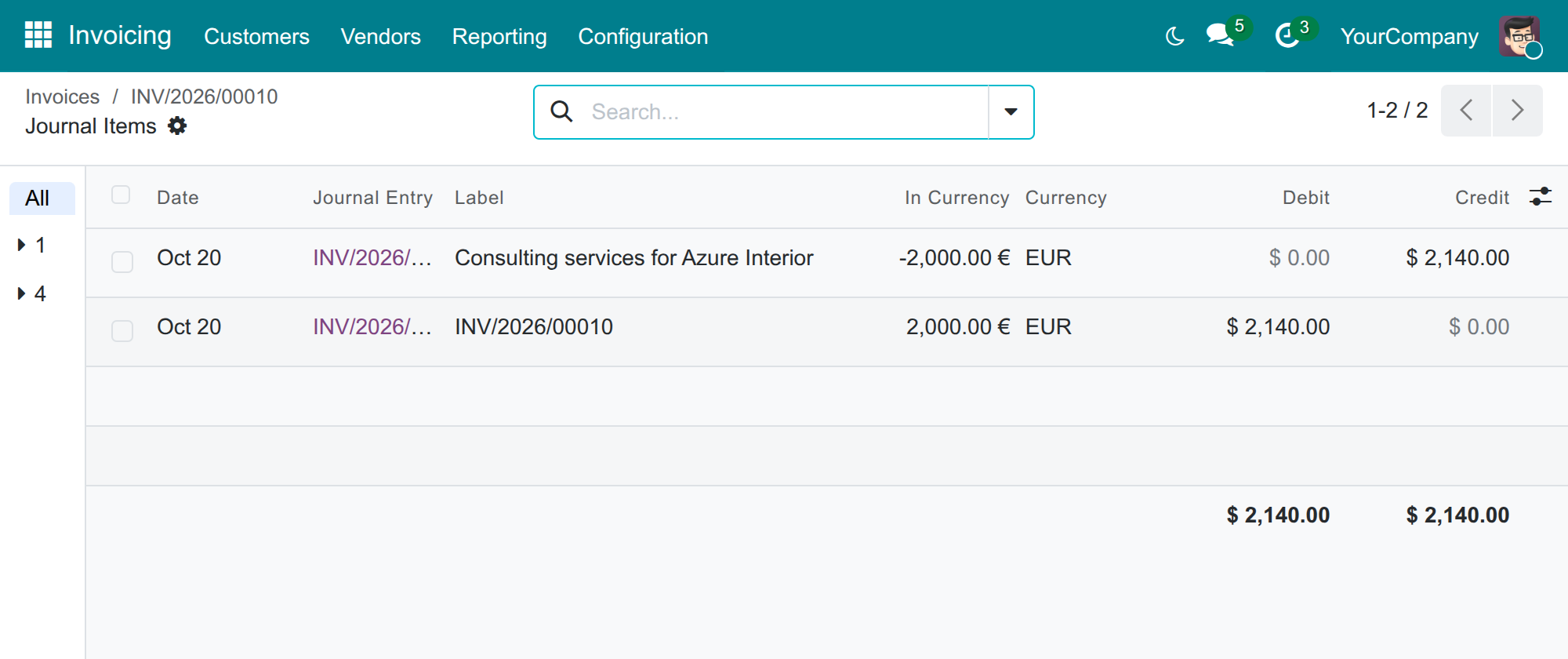
Pay a bill and receive a payment
- Open the posted bill or invoice and click Pay.
- Choose the Journal of the bank you pay from or are paid in, check the Amount and the Payment Date, then click Create Payment.
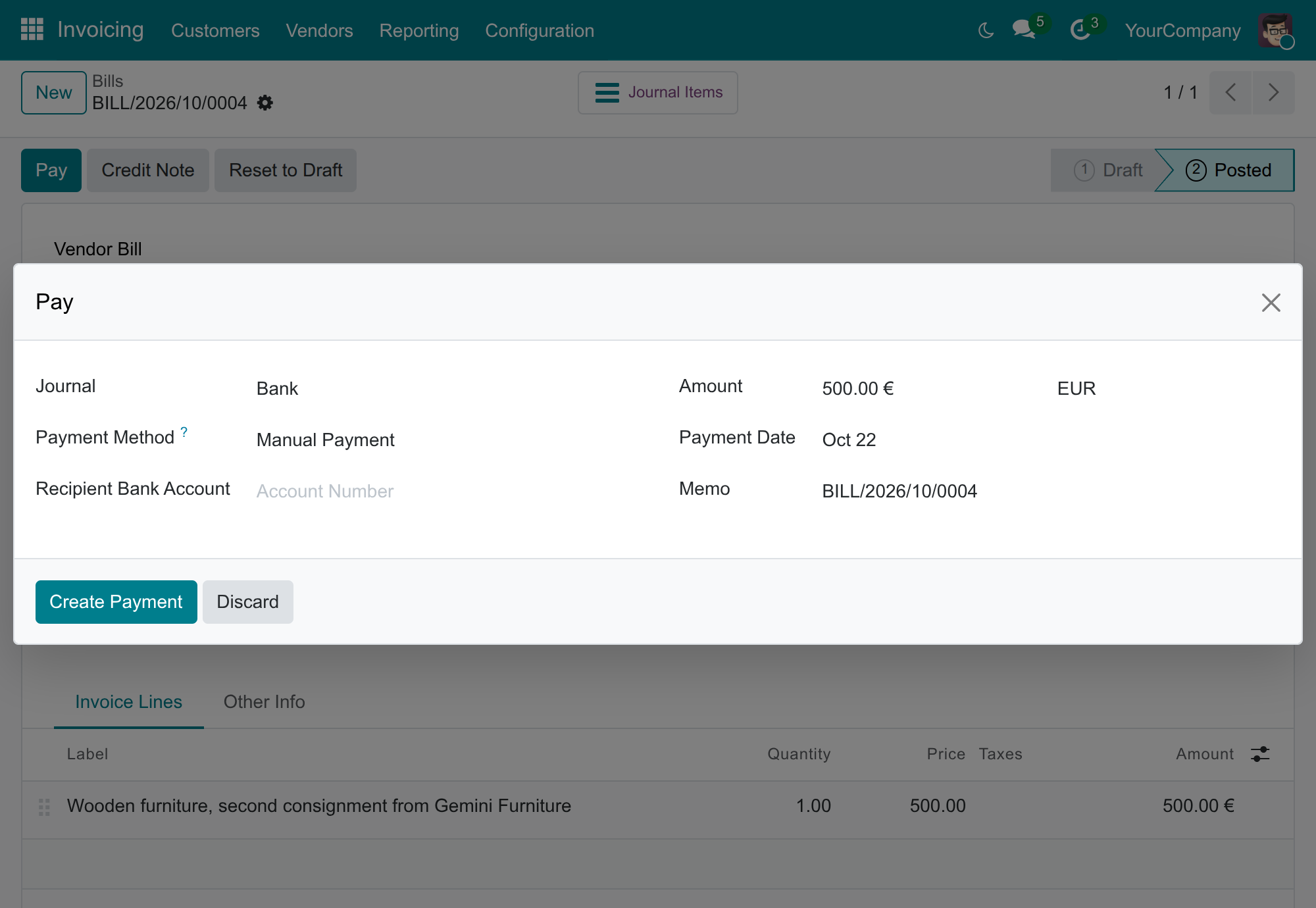
The payment takes the rate of the bank of the journal you chose: the Sell Rate when you send money, the Buy Rate when you receive it. A journal with no bank falls back to the Main Bank.
In the example, EUR 1,000 sent from the Bank journal (ING) on 22 October is booked at USD 1,140.00, the Sell Rate of 1.14 that ING published on 15 October. The bill was booked at USD 1,130.00 with the Main Bank's rate, so the standard exchange difference entry of USD 10.00 is posted when the payment settles the bill. The EUR 2,000 received on the same journal is booked at USD 2,180.00, the Buy Rate of 1.09 of ING.
Other documents that follow the same rule
- Bank statement lines: money received takes the Buy Rate and money paid out the Sell Rate of the bank of the statement journal.
- Transfers between your own bank journals: by default the leg that sends the money takes the Buy Rate and the leg that receives it takes the Sell Rate.
- Paying in another currency than the document: the Pay dialog proposes the amount with the same types: Sell Rate when you send money and Buy Rate when you receive it if one of the two currencies is the company currency, and the Transfer Rate when both are foreign currencies. A company that keeps its books in VND and pays a USD bill from a EUR journal is the second case.
- Duplicating a journal entry: the copy takes a new date, and its foreign-currency lines are priced again at the bank rate of that date. An entry that mixes lines in the company currency and in a foreign currency keeps the amounts it was copied with, so it can still be posted.
Troubleshooting
- A bill or invoice is converted one to one
- The currency has no rate dated on or before the document date, while a Main Bank or a journal bank applies. Add a rate for that currency dated on or before the document date. A document still in draft converts again when you change its date; a posted one is set back to draft first.
- Odoo refuses a rate: only one currency rate per day is allowed
- A rate already exists for the same currency, day, bank and exchange type. Edit that line, or give the new one another bank or another exchange type.
- A rate cannot be saved without a bank
- The Bank is required once an Exchange Type is chosen. Pick the bank, or clear the exchange type to enter a plain rate.
- A rate I entered is not used
- Check the three conditions: the rate is dated on or before the document date, its bank is the one the document uses (the Main Bank for bills and invoices, the journal's bank for payments), and its exchange type is the one the document takes (Sell Rate for a bill or a payment sent, Buy Rate for an invoice or a payment received).
- The payment is booked at another rate than its bill
- This is expected. A bill takes the rate of the Main Bank and a payment the rate of the bank of its journal. The difference is posted as an exchange difference when the payment settles the bill.
- A bank cannot be saved
- Auto Currency Rates Update is ticked and no Auto Currency Rates Update Service Provider is available. Untick the box, or install the application that supplies the provider.
- The Currencies list does not show the rate of my invoices
- The Unit per USD column shows the latest rate of the Main Bank, whatever its type. The rate of a document is shown under Currency on the document itself.
- A branch converts at the wrong bank
- Check Invoicing ‣ Configuration ‣ Settings with the branch selected. A branch without a Main Bank takes the one of its parent company.
FAQ
- Does the application download the bank rates?
- No. Rates are entered by hand. The bank form has a switch for an automatic update, but the provider that would fetch the rates has to come from another application.
- Can I enter a rate without a bank?
- Yes. A rate with no bank and no exchange type is a plain rate: it is used when no bank rate fits.
- Which rate do credit notes take?
- The same as the document they correct: a vendor credit note the Sell Rate, a customer credit note the Buy Rate.
- Do documents already posted change when I add or change a rate?
- No. The converted amounts are fixed on the entry when it is posted.
- Where are the Transfer Rates used?
- When the Pay dialog proposes the amount of a payment made in a foreign currency for a document in another foreign currency, and on customs declarations with the application Foreign Trade & Logistics Currency Rate.
This software and associated files (the "Software") may only be used (executed, modified, executed after modifications) if you have purchased a valid license from the authors, typically via Odoo Apps, or if you have received a written agreement from the authors of the Software (see the COPYRIGHT file).
You may develop Odoo modules that use the Software as a library (typically by depending on it, importing it and using its resources), but without copying any source code or material from the Software. You may distribute those modules under the license of your choice, provided that this license is compatible with the terms of the Odoo Proprietary License (For example: LGPL, MIT, or proprietary licenses similar to this one).
It is forbidden to publish, distribute, sublicense, or sell copies of the Software or modified copies of the Software.
The above copyright notice and this permission notice must be included in all copies or substantial portions of the Software.
THE SOFTWARE IS PROVIDED "AS IS", WITHOUT WARRANTY OF ANY KIND, EXPRESS OR IMPLIED, INCLUDING BUT NOT LIMITED TO THE WARRANTIES OF MERCHANTABILITY, FITNESS FOR A PARTICULAR PURPOSE AND NONINFRINGEMENT. IN NO EVENT SHALL THE AUTHORS OR COPYRIGHT HOLDERS BE LIABLE FOR ANY CLAIM, DAMAGES OR OTHER LIABILITY, WHETHER IN AN ACTION OF CONTRACT, TORT OR OTHERWISE, ARISING FROM, OUT OF OR IN CONNECTION WITH THE SOFTWARE OR THE USE OR OTHER DEALINGS IN THE SOFTWARE.
