


Loan Management
| Lines of Code | 8525 |
| Technical name | to_loan_management |
| License | OPL-1 |
| Website | https://viindoo.com/intro/loan-management |
| Read description for | v 10.0 v 11.0 v 12.0 v 13.0 v 14.0 v 15.0 v 16.0 v 17.0 |
| Required Apps | Invoicing (account) Discuss (mail) |
| Included Dependencies | Viindoo Base Accounting Foundation |
| Extensions | Loan Management - Vietnam Accounting Bank Exchange Rate Application for Loans |
 Loan Management
Manage every loan — borrowing and lending — in one place
From the first disbursement to the final repayment, Loan Management keeps contracts, interest, and journal entries accurate and automatic inside Odoo Accounting.
Start a 15-day free trial Watch the demo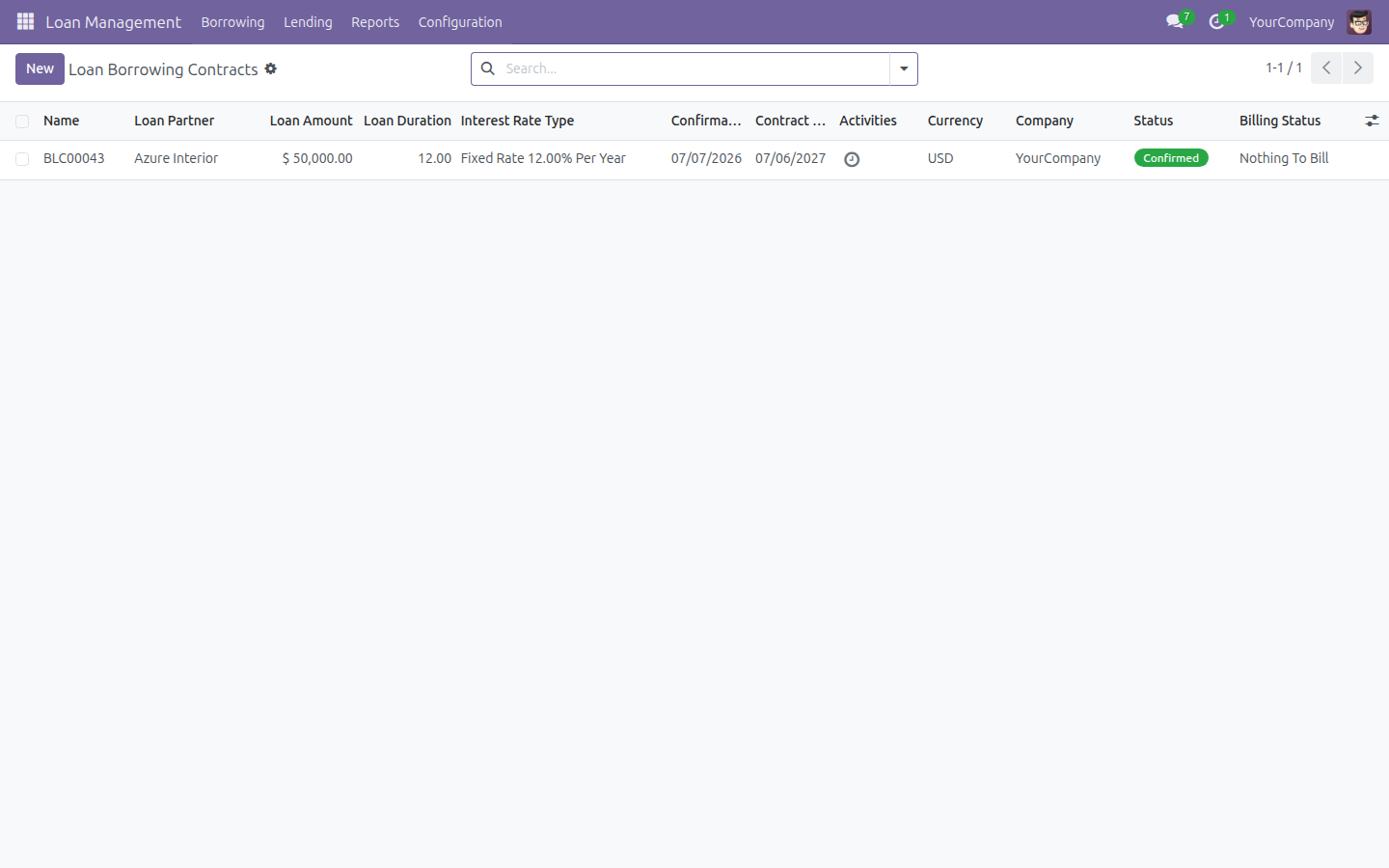
Two-way loan contracts
Create borrowing contracts with partners and lending contracts to partners from the same app. Each side mirrors the other, so your team learns one workflow and applies it everywhere.
Fixed and floating interest
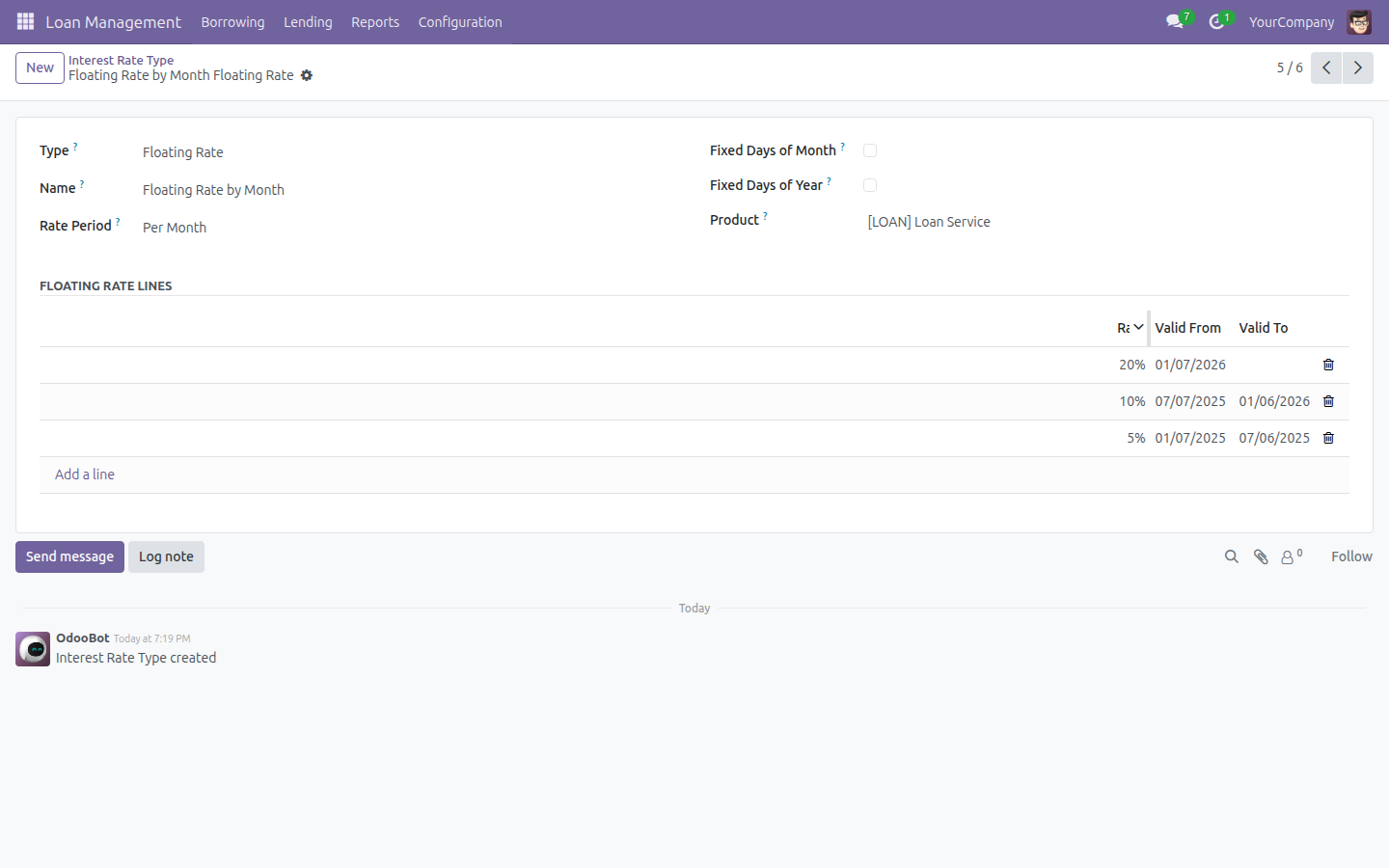
Define fixed or floating rate types once and let the app compute periodic interest per repayment schedule. Rate changes take effect from the date you set — no manual recalculation.
Automatic payment matching
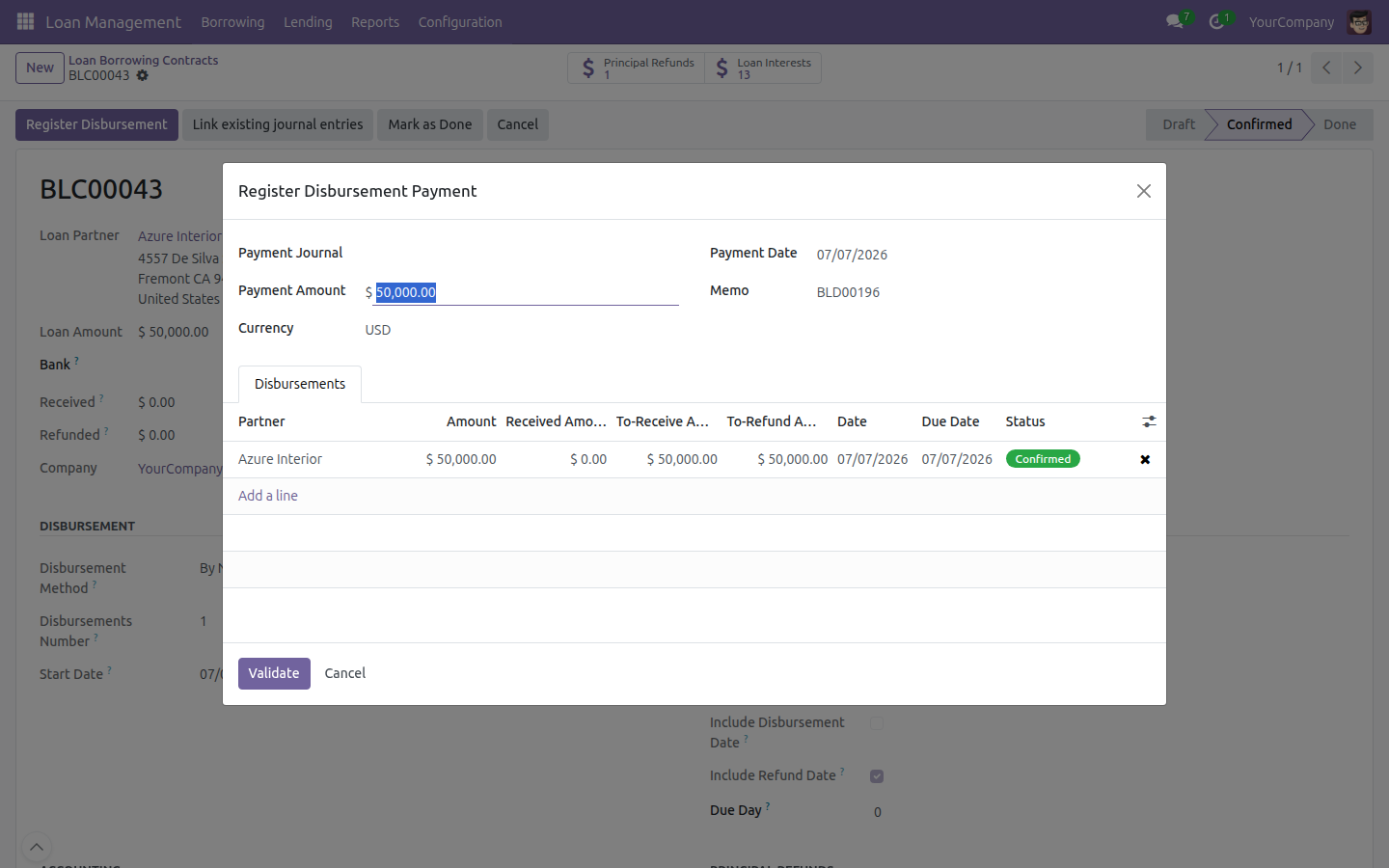
Record repayments and let the app reconcile them against the right contract, block over-payment beyond the outstanding balance, and update loan balances in real time.
Key Features
Borrowing Contracts
Draft, confirm, cancel; track disbursements, repayments, refunds; auto payment schedule.
Lending Contracts
Split into multiple disbursements; record disbursed amounts and dates; mark fully repaid or adjust early.
Disbursements
Single or multiple, per contract, with their own state and accounting.
Interest Computation
Fixed and floating rate types, periodic interest, outstanding-interest tracking.
Principal Refunds
Partial or full, capped at the borrowed amount, with automatic journal entries.
Payment Management & Reconciliation
Partial/full repayments, over/under-payment handling, discrepancy alerts.
Link Existing Journal Entries
Attach journal items you already posted to loan disbursement and refund lines.
Interest Invoicing
Create the bill (borrowing) or invoice (lending) for each interest period.
Multi-Currency
Manage loans in several currencies with automatic exchange-rate differences.
Accounting Integration
Journal entries generated automatically on disbursement, repayment, and refund.
Loan Analysis
A pivot and graph report over interest, total debt, and outstanding balances.
Role-Based Access
Loan Management User and Administrator groups.
Benefits
Efficiency: automated schedules, tracking, and journal entries remove the manual spreadsheet work.
Precision: interest is computed the same way every period, for both borrowing and lending.
Compliance: built-in journal entries and analytics keep loan activity inside your accounting standards.
Scalability: manage loans across companies, currencies, and regions from one app.
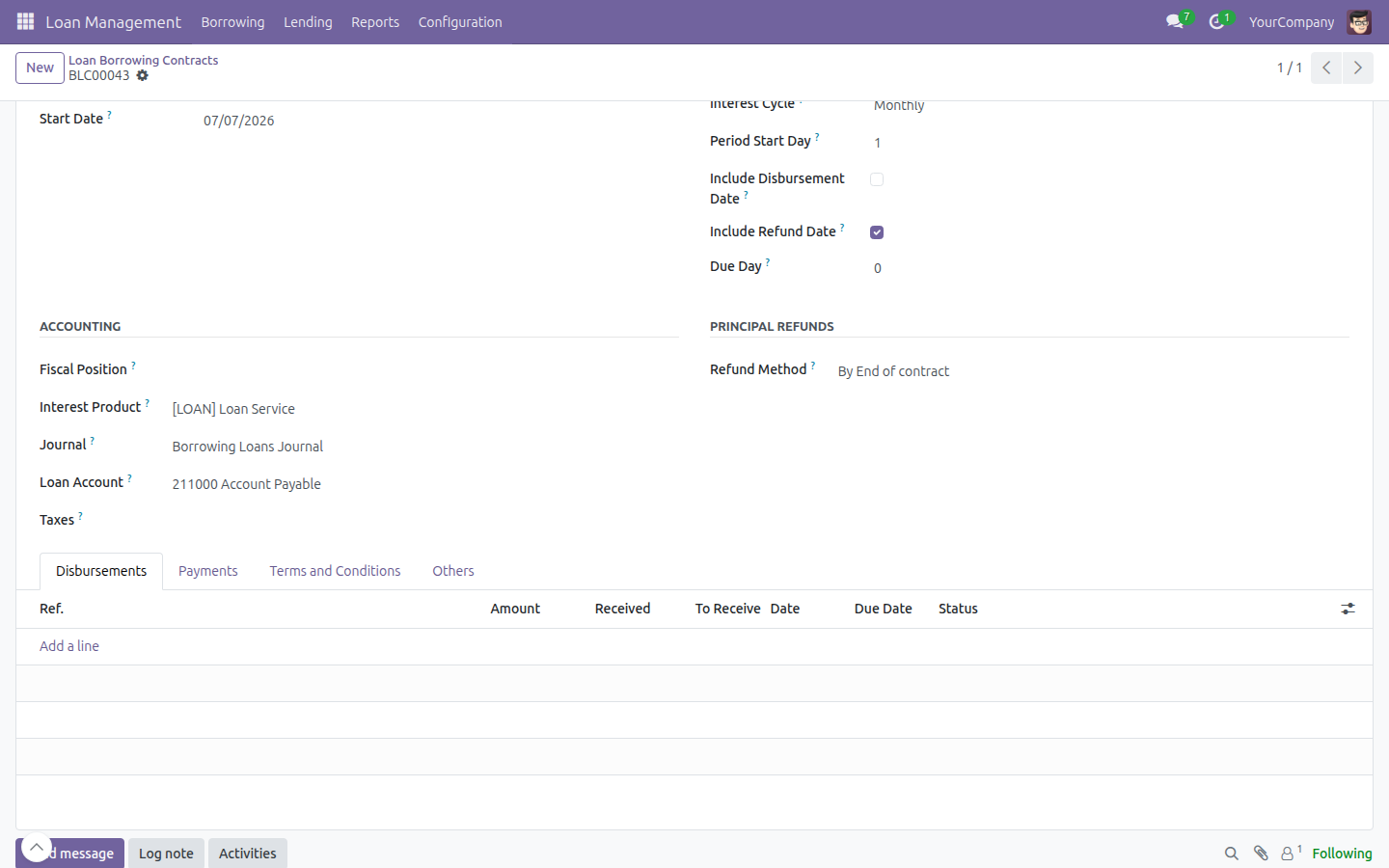
Start a Borrowing Contract
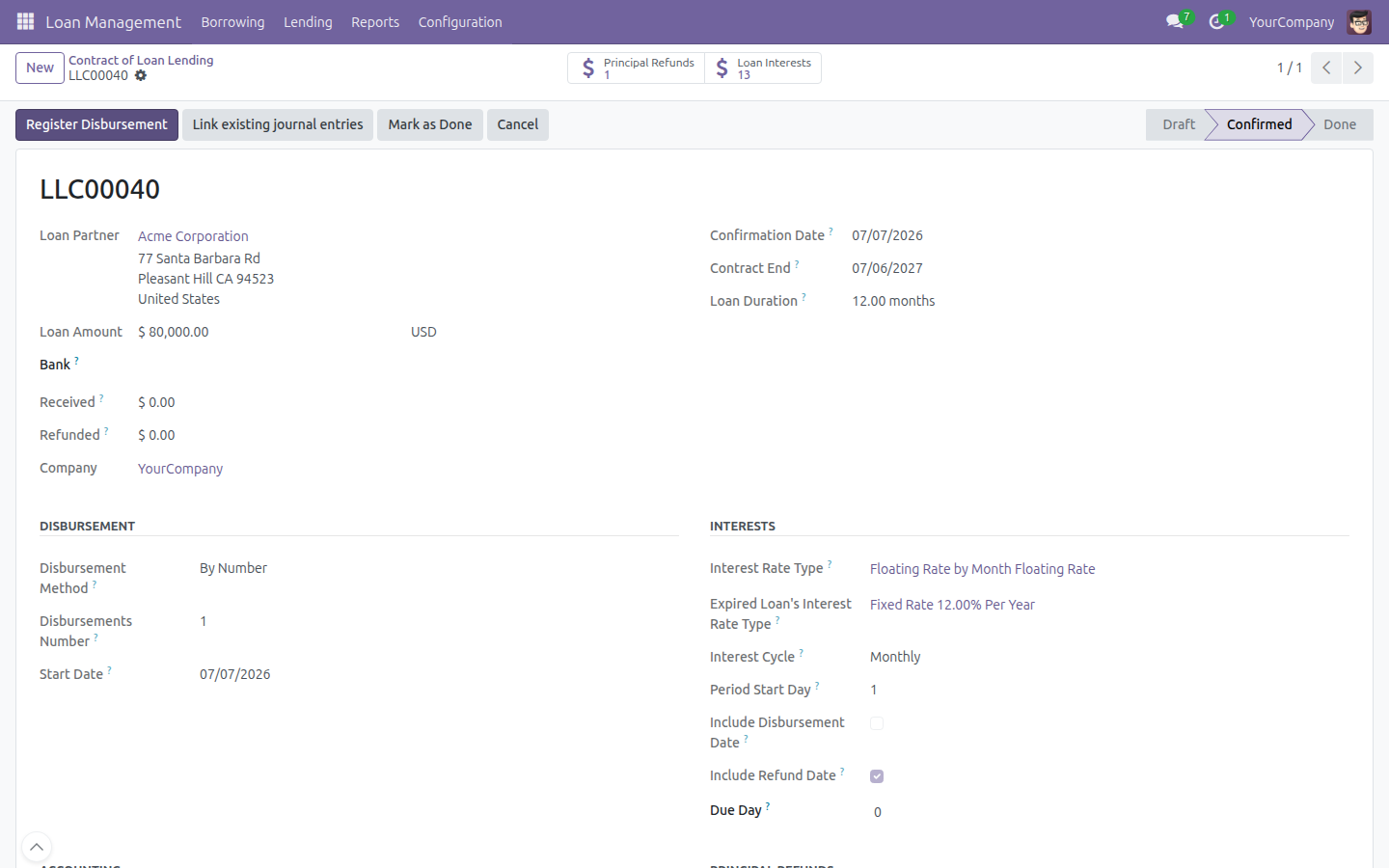
Manage a Lending Contract
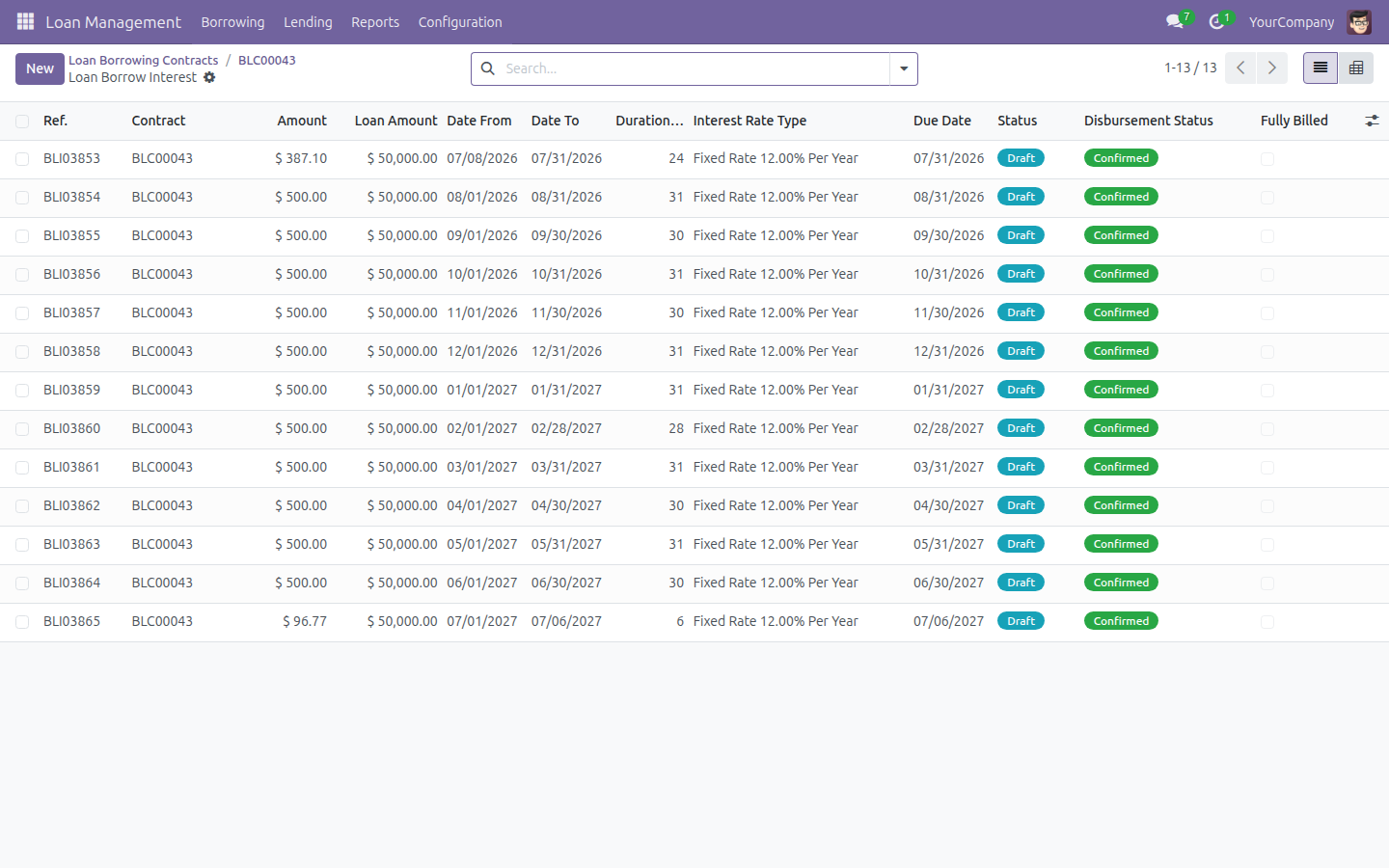
Track Interest Lines
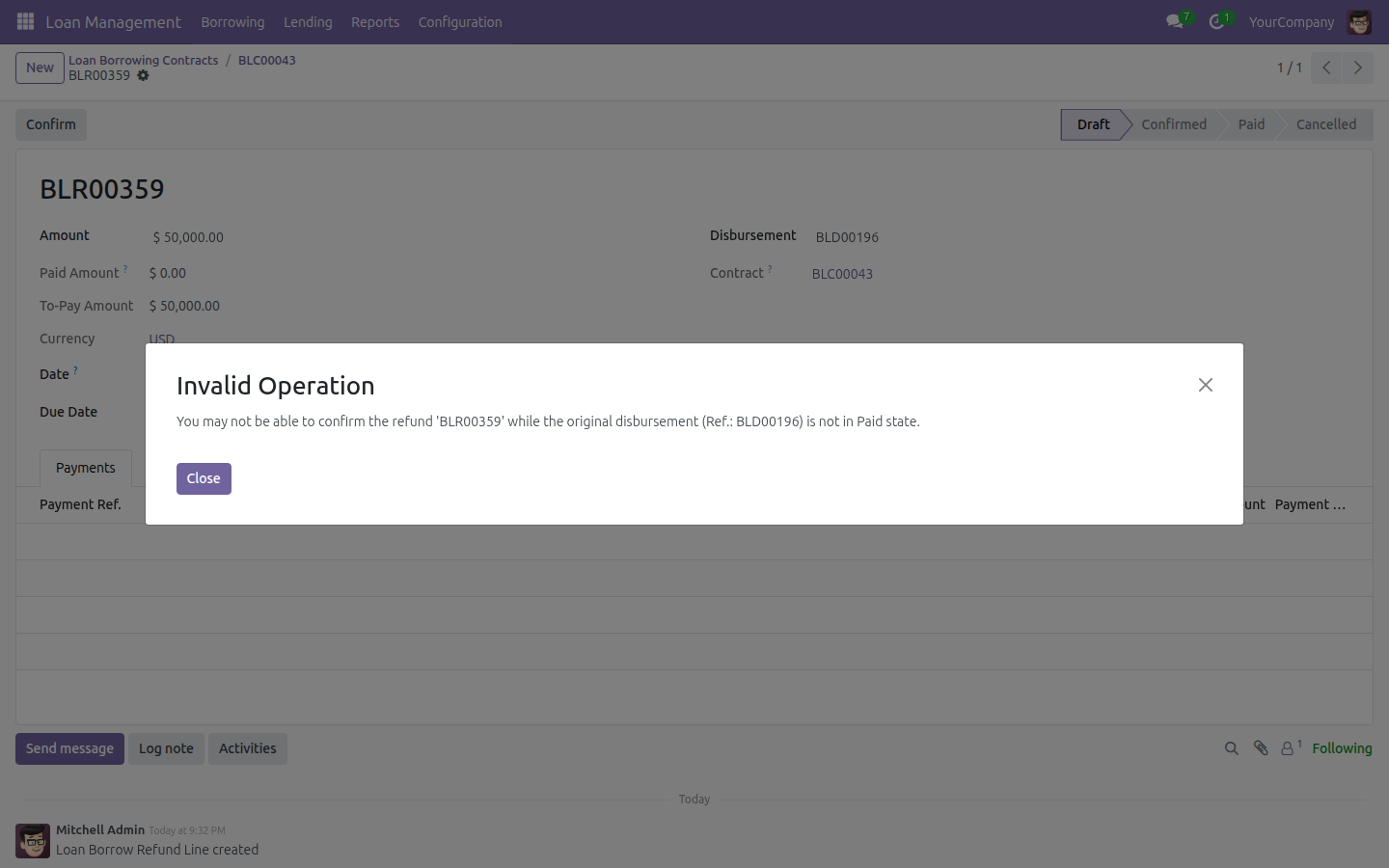
Plan a Principal Refund
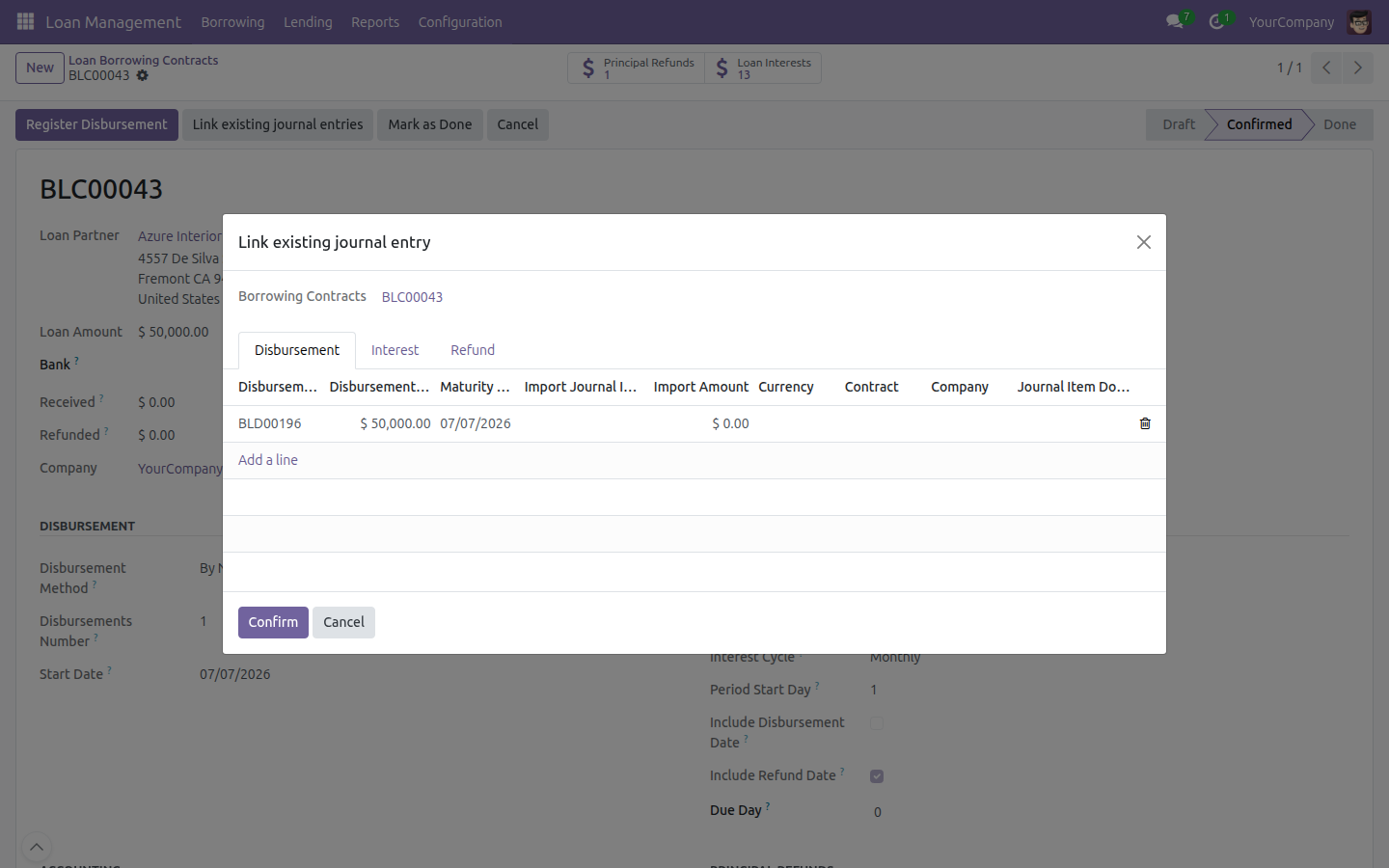
Link Existing Journal Entries
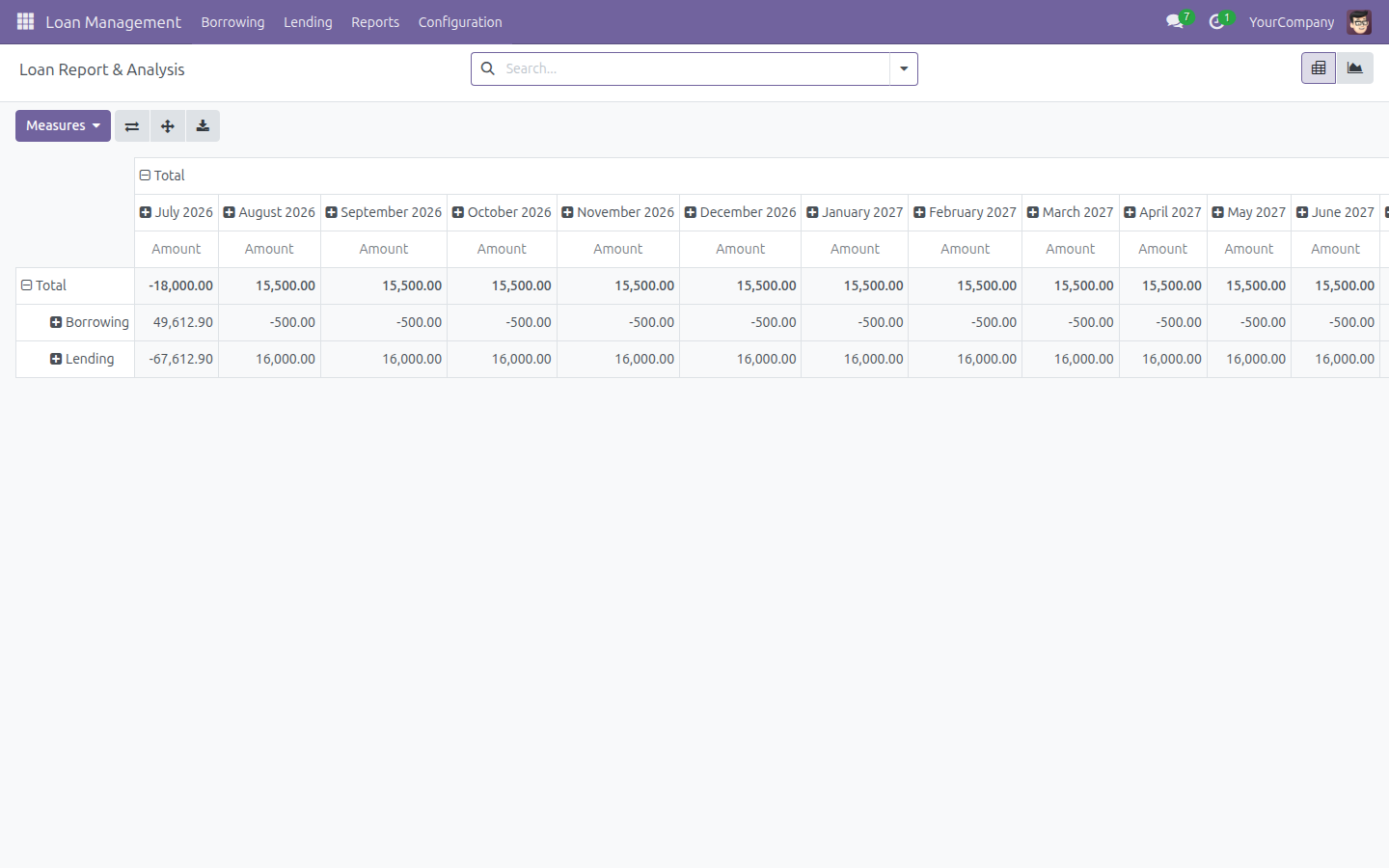
Analyze Loan Performance
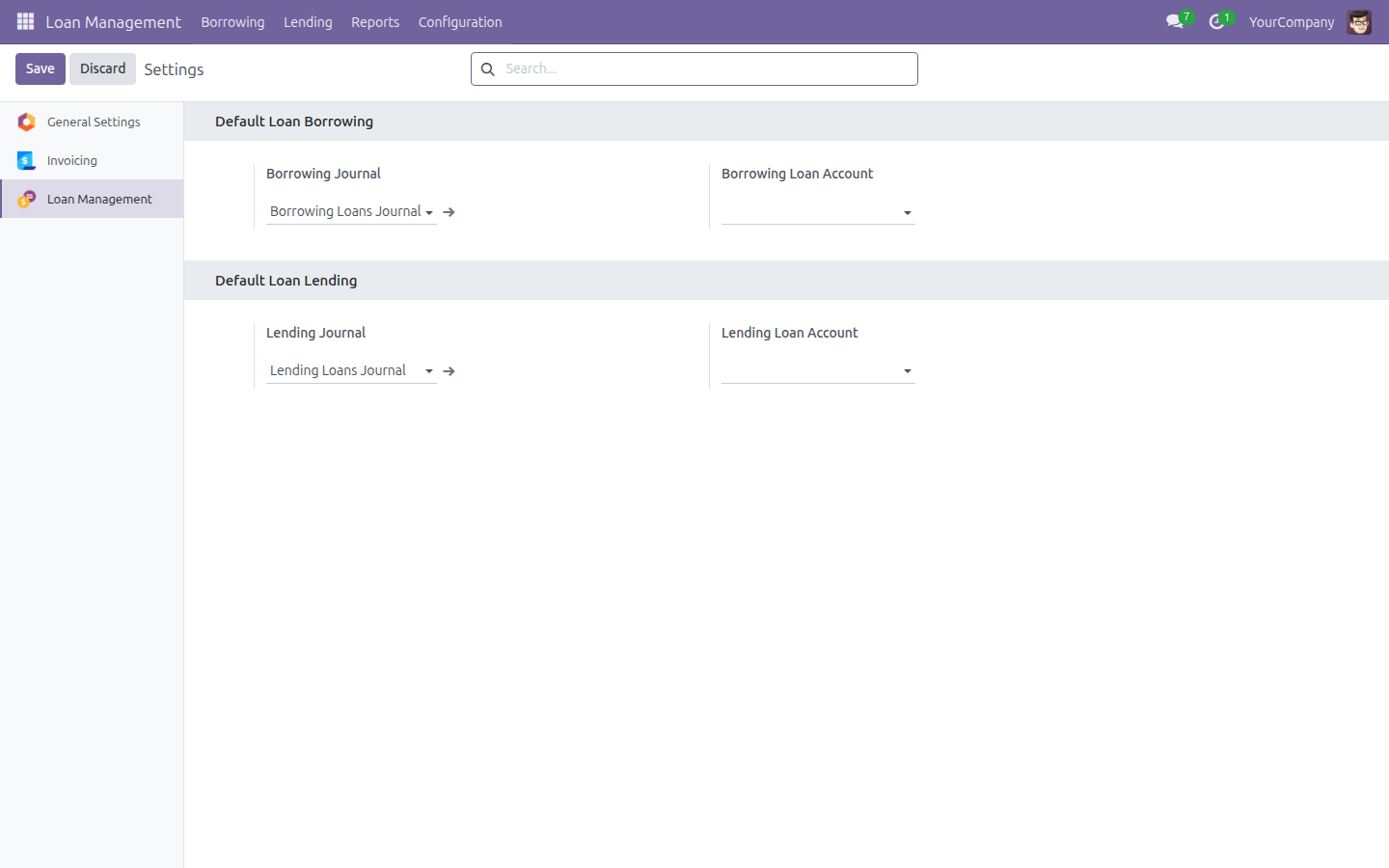
Configure Loan Journals and Accounts
See Loan Management in Action
Need help with Loan Management?
Pre-Sales & Partnership
viindoo.com/intro/loan-managementTechnical Support
apps.support@viindoo.comTechnical Requirement
- Odoo version: 18.0
- Editions: Community, Enterprise
- Required modules: Viindoo Accounting (viin_account), Viindoo Base (to_base)
- License: OPL-1
Who Should Use This Module?
Financial Institutions & Banks
Financial institutions, banks, and credit companies offering loan or consumer-lending services.
Businesses with Internal Borrowing
Businesses with internal borrowing between branches or subsidiaries, or project financing from banks and partners.
Funding & Non-Profit Organizations
Funding organizations, non-profits, and social enterprises managing disbursement and repayment schedules.
Private Lenders & Investors
Private lenders and investors tracking interest, repayment schedules, and cash flow.
Frequently Asked Questions
Does it handle both money we borrow and money we lend?
Yes — borrowing and lending contracts are both first-class, with mirrored workflows.
Can interest rates change during a contract?
Yes — fixed or floating rate types, with changes effective from the date you set.
Does it post to accounting automatically?
Yes — disbursements, repayments, and refunds generate journal entries in Odoo Accounting.
Can I link journal entries I already recorded?
Yes — attach existing journal items to a loan's disbursement or refund lines.
Does it support foreign-currency loans?
Yes — multi-currency with automatic exchange-rate differences.
Bring every loan into one accurate, automatic workflow.
Start a 15-day free trial
Loan Management
Loan Management gives you one place to track both money your company borrows and money your company lends: contracts, disbursements, principal refunds, interest, payments, and the resulting accounting entries.
Installation
- Open the Apps menu.
- Search for Loan Management.
- Click Install.
Loan Management depends on the following apps and installs them automatically if they are missing:
- Accounting (Odoo's own Invoicing/Accounting app)
- Accounting Foundation
- Viindoo Base
Configuration
Set the defaults below before creating your first contract.
Default journals and accounts
Open Loan Management > Configuration > Settings. Under Default Loan Borrowing, set the Borrowing Journal and the Borrowing Loan Account used for new borrowing contracts. Under Default Loan Lending, set the Lending Journal and the Lending Loan Account used for new lending contracts. Click Save.

Interest Rate Type
Interest rates are defined once as reusable Interest Rate Type records, then picked on any contract.
- Open Loan Management > Configuration > Interest Rates > Interest Rate Type.
- Click New.
- Set Type to Fixed Rate or Floating Rate.
- Give it a Name, then set the Rate Period (Per Week, Per Month, or Per Year).
- For a Fixed Rate, fill in the fixed rate percentage.
- For a Floating Rate, add one line per period under Floating Rate Lines, each with a Rate, a Valid From date, and an optional Valid To date - this lets the rate change over time without editing the contract.
- Optionally set the Product used to invoice the interest.
- Click Save.

Loan Service product
Any service product can be used to invoice interest: open the product form and enable the Loan Interest product option so it becomes selectable on Interest Rate Types and on loan contracts.
Usage
Borrowing
Use Borrowing to track a loan your company receives from a lender.
Create and confirm a borrowing contract
- Open Loan Management > Borrowing > Contracts.
- Click New.
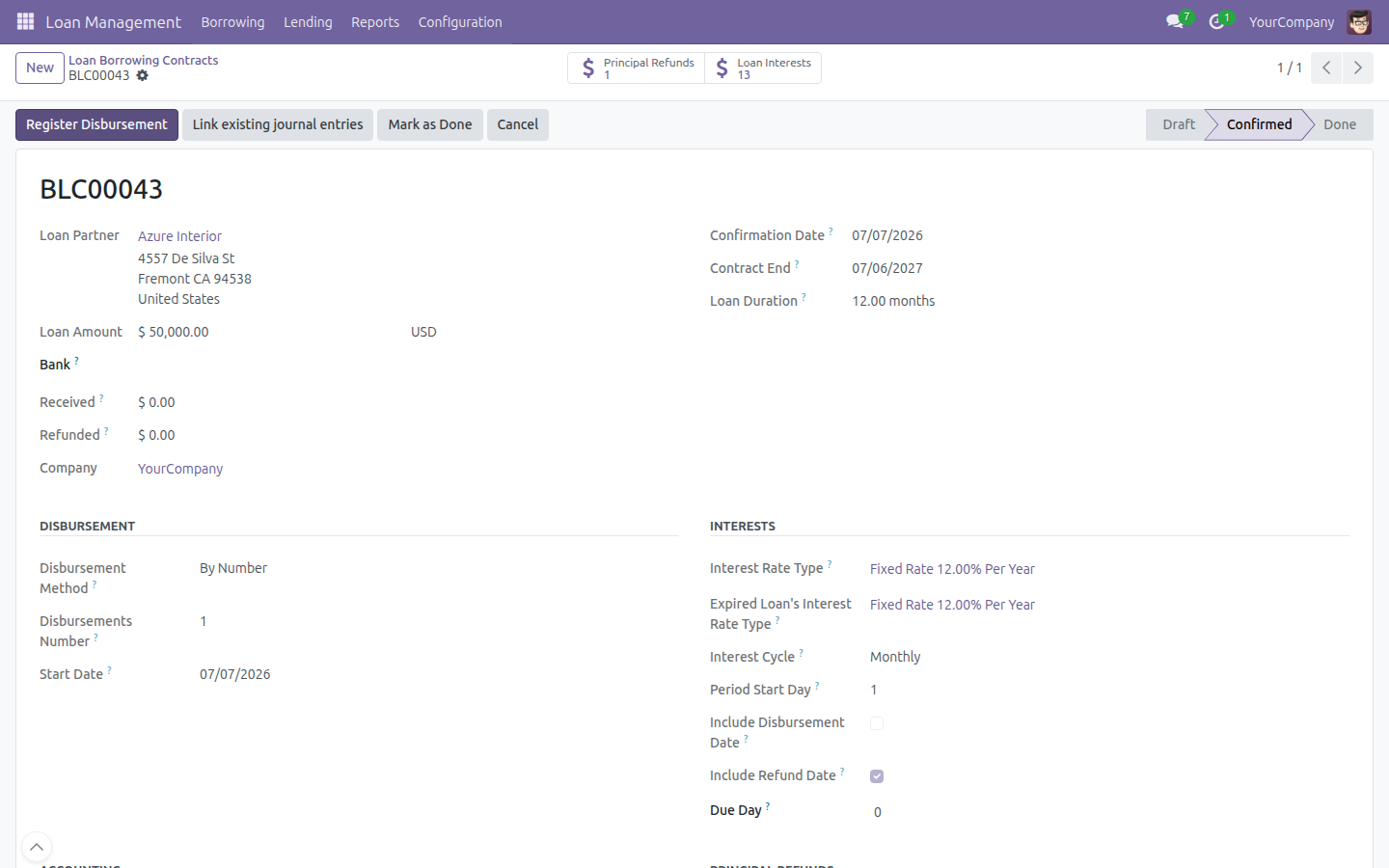
- Fill in the Loan Partner (the lender) and the Loan Amount.
- Under Disbursement, choose the Disbursement Method (By Number, By End Date, or Upon Request) and the Start Date.
- Under Interests, pick the Interest Rate Type and the Expired Loan's Interest Rate Type, then set the Interest Cycle (Weekly, Monthly, Quarterly, Biannually, or Annually).
- Under Accounting, set the Journal and the Loan Account used to post the contract's entries.
- Under Principal Refunds, choose the Refund Method.
- Click Save, then click Confirm.

Confirming the contract automatically generates its disbursement schedule (shown on the Disbursements tab) as well as the principal refund and interest lines, reachable from the Principal Refunds and Loan Interests smart buttons on the contract.


Register the disbursement payment
Once a contract is confirmed, click Register Disbursement on the contract (or open Loan Management > Borrowing > Disbursements and open a line) to record the money actually received from the lender.
- Click Register Disbursement.
- Choose the Payment Journal and check the Payment Amount, Payment Date, and Memo.
- Select which disbursement lines the payment covers.
- Click Validate.

The payment is automatically matched against the outstanding disbursement balance, so partial payments, overpayments, and underpayments are tracked without extra setup.
Track interest
Open Loan Management > Borrowing > Interests to see every interest line generated for your borrowing contracts, with its Amount, Date From, Date To, and Status.

Select one or more Draft lines and use Actions > Interest Immediate Confirm to confirm them in bulk, without opening each line. A confirmed interest line stays outstanding until it is paid or invoiced.
Register the principal refund
Open Loan Management > Borrowing > Principal Refunds to see the repayment installments due back to the lender. Open a line and click Confirm, then click Register Refund to record the amount your company sends back to the lender.

Invoice interest
To turn confirmed, not-yet-billed interest lines into a vendor bill: select the lines on Loan Management > Borrowing > Interests and use Actions > Create Invoice. Loan Management groups the selected lines by company, currency, partner, journal, and fiscal position, then opens the Interests Invoicing wizard where you click Create Invoices (or Create & View Invoice to open the resulting bill directly).
Link existing journal entries
If a bank statement or another process already created journal entries for a disbursement, interest, or refund outside of Loan Management, click Link existing journal entries on the contract to reconcile them retroactively instead of re-entering the transaction.
- Click Link existing journal entries on a confirmed contract.
- On the Disbursement, Interest, or Refund tab, pick the Move Line(s) to import for each line and check the resulting Import Amount.
- Click Confirm.

Loan Management creates the matching payment record automatically, flips the interest to Paid once fully settled, and reconciles the disbursement payment.
Lending
Lending mirrors every Borrowing screen for a loan your company grants to a partner: Loan Management > Lending > Contracts, Disbursements, Principal Refunds, and Interests work the same way, with money flowing in the opposite direction (your company sends the disbursement and receives the refund and interest).
- Open Loan Management > Lending > Contracts and click New.
- Fill in the Loan Partner (the borrower), the Loan Amount, the Interest Rate Type, and the Loan Account, exactly as for a borrowing contract.
- Click Save, then Confirm.

Use Register Disbursement to record money sent to the borrower, and Register Refund to record money received back, then invoice interest to the borrower the same way as on the Borrowing side (this time it creates a customer invoice instead of a vendor bill).
Loan Analysis report
Open Loan Management > Reports > Loan Analysis for a pivot and graph view across every disbursement, principal refund, and interest transaction, for both Borrowing and Lending, with amounts converted to your company currency. Use Measures to change what is summed, Flip axis and Expand all to reshape the table, and Download xlsx to export it.

This report is only visible to users in the Administrator role.
Roles
Loan Management adds two roles, set on a user's Settings > Users form under the Loan Management section:
- User - full access to borrowing and lending operations (contracts, disbursements, refunds, interest, payments).
- Administrator - everything a User can do, plus Configuration (Settings, Interest Rate Type) and the Loan Analysis report.
Troubleshooting
"No outstanding account is configured for inbound/outbound payments"
This appears when registering a disbursement or refund payment on a journal (for example Bank or Cash) that has no outstanding account set for its payment method. Open Accounting > Configuration > Journals, open the journal used by the contract, and set an outstanding receipts/payments account on its payment methods, then register the payment again.
"You may not be able to confirm the refund while the original disbursement is not in Paid state" -------------------------------------------------------------------------
A principal refund can only be confirmed once its disbursement has been paid in full. Register and validate the disbursement payment first (see Register the disbursement payment), then confirm the refund.
"You may not be able to confirm an interest if its associated disbursement is neither in Paid state nor in Refunded state" -------------------------------------------------------------------------
Same rule as above, applied to interest: pay the disbursement before confirming or invoicing the interest lines that depend on it.
A repayment does not match any disbursement or refund line
Registering a payment always matches it automatically against the outstanding balance of the selected lines. If the amount does not fully settle a line, the remaining balance stays open as a partial payment - split the payment across several disbursements or refunds instead of forcing one line to absorb the full amount.
FAQ
Can I split a loan into several disbursements? Yes. Set Disbursement Method to By Number (and choose how many), By End Date, or Upon Request on the contract before confirming it.
Can the interest rate change during the life of a contract? Yes, if the contract uses a Floating Rate Interest Rate Type. Add a new line under Floating Rate Lines with the new rate and a Valid From date; existing confirmed interest keeps its original rate.
What happens if a partner overpays or underpays? Loan Management automatically matches the payment against the outstanding balance; any difference stays visible as a partial or over-matched amount on the disbursement or refund line so you can follow up.
Does Loan Management support multiple currencies? Yes. Set the contract's currency when creating it; disbursement, repayment, and refund journal entries are posted with the exchange rate in effect on each transaction date, and the Loan Analysis report converts everything to your company currency.
Who can see the Loan Analysis report and change the default journals? Only users in the Administrator role; the User role covers the day-to-day contract, disbursement, refund, and interest operations.
This software and associated files (the "Software") may only be used (executed, modified, executed after modifications) if you have purchased a valid license from the authors, typically via Odoo Apps, or if you have received a written agreement from the authors of the Software (see the COPYRIGHT file).
You may develop Odoo modules that use the Software as a library (typically by depending on it, importing it and using its resources), but without copying any source code or material from the Software. You may distribute those modules under the license of your choice, provided that this license is compatible with the terms of the Odoo Proprietary License (For example: LGPL, MIT, or proprietary licenses similar to this one).
It is forbidden to publish, distribute, sublicense, or sell copies of the Software or modified copies of the Software.
The above copyright notice and this permission notice must be included in all copies or substantial portions of the Software.
THE SOFTWARE IS PROVIDED "AS IS", WITHOUT WARRANTY OF ANY KIND, EXPRESS OR IMPLIED, INCLUDING BUT NOT LIMITED TO THE WARRANTIES OF MERCHANTABILITY, FITNESS FOR A PARTICULAR PURPOSE AND NONINFRINGEMENT. IN NO EVENT SHALL THE AUTHORS OR COPYRIGHT HOLDERS BE LIABLE FOR ANY CLAIM, DAMAGES OR OTHER LIABILITY, WHETHER IN AN ACTION OF CONTRACT, TORT OR OTHERWISE, ARISING FROM, OUT OF OR IN CONNECTION WITH THE SOFTWARE OR THE USE OR OTHER DEALINGS IN THE SOFTWARE.
