

Project Scheduling
by Viindoo
| Lines of Code | 1483 |
| Technical name | viin_project_gantt |
| License | OPL-1 |
| Website | https://viindoo.com/apps/modules/19.0/viin_project_gantt |
| Read description for | v 16.0 v 17.0 v 18.0 |
| Required Apps | Project (project) Discuss (mail) Employees (hr) |
| Included Dependencies | Web Gantt |
| Extensions | Freight Project Gantt |

Gantt planning for project tasks
Plan, allocate resources, and determine the time to do each task based on scheduled hours, start and end dates - built on Viindoo Web Gantt.
Project Scheduling (technical name viin_project_gantt) is an Odoo 19.0 app for Odoo Community, built for project managers, delivery and PMO teams, and Odoo implementers.
At a Glance
The facts of Project Scheduling, version 0.1.4, in one place. Published by Viindoo.
project.task (Gantt fields, critical path) and ir.actions.act_window.viewHow It Works
Three screens.
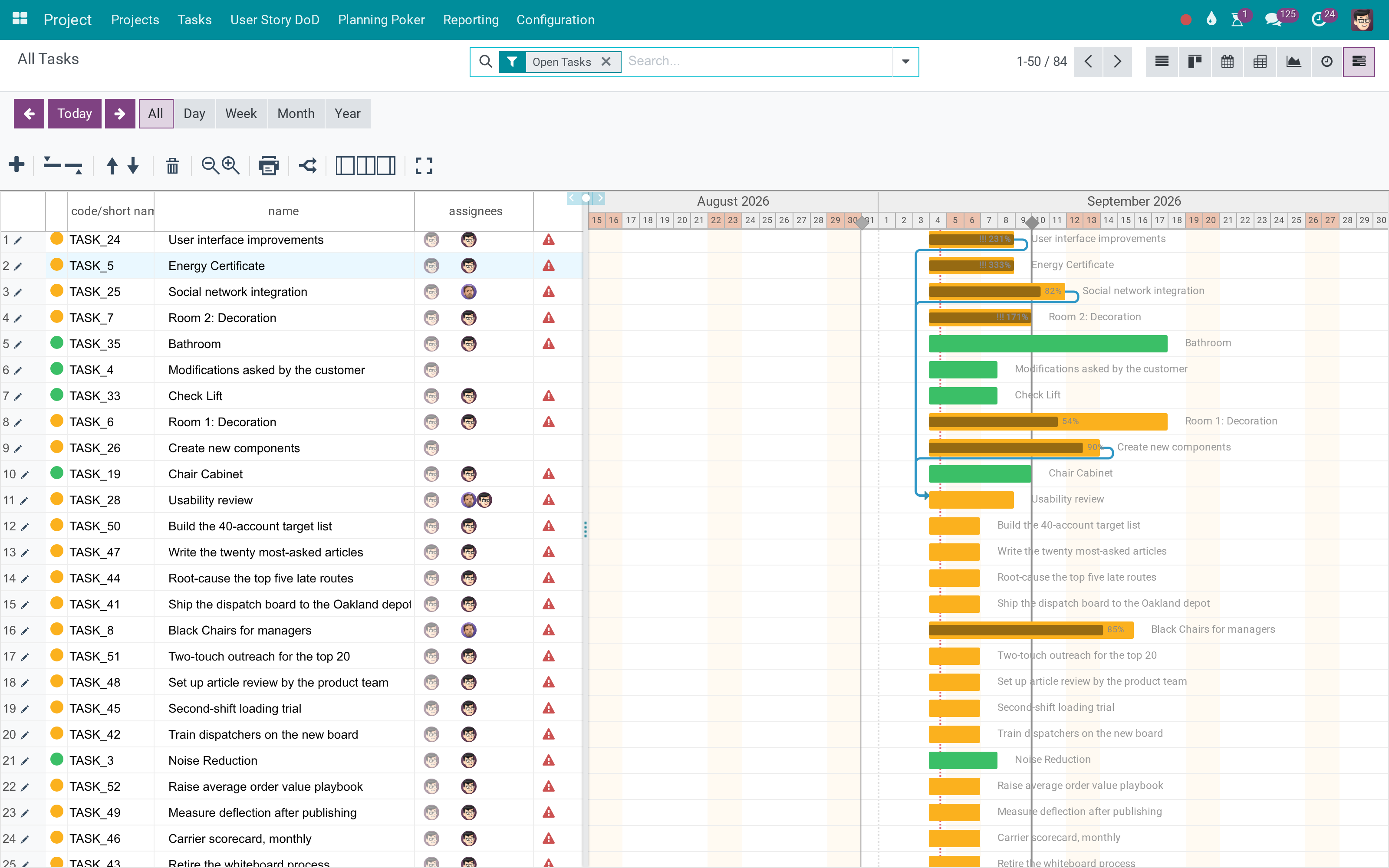
The timeline
Planned start and end, progress, and dependencies on one Gantt.
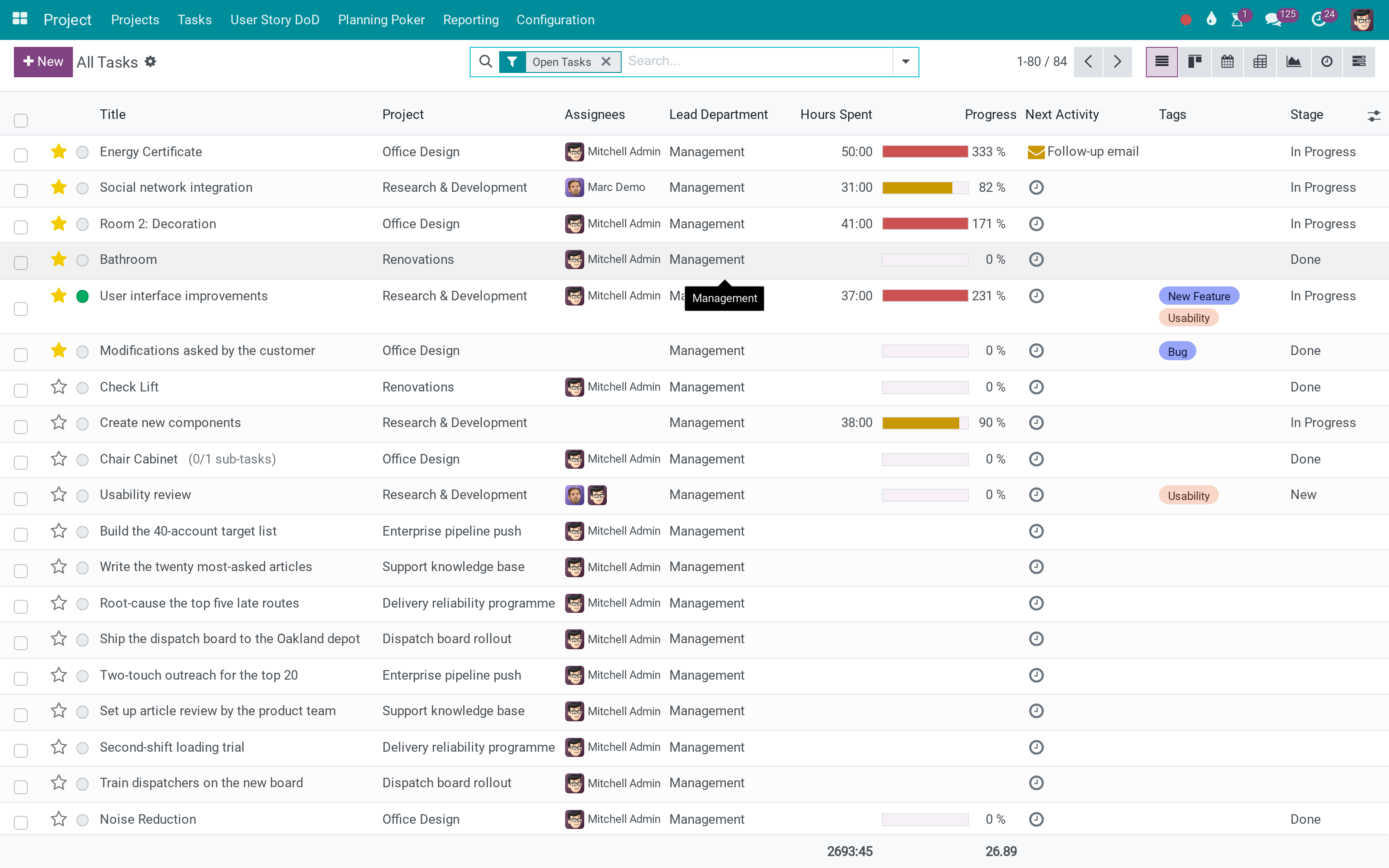
The tasks
The records the bars are drawn from.
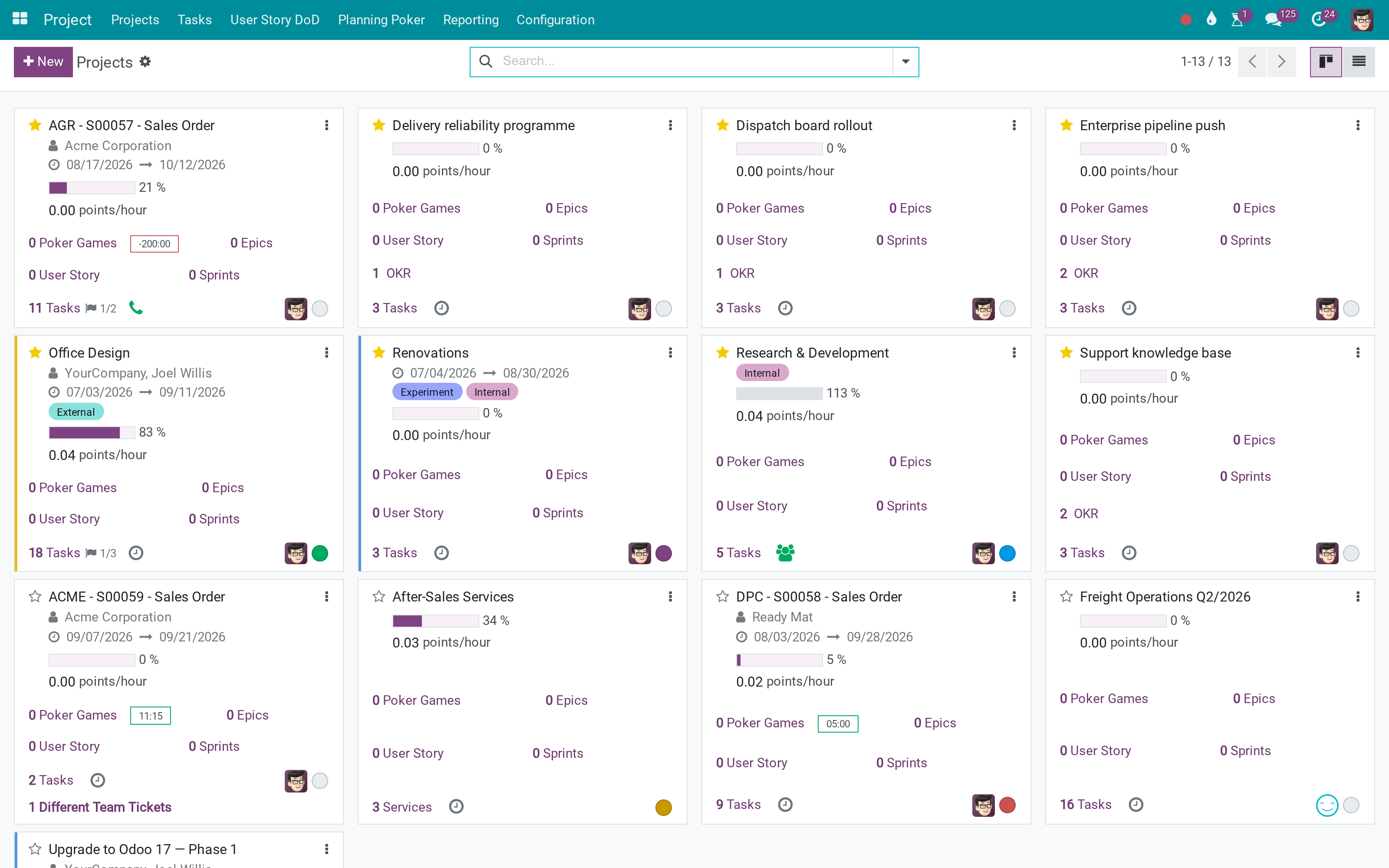
The projects
Where they belong.
What You Get
Gantt view of project tasks
Planned end date calculated from scheduled hours
Task dependencies visible on the chart
Critical Path Method insight
Reschedule by dragging
Same tasks, another view
More Screens
Everything below was taken on a database seeded with real business data, on this series - not a mock-up and not a screenshot from an older version.
Projects
What This App Does Not Do
Read this before you buy. Everything below is something the app deliberately leaves to another app or to you.
It shows overload; resolving it is yours.
A task without start and end has no bar.
A Gantt of nothing is empty.
Works Well With
Apps from the same stack, built to fit this one:
Who Should Use Project Scheduling?
Project managers
Balance workloads, move milestones, and read dependency risk on a timeline tied to real tasks.
Delivery and PMO teams
Compare schedules across projects, explain delays with visual chains, and align plans with timesheet reality.
Odoo implementers
Give customers a turnkey Gantt on standard project.task records without custom JavaScript.
Frequently Asked Questions
What does Project Scheduling do?
Gantt scheduling for Odoo Project tasks with planned dates, progress, assignees, stages, dependencies, and calendar-aware planned end calculation - plus Critical Path Method insight.
What does Project Scheduling not do?
It does not level resources. It shows overload; resolving it is yours. Tasks need dates. A task without start and end has no bar. It does not replace the plan.
Who is Project Scheduling for?
Project managers: balance workloads and read dependency risk on a real timeline. Delivery and PMO teams: compare schedules and align plans with timesheet reality. Odoo implementers: deliver a turnkey Gantt without custom JavaScript.
Which Odoo version and editions does it support?
Odoo 19.0 - Odoo Community Edition. Upgrades to a newer Odoo series are a separate purchase for that series.
What does it depend on?
It installs on top of: project, hr_timesheet, viin_web_gantt. Odoo installs them with it.
How do I set it up?
Install it on top of Project, Timesheets, and Web Gantt - the Gantt view appears on project tasks automatically.
What works well with it?
Web Gantt (viin_web_gantt): the required rendering engine. Scrum Project Scheduling (viin_project_scrum_gantt): the same Gantt for epics and user stories. Freight Project Gantt (viin_freight_gantt): the same Gantt for freight tasks.
Can I try it before buying?
Yes - the Live Preview button at the top of this page opens the module's own screen on a working database.
How do I get support?
Write to apps.support@viindoo.com with your Odoo version and the technical name viin_project_gantt; pre-sales questions go to sales@viindoo.com.
See Project Scheduling in Action
or use the Live Preview button at the top of this page
Need help with Project Scheduling?
For questions, implementation support or a custom feature, contact Viindoo.
Pre-Sales & Partnership
sales@viindoo.comUpgrades to a newer Odoo series are a separate purchase for that series.
All Viindoo apps: apps.odoo.com/apps/modules/browse?author=Viindoo
Technical Requirement
project), Timesheets (hr_timesheet), and Viindoo Web Gantt (viin_web_gantt)Changes log
0.1.4 - Latest on the 19.0 line
- Maintenance and compatibility updates for project tasks and Gantt integration.
0.1.0 - Initial release
- Initial Project Scheduling bridge with task Gantt view, planned dates, dependency-aware scheduling, resource allocation context, and Critical Path support.
This software and associated files (the "Software") may only be used (executed, modified, executed after modifications) if you have purchased a valid license from the authors, typically via Odoo Apps, or if you have received a written agreement from the authors of the Software (see the COPYRIGHT file).
You may develop Odoo modules that use the Software as a library (typically by depending on it, importing it and using its resources), but without copying any source code or material from the Software. You may distribute those modules under the license of your choice, provided that this license is compatible with the terms of the Odoo Proprietary License (For example: LGPL, MIT, or proprietary licenses similar to this one).
It is forbidden to publish, distribute, sublicense, or sell copies of the Software or modified copies of the Software.
The above copyright notice and this permission notice must be included in all copies or substantial portions of the Software.
THE SOFTWARE IS PROVIDED "AS IS", WITHOUT WARRANTY OF ANY KIND, EXPRESS OR IMPLIED, INCLUDING BUT NOT LIMITED TO THE WARRANTIES OF MERCHANTABILITY, FITNESS FOR A PARTICULAR PURPOSE AND NONINFRINGEMENT. IN NO EVENT SHALL THE AUTHORS OR COPYRIGHT HOLDERS BE LIABLE FOR ANY CLAIM, DAMAGES OR OTHER LIABILITY, WHETHER IN AN ACTION OF CONTRACT, TORT OR OTHERWISE, ARISING FROM, OUT OF OR IN CONNECTION WITH THE SOFTWARE OR THE USE OR OTHER DEALINGS IN THE SOFTWARE.
