

Stock Age Report
| Lines of Code | 1516 |
| Technical name | to_stock_age_report |
| License | OPL-1 |
| Website | https://viindoo.com/apps/modules/18.0/to_stock_age_report |
| Read description for | v 17.0 |
| Required Apps | Invoicing (account) Discuss (mail) Inventory (stock) |
| Included Dependencies | Viindoo Base Viin Warehouse |

How old is the stock you are holding?
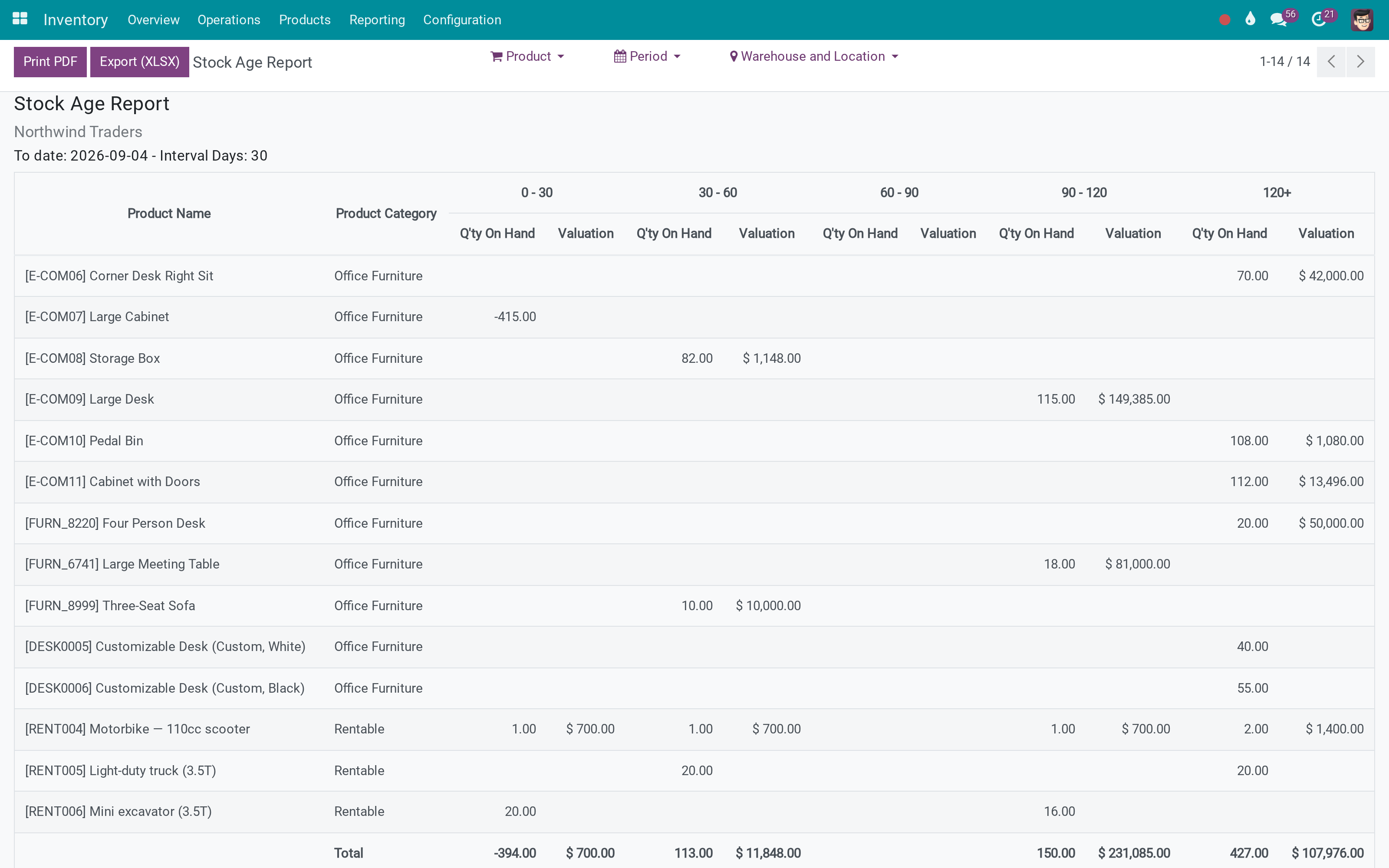
Quantity and valuation bucketed by age - 0-30, 30-60, 60-90, 90-120, 120+ days - per product and category, printable and exportable.
Stock Age Report (technical name to_stock_age_report) is an Odoo 18.0 app for Odoo Community and Viindoo Cloud, built for inventory manager, financial controller, buyer, auditor.
At a Glance
The facts of Stock Age Report, version 0.1.2, in one place. Published by Viindoo.
How It Works
One screen, three filters.
Read the ageing
Each product's quantity and valuation, split by how long it has been in stock. The total line ties back to the inventory valuation.
Check it against the stock itself
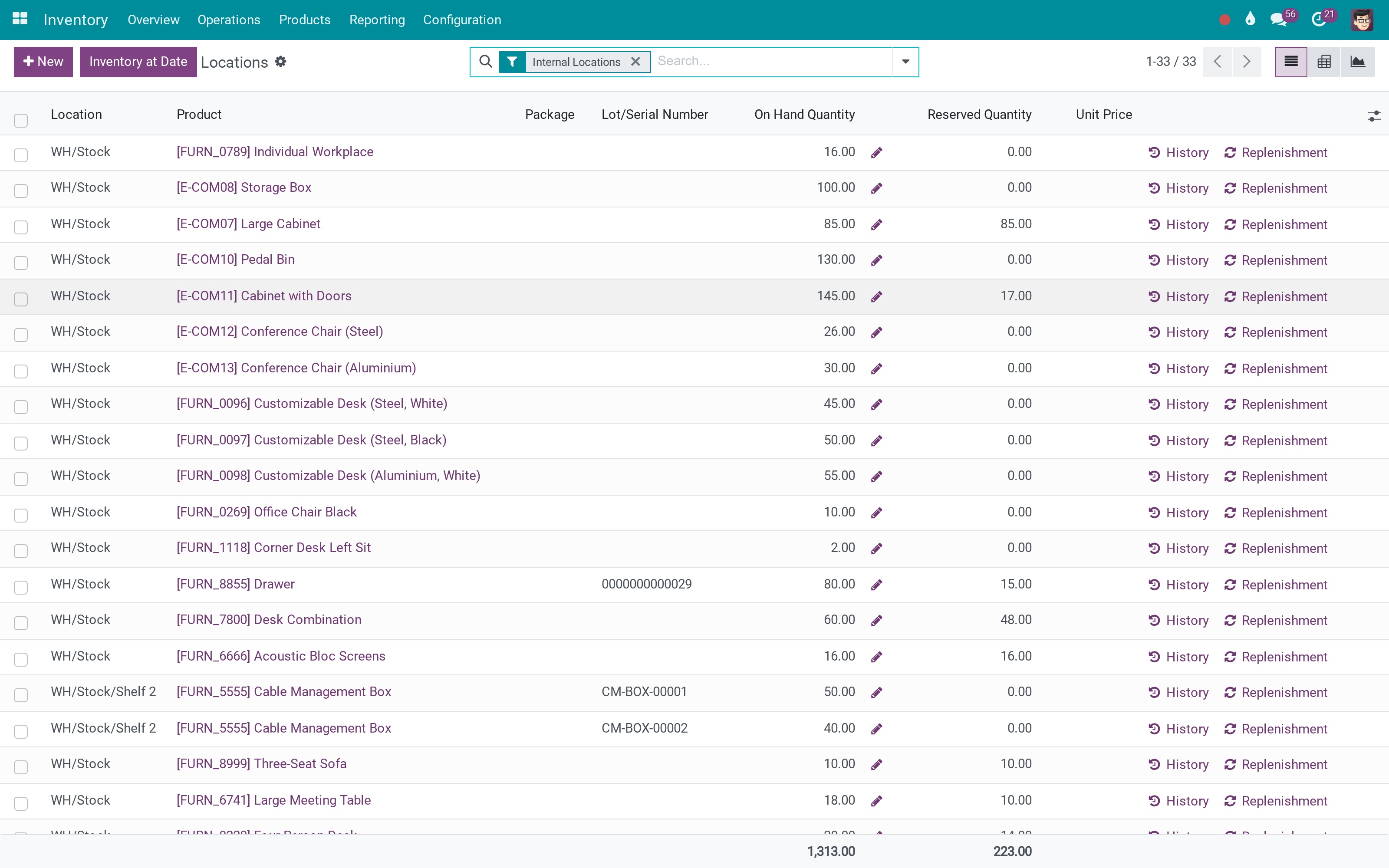
The report reads the same valuation layers the on-hand figures come from, so the two agree.
What You Get
Quantity on hand and valuation, split into age buckets per product
Interval length and number of periods are yours to set - 30 days and five buckets by default
Filters by product, by period, and by warehouse or location
Grouped by product category, with a total line that ties to the valuation
Print to PDF and export to XLSX from the report itself
Reads the valuation layers, so it agrees with the inventory valuation report
More Screens
Everything below was taken on a database seeded with real business data, on this series - not a mock-up and not a screenshot from an older version.
On-hand stock
What This App Does Not Do
Read this before you buy. Everything below is something the app deliberately leaves to another app or to you.
A product that was received and partly consumed shows the age of what remains; it is not a turnover report.
No write-down is posted and no rule is enforced - the numbers are the input to that decision.
The figures come from the valuation layers, so standard, FIFO or average cost all read as configured.
Works Well With
Apps from the same stack, built to fit this one:
Who Should Use Stock Age Report?
Inventory manager
Sees what has not moved in four months, by value.
Financial controller
Has the ageing basis for a provision, not an anecdote.
Buyer
Stops reordering what is already sitting in the racks.
Auditor
Gets the ageing table as a PDF or a spreadsheet.
Frequently Asked Questions
What does Stock Age Report do?
Quantity and valuation bucketed by age - 0-30, 30-60, 60-90, 90-120, 120+ days - per product and category, printable and exportable.
What does Stock Age Report not do?
It measures age, not movement. A product that was received and partly consumed shows the age of what remains; it is not a turnover report. It is a report, not a policy. No write-down is posted and no rule is enforced - the numbers are the input to that decision. Valuation follows your costing method. The figures come from the valuation layers, so standard, FIFO or average cost all read as configured.
Who is Stock Age Report for?
Inventory manager: Sees what has not moved in four months, by value. Financial controller: Has the ageing basis for a provision, not an anecdote. Buyer: Stops reordering what is already sitting in the racks. Auditor: Gets the ageing table as a PDF or a spreadsheet.
Which Odoo version and editions does it support?
Odoo 18.0 - Odoo Community, Viindoo Cloud. Upgrades to a newer Odoo series are a separate purchase for that series.
What does it depend on?
It installs on top of: viin_stock, stock_account, to_base. Odoo installs them with it.
How do I set it up?
One screen, three filters.
What works well with it?
Accounting Foundation (viin_account): Account types the valuation posts to.
Can I try it before buying?
Yes - the Live Preview button at the top of this page opens the module's own screen on a working database.
How do I get support?
Write to apps.support@viindoo.com with your Odoo version and the technical name to_stock_age_report; pre-sales questions go to sales@viindoo.com.
See Stock Age Report in Action
or use the Live Preview button at the top of this page
Need help with Stock Age Report?
For questions, implementation support or a custom feature, contact Viindoo.
Pre-Sales & Partnership
sales@viindoo.comUpgrades to a newer Odoo series are a separate purchase for that series.
All Viindoo apps: Viindoo Apps
Technical Requirement
Changes log
0.1.2 - Latest on the 18.0 line
- Document attachment IDOR, share allow-list, appointment partner overwrite, report model allow-list.
- Add test case.
- Only load product when selected a product category.
- Cannot update pageSize when changing product category.
- Add pager The issue with the client action is that it tries to load all the products (250k) at once.
Installation
- Navigate to Apps.
- Search with keyword to_stock_age_report.
- Press Install.
Instruction
Instruction video: Stock Age Report
Products receipt
First of all, you need to choose the right inventory flow to handle your receipts. Then, proceed to receive products.
View the Stock Age Report
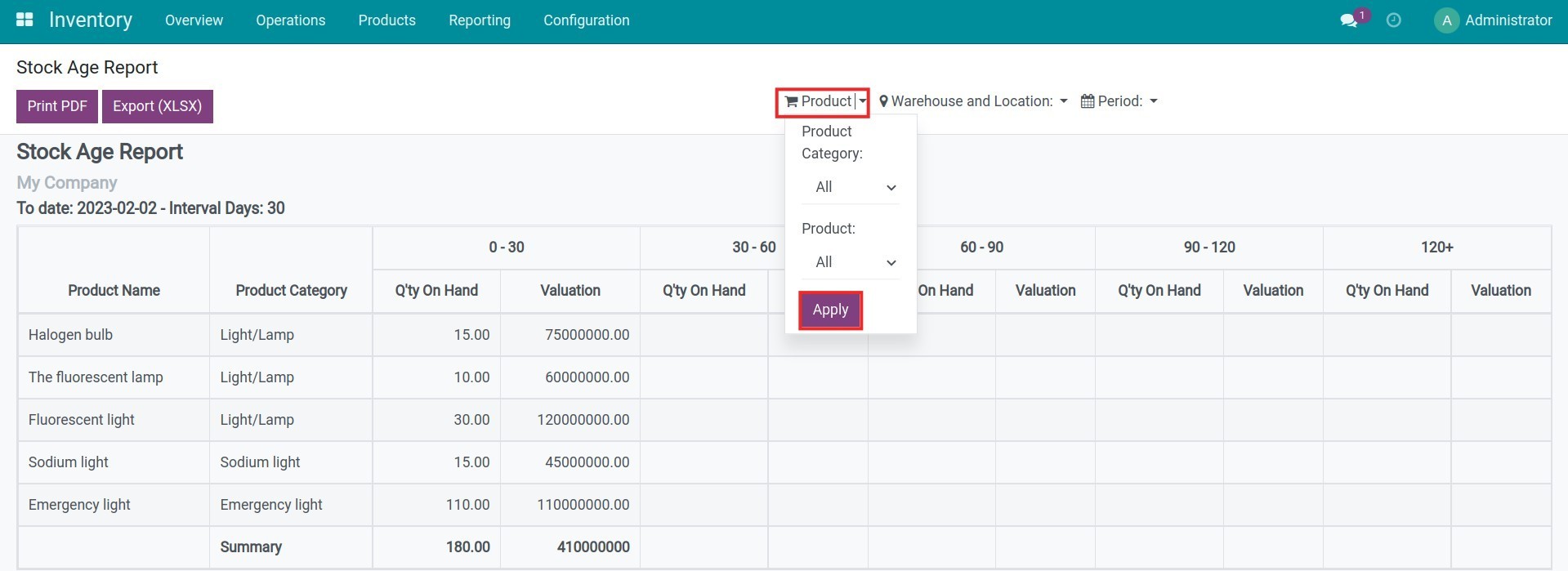
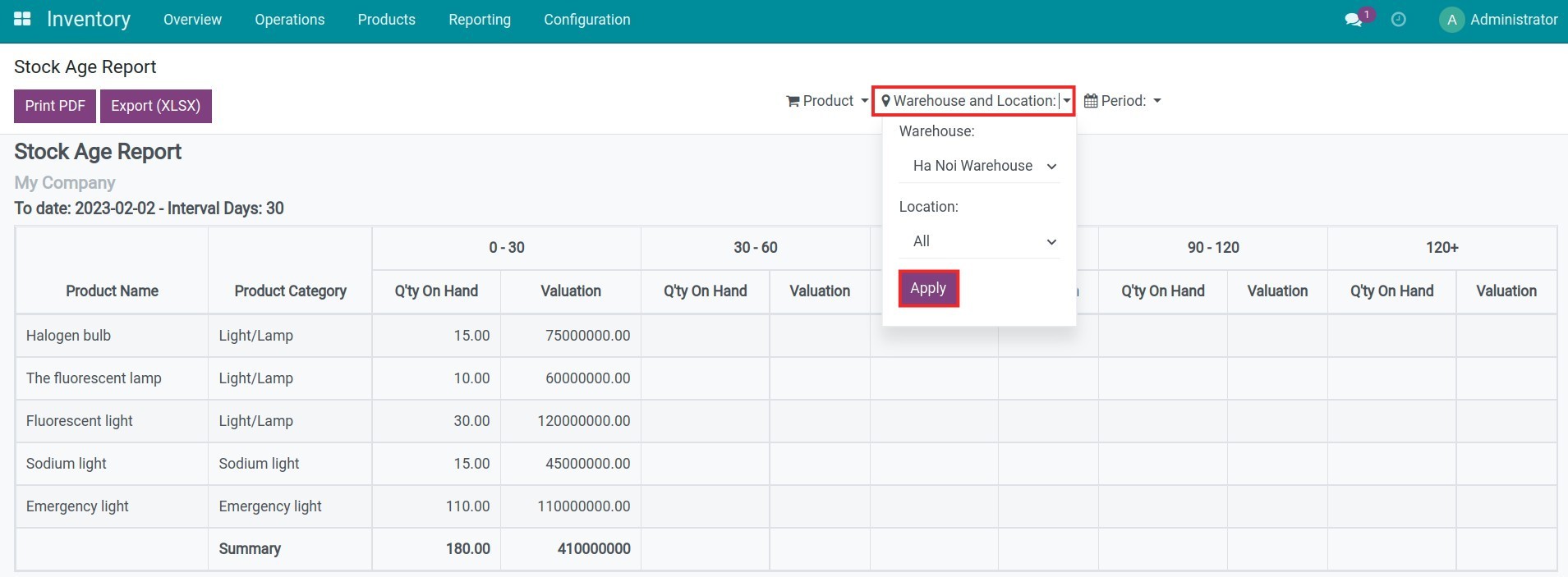
During the inventory management process, if you want to view the stock age report, you navigate to Inventory > Reporting > Stock Age Report. The Viindoo ERP software provides the filters tool supports you to filter and group the information on the report by different criteria:
- Product: you can choose to view reports by a product category/product or view all.
- Warehouse and Location: you can choose to view reports in a warehouse/location or view all.
- Period: you can select the length of a period (how many days per period), the number of periods and enter the date you want the report to display up to that date.

After selecting the above criteria, you will see the number of products in the Q'ty On Hand column and the product value in the Valuation column following the selected criteria, corresponding to the stock age of the product.

Note: The stock age report only shows products with the product type is Consumable/Storable Product.
This software and associated files (the "Software") may only be used (executed, modified, executed after modifications) if you have purchased a valid license from the authors, typically via Odoo Apps, or if you have received a written agreement from the authors of the Software (see the COPYRIGHT file).
You may develop Odoo modules that use the Software as a library (typically by depending on it, importing it and using its resources), but without copying any source code or material from the Software. You may distribute those modules under the license of your choice, provided that this license is compatible with the terms of the Odoo Proprietary License (For example: LGPL, MIT, or proprietary licenses similar to this one).
It is forbidden to publish, distribute, sublicense, or sell copies of the Software or modified copies of the Software.
The above copyright notice and this permission notice must be included in all copies or substantial portions of the Software.
THE SOFTWARE IS PROVIDED "AS IS", WITHOUT WARRANTY OF ANY KIND, EXPRESS OR IMPLIED, INCLUDING BUT NOT LIMITED TO THE WARRANTIES OF MERCHANTABILITY, FITNESS FOR A PARTICULAR PURPOSE AND NONINFRINGEMENT. IN NO EVENT SHALL THE AUTHORS OR COPYRIGHT HOLDERS BE LIABLE FOR ANY CLAIM, DAMAGES OR OTHER LIABILITY, WHETHER IN AN ACTION OF CONTRACT, TORT OR OTHERWISE, ARISING FROM, OUT OF OR IN CONNECTION WITH THE SOFTWARE OR THE USE OR OTHER DEALINGS IN THE SOFTWARE.
