E-Invoice - Viettel S-Invoice Integrator
| Lines of Code | 1097 |
| Technical name | l10n_vn_viin_accounting_sinvoice |
| License | OPL-1 |
| Website | https://viindoo.com/apps/modules/19.0/l10n_vn_viin_accounting_sinvoice |
| Read description for | v 12.0 v 13.0 v 14.0 v 15.0 v 16.0 v 17.0 v 18.0 |
| Required Apps | Invoicing (account) Discuss (mail) |
| Included Dependencies | Vietnamese E-Invoice Integration Partner Budget Code Partner Identity Information Viindoo Base Accounting Foundation API Request Logger Legal Invoice Number |
| Extensions | [TEST] Vietnamese E-Invoice Provider Test Adapter |

E-Invoice - Viettel S-Invoice Integrator
Integrates with Viettel's S-Invoice service to issue legal e-Invoice
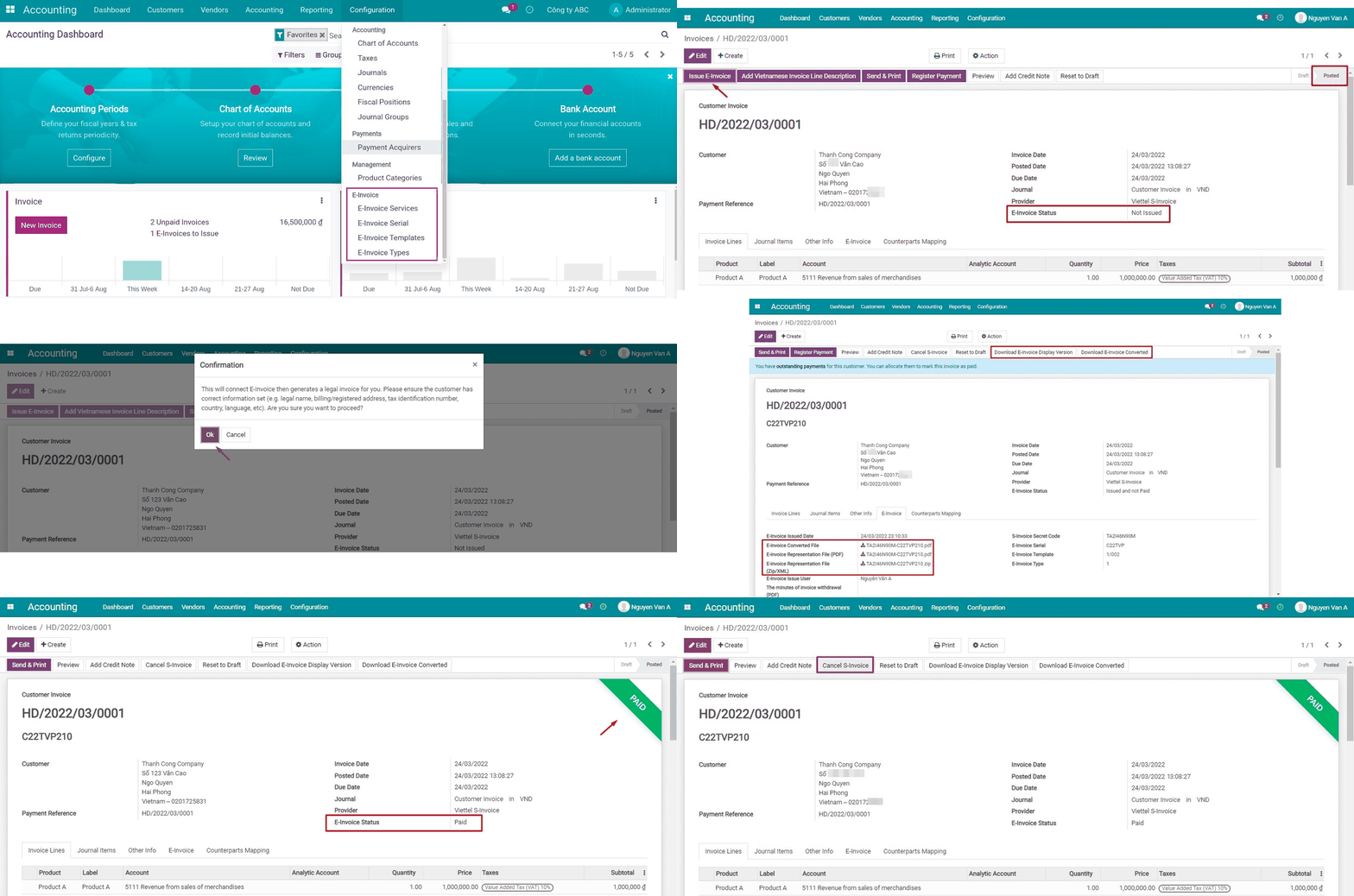
At a Glance
The facts of E-Invoice - Viettel S-Invoice Integrator, version 1.0.5, in one place. Published by Viindoo.
Key Features
Built natively on Odoo/Viindoo to streamline real business operations:
Preview Draft Before You Issue
Open a full preview PDF of the S-Invoice before it is issued - no e-invoice number reserved, nothing sent to the tax authority yet - so you can check figures and layout with confidence.
Automatic Payment-Status Sync
Registering a payment on the invoice in Odoo automatically pushes the paid status to Viettel S-Invoice - one less manual step for your accounting team.
E-Invoice Cancel-Guard
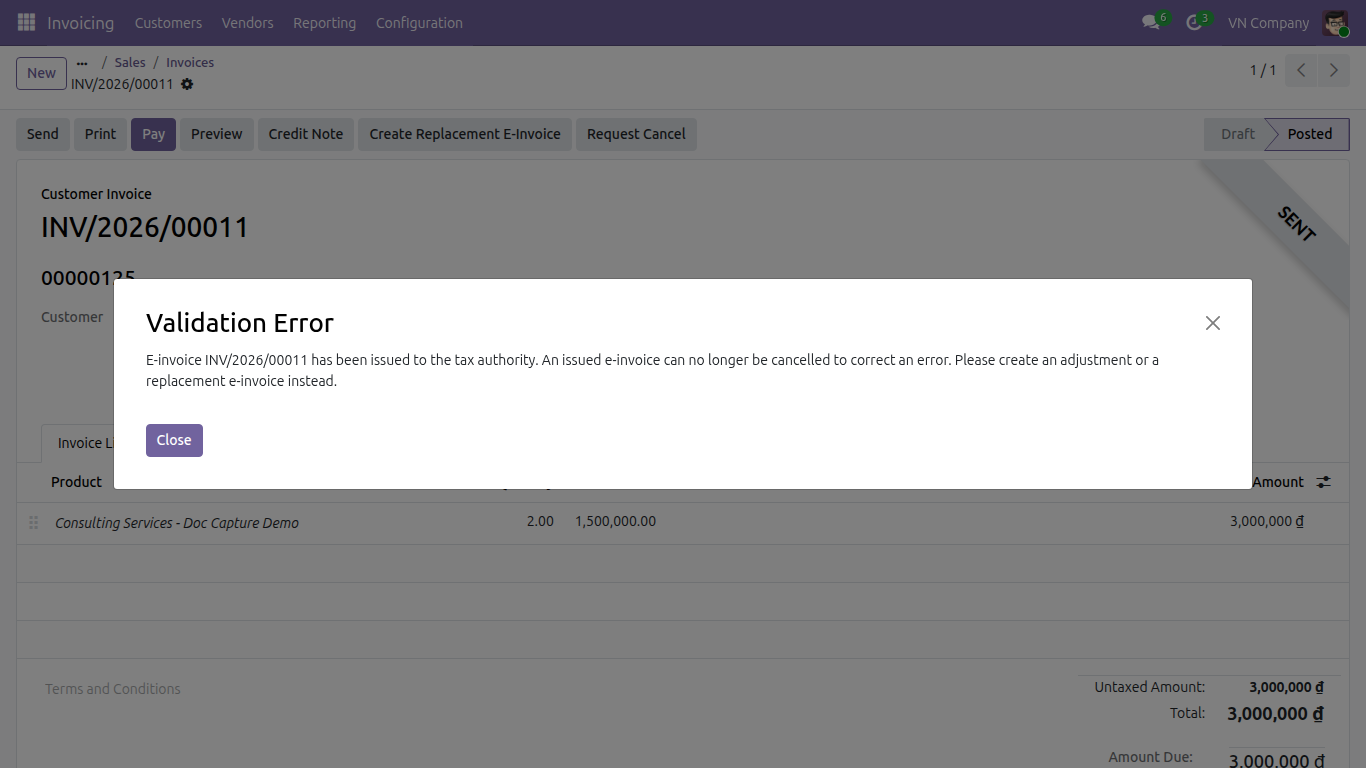
An issued S-Invoice can no longer be plainly cancelled, however long ago it was issued - this module blocks the cancel, even through the core Request Cancel button, and redirects you to adjust or replace it instead, keeping you compliant.
Legal Disclosure on the Customer Portal
Your customer's portal invoice page shows the legal e-invoice number, secret code and a direct link to look it up on the Viettel S-Invoice lookup page - so they can verify it independently.
One Unified E-Invoice Interface
Issuance, adjustment, replacement and download run through Odoo's native Viettel integration and appear on the same E-Invoice menu, tab and status filter shared by every e-invoice provider - no separate Viettel-only screens.
S-Invoice Numbering, Reachable in One Place
Manage your Viettel S-Invoice templates and symbols from the same E-Invoice menu you use for every other e-invoice setting - no more digging through generic Invoicing configuration.
Benefits
The cancel-guard closes a real compliance gap: an issued e-invoice can never be silently cancelled and detached from the tax-authority record.
Draft preview and automatic payment-status sync remove two manual checks accountants used to run by hand.
Accountants stop switching between a Viettel-only screen and every other provider's screen - one E-Invoice menu, tab and status filter for all of them.
Buyers can independently verify their legal e-invoice number and secret code straight from the customer portal.
Issuance itself rides on Odoo core's own Viettel integration, so you benefit from upstream fixes and improvements while keeping the Viindoo conveniences on top.
Select Viettel S-Invoice in Vietnam E-Invoicing settings


Issue through the unified E-Invoice tab
Download the display and converted files


Automatic payment-status sync
E-Invoice cancel-guard

See E-Invoice - Viettel S-Invoice Integrator in Action
See how this module solves real business problems in a working Viindoo environment.
Need help with E-Invoice - Viettel S-Invoice Integrator?
For questions, implementation support, or consulting services, contact Viindoo.
Pre-Sales & Partnership
sales@viindoo.comWhen contacting us, please include:
- Odoo/Viindoo version (CE/EE).
- Number of users and business scope.
- Other modules currently in use.
Technical Support
apps.support@viindoo.comFor faster troubleshooting, please provide:
- Order number or app reference.
- Odoo/Viindoo version & edition.
- Steps to reproduce the issue.
- Screenshots/logs if available.
Technical Requirement
Changes log
We continuously improve this module. Recent updates from the official Viindoo repository:
- 2026-07-05 Improved Upgraded to Odoo 19.0: issuance now rides entirely on Odoo core's native Viettel integration; kept only the draft preview, automatic payment-status sync and portal legal disclosure on top, added the cancel-guard, and moved into the unified E-Invoice menu, tab and status filter.
- 2025-09-11 Added Identification, passport, budget code for Vietnam edi.
- 2025-09-15 Fixed Rounding subtotal when have discount.
- 2025-08-15 Fixed Wrong taxable amount.
- 2025-06-13 Fixed BuyerLegalName is require when have taxcode.
- 2025-06-09 Fixed Only get positive tax amount when needed, correct meinvoice data.
- 2025-05-06 Fixed Tax code for personal is optional.
Works Great With These Modules
Extend E-Invoice - Viettel S-Invoice Integrator with complementary Viindoo apps:
Vietnam E-Invoice Integration
The provider-agnostic hub that powers the unified E-Invoice menu, tab, status filter and Vietnam E-Invoicing settings this module plugs into.
Module l10n_vn_viin_ediPOS Receipt Viettel Sinvoice Information
Show the Viettel S-Invoice legal number, secret code and lookup URL on the Point of Sale receipt, as the legal disclosure requires.
Module l10n_vn_viin_accounting_sinvoice_posVietnam Electronic Invoice Line Grouping
Provide options to issue an e-invoice on a detailed or line-grouped form, including for invoices issued via Viettel S-Invoice.
Module l10n_vn_edi_line_groupingVietnam E-invoice - Sale
Automatically add Vietnamese descriptions when creating invoices from sales orders for compliance and efficiency.
Module l10n_vn_viin_einvoice_saleWho Should Use This Module?
Built for teams that need this capability fully integrated into their Odoo/Viindoo stack.
Accounting Managers
Manage Viettel S-Invoice e-invoices seamlessly, alongside every other provider, while staying compliant with state regulations.
Companies Already Using Viettel S-Invoice
Keep your existing Viettel S-Invoice registration while gaining the unified E-Invoice interface and the cancel-guard.
Implementers & Odoo Partners
Looking for a production-ready Viettel S-Invoice add-on to deliver Vietnam-localized projects faster and at lower risk.
Installation
- Navigate to Apps.
- Search with keyword l10n_vn_viin_accounting_sinvoice.
- Press Install.
Instruction
Note
Extends l10n_vn_viin_edi - see its documentation.
Instruction video: E-Invoice - Viettel S-Invoice Integrator
This module lets a company issue its Vietnamese e-invoices through Viettel S-Invoice. Issuance, adjustment, replacement and download now run entirely on Odoo core's native Viettel integration; this module adds only the handful of conveniences core does not provide - a draft preview before you issue, automatic payment-status sync, the legal e-invoice disclosure on the customer portal and on printed point-of-sale receipts, and the cancel-guard on your issued S-Invoices - and it surfaces every one of them through the same unified E-Invoice interface used by every other provider in this cluster.
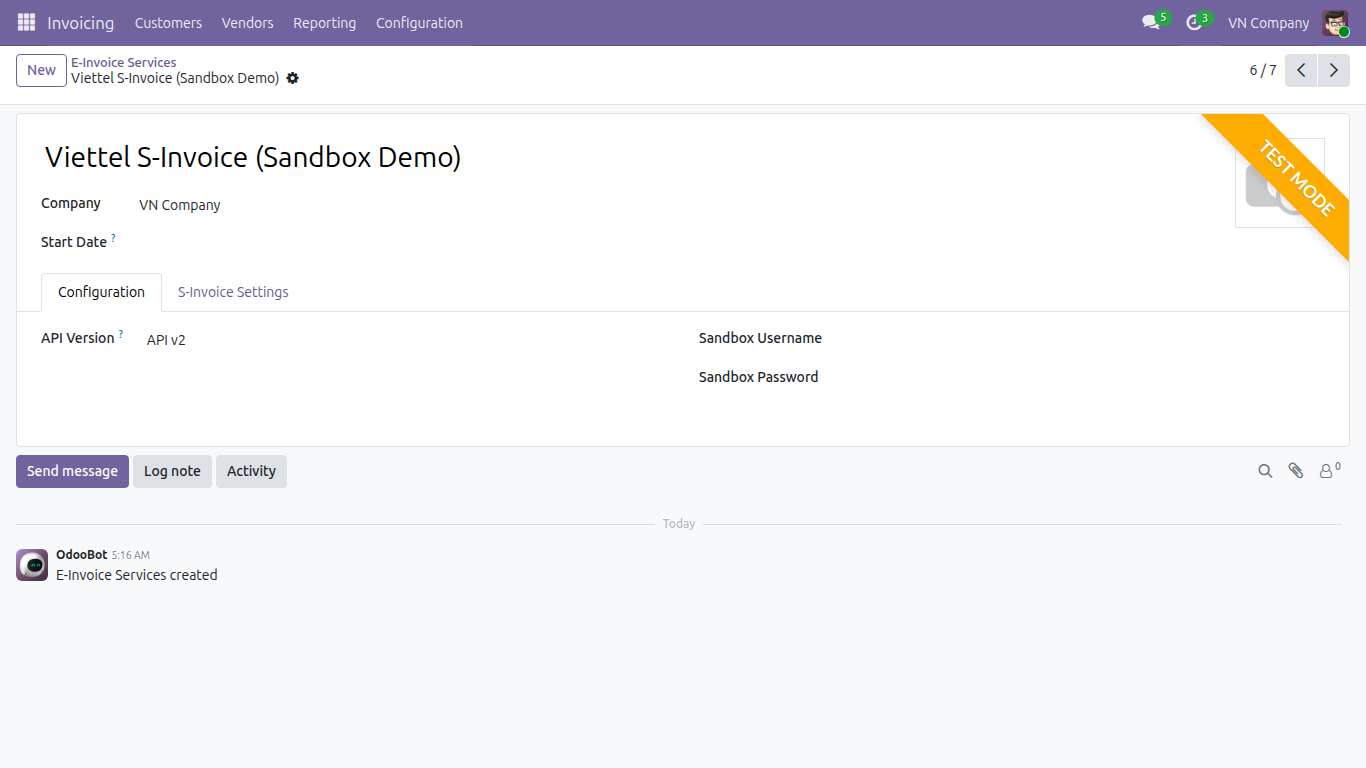
1. Configure the Viettel S-Invoice service.
- Go to Accounting ‣ Configuration ‣ E-Invoice ‣ E-Invoice Services and open (or create) the service record for Viettel S-Invoice.
- On the Configuration tab, fill in the connection fields: the Mode (Sandbox or Production), and either Username/Password for Production or Sandbox Username/ Sandbox Password for Sandbox.
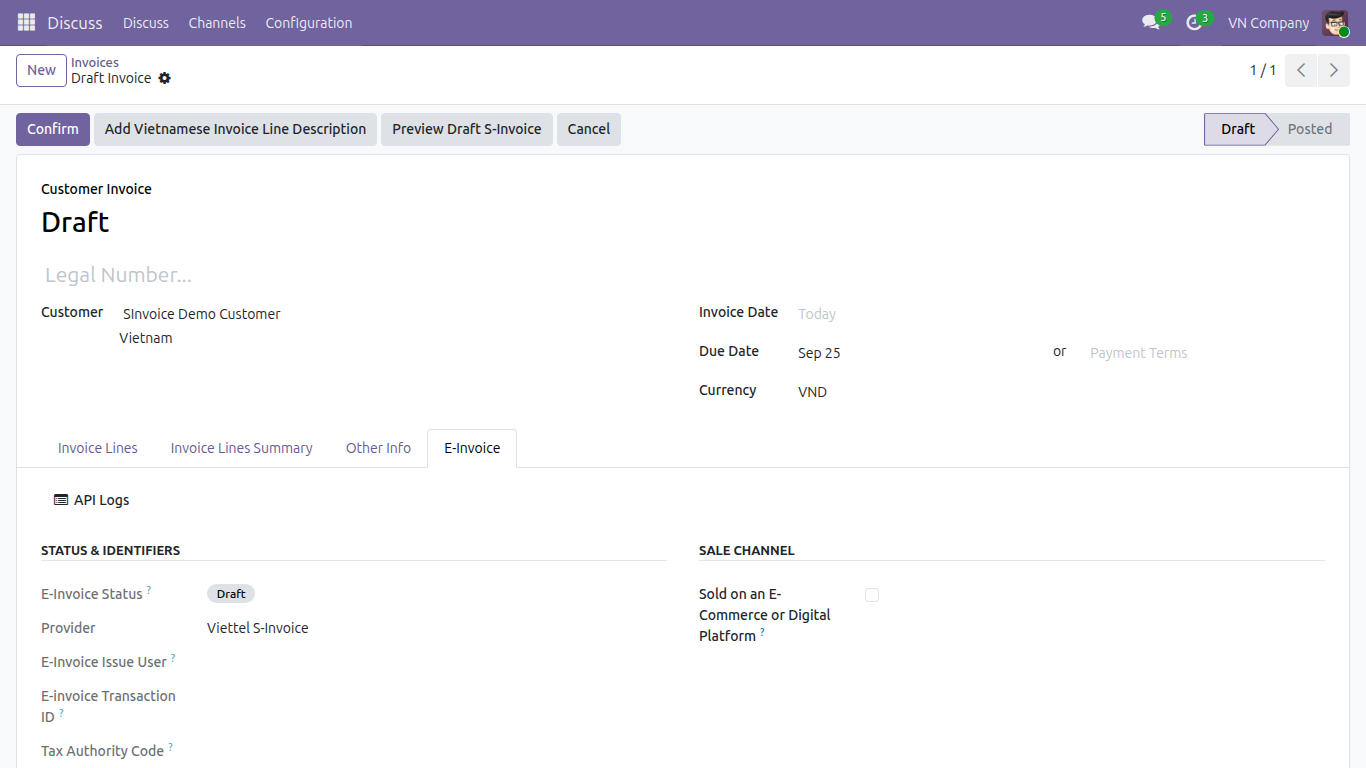
2. Preview the draft before you issue (this module's own addition).
- On a not-yet-issued customer invoice routed to Viettel S-Invoice, press Preview Draft S-Invoice next to the usual Send & Print button. This opens the PDF exactly as it would look once issued, with no e-invoice number reserved and nothing sent to the tax authority yet - a safe way to check the layout and figures beforehand.
3. Issue the e-invoice through Send & Print.
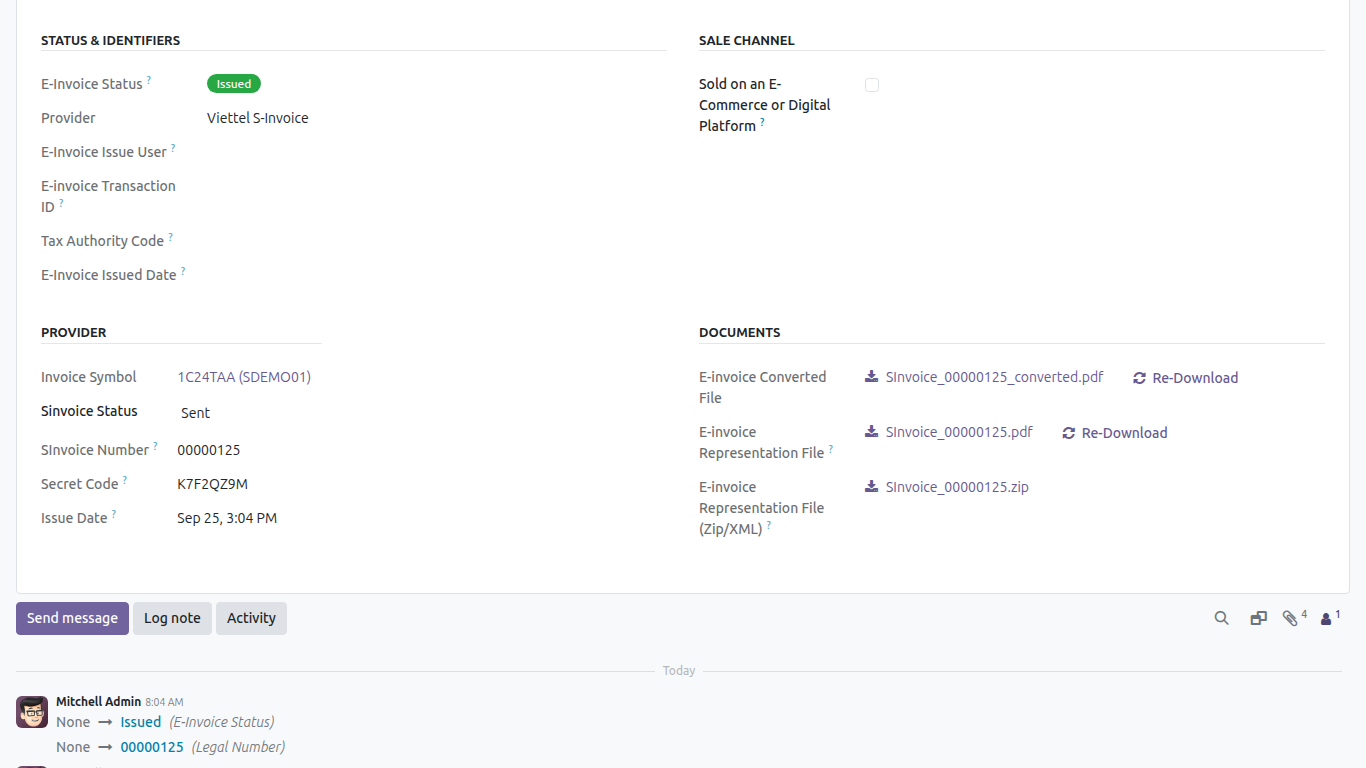
- Confirm the invoice (Posted), then run Send & Print as usual. Odoo core sends the invoice to Viettel S-Invoice and reports back the e-invoice number, the legal status and the generated files - all shown together on the invoice's E-Invoice tab, alongside every other provider's fields.
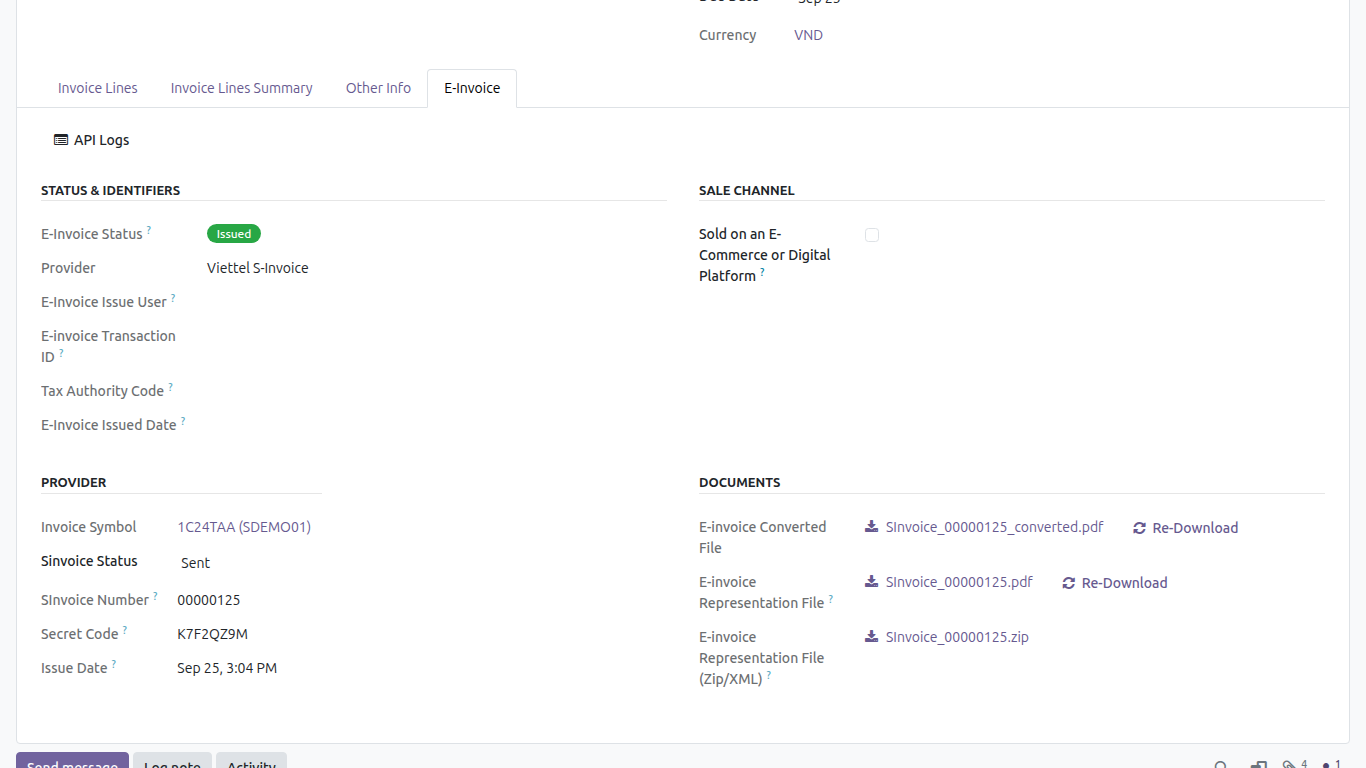
4. Download the generated files.
- Once issued, download the E-invoice Representation File (PDF display version), the E-invoice Converted File, or the E-invoice Representation File (Zip/XML) directly from the invoice's E-Invoice tab, under Documents.
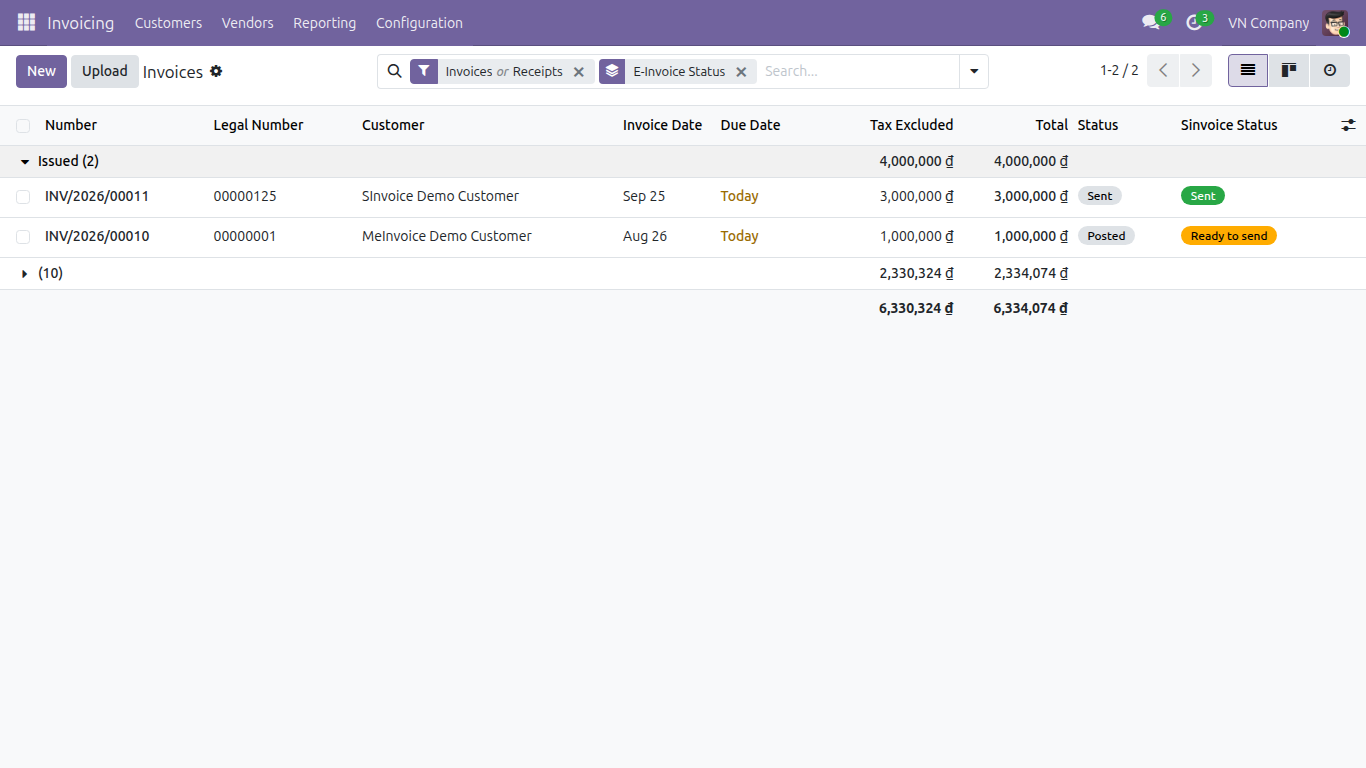
5. Track e-invoice status across every provider.
- On the customer invoice list, use the E-Invoice Issued / E-Invoice Cancelled / E-Invoice Error filters, or group by E-Invoice Status, to see - in one normalized view - which invoices are still to issue, issued, adjusted, replaced, cancelled or in error - Viettel S-Invoice included, side by side with any other provider you use.
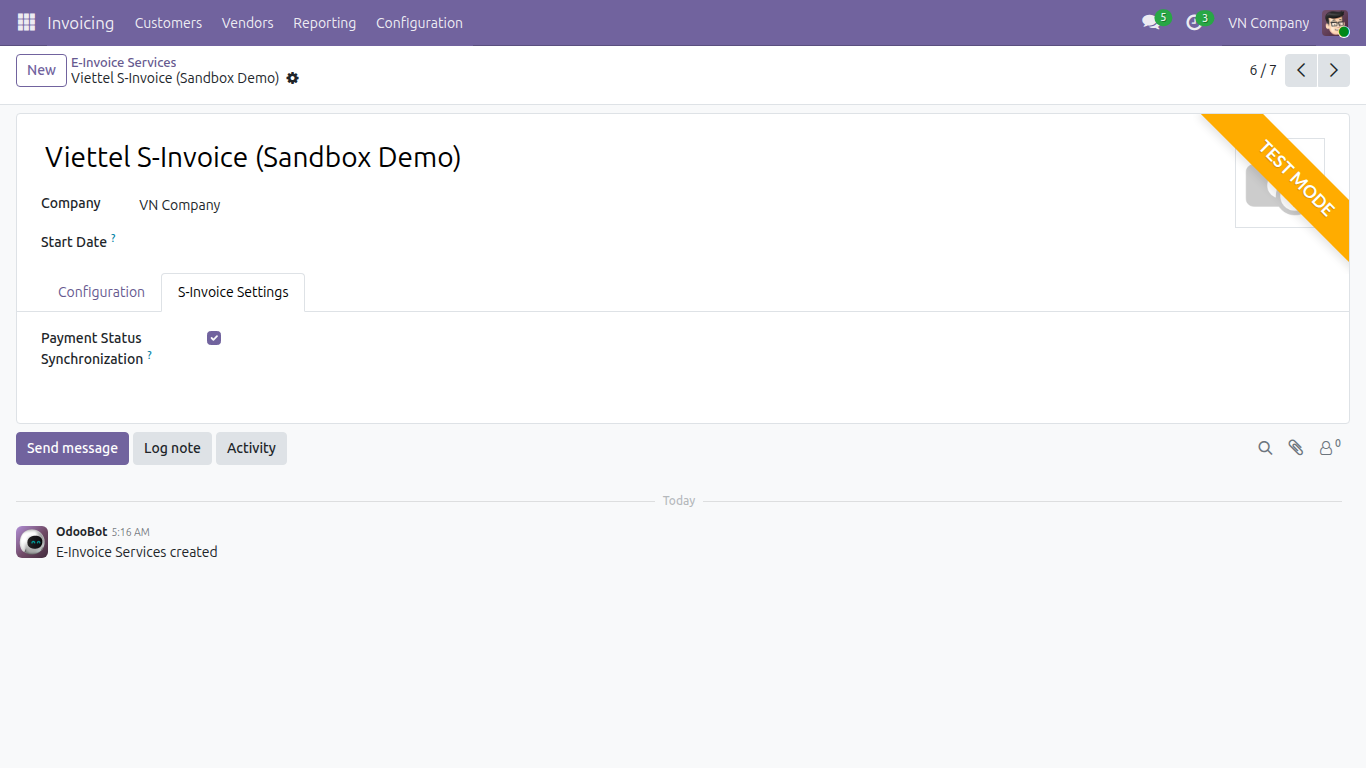
6. Payment status syncs automatically (this module's own addition).
- When Payment Status Synchronization is enabled on the Viettel S-Invoice service record's S-Invoice Settings tab (on by default), registering a payment on the invoice in Odoo automatically pushes the paid status to Viettel S-Invoice - no manual step needed.
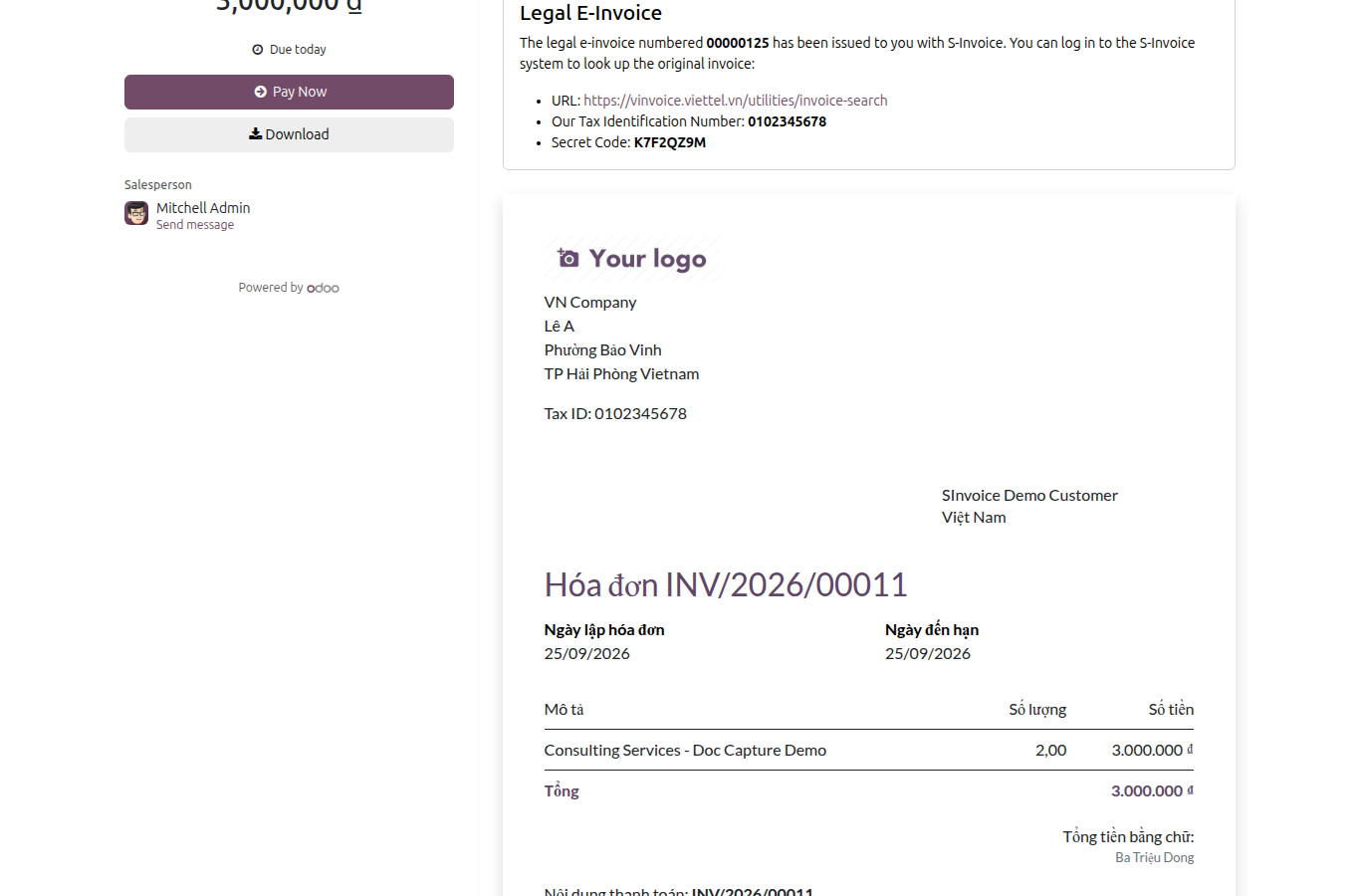
7. Your customer sees the legal disclosure on the portal (this module's own addition).
- Once issued, the customer portal invoice page shows a Legal E-Invoice card with the legal e-invoice number, a lookup URL, the company's tax identification number, the secret code and - whenever Viettel S-Invoice returns one for that transaction - the tax authority code, so your customer can verify the e-invoice independently.
8. The same disclosure also prints on point-of-sale receipts.
- A point-of-sale order invoiced through Viettel S-Invoice gets the same mandated Decree-123 disclosure block on its printed receipt as every other e-invoice provider - the invoice number, the lookup code and the lookup URL, plus a QR code encoding that URL. See the Show EInvoice Information on POS Receipt (l10n_vn_viin_edi_pos) user guide for the full walkthrough.
- One Viettel S-Invoice-specific nuance: the invoice number and the lookup code always print once the e-invoice is issued, but the tax-authority code row only appears when Viettel S-Invoice actually returns that code for the transaction.
9. Adjust or replace instead of cancelling an issued S-Invoice.
- An already-issued Viettel S-Invoice can no longer be simply cancelled, however long ago it was issued - this module blocks it even when you click core's own Request Cancel button. The button stays visible, but clicking it raises a message pointing you to adjust or replace the e-invoice instead, so a legitimately issued S-Invoice can never be silently detached from the tax authority record.
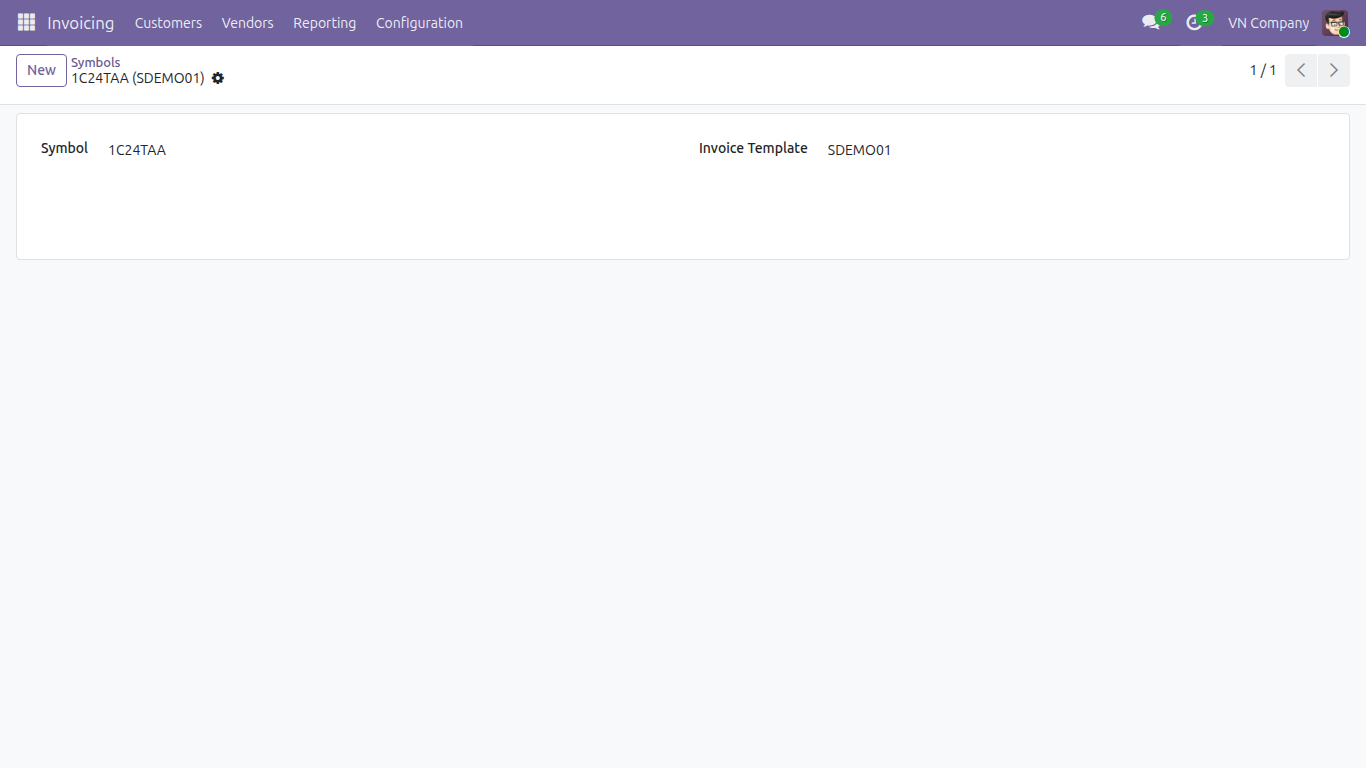
10. Manage your S-Invoice numbering configuration from the E-Invoice menu.
- Go to the unified E-Invoice menu (Accounting ‣ Configuration ‣ E-Invoice) and open the SInvoice entry to reach the Viettel-specific Templates and Symbols used to number your S-Invoices - reachable from the same place as every other e-invoice setting, instead of buried under the generic Invoicing settings.
This software and associated files (the "Software") may only be used (executed, modified, executed after modifications) if you have purchased a valid license from the authors, typically via Odoo Apps, or if you have received a written agreement from the authors of the Software (see the COPYRIGHT file).
You may develop Odoo modules that use the Software as a library (typically by depending on it, importing it and using its resources), but without copying any source code or material from the Software. You may distribute those modules under the license of your choice, provided that this license is compatible with the terms of the Odoo Proprietary License (For example: LGPL, MIT, or proprietary licenses similar to this one).
It is forbidden to publish, distribute, sublicense, or sell copies of the Software or modified copies of the Software.
The above copyright notice and this permission notice must be included in all copies or substantial portions of the Software.
THE SOFTWARE IS PROVIDED "AS IS", WITHOUT WARRANTY OF ANY KIND, EXPRESS OR IMPLIED, INCLUDING BUT NOT LIMITED TO THE WARRANTIES OF MERCHANTABILITY, FITNESS FOR A PARTICULAR PURPOSE AND NONINFRINGEMENT. IN NO EVENT SHALL THE AUTHORS OR COPYRIGHT HOLDERS BE LIABLE FOR ANY CLAIM, DAMAGES OR OTHER LIABILITY, WHETHER IN AN ACTION OF CONTRACT, TORT OR OTHERWISE, ARISING FROM, OUT OF OR IN CONNECTION WITH THE SOFTWARE OR THE USE OR OTHER DEALINGS IN THE SOFTWARE.