

Thiết bị & Phụ kiện
| Số dòng Code | 800 |
| Tên kỹ thuật | viin_maintenance |
| Giấy phép | OPL-1 |
| Website | https://viindoo.com/apps/app/19.0/viin_maintenance |
| Đọc mô tả cho | v 11.0 v 12.0 v 13.0 v 14.0 v 15.0 v 16.0 v 17.0 v 18.0 |
| Yêu cầu các App | Discuss (mail) Maintenance (maintenance) |
| Các mở rộng | Thiết bị & Phụ kiện cho Nhân viên |

Equipment & Parts
Manage equipments and parts in hierarchy structure.
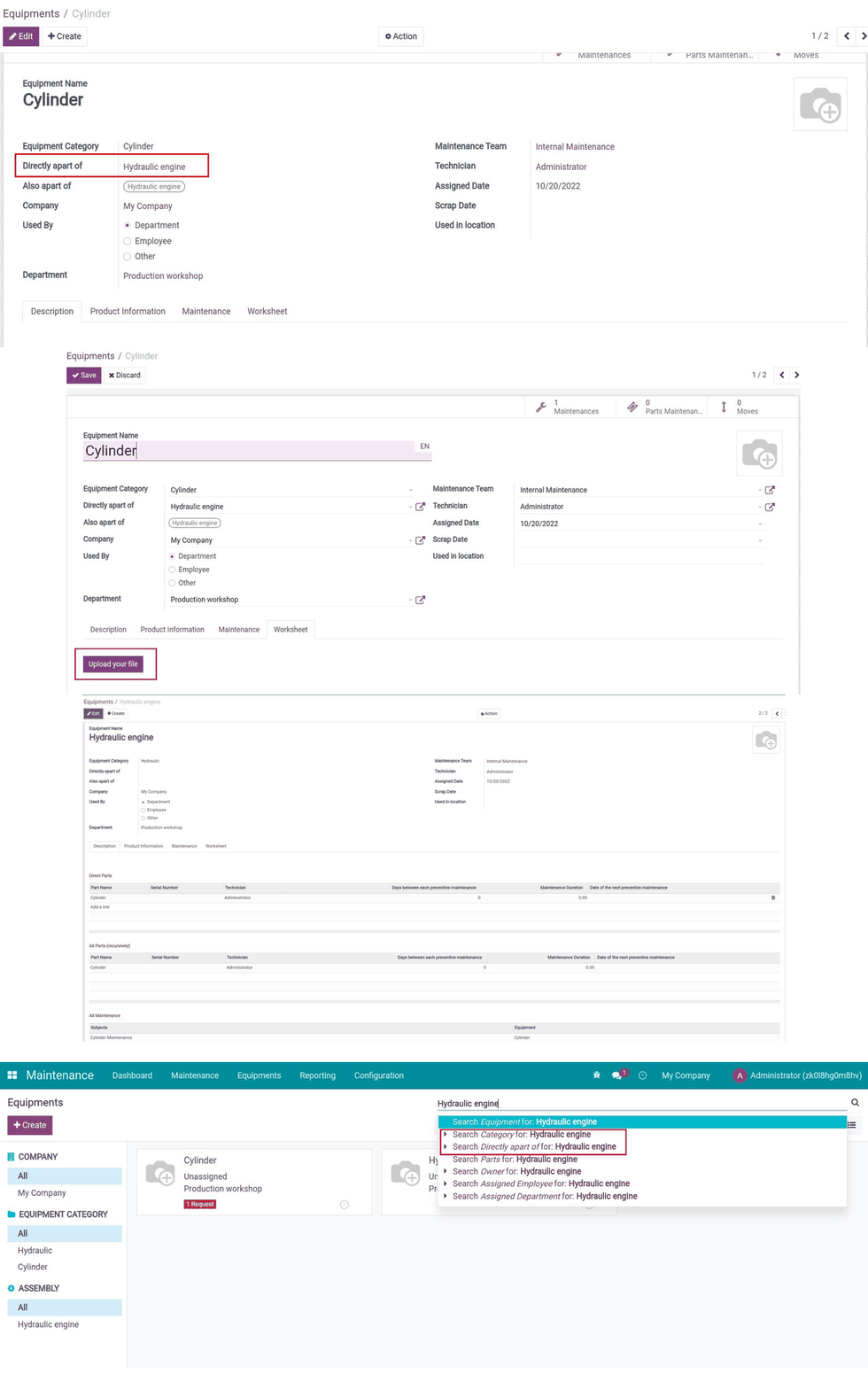
Key Features
Built natively on Odoo/Viindoo to streamline real business operations:
Maintenance app allows
- Allow equipment to be a part of another equipment. E.g. Equipment A and equipment B is the direct part of equipment C.
- Show equipment and its direct parts as well as its dependent equipment on the same view.
- Search for equipment using its parts.
- Group the parts by equipment.
- Add an image of the equipment in its detail and show that image on Kanban.
- Add the Worksheet tab so you can upload and quickly view the equipment-related PDF document right on the Equipment view. This feature will help you to centrally store information and make them easy to be found.
- Track the changing history of some fields on the maintenance request.
- Only allow the maintenance manager to delete the maintenance request.
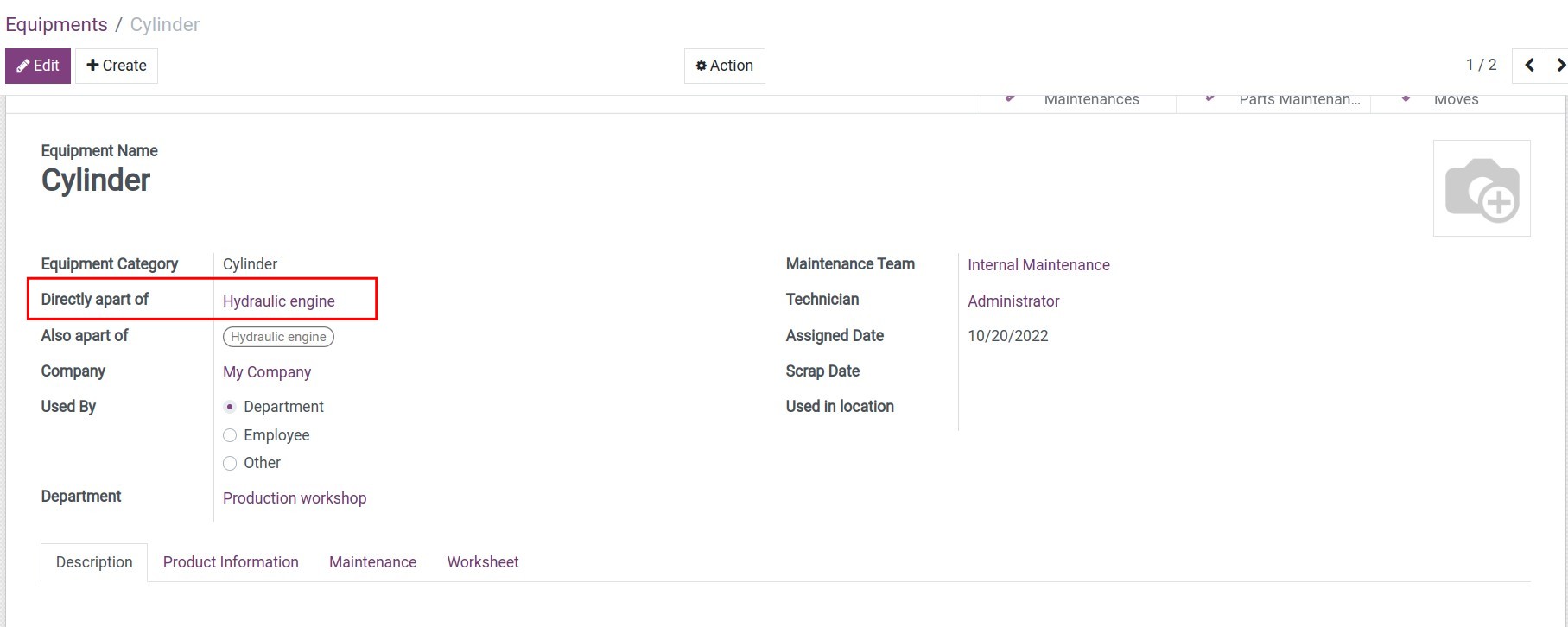
Create equipment in a genealogical hierarchy
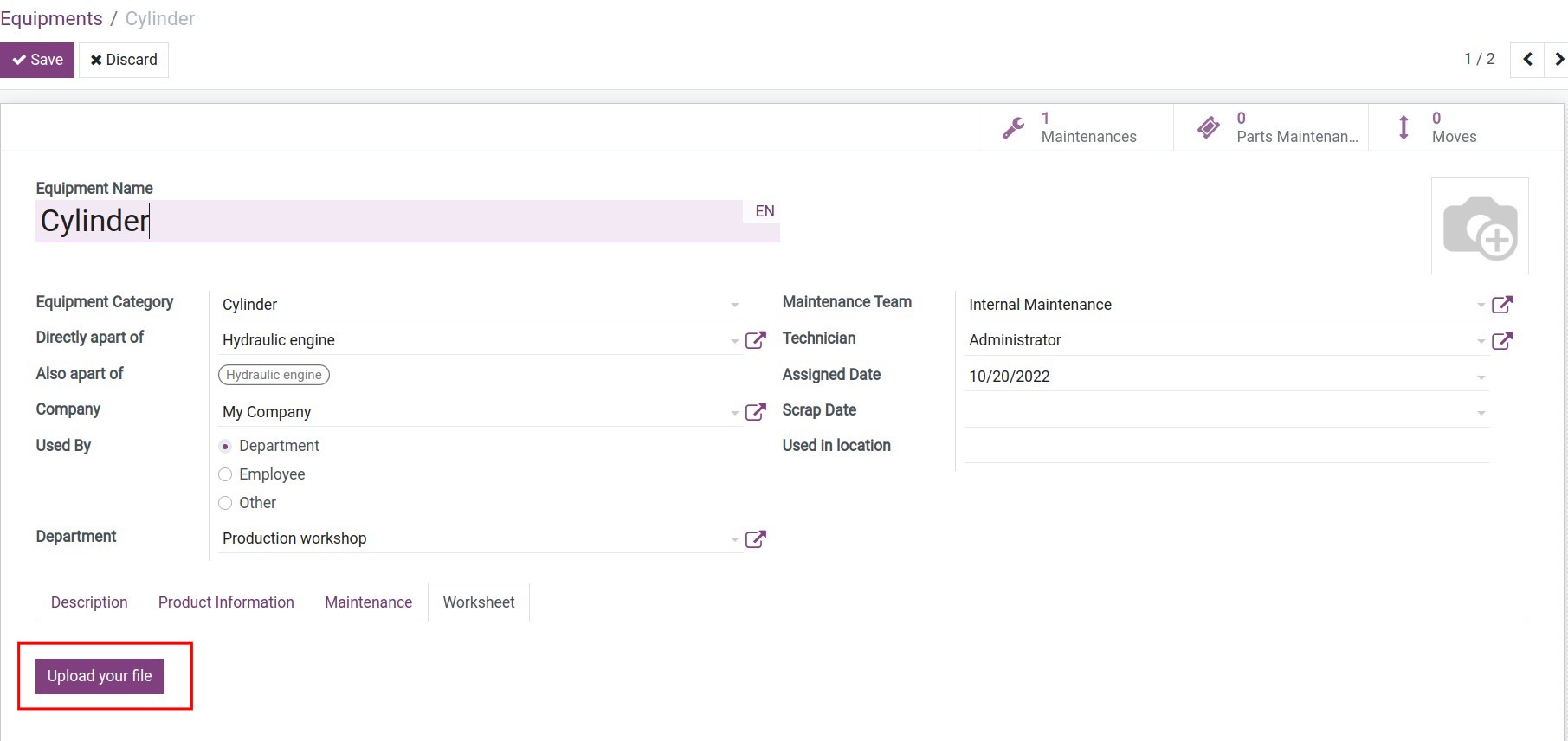
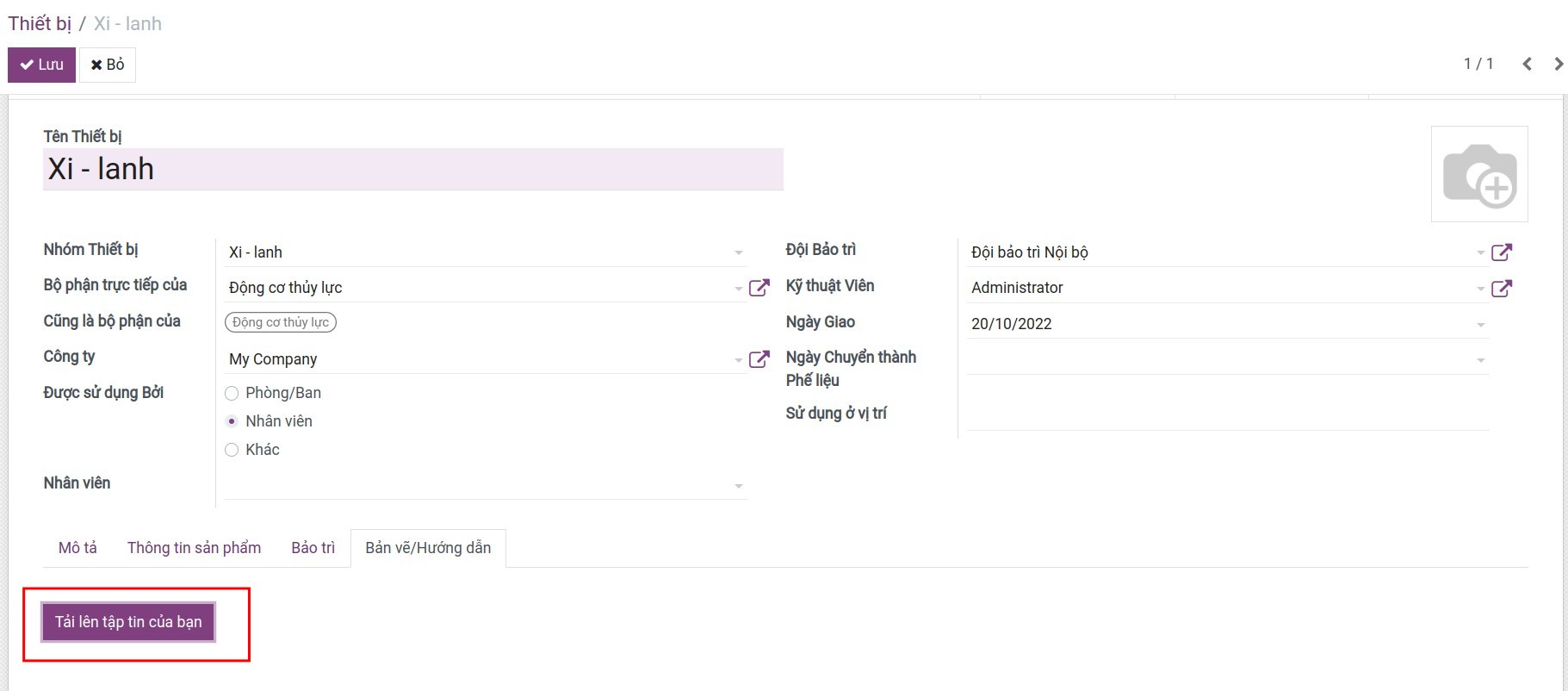
Download equipment documents
Link with the equipment part
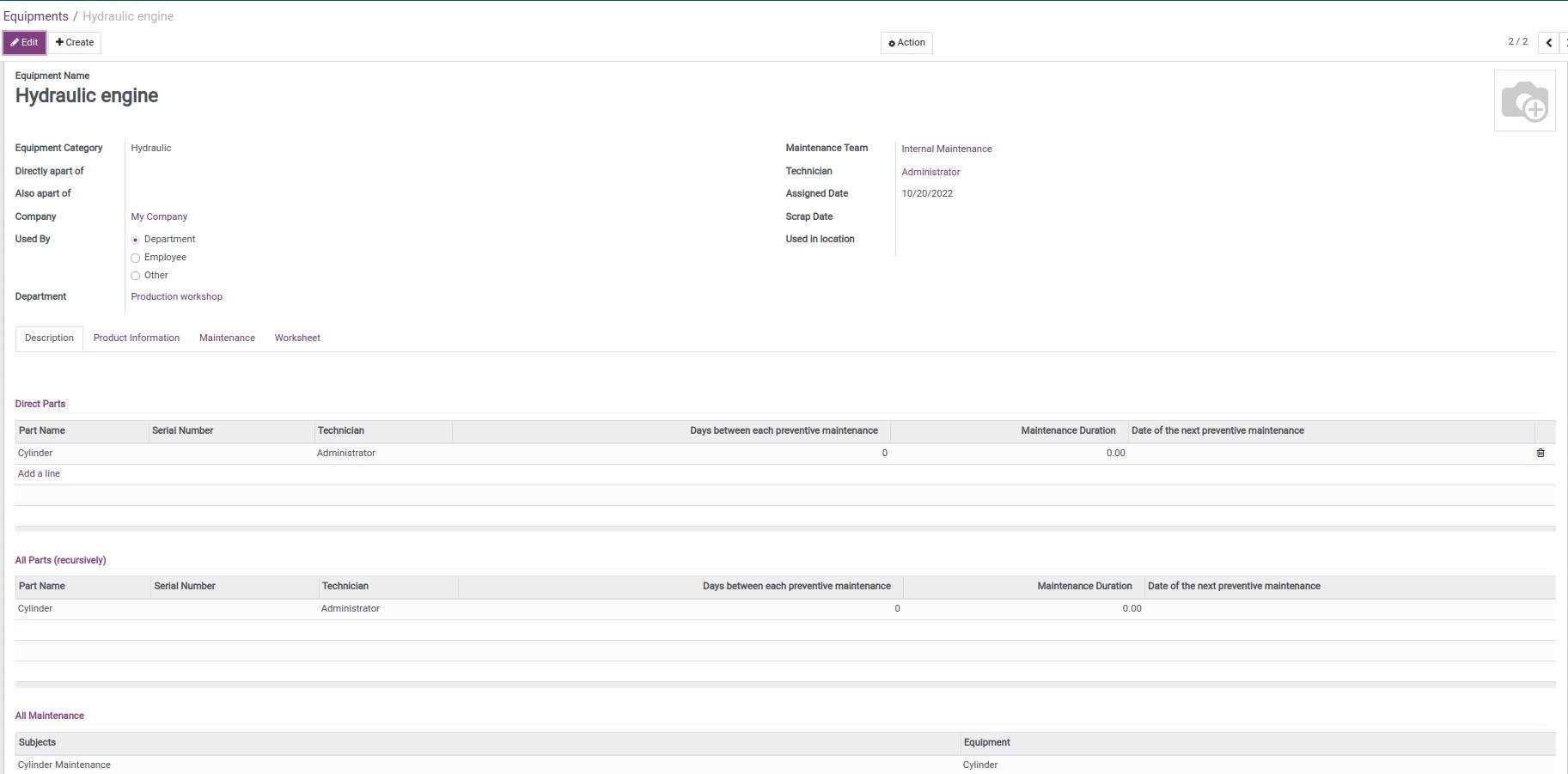
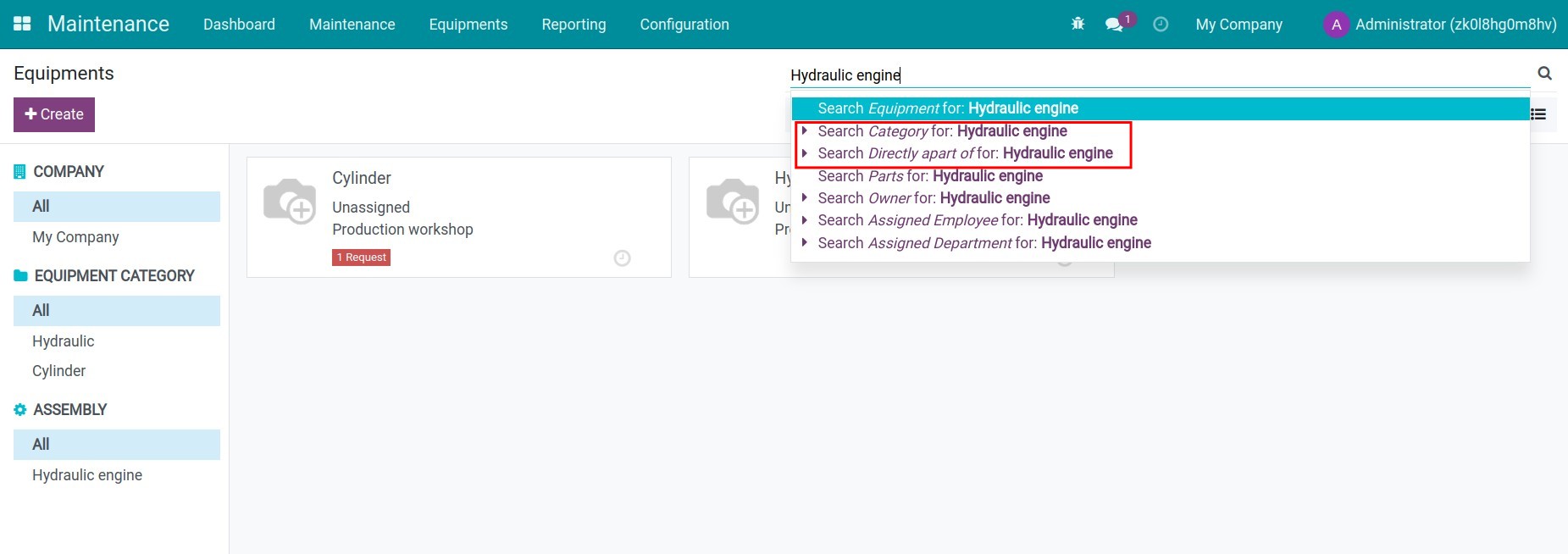
Search the related equipment
See Equipment & Parts in Action
See how this module solves real business problems in a working Viindoo environment.
Need help with Equipment & Parts?
For questions, implementation support, or consulting services, contact Viindoo.
Pre-Sales & Partnership
When contacting us, please include:
- Odoo/Viindoo version (CE/EE).
- Number of users and business scope.
- Other modules currently in use.
Technical Support
For faster troubleshooting, please provide:
- Order number or app reference.
- Odoo/Viindoo version & edition.
- Steps to reproduce the issue.
- Screenshots/logs if available.
Technical Requirement
Works Great With These Modules
Extend Equipment & Parts with complementary Viindoo apps:
Stock Equipment Bom Kit
Allows users to create equipment that is the main product which has the BoM type as a kit. The main product has a paternal relationship with its pieces of equipment, which form part of the BoM kit.
Module to_stock_equipment_bom_kitInventory Equipment Maintenance Tracking
Track Lot/Serial's related maintenances
Module to_stock_equipment_hierarchyEmployee Equipment & Parts
This module allows to allocate of parts when allocating their main equipment to employees or departments.
Module viin_hr_maintenancePreventive Maintenance Mode
Module to add a field to distinguish preventive maintenance mode with other integrated modules
Module viin_maintenance_preventive_modeWho Should Use This Module?
Built for teams that need this capability fully integrated into their Odoo/Viindoo stack.
Executives & Business Owners
Need clear visibility into operations and a stack that scales without bespoke development.
Operations / Department Leaders
Want to streamline daily workflows, remove manual handoffs, and keep data consistent across teams.
Implementers & Odoo Partners
Looking for production-ready Viindoo modules to deliver projects faster and at lower risk.
Cài đặt
- Truy cập Ứng dụng.
- Tìm từ khóa viin_maintenance.
- Ấn Cài đặt.
Hướng dẫn sử dụng
Video hướng dẫn: Thiết bị & Phụ kiện
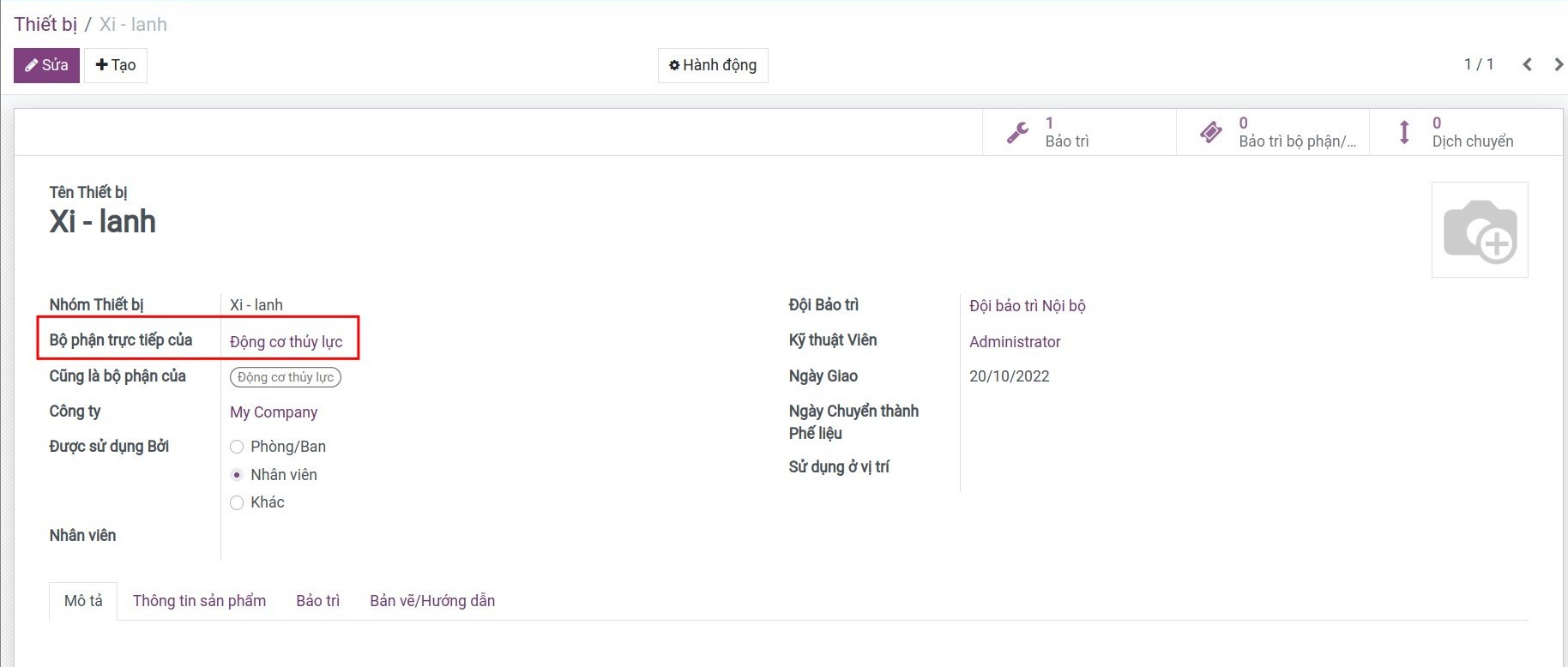
1. Tạo thiết bị và các thành phần thiết bị theo phân cấp phả hệ (cha/con).
Để tạo thiết bị từ phân hệ Bảo Trì, bạn truy cập Bảo trì > Thiết bị > Tạo, tại đây, bạn cần điền đầy đủ các thông tin cơ bản cho thiết bị. Ngoài ra, nếu trong một thiết bị có nhiều thiết bị khác cần được theo dõi bảo trì, bạn chọn bộ phận trực tiếp cho thiết bị đó thuộc thiết bị nào. Ví dụ: Tạo thiết bị là Xi-lanh là bộ phận trực tiếp của Động cơ thủy lực.
Lưu ý: Nếu bạn không có nhu cầu quản lý thiết theo phả hệ, bạn có thể bỏ trống trường Bộ phận trực tiếp của. Ngoài ra, trên hồ sơ thiết bị, bạn có thể tải các bản vẽ/Hướng dẫn để bạn có thể xem nhanh tài liệu PDF liên quan đến thiết bị này.
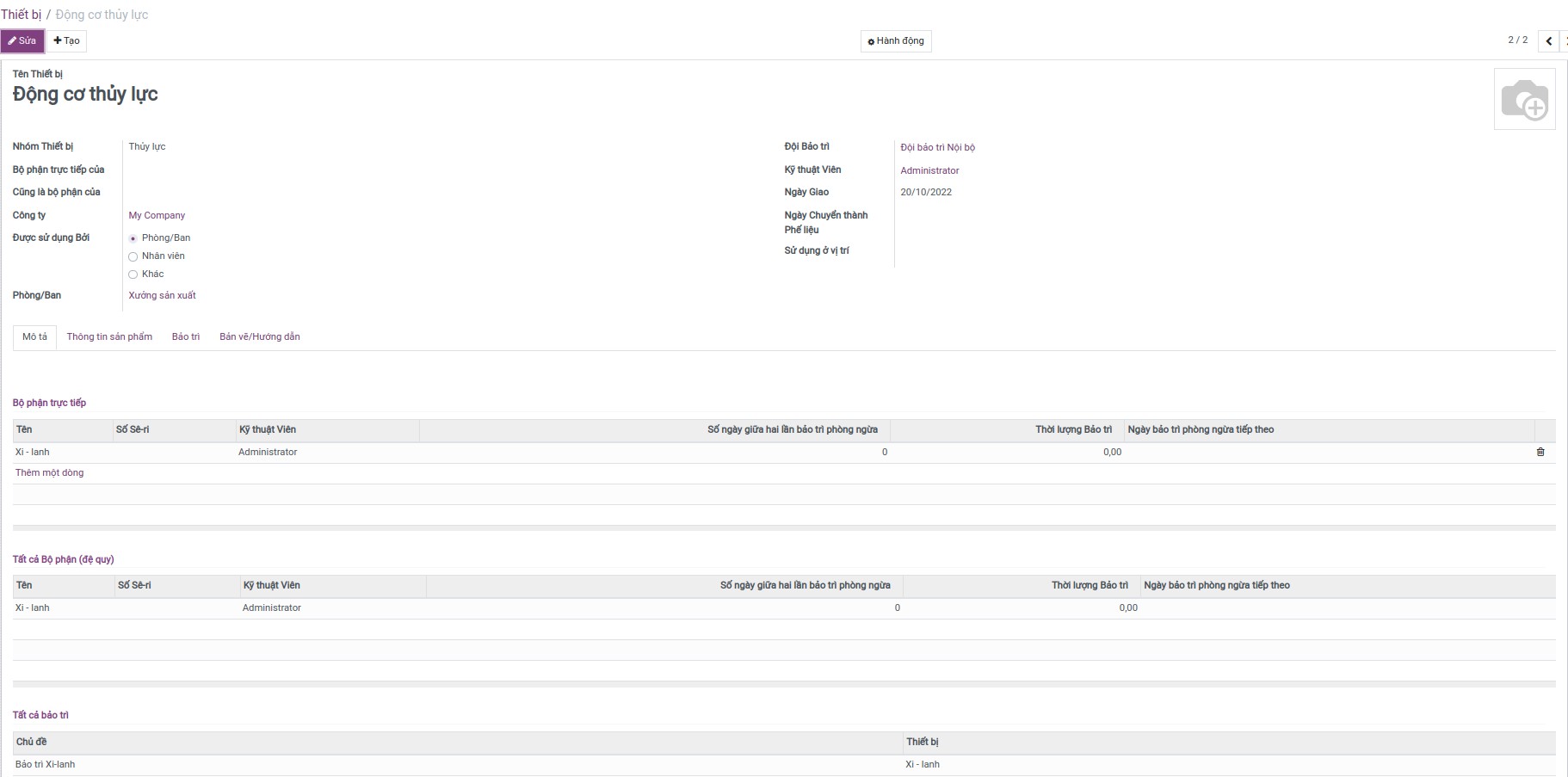
2. Hiển thị liên kết thiết bị và các thành phần trực tiếp của thiết bị.
Đứng trên giao diện thiết bị cha, bạn hoàn toàn có thể theo dõi các thành phần trực tiếp của thiết bị và các yêu cầu bảo trì của các thiết bị con và ngược lại.
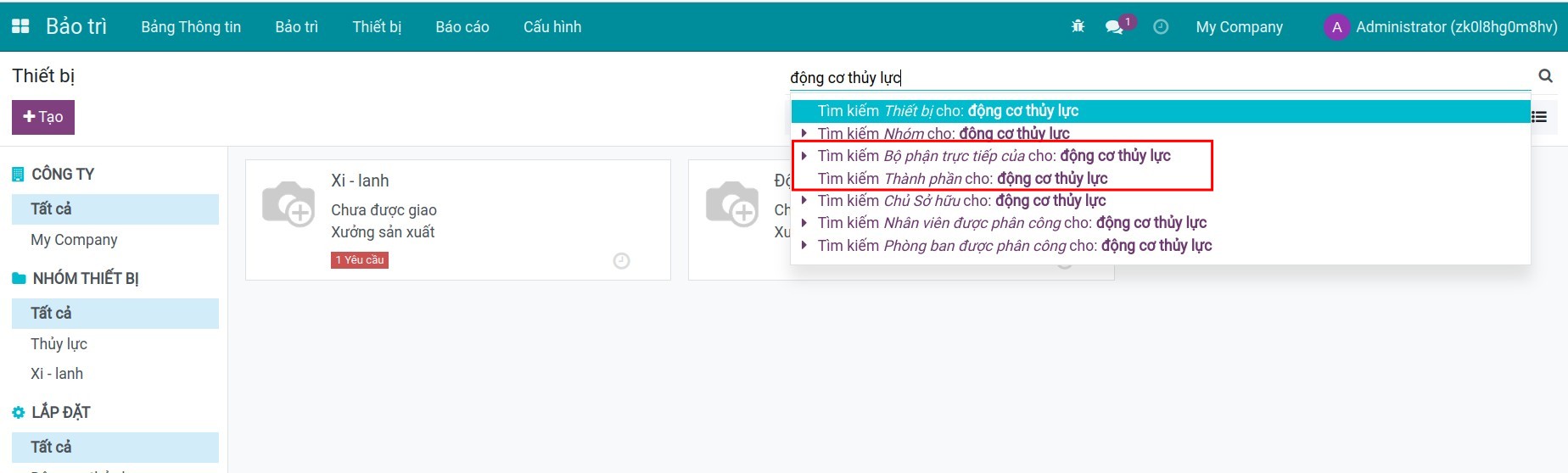
3. Nhóm/Tìm kiếm thiết bị từ các thành phần trực tiếp của thiết bị.
Tại giao diện danh sách thiết bị, bạn có thể tìm kiếm thiết bị theo các tiêu chí Bộ phận trực tiếp của hoặc Thành phần cho thiết bị liên quan.
Phần mềm này và các tệp liên kết ("Phần mềm") được sử dụng (chạy, tuỳ biến, chạy sau khi được tuỳ biến) chỉ khi bạn mua được giấy phép có hiệu lực từ tác giả, điển hình như qua các Ứng dụng Odoo, hoặc trong trường hợp bạn nhận được thoả thuận bằng văn bản từ tác giả của Phần mềm (chi tiết tại tệp COPYRIGHT).
Bạn có thể phát triển các phân hệ Odoo có sử dụng Phần mềm như một Thư viện (thường là phụ thuộc vào, nhập vào và sử dụng nguồn của nó) nhưng không sao chéo bất kỳ mã nguồn hay tài liệu nào thuộc Phần mềm. Bạn có thể phân phối những phân hệ này theo giấy phép mà bạn lựa chọn, miễn sao nội dung giấy phép đó tương tích với điều khoản của Giấy phép Phần mềm Độc quyền Odoo (ví dụ: LGPL, MIT hay bất kỳ loại giấy phép phần mềm độc quyền nào tương tự vậy).
Nghiêm cấm phát hành, phân phối, cấp phép lại hoặc bán bản sao của Phần mềm hoặc bản sao Phần mềm đã được sửa đổi.
Thông báo bản quyền và chấp thuận nêu trên buộc phải được bao gồm trong tất cả các bản sao hoặc các phần quan trọng của Phần mềm.
PHẦN MỀM ĐƯỢC CUNG CẤP "NGUYÊN TRẠNG", KHÔNG BẢO ĐẢM DƯỚI BẤT KỲ HÌNH THỨC NÀO, ĐƯỢC THỂ HIỆN RÕ RÀNG HOẶC NGỤ Ý, KHÔNG GIỚI HẠN ĐẢM BẢO VỀ CÁC BẢO ĐẢM NGỤ Ý VỀ KHẢ NĂNG THƯƠNG MẠI, PHÙ HỢP VỚI MỤC ĐÍCH CỤ THỂ VÀ KHÔNG VI PHẠM. TRONG MỌI TRƯỜNG HỢP SẼ KHÔNG CÓ TÁC GIẢ HOẶC CHỦ SỞ HỮU BẢN QUYỀN NÀO CHỊU TRÁCH NHIỆM VỀ BẤT KỲ KHIẾU NẠI, THIỆT HẠI HOẶC TRÁCH NHIỆM PHÁP LÝ KHÁC NÀO TRONG PHẠM VI HỢP ĐỒNG, CÁC THIỆT HẠI HOẶC CÁCH KHÁC, PHÁT SINH TỪ, NGOÀI HOẶC CÓ LIÊN KẾT VỚI PHẦN MỀM HOẶC VIỆC SỬ DỤNG HOẶC KINH DOANH KHÁC TẠI PHẦN MỀM.
