Bảo hành
| Số dòng Code | 1282 |
| Tên kỹ thuật | to_warranty_management |
| Giấy phép | OPL-1 |
| Website | https://viindoo.com/apps/app/18.0/to_warranty_management |
| Đọc mô tả cho | v 11.0 v 12.0 v 13.0 v 14.0 v 15.0 v 16.0 v 17.0 |
| Yêu cầu các App | Discuss (mail) |
| Bao gồm Các phụ thuộc | Mốc Sản Phẩm |
| Các mở rộng | Quản lý Bảo Hành cho Bán Hàng Kho bảo hành Quản Lý Bảo Hành Cho Mua Hàng |

Viindoo Warranty - Protect Your Products. Delight Your Customers.
Manage warranty policies and claims end-to-end inside Odoo/Viindoo. Define policies by time or operating milestones, look up coverage by lot/serial, integrate with repair, and turn after-sales service into a competitive advantage.
Set warranty terms on each product, auto-calculate expiry dates, process customer claims with a clear workflow (claim → investigate → confirm → finish), and analyze warranty performance with built-in reports.
Key Features
A complete after-sales service backbone for any company that ships physical products: policy-driven warranty terms, traceable coverage, structured claim workflow, and analytics.
Flexible Warranty Policies
Define policies by time (e.g. 24 months) or product milestones (e.g. 10,000 km, 1,000 hours). Attach different policies to each product.
Auto Expiry Calculation
Warranty expiration is auto-computed from delivery date or first usage. No spreadsheet, no manual tracking, no missed deadlines.
Lookup by Lot / Serial
Scan or search any lot/serial number to instantly see product info, applicable policy, expiry status and full claim history.
Repair Integration
Trigger a repair order directly from a warranty claim. Repair history is linked back to the original claim and product unit.
Structured Claim Workflow
Claims move through clear states: Created → Investigating → Confirmed / Refused → Completed. Each step is auditable with full chatter.
Reports & Analytics
Slice and dice claims by partner, product, status, period or lot/serial. Spot quality issues early and feed insights back to product teams.
Benefits
Clear policy on every product unit and a transparent claim flow eliminate "he-said-she-said" disputes with customers and reduce avoidable goodwill repairs.
Frontline staff can verify coverage by serial number in seconds, give customers an immediate answer, and start a claim without leaving Odoo.
Aggregate claim data by product and component to identify defect patterns early, feeding improvements back to production and procurement.
Warranty data lives next to sales, inventory and repair — no parallel Excel files, no inconsistent records, no lost claims.
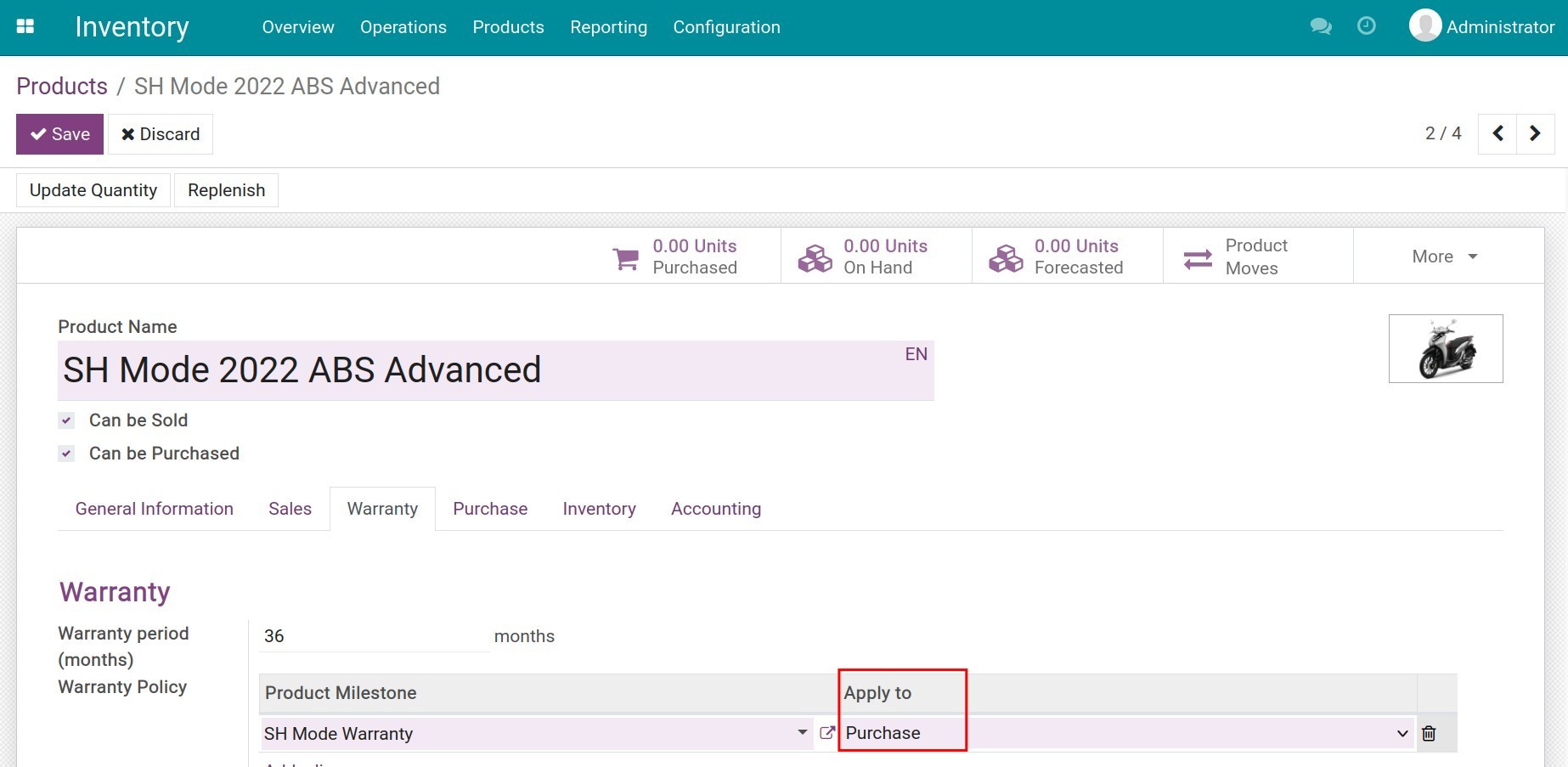
Configure Warranty on Each Product
- Choose policy type: time-based or milestone-based.
- Set duration in days, months, or years.
- Configure operating-milestone units (km, hours, cycles, etc.).
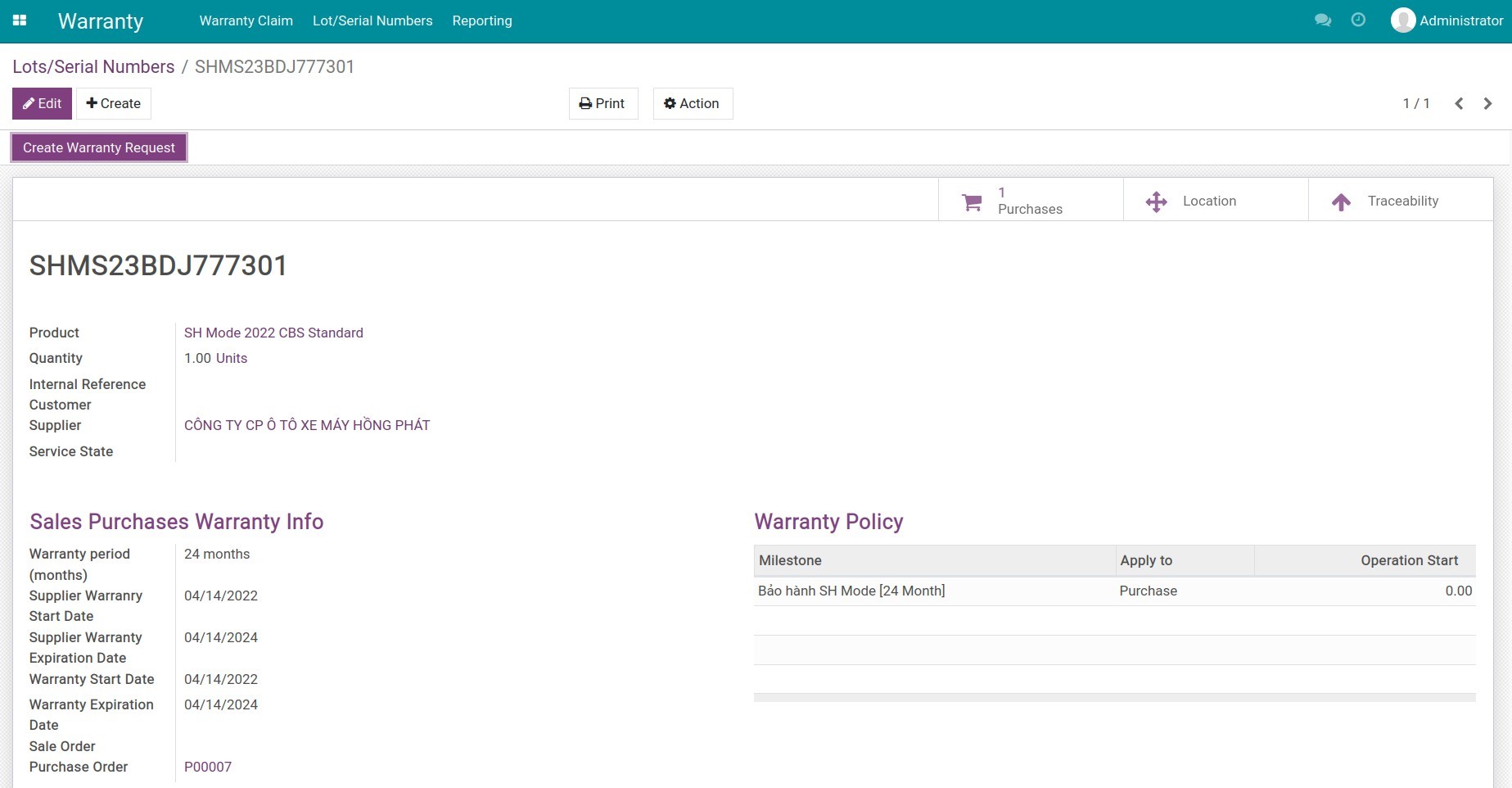
Lookup Warranty by Lot/Serial
- Front-desk staff search by serial number in one click.
- See product, customer, applied policy and expiry date.
- Full repair and claim history on one screen.
End-to-End Claim Workflow
- Capture claim with reason, attachments, expected resolution.
- Route through investigate → confirm/refuse → complete stages.
- Notify customers automatically at each stage.
Reports & Insights for Quality Teams
- Group by partner, product, status, period or lot/serial.
- Pivot, graph, kanban views out of the box.
- Export to Excel for QA, finance, or supplier escalation.
See Viindoo Warranty in Action
Watch how warranty policies are configured, how front-line agents verify coverage, and how claims flow through to repair and reporting.
Need help with Viindoo Warranty?
For pre-sales questions, implementation, or warranty-process consulting, contact Viindoo.
Pre-Sales & Partnership
Please include:
- Odoo/Viindoo version (CE/EE).
- Product categories you sell.
- Volume of warranty claims per month.
Technical Support
For faster troubleshooting:
- Order number or app reference.
- Odoo/Viindoo version & edition.
- Steps to reproduce the issue.
- Screenshots/logs if available.
Technical Requirement
Works Great With These Modules
Extend Viindoo Warranty with complementary modules to cover the full sales → delivery → claim → repair lifecycle.
Repair Orders
Trigger repair orders from a claim, track labor and parts, return repaired items back to the customer with full traceability.
Sales & Delivery
Automatic warranty assignment at delivery — every serial unit shipped to a customer carries its policy and expiry date.
Product Milestone
Tracks operating units (km, hours, cycles) that drive milestone-based warranty terms, essential for vehicles, machinery and equipment.
Who Should Use Viindoo Warranty?
Manufacturers
Track every serial shipped, monitor quality issues, and turn warranty data into product improvement insights.
Distributors & Retailers
Provide consistent after-sales service across stores; handle claims with a clear process instead of ad-hoc spreadsheets.
Equipment / Machinery Vendors
Manage milestone-based warranties (hours, km, cycles) for high-value capital goods with traceable claim history.
Service Centers
Unify warranty claim intake with repair execution so technicians always know what's covered and what's billable.
Odoo Partners
Deliver a battle-tested warranty backbone to client implementations without building from scratch.
Cài đặt
- Truy cập Ứng dụng.
- Tìm từ khóa to_warranty_management.
- Ấn Cài đặt.
Hướng dẫn sử dụng
Video hướng dẫn: Bảo hành
1. Phân quyền người dùng
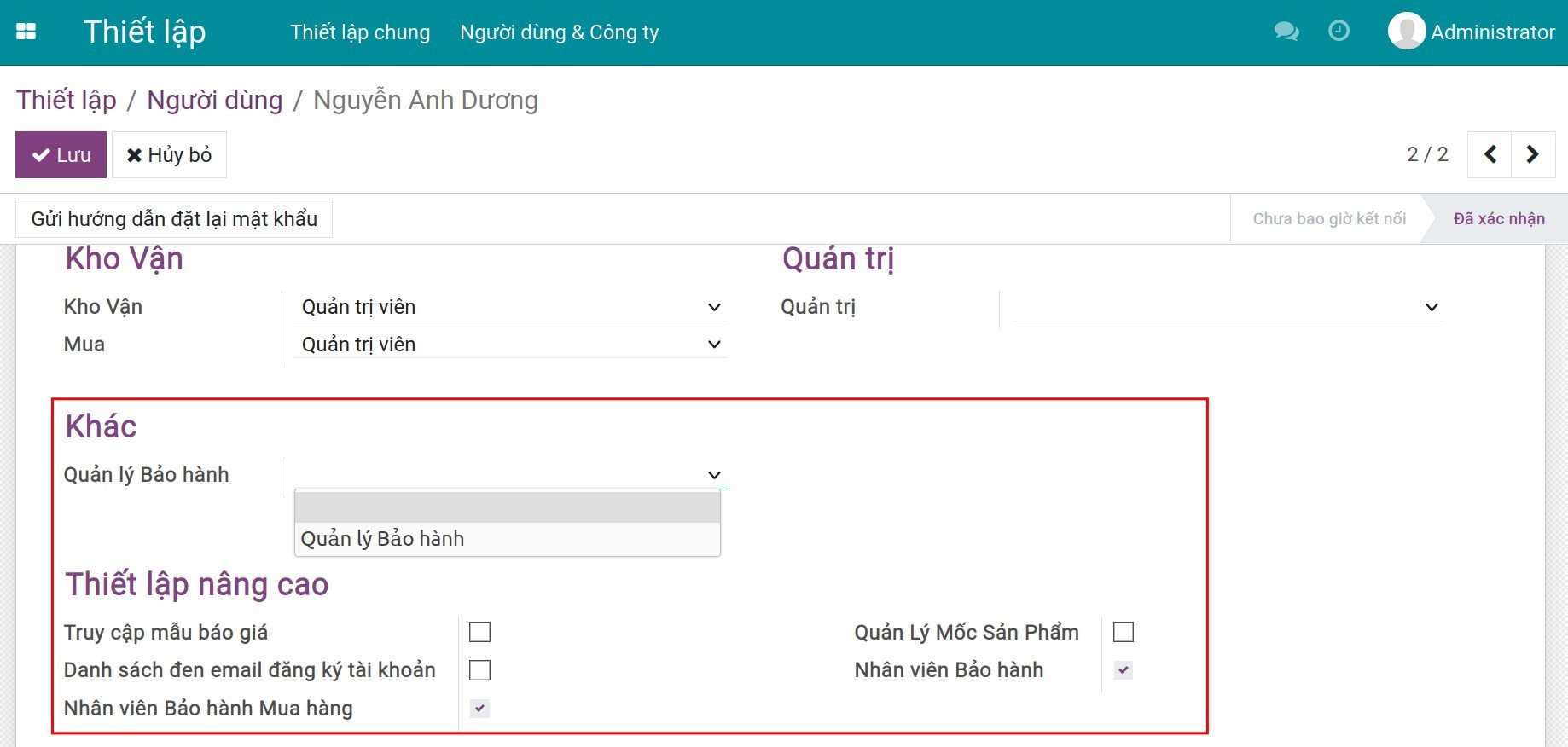
Để phân quyền người dùng trong phần mềm Quản lý Bảo hành, bạn truy cập Thiết lập ‣ Người dùng & Công ty ‣ Người dùng, chọn tài khoản nhân viên cần thiết lập, ấn Sửa và tìm đến mục Quản lý bảo hành.
2. Quản lý thông tin bảo hành của sản phẩm
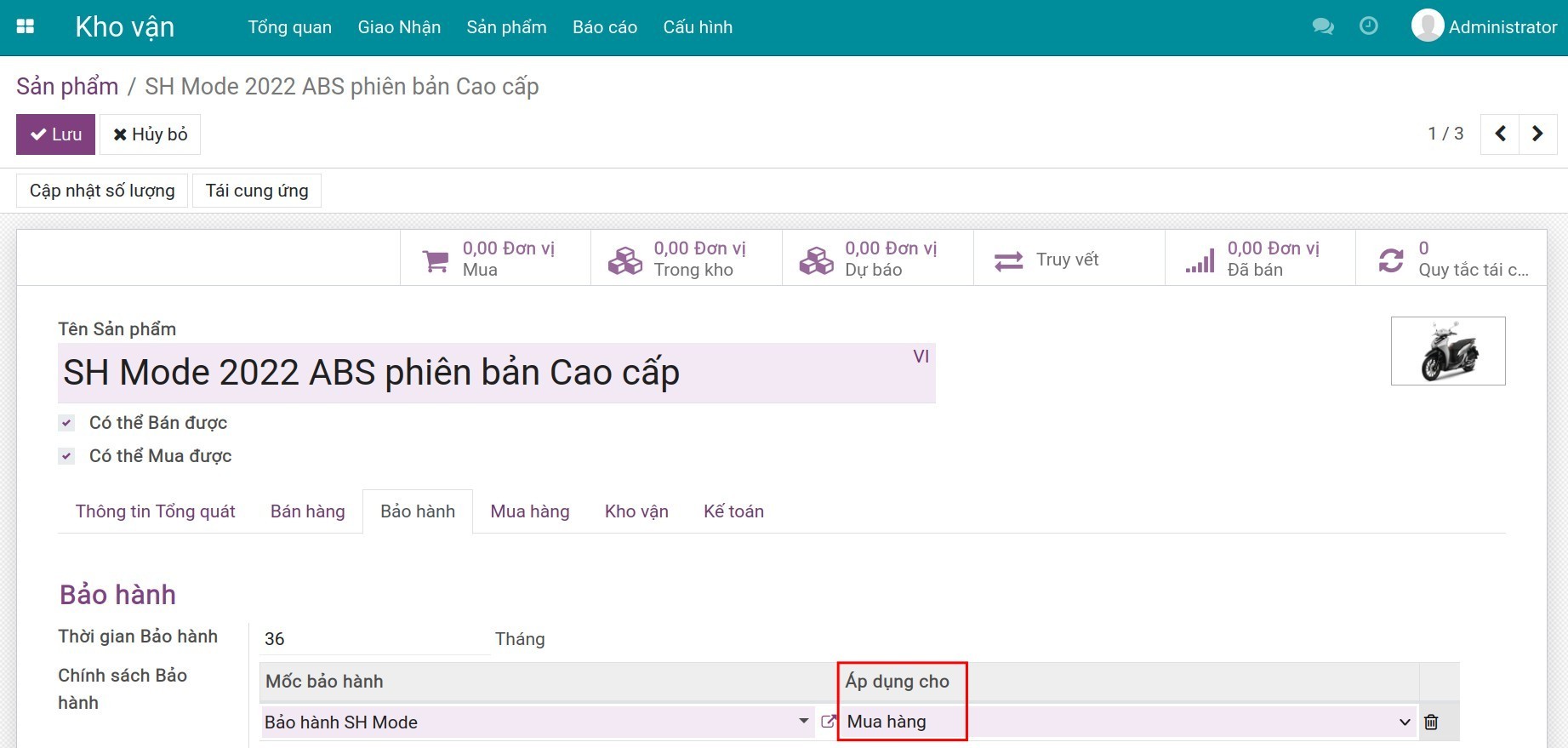
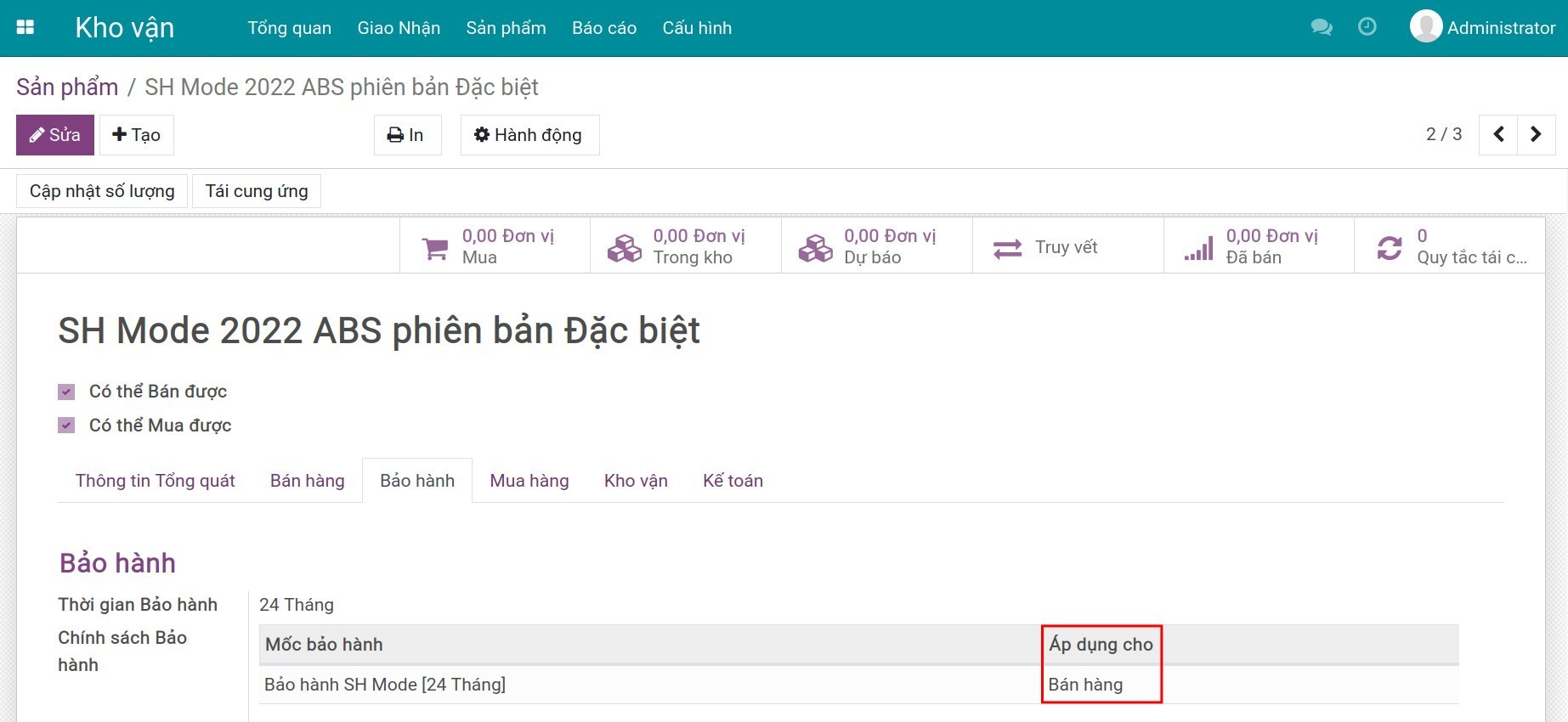
Tiếp theo, bạn cần thiết lập thông tin bảo hành của nhà cung cấp hay khách hàng trên sản phẩm.
3. Quản lý bảo hành
Trong phần mềm quản lý Bảo hành của Viindoo, hỗ trợ cả 2 trường hợp bảo hành cho nhà cung cấp và bảo bảo hành cho khách hàng. Dưới đây, sẽ hướng dẫn chi tiết về bảo hành cho khách hàng. Trường hợp bảo hành cho nhà cung cấp bạn có thể thao tác tương tự.
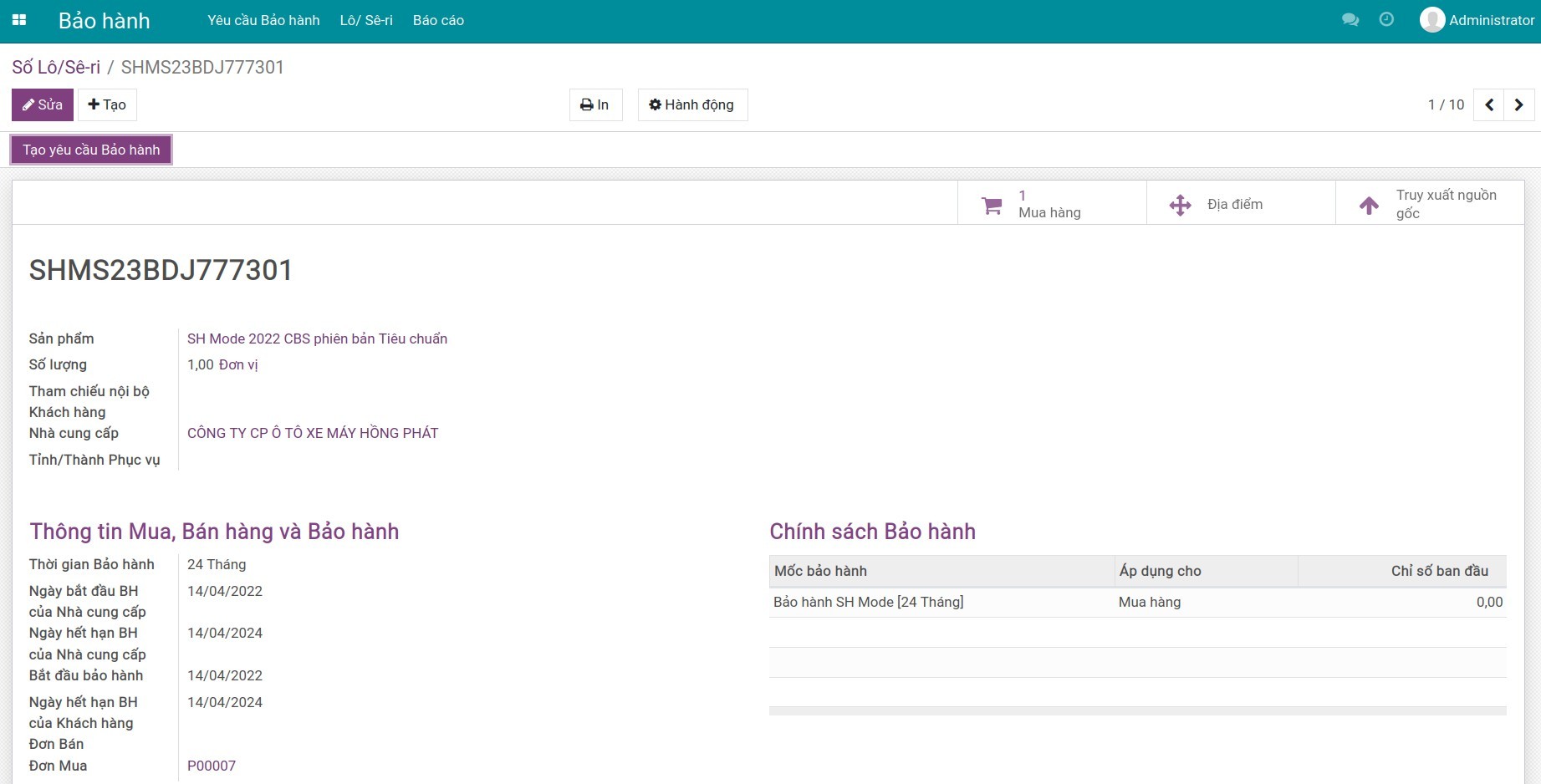
Bước 1: Tra cứu thời hạn bảo hành của sản phẩm
Khi tiếp nhận yêu cầu bảo hành, trước tiên bạn cần tra cứu thông tin bảo hành của sản phẩm.
Bước 2: Tạo yêu cầu bảo hành của khách hàng
Để tạo mới yêu cầu bảo hành cho khách hàng, bạn truy cập vào Bảo hành ‣ Yêu cầu bảo hành ‣ Dự thảo , ấn Tạo để tạo mới một yêu cầu bảo hành. Tại phiếu yêu cầu bảo hành bạn thay đổi thông tin kiểu đối tác thành Khách hàng.
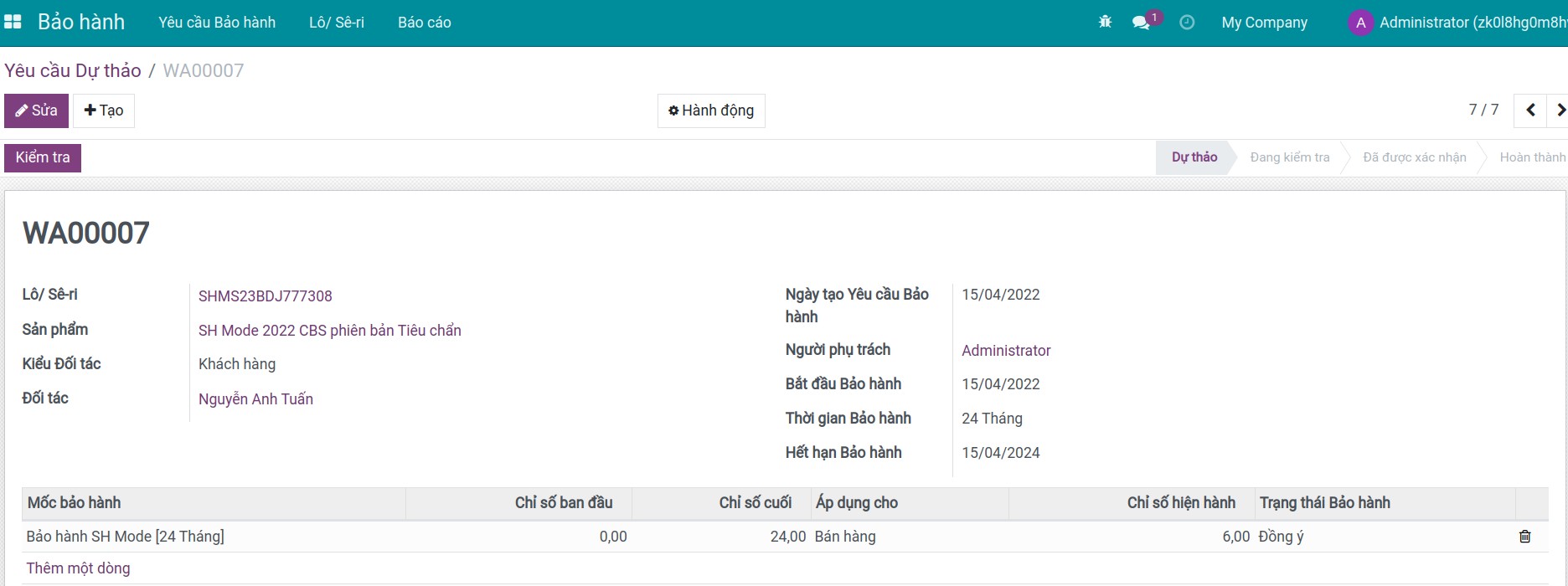
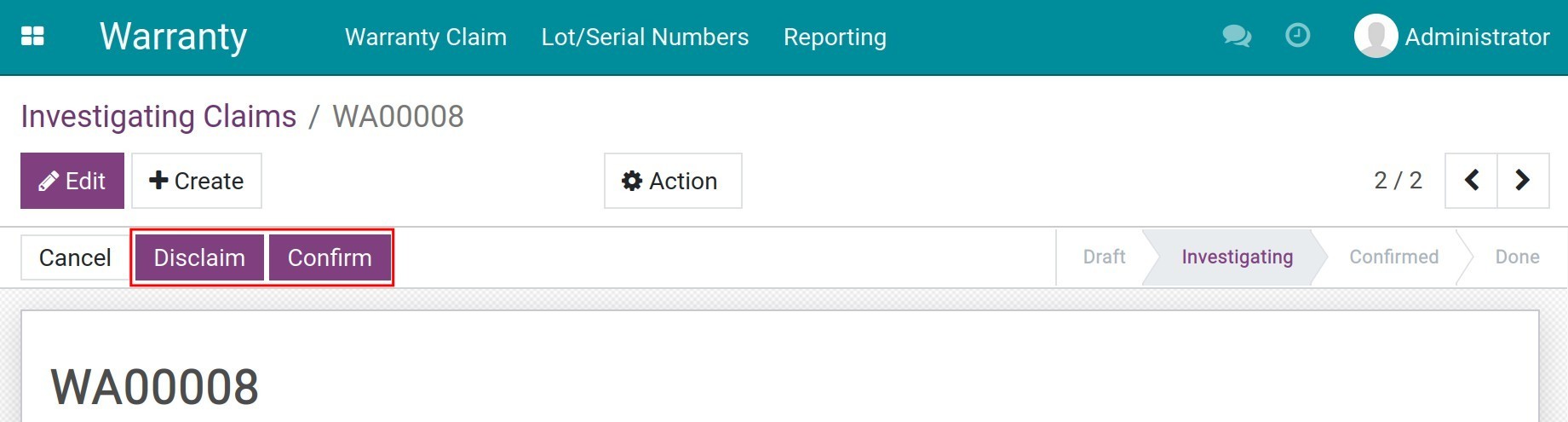
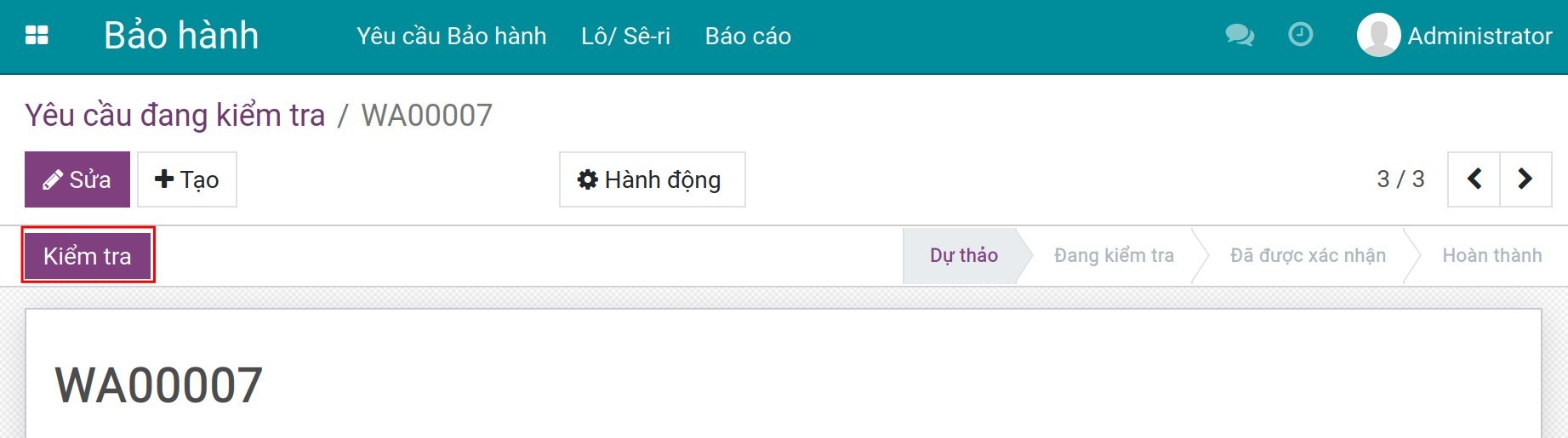
Sau khi đã điền đầy đủ thông tin, bạn ấn Kiểm tra để bắt đầu đánh giá yêu cầu bảo hành.
Bước 3: Đánh giá các yêu cầu bảo hành
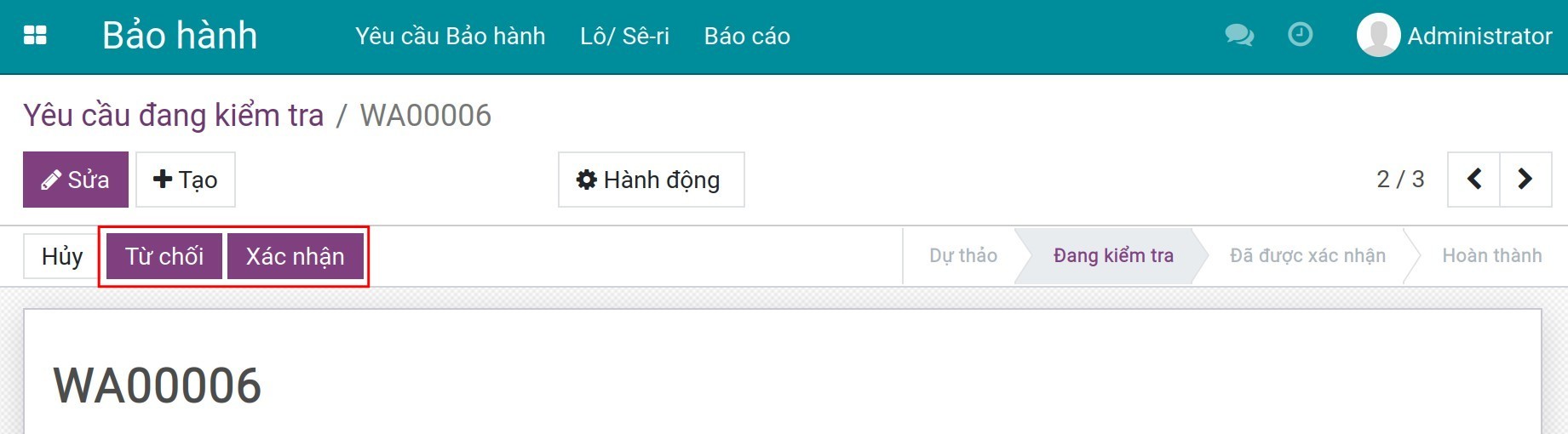
Tại chi tiết từng yêu cầu bảo hành, bạn ấn Xác nhận để đồng ý tiếp nhận bảo hành theo như yêu cầu hoặc Từ chối để từ chối tiếp nhận bảo hành.
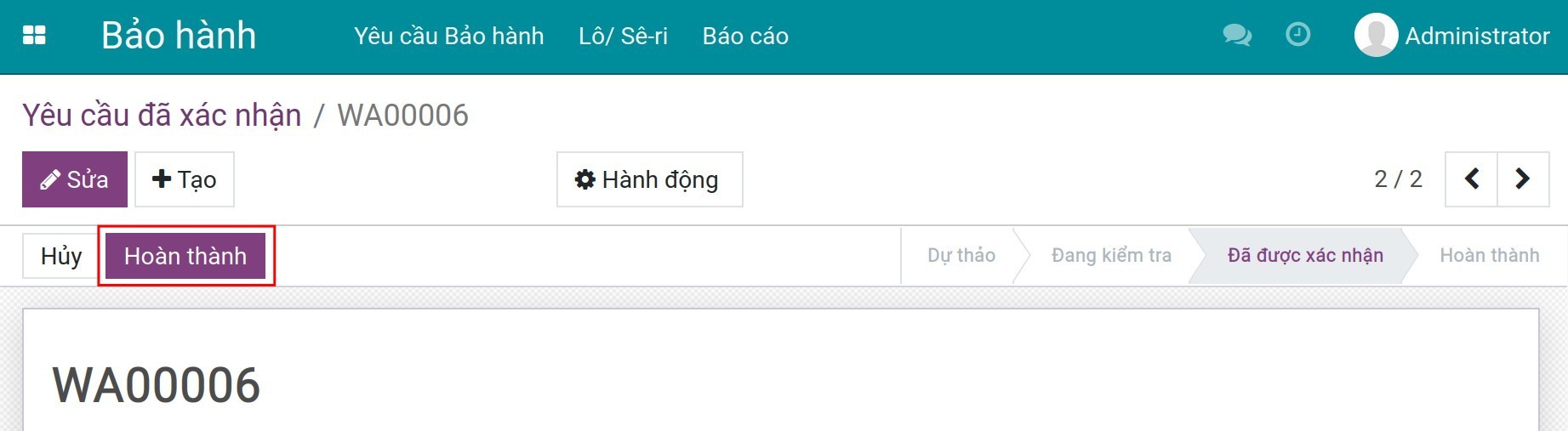
Khi đã hoàn thành việc bảo hành sản phẩm theo yêu cầu, tại giao diện phiếu yêu cầu ấn Hoàn thành để kết thúc quy trình bảo hành.
4. Báo cáo bảo hành
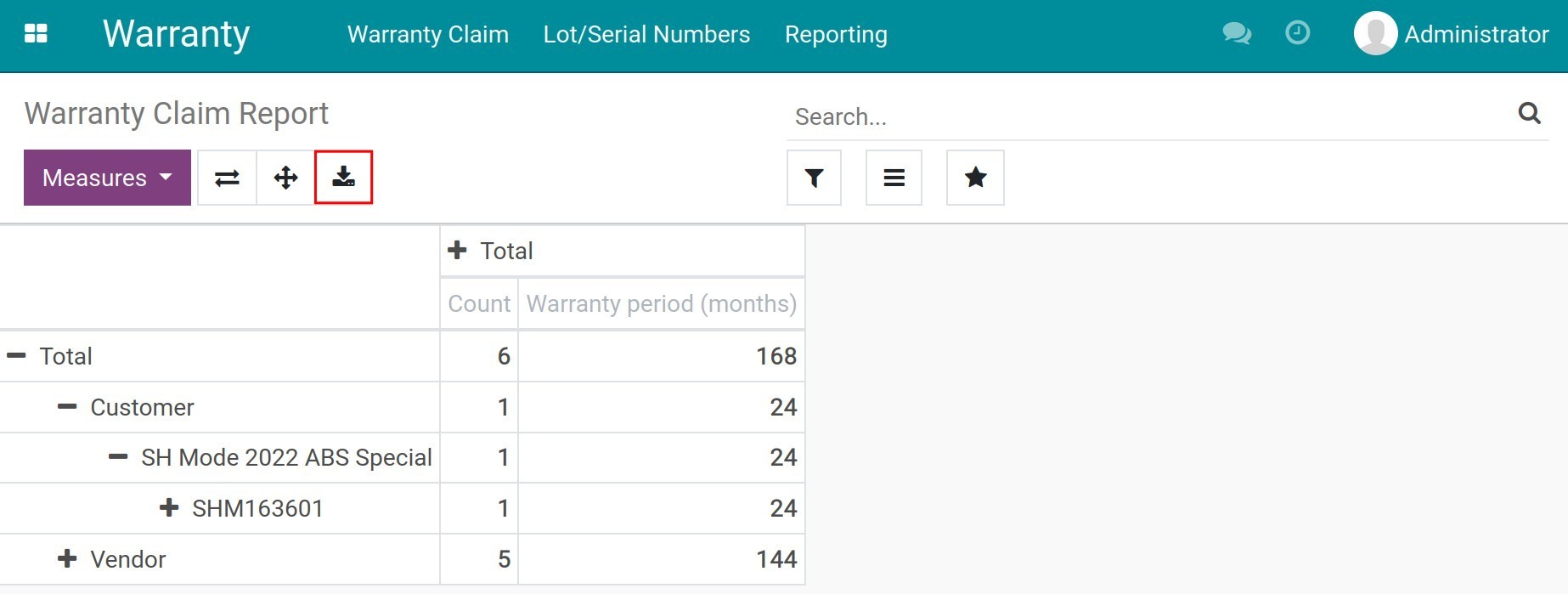
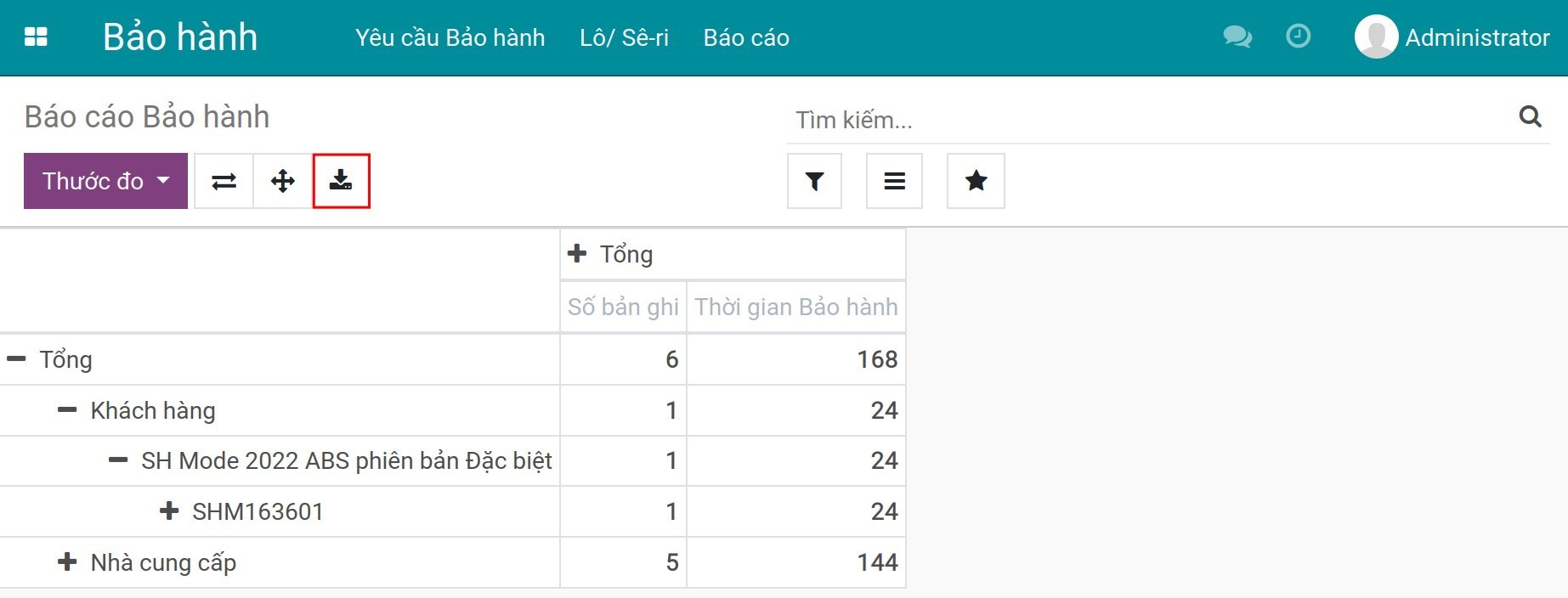
Để xem báo cáo bảo hành, bạn truy cập Bảo hành ‣ Báo cáo. Tại đây, hệ thống cho phép bạn phân tích theo nhiều tiêu chí: khách hàng, phiếu yêu cầu bảo hành, thời gian bảo hành, tình trạng bảo hành...
Phần mềm này và các tệp liên kết ("Phần mềm") được sử dụng (chạy, tuỳ biến, chạy sau khi được tuỳ biến) chỉ khi bạn mua được giấy phép có hiệu lực từ tác giả, điển hình như qua các Ứng dụng Odoo, hoặc trong trường hợp bạn nhận được thoả thuận bằng văn bản từ tác giả của Phần mềm (chi tiết tại tệp COPYRIGHT).
Bạn có thể phát triển các phân hệ Odoo có sử dụng Phần mềm như một Thư viện (thường là phụ thuộc vào, nhập vào và sử dụng nguồn của nó) nhưng không sao chéo bất kỳ mã nguồn hay tài liệu nào thuộc Phần mềm. Bạn có thể phân phối những phân hệ này theo giấy phép mà bạn lựa chọn, miễn sao nội dung giấy phép đó tương tích với điều khoản của Giấy phép Phần mềm Độc quyền Odoo (ví dụ: LGPL, MIT hay bất kỳ loại giấy phép phần mềm độc quyền nào tương tự vậy).
Nghiêm cấm phát hành, phân phối, cấp phép lại hoặc bán bản sao của Phần mềm hoặc bản sao Phần mềm đã được sửa đổi.
Thông báo bản quyền và chấp thuận nêu trên buộc phải được bao gồm trong tất cả các bản sao hoặc các phần quan trọng của Phần mềm.
PHẦN MỀM ĐƯỢC CUNG CẤP "NGUYÊN TRẠNG", KHÔNG BẢO ĐẢM DƯỚI BẤT KỲ HÌNH THỨC NÀO, ĐƯỢC THỂ HIỆN RÕ RÀNG HOẶC NGỤ Ý, KHÔNG GIỚI HẠN ĐẢM BẢO VỀ CÁC BẢO ĐẢM NGỤ Ý VỀ KHẢ NĂNG THƯƠNG MẠI, PHÙ HỢP VỚI MỤC ĐÍCH CỤ THỂ VÀ KHÔNG VI PHẠM. TRONG MỌI TRƯỜNG HỢP SẼ KHÔNG CÓ TÁC GIẢ HOẶC CHỦ SỞ HỮU BẢN QUYỀN NÀO CHỊU TRÁCH NHIỆM VỀ BẤT KỲ KHIẾU NẠI, THIỆT HẠI HOẶC TRÁCH NHIỆM PHÁP LÝ KHÁC NÀO TRONG PHẠM VI HỢP ĐỒNG, CÁC THIỆT HẠI HOẶC CÁCH KHÁC, PHÁT SINH TỪ, NGOÀI HOẶC CÓ LIÊN KẾT VỚI PHẦN MỀM HOẶC VIỆC SỬ DỤNG HOẶC KINH DOANH KHÁC TẠI PHẦN MỀM.