OmniApproval™ - Phê duyệt chấm công
| Số dòng Code | 1046 |
| Tên kỹ thuật | viin_approval_hr_timesheet |
| Giấy phép | OPL-1 |
| Website | https://viindoo.com/apps/modules/18.0/to_hr_timesheet_approval |
| Đọc mô tả cho | v 13.0 v 14.0 v 15.0 v 16.0 v 17.0 v 19.0 |
| Yêu cầu các App | Time Off (hr_holidays) Project (project) Discuss (mail) Calendar (calendar) Employees (hr) Employee Contracts (hr_contract) |
| Bao gồm Các phụ thuộc | Mô-đun Cơ Sở OmniApproval™: Một nền tảng, mọi phê duyệt Bộ đếm thời gian chấm công Quản trị Nhân sự Nâng cao OmniApproval™ - Phê duyệt kế toán quản trị OmniApproval™ - Phê duyệt Dự án & Công việc Proxy metadata IR an toàn Bộ đếm tăng thời gian |
| Các mở rộng | Duyệt Chấm công cho Tăng ca |

Timesheets that someone actually approved
Timesheet lines routed through the approval engine - submitted, checked by the manager who can see them, and locked once approved.
OmniApproval™ - Timesheet Approvals (technical name viin_approval_hr_timesheet) is an Odoo 18.0 app for Odoo Community and Odoo Enterprise and Viindoo Cloud, built for employee, manager, finance, payroll.
At a Glance
The facts of OmniApproval™ - Timesheet Approvals, version 0.1.4, in one place. Published by Viindoo.
How It Works
Two screens.
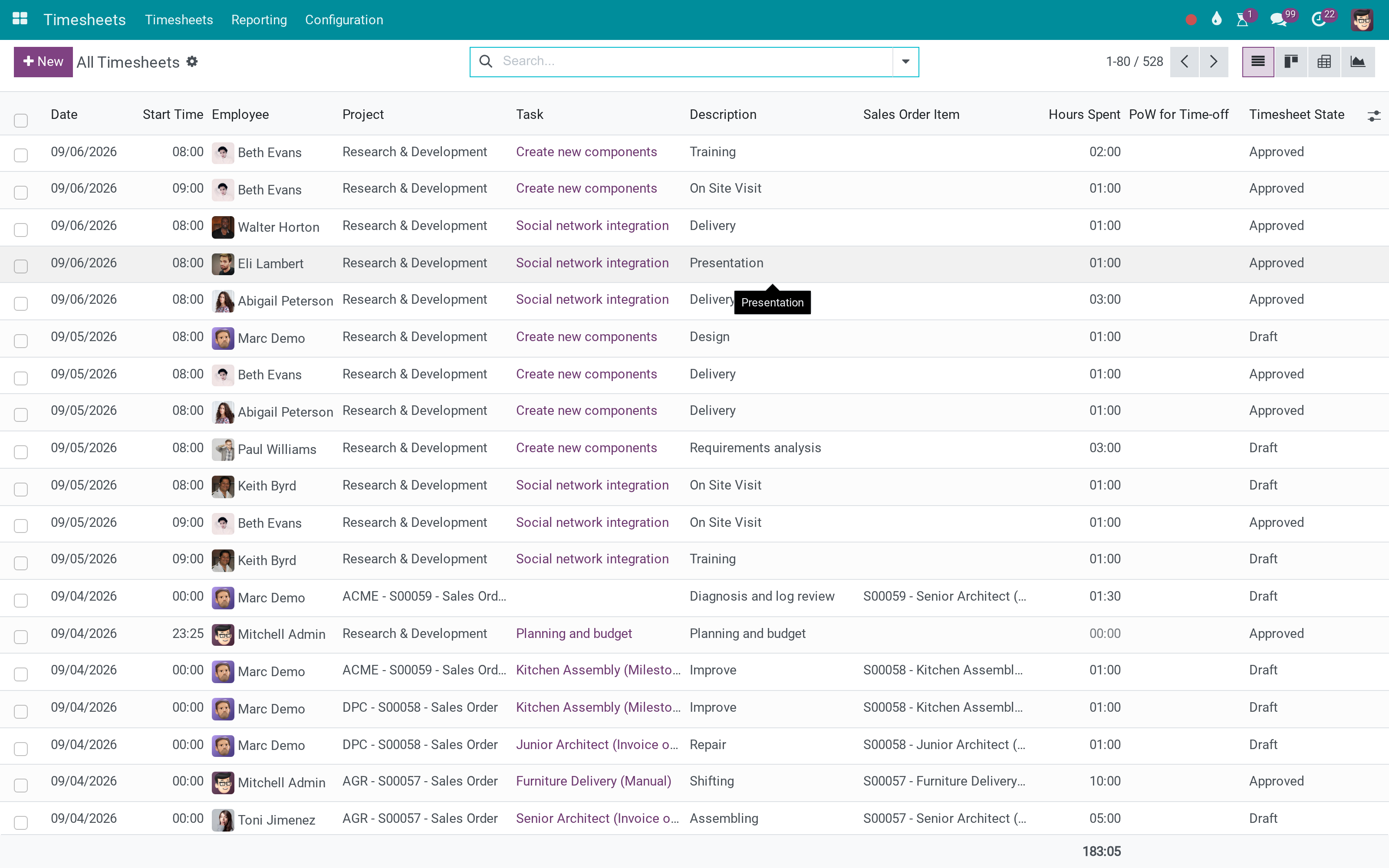
The lines, with their state
Draft and approved side by side - the difference between what was typed and what was agreed.
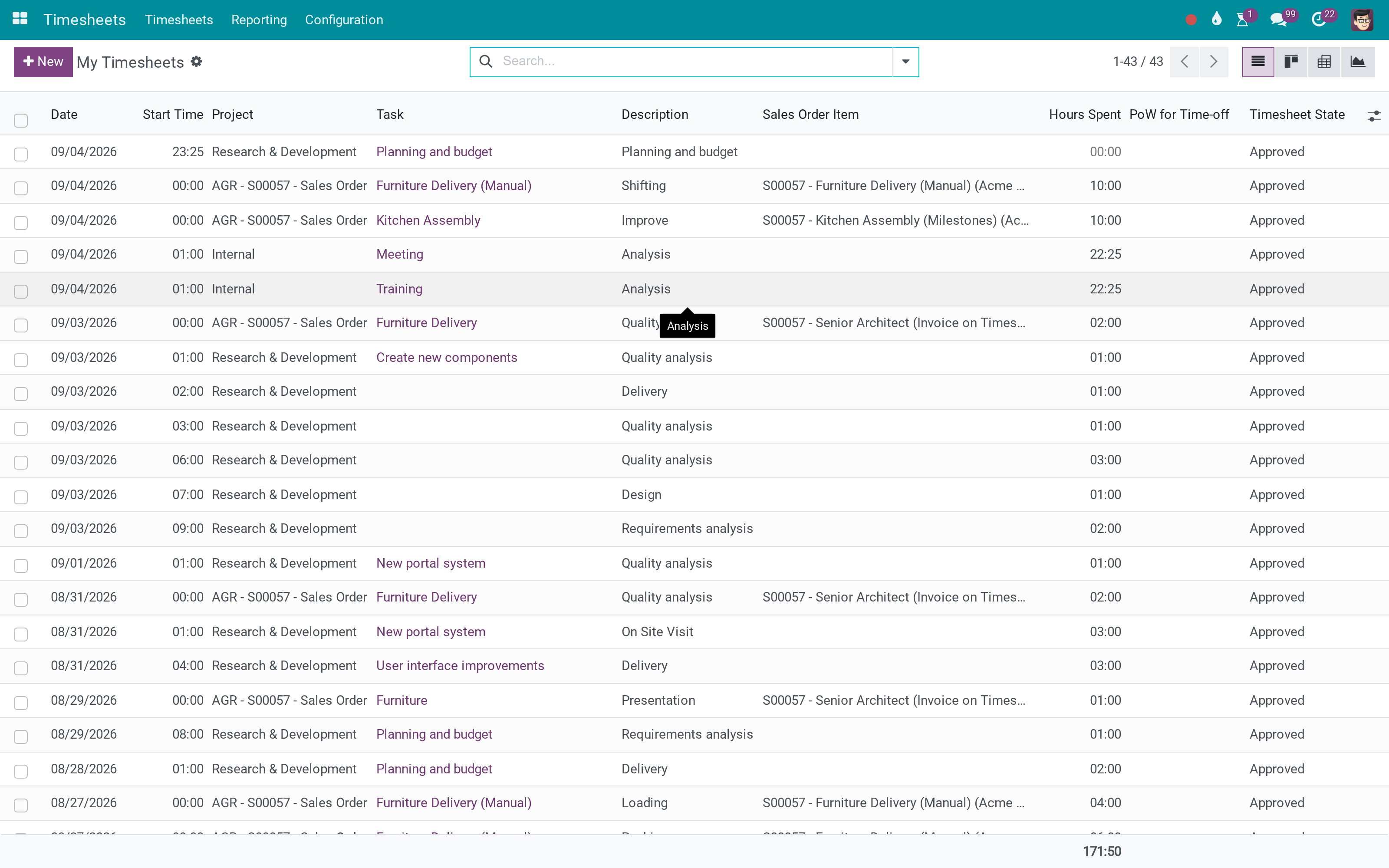
And a person's own week
The same lines from the employee's side, before they are submitted.
What You Get
Timesheet lines attached to an approval request
Routed through the approval engine: sequential approvers, minimums, deadlines
The request shows the employees and projects it covers
Refusal returns the lines with a reason
Approved time is locked against further editing
Managers only see the requests they are entitled to act on
More Screens
Everything below was taken on a database seeded with real business data, on this series - not a mock-up and not a screenshot from an older version.
My timesheets
What This App Does Not Do
Read this before you buy. Everything below is something the app deliberately leaves to another app or to you.
Who may approve is configured there, per approval type.
Payroll reads approved time; the calculation stays payroll's.
Approval locks the time entries, not the work.
Corrections are made by the person who entered the time.
Works Well With
Apps from the same stack, built to fit this one:
Who Should Use OmniApproval™ - Timesheet Approvals?
Employee
Submits the week instead of having it silently consumed.
Manager
Approves the time of the people they are responsible for.
Finance
Bills from hours somebody signed for.
Payroll
Reads approved time rather than typed time.
Frequently Asked Questions
What does OmniApproval™ - Timesheet Approvals do?
Timesheet lines routed through the approval engine - submitted, checked by the manager who can see them, and locked once approved.
What does OmniApproval™ - Timesheet Approvals not do?
It needs the approval engine. Who may approve is configured there, per approval type. It does not compute pay. Payroll reads approved time; the calculation stays payroll's. It does not lock projects. Approval locks the time entries, not the work. Refusal is a reason, not a rewrite. Corrections are made by the person who entered the time.
Who is OmniApproval™ - Timesheet Approvals for?
Employee: Submits the week instead of having it silently consumed. Manager: Approves the time of the people they are responsible for. Finance: Bills from hours somebody signed for. Payroll: Reads approved time rather than typed time.
Which Odoo version and editions does it support?
Odoo 18.0 - Odoo Community, Odoo Enterprise, Viindoo Cloud. Upgrades to a newer Odoo series are a separate purchase for that series.
What does it depend on?
It installs on top of: hr_contract, hr_timesheet, viin_approval, viin_hr_timesheet_timer, viin_approval_project, project_timesheet_holidays. Odoo installs them with it.
How do I set it up?
Two screens.
What works well with it?
OmniApproval (viin_approval): The engine the requests run through. Timesheet Timer (viin_hr_timesheet_timer): Recording the time in the first place. Timesheets in Payroll (to_hr_timesheet_payroll): Where approved time becomes money.
Can I try it before buying?
Yes - the Live Preview button at the top of this page opens the module's own screen on a working database.
How do I get support?
Write to apps.support@viindoo.com with your Odoo version and the technical name viin_approval_hr_timesheet; pre-sales questions go to sales@viindoo.com.
See OmniApproval™ - Timesheet Approvals in Action
Live demo: v18demo-int.viindoo.com/web#action=hr_timesheet.timesheet_action_all
Need help with OmniApproval™ - Timesheet Approvals?
For questions, implementation support or a custom feature, contact Viindoo.
Pre-Sales & Partnership
sales@viindoo.comUpgrades to a newer Odoo series are a separate purchase for that series.
All Viindoo apps: Viindoo Apps
Technical Requirement
Changes log
0.1.4 - Latest on the 17.0 line
- A request computes the employees and projects it involves, so an approver sees its scope.
- Approved lines are protected from further editing.
Phê duyệt giờ công
Dành cho: nhân viên ghi giờ công, người quản lý và người phê duyệt giờ công, quản trị viên phê duyệt.
Note
Mở rộng Bảng giờ công - xem tài liệu của hr_timesheet.
Note
Mở rộng Phê duyệt cho dự án - xem tài liệu của viin_approval_project.
Note
Mở rộng Phê duyệt - xem tài liệu của viin_approval.
Tổng quan
Giờ công có thể là căn cứ tính lương, chi phí dự án và đánh giá hiệu suất, nên cần quản lý xác nhận trước. Module bổ sung loại phê duyệt Giờ công: nhân viên trình nhiều dòng giờ công trong một đề nghị phê duyệt, người phê duyệt duyệt hoặc từ chối. Mỗi dòng giờ công hiển thị trạng thái phê duyệt nên ai cũng biết giờ nào đã được xác nhận.
| Vai trò | Công việc | Quyền cần gán |
|---|---|---|
| Nhân viên | Ghi giờ công và xin phê duyệt các dòng giờ công. | Quyền Bảng giờ công của nhân viên |
| Người phê duyệt | Duyệt hoặc từ chối đề nghị. | Bảng giờ công: Người dùng: tất cả giờ công, cùng một quyền Phê duyệt |
| Quản trị viên phê duyệt | Thiết lập loại phê duyệt và hợp đồng. | Phê duyệt: Quản trị viên |
Thiết lập (dành cho Quản trị viên)
Cài đặt module
- Truy cập Ứng dụng.
- Tìm Phê duyệt giờ công (viin_approval_hr_timesheet).
- Bấm Cài đặt.
Phân quyền
Truy cập Cài đặt ‣ Người dùng & Công ty ‣ Người dùng và mở một người dùng. Ở nhóm Bảng giờ công, gán Người dùng: tất cả giờ công cho từng người phê duyệt. Ở nhóm Phê duyệt, gán quyền phù hợp với vai trò của họ.
Chọn đối tượng cần phê duyệt
Giờ công của nhân viên được xác nhận tự động, trừ khi hợp đồng của họ yêu cầu phê duyệt. Trên hợp đồng của nhân viên, đánh dấu Phê duyệt giờ công. Ô này được đánh dấu sẵn khi phòng ban hoặc vị trí công việc của hợp đồng bật Phê duyệt giờ công, nên bạn có thể quyết định một lần cho cả phòng ban hoặc vị trí công việc.
Loại phê duyệt
Truy cập Phê duyệt ‣ Cấu hình ‣ Loại phê duyệt và mở Giờ công. Loại này được tạo sẵn: quản lý của nhân viên phê duyệt từng đề nghị, và bạn có thể thêm các bước và người phê duyệt khác ở tab Quy trình phê duyệt.

Nhân viên: ghi giờ công và xin phê duyệt
Ghi giờ công
Ghi giờ trong ứng dụng Bảng giờ công như bình thường. Mỗi dòng có cột trạng thái, là Dự thảo cho đến khi dòng được trình trong một đề nghị.
Xin phê duyệt
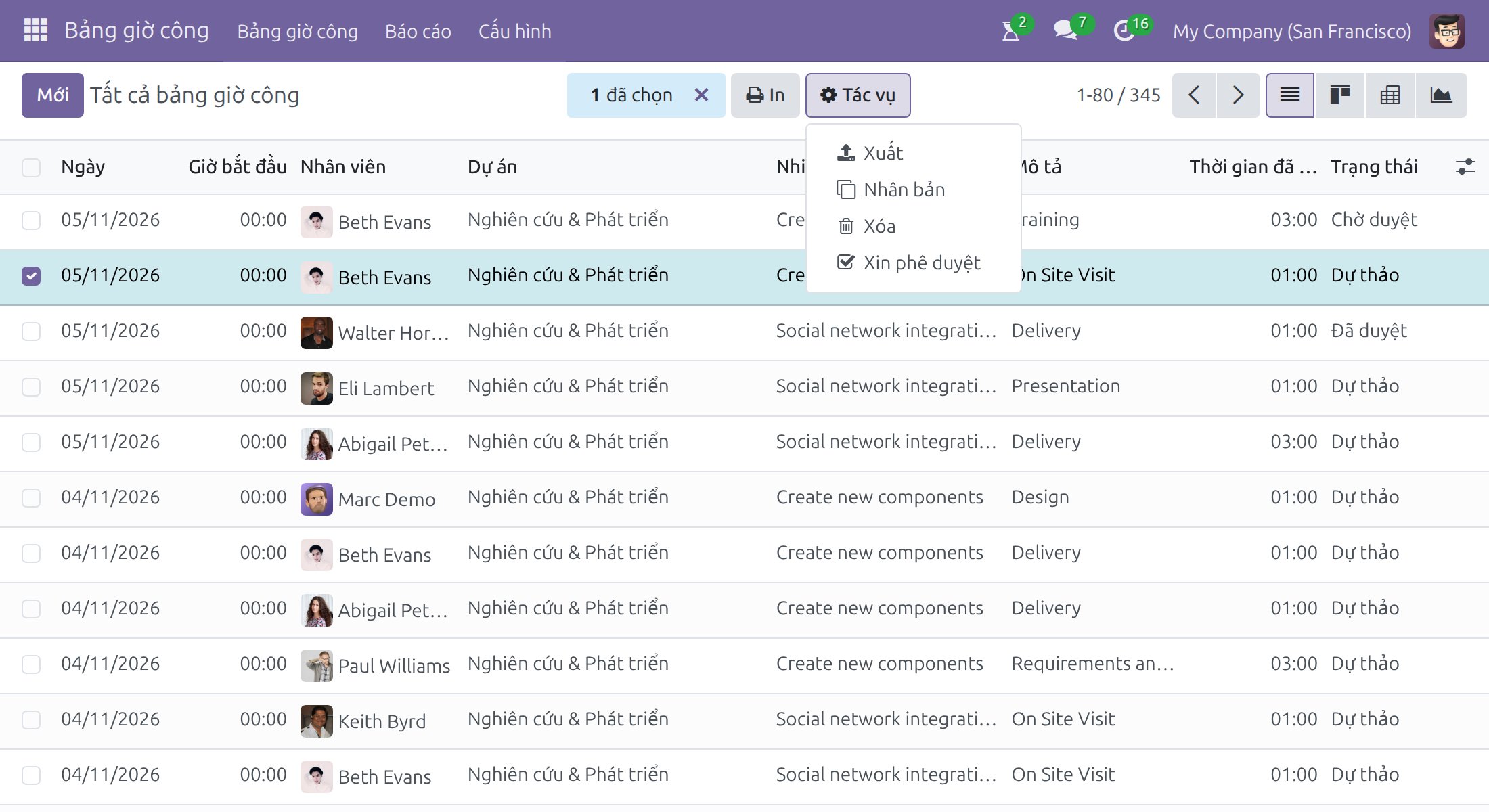
- Trong ứng dụng Bảng giờ công, mở danh sách giờ công của bạn và chọn các dòng cần phê duyệt.
- Bấm Tác vụ ‣ Xin phê duyệt.
- Kiểm tra tiêu đề và các dòng, rồi bấm Tạo đề nghị phê duyệt.
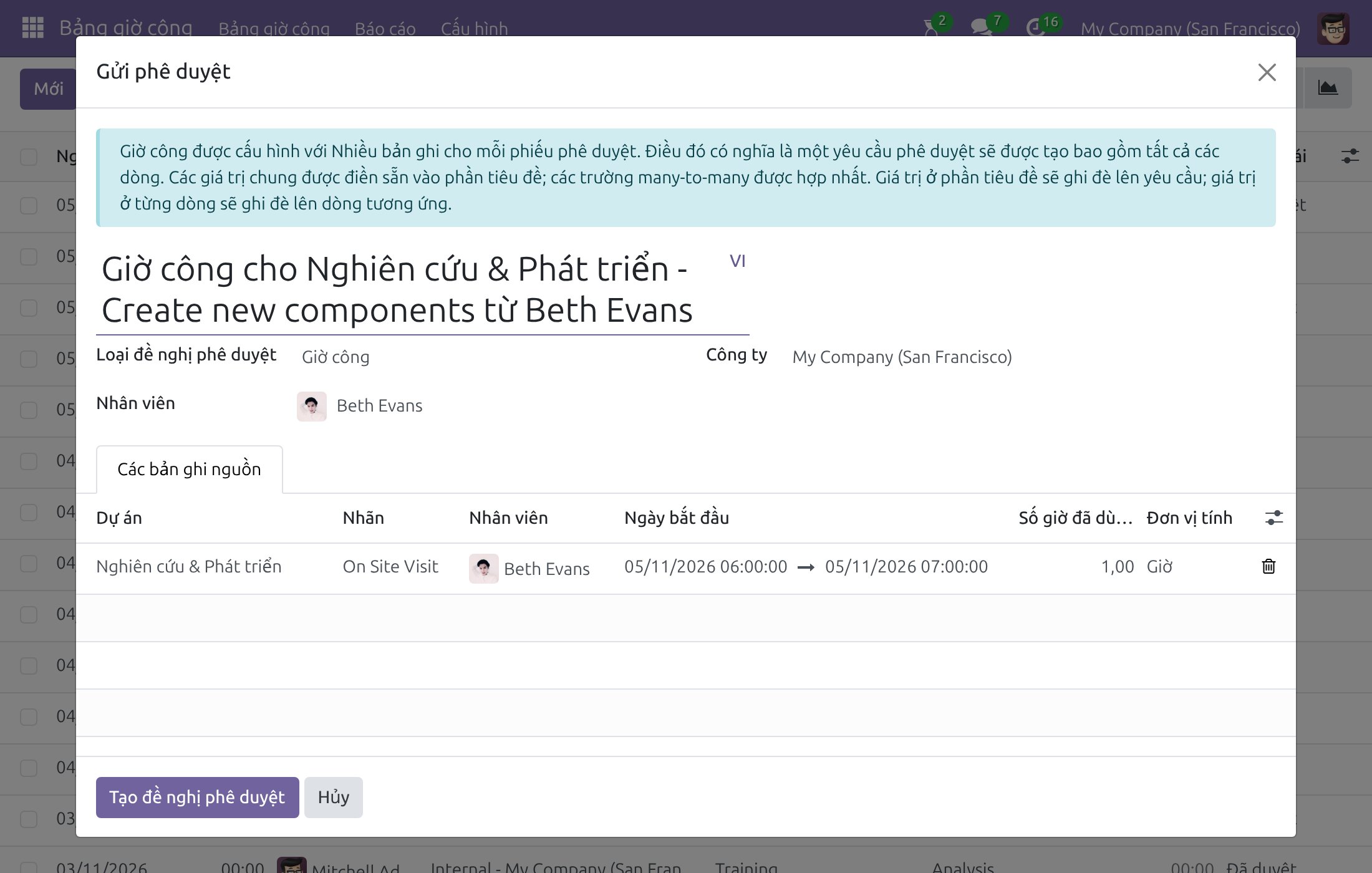
Đề nghị mở ra ở giai đoạn Dự thảo. Kiểm tra các dòng ở tab Bảng giờ công, rồi bấm Trình.
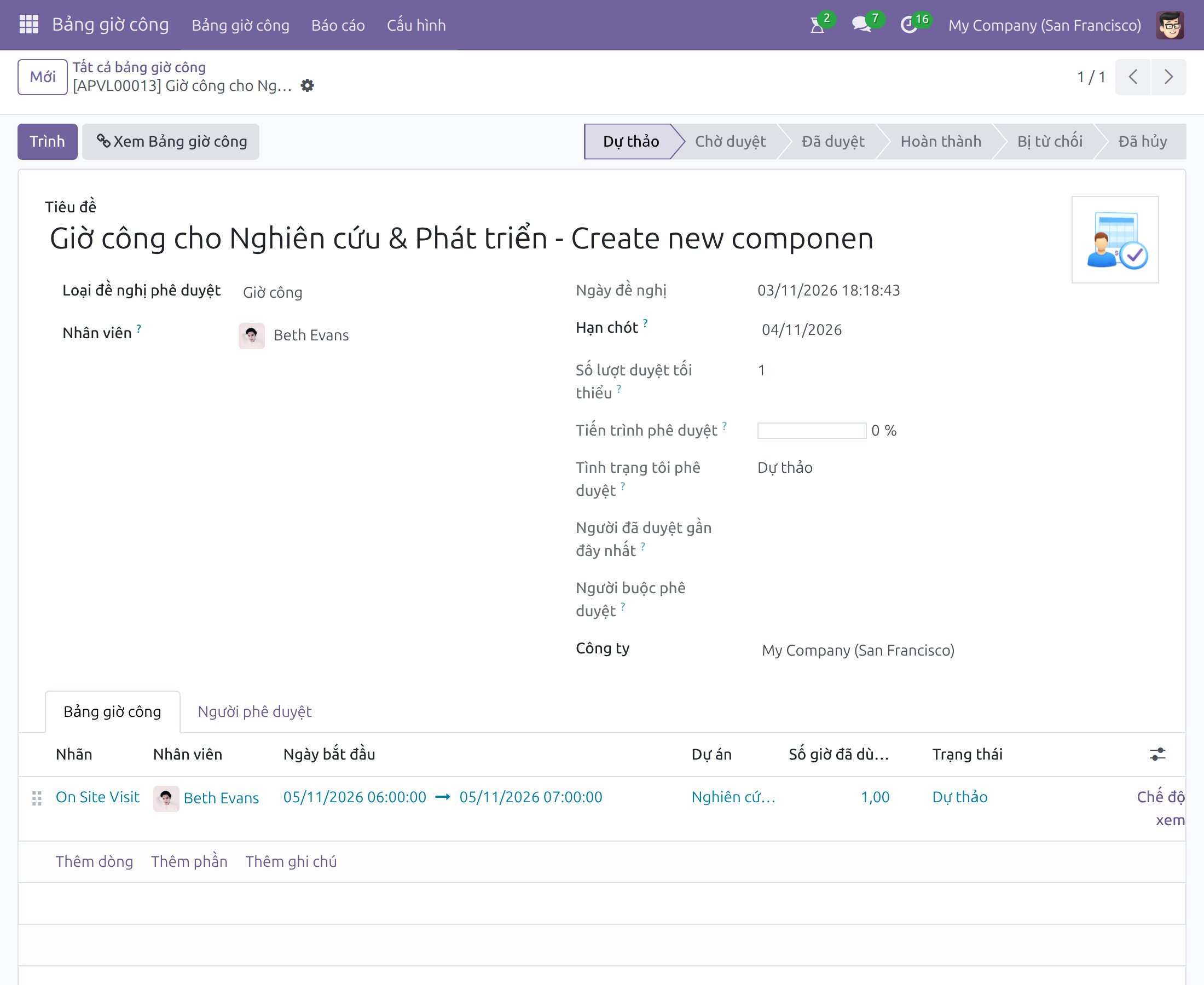
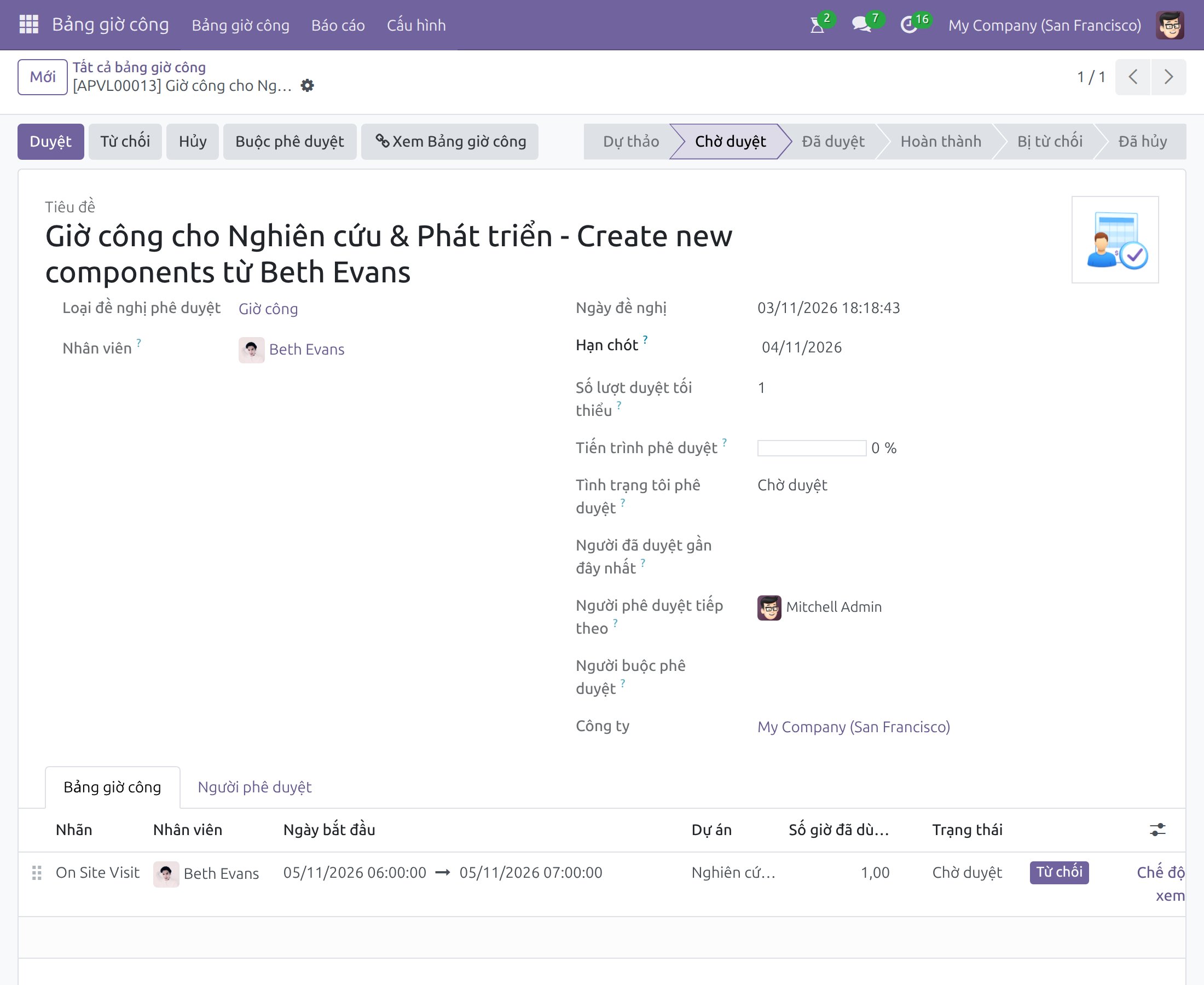
Đề nghị chuyển sang Chờ duyệt và người phê duyệt nhận được thông báo.
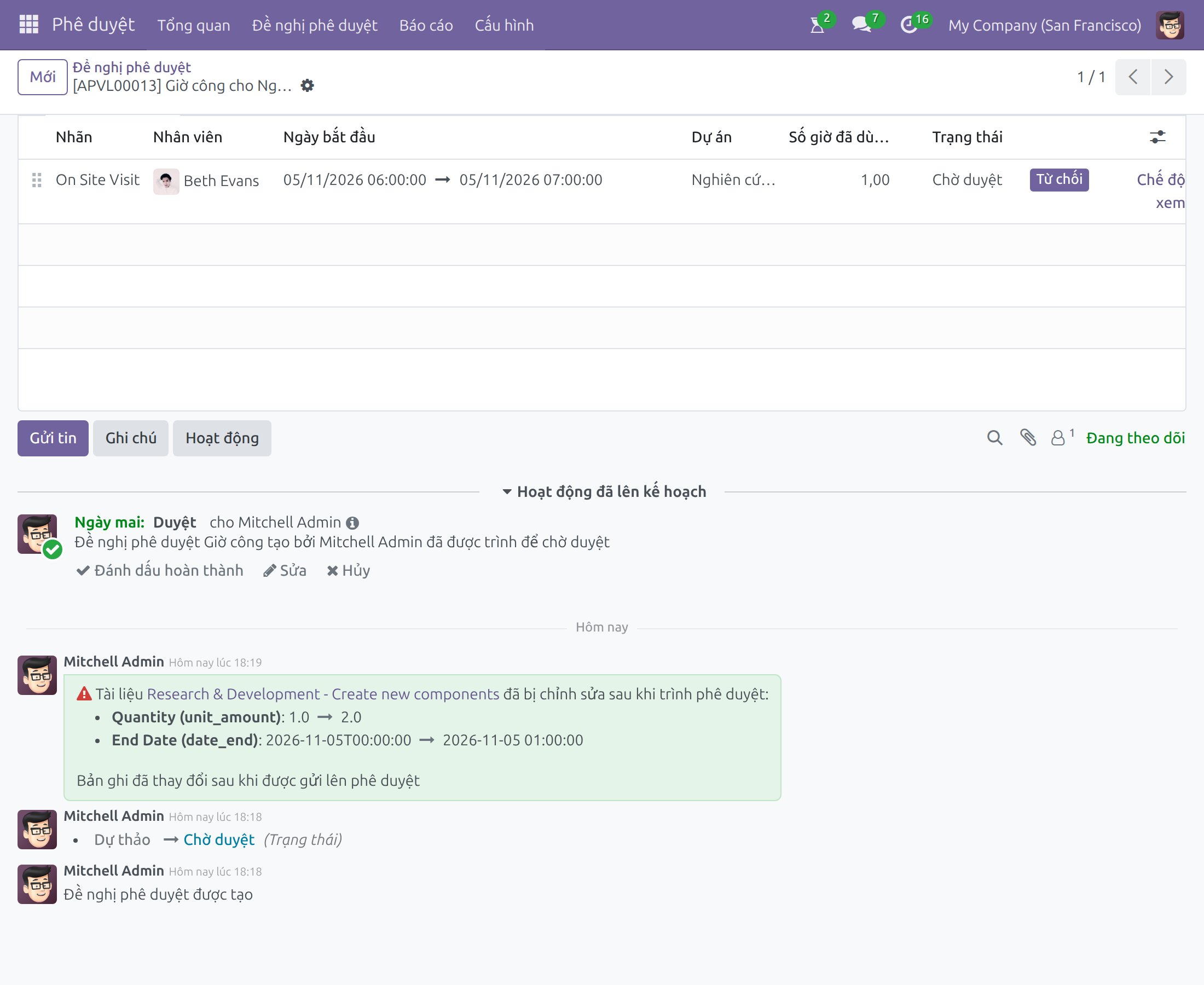
Sửa giờ công khi đề nghị đang chờ duyệt
Các dòng giờ công vẫn mở khi đề nghị đang chờ duyệt. Bạn có thể sửa một dòng (ví dụ số giờ) hoặc xóa nó, việc phê duyệt vẫn tiếp tục. Mỗi thay đổi được ghi vào phần thảo luận của đề nghị dưới dạng ghi chú nêu giá trị cũ và mới, để người phê duyệt biết điều gì đã đổi sau khi trình. Khi xóa một dòng, đề nghị vẫn còn và có thêm ghi chú rằng tài liệu liên kết đã bị xóa.
Người phê duyệt: duyệt hoặc từ chối
Mở Phê duyệt ‣ Đề nghị phê duyệt, hoặc dùng hoạt động bạn nhận được, rồi mở đề nghị. Kiểm tra các dòng, sau đó bấm Duyệt hoặc Từ chối. Bấm Hủy để rút lại đề nghị. Buộc phê duyệt dành riêng cho quản trị viên phê duyệt. Xem Bảng giờ công mở các dòng giờ công liên quan.
Khi đề nghị có nhiều bước, đề nghị ở trạng thái Chờ duyệt cho đến khi bước bắt buộc cuối cùng hoàn tất.
Theo dõi trạng thái phê duyệt
Mọi người liên quan theo dõi giai đoạn của đề nghị trên thanh trạng thái. Trong ứng dụng Bảng giờ công, cột trạng thái của danh sách cho biết kết quả của từng dòng; bạn có thể lọc hoặc nhóm danh sách theo cột này.
Xử lý sự cố
Không thêm được một dòng vào đề nghị. Chỉ các dòng của cùng một nhân viên, ở trạng thái Dự thảo và chưa nằm trong đề nghị khác mới được trình cùng nhau.
Một dòng đã Đã duyệt mà không có đề nghị. Hợp đồng của nhân viên chưa đánh dấu Phê duyệt giờ công, hoặc dòng đến từ nghỉ phép, nên dòng được xác nhận tự động.
Phần mềm này và các tệp liên kết ("Phần mềm") được sử dụng (chạy, tuỳ biến, chạy sau khi được tuỳ biến) chỉ khi bạn mua được giấy phép có hiệu lực từ tác giả, điển hình như qua các Ứng dụng Odoo, hoặc trong trường hợp bạn nhận được thoả thuận bằng văn bản từ tác giả của Phần mềm (chi tiết tại tệp COPYRIGHT).
Bạn có thể phát triển các phân hệ Odoo có sử dụng Phần mềm như một Thư viện (thường là phụ thuộc vào, nhập vào và sử dụng nguồn của nó) nhưng không sao chéo bất kỳ mã nguồn hay tài liệu nào thuộc Phần mềm. Bạn có thể phân phối những phân hệ này theo giấy phép mà bạn lựa chọn, miễn sao nội dung giấy phép đó tương tích với điều khoản của Giấy phép Phần mềm Độc quyền Odoo (ví dụ: LGPL, MIT hay bất kỳ loại giấy phép phần mềm độc quyền nào tương tự vậy).
Nghiêm cấm phát hành, phân phối, cấp phép lại hoặc bán bản sao của Phần mềm hoặc bản sao Phần mềm đã được sửa đổi.
Thông báo bản quyền và chấp thuận nêu trên buộc phải được bao gồm trong tất cả các bản sao hoặc các phần quan trọng của Phần mềm.
PHẦN MỀM ĐƯỢC CUNG CẤP "NGUYÊN TRẠNG", KHÔNG BẢO ĐẢM DƯỚI BẤT KỲ HÌNH THỨC NÀO, ĐƯỢC THỂ HIỆN RÕ RÀNG HOẶC NGỤ Ý, KHÔNG GIỚI HẠN ĐẢM BẢO VỀ CÁC BẢO ĐẢM NGỤ Ý VỀ KHẢ NĂNG THƯƠNG MẠI, PHÙ HỢP VỚI MỤC ĐÍCH CỤ THỂ VÀ KHÔNG VI PHẠM. TRONG MỌI TRƯỜNG HỢP SẼ KHÔNG CÓ TÁC GIẢ HOẶC CHỦ SỞ HỮU BẢN QUYỀN NÀO CHỊU TRÁCH NHIỆM VỀ BẤT KỲ KHIẾU NẠI, THIỆT HẠI HOẶC TRÁCH NHIỆM PHÁP LÝ KHÁC NÀO TRONG PHẠM VI HỢP ĐỒNG, CÁC THIỆT HẠI HOẶC CÁCH KHÁC, PHÁT SINH TỪ, NGOÀI HOẶC CÓ LIÊN KẾT VỚI PHẦN MỀM HOẶC VIỆC SỬ DỤNG HOẶC KINH DOANH KHÁC TẠI PHẦN MỀM.