Tích hợp Hóa đơn Điện tử Viettel S-Invoice
| Số dòng Code | 1483 |
| Tên kỹ thuật | l10n_vn_viin_accounting_sinvoice |
| Giấy phép | OPL-1 |
| Website | https://viindoo.com/apps/modules/17.0/l10n_vn_viin_accounting_sinvoice |
| Đọc mô tả cho | v 12.0 v 13.0 v 14.0 v 15.0 v 16.0 v 18.0 v 19.0 |
| Yêu cầu các App | Invoicing (account) Discuss (mail) |
| Bao gồm Các phụ thuộc | Tích hợp Hóa đơn Điện tử Việt Nam Mã đơn vị quan hệ ngân sách Thông tin Định danh Đối tác Tạo hóa đơn điện tử thay thế Việt Nam Mô-đun Cơ Sở Kế toán Viindoo Số hóa đơn giá trị gia tăng |
| Các mở rộng | Vietnam Accounting Compliance Suite Thông tin Hóa đơn Điện tử Viettel Sinvoice trên Biên lai POS |

E-Invoice - Viettel S-Invoice Integrator
Integrates with Viettel's S-Invoice service to issue legal e-Invoice
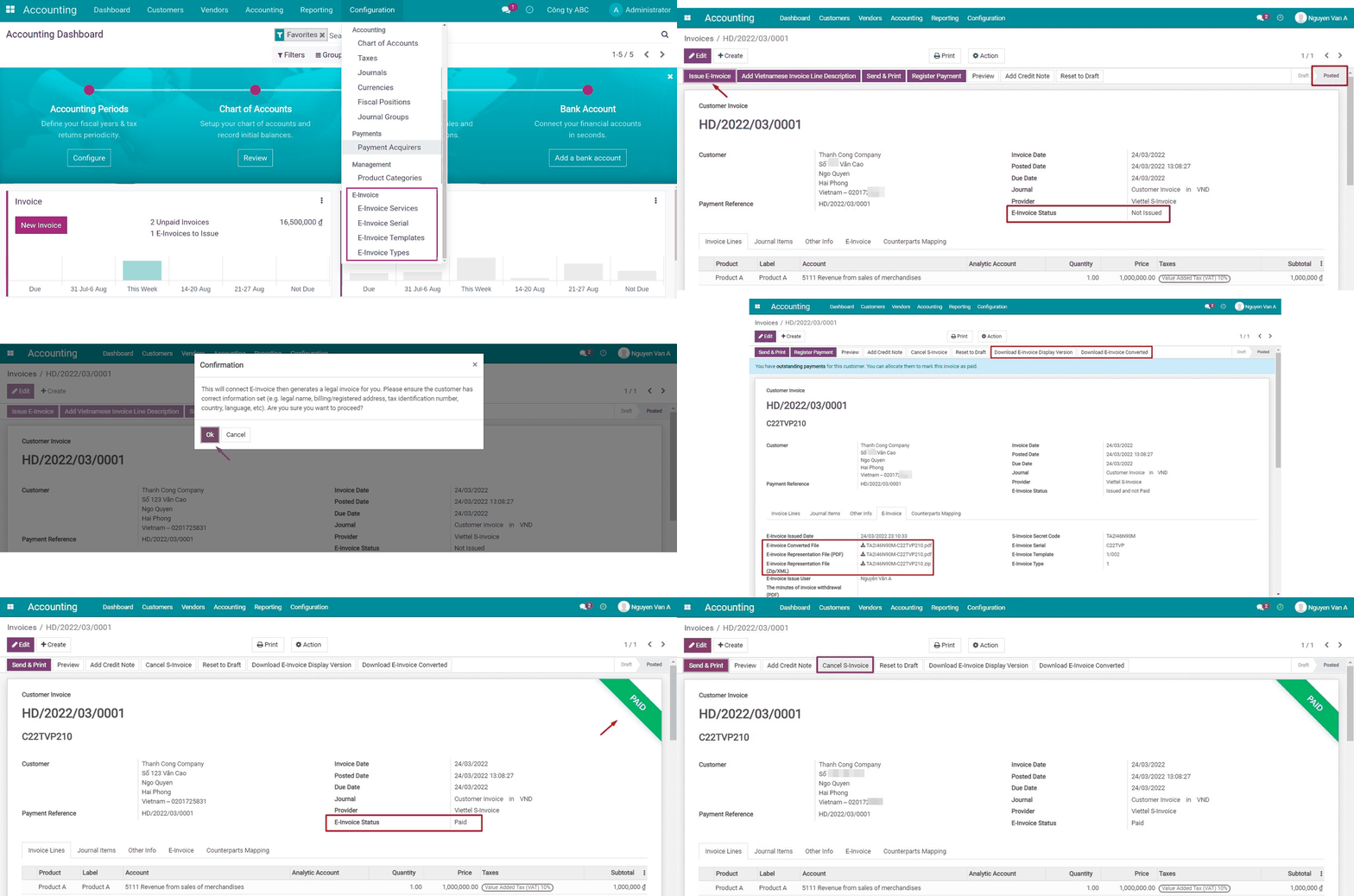
Key Features
Built natively on Odoo/Viindoo to streamline real business operations:
Preview draft Sinvoice
Issue S-Invoices from the system Invoices which are either in Open or Paid status
Generate a Display Version of the issued invoice and store it in the system for later download
Generate a Converted Version of the issued invoice and store it in the system for later download
S-Invoice will be set as Paid automatically when the respective invoice in the system is marked as Paid
S-Invoice will be reopened (from the Paid status) automatically when the respective invoice in the system is reopened from Paid
Cancel issued S-Invoices
Manage the system invoices based on the S-Invoice status
- Not Paid: the system invoices that have the respective S-Invoice issued but not set as paid.
- Paid: the system invoices that have the respective S-Invoice issued and paid.
- Adjusted: the system invoices that have the corresponding S-Invoice issued but are adjusted by another invoices.
Easy to define and manage invoice serial numbers, invoice templates, and invoices type according to the States regulation
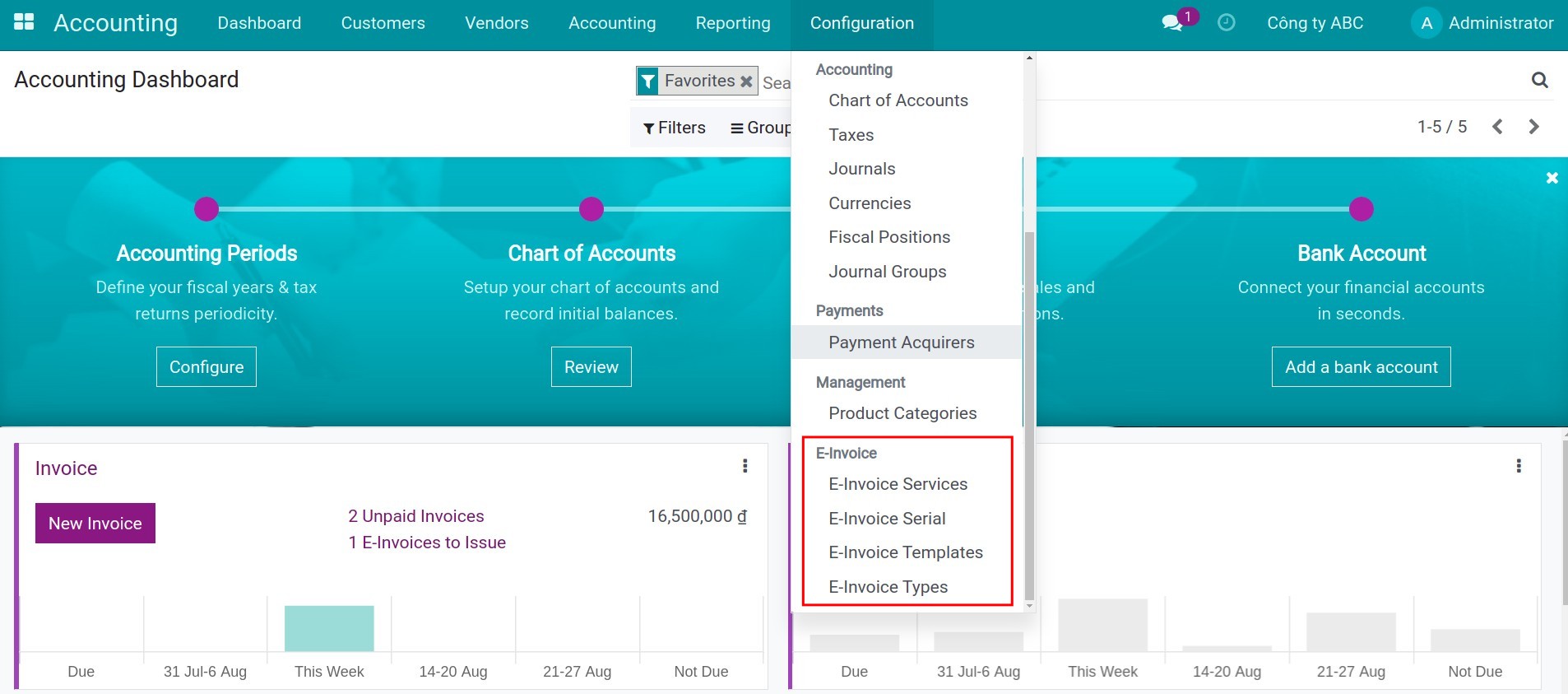
Invoice Serial can be set up for a company (in Accounting > Configuration > E-Invoice Serial) and accounting journals
- Support multi-companies environment for different invoice serial.
- Support multiple invoice serial types for the same company: You can issue invoices with different serials that you have registered with S-Invoice and accepted by the authority.
Configure an invoice template for a company (in Accounting > Configuration > E-Invoice Templates) and accounting journals
- Support multi-companies environments for different invoice templates.
- Support multiple invoice templates for the same company: You can issue invoices with different templates that you have registered with S-Invoice and accepted by the authority.
Configure Invoice Type for a company (in Accounting > Configuration > E-Invoice Types) and accounting journals
- Support multi-companies environment for different invoice types.
- Support multiple invoice types for the same company: You can issue invoices with different types that you have registered with S-Invoice and accepted by the authority.
Support advanced payment by issuing S-Invoice with an adjustment line
For example:
- The first invoice consists of a single line for 10% as deposit.
- The second invoice consists of a single line for 20% as deposit.
- The final invoice consists of products/services lines and the negative line to compensate for the previous deposit.
Send the S-Invoice instead of the default invoice template right from the the system Invoicing interface
Customer Portal
- Customers can download the display version of the S-Invoice in PDF format that also has an EU's Factur-X standard-compliant file attached to it so that they can import it into their own instance.
- Customers can print the display version of the S-Invoice.
- Customers can download the zipped XML version of S-Invoice so that they can import it to any software that supports S-Invoice XML.
Support Sandbox mode for your testing before launching in production
Automatically search for not-yet-issued invoices that have a billing date before the current date and remind you to issue the e-invoice for them
Provide smart and comprehensive help strings to help you quickly solve any issues without having to ask for technical support
Multilingual support for S-invoice issuing to foreign customers according to the state rules: Invoice must be written in Vietnamese and may have another language additionally
Support only S-invoice version 2 because version 1 is deprecated
Benefits
Ensure Compliance:
Easily adhere to state-mandated e-Invoice regulations, reducing the risk of penalties.
Boost Operational Efficiency:
Automate the e-Invoice process, minimizing manual errors and saving time.
Enhance Transparency:
Track and monitor the status of issued e-Invoices for greater clarity and accountability.
Support for Multi-Company Environments:
Manage invoice templates, serials, and types across multiple companies effortlessly.
Improve Customer Experience:
Provide customers with easy access to compliant e-Invoices in their preferred format.
Declare the integrated information
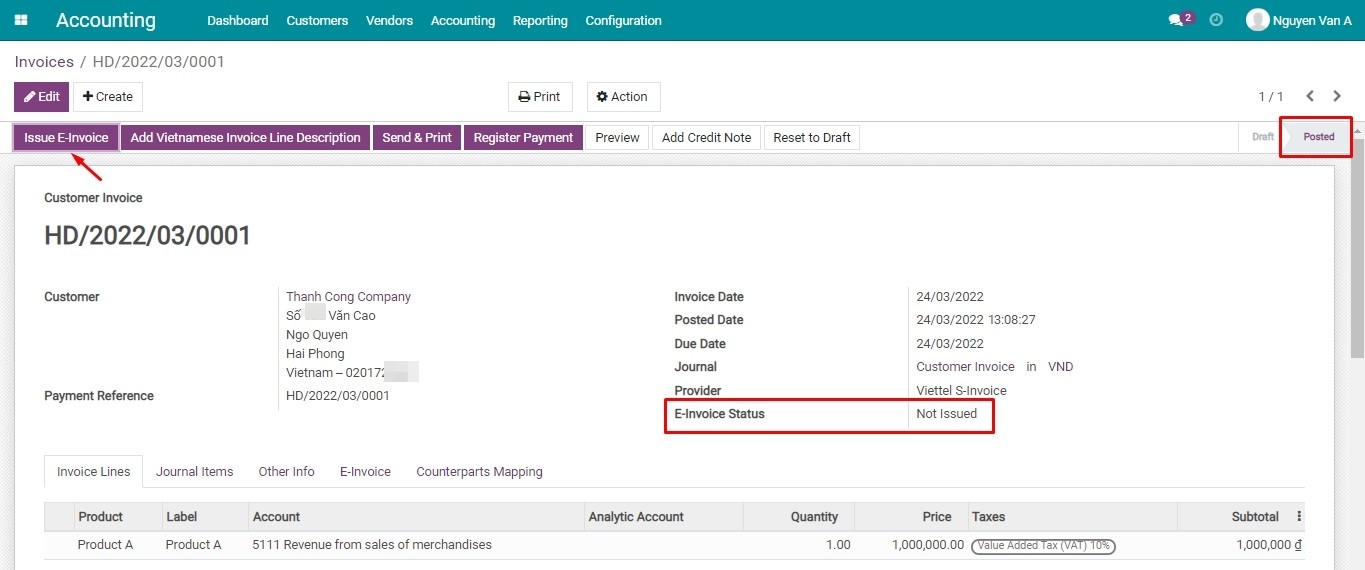
Issue the E-invoice
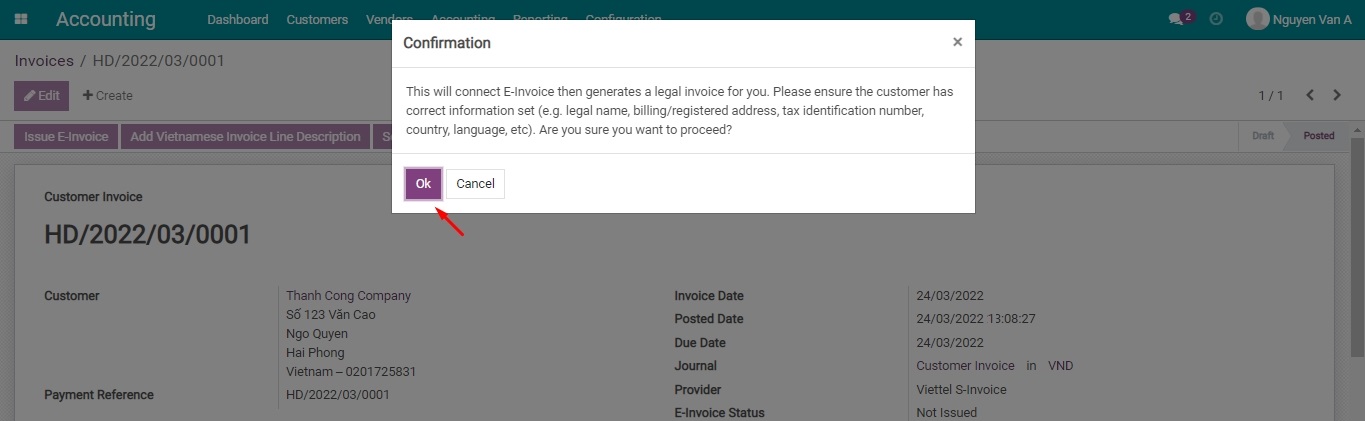
Confirm to issuing the E-invoice
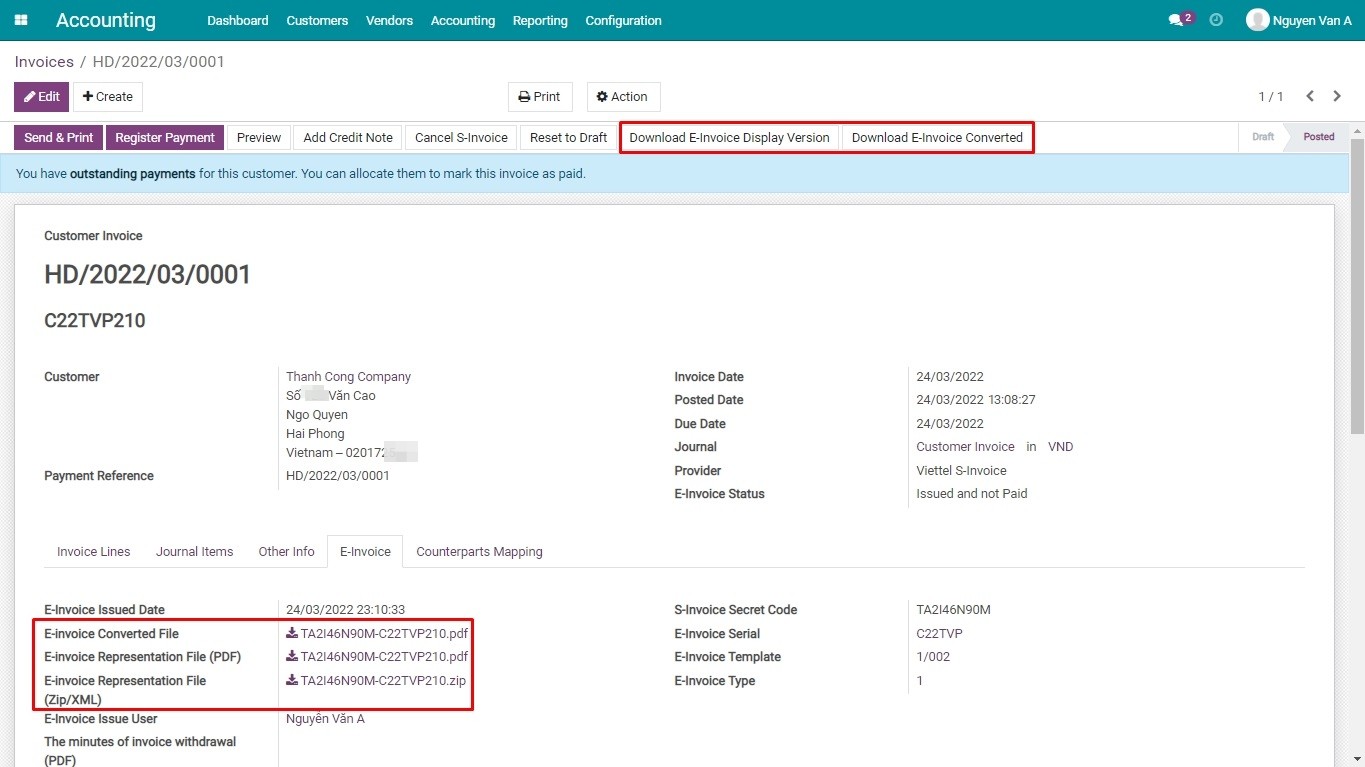
Download the E-invoice
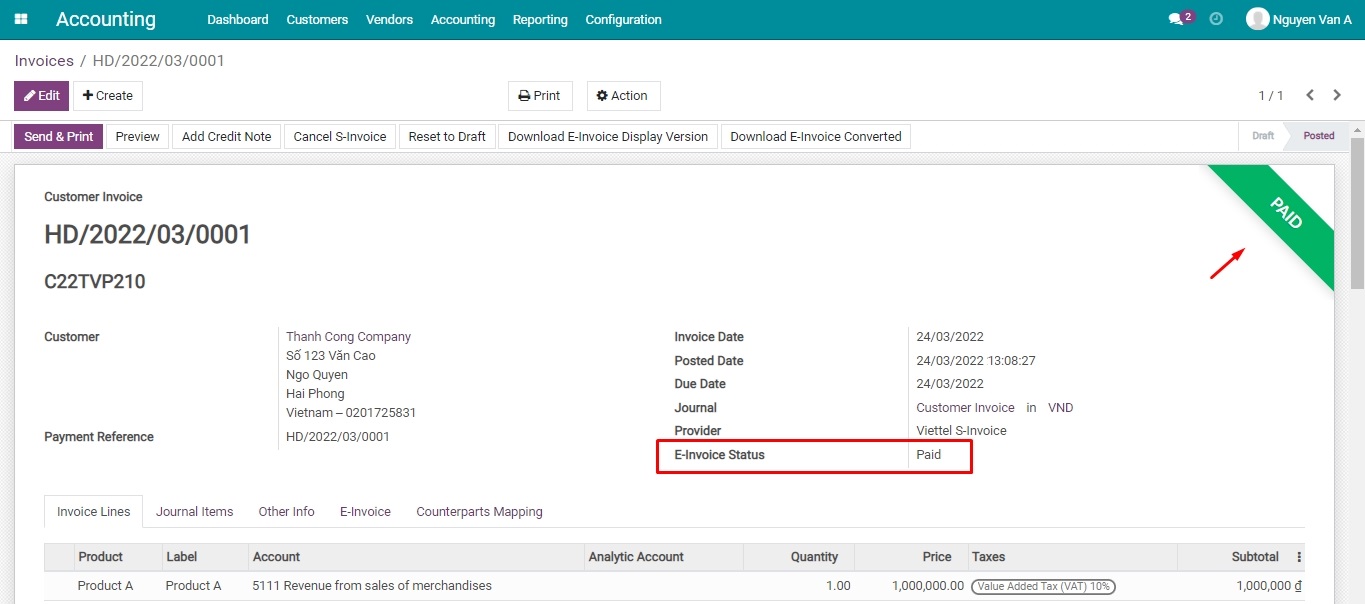
the E-invoice staus on the Viindoo Software
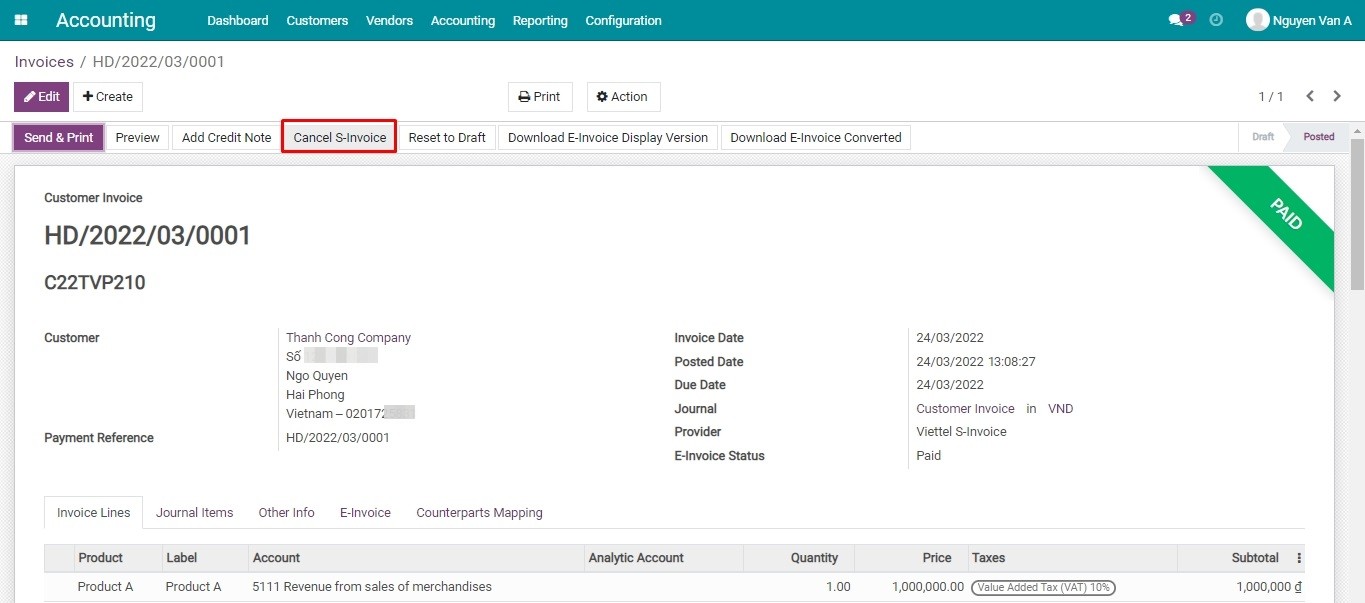
Cancel the issued e-invoice
See E-Invoice - Viettel S-Invoice Integrator in Action
See how this module solves real business problems in a working Viindoo environment.
Need help with E-Invoice - Viettel S-Invoice Integrator?
For questions, implementation support, or consulting services, contact Viindoo.
Pre-Sales & Partnership
sales@viindoo.comWhen contacting us, please include:
- Odoo/Viindoo version (CE/EE).
- Number of users and business scope.
- Other modules currently in use.
Technical Support
apps.support@viindoo.comFor faster troubleshooting, please provide:
- Order number or app reference.
- Odoo/Viindoo version & edition.
- Steps to reproduce the issue.
- Screenshots/logs if available.
Technical Requirement
Changes log
We continuously improve this module. Recent updates from the official Viindoo repository:
- 2025-09-11 Added Identification, passport, budget code for Vietnam edi.
- 2025-09-15 Fixed Rounding subtotal when have discount.
- 2025-08-15 Fixed Wrong taxable amount.
- 2025-06-13 Fixed BuyerLegalName is require when have taxcode.
- 2025-06-09 Fixed Only get positive tax amount when needed, correct meinvoice data.
- 2025-05-06 Fixed Tax code for personal is optional.
Works Great With These Modules
Extend E-Invoice - Viettel S-Invoice Integrator with complementary Viindoo apps:
POS Receipt Viettel Sinvoice Infomation
Show Viettel Sinvoice informations on POS Receipt
Module l10n_vn_viin_accounting_sinvoice_posWho Should Use This Module?
Built for teams that need this capability fully integrated into their Odoo/Viindoo stack.
Elevate your invoicing operations with the E-Invoice - Viettel S-Invoice Integrator, ensuring compliance, transparency, and efficiency.
Cài đặt
- Truy cập Ứng dụng.
- Tìm từ khóa l10n_vn_viin_accounting_sinvoice.
- Ấn Cài đặt.
Hướng dẫn sử dụng
Video hướng dẫn: Tích hợp E-Invoice - Viettel S-Invoice
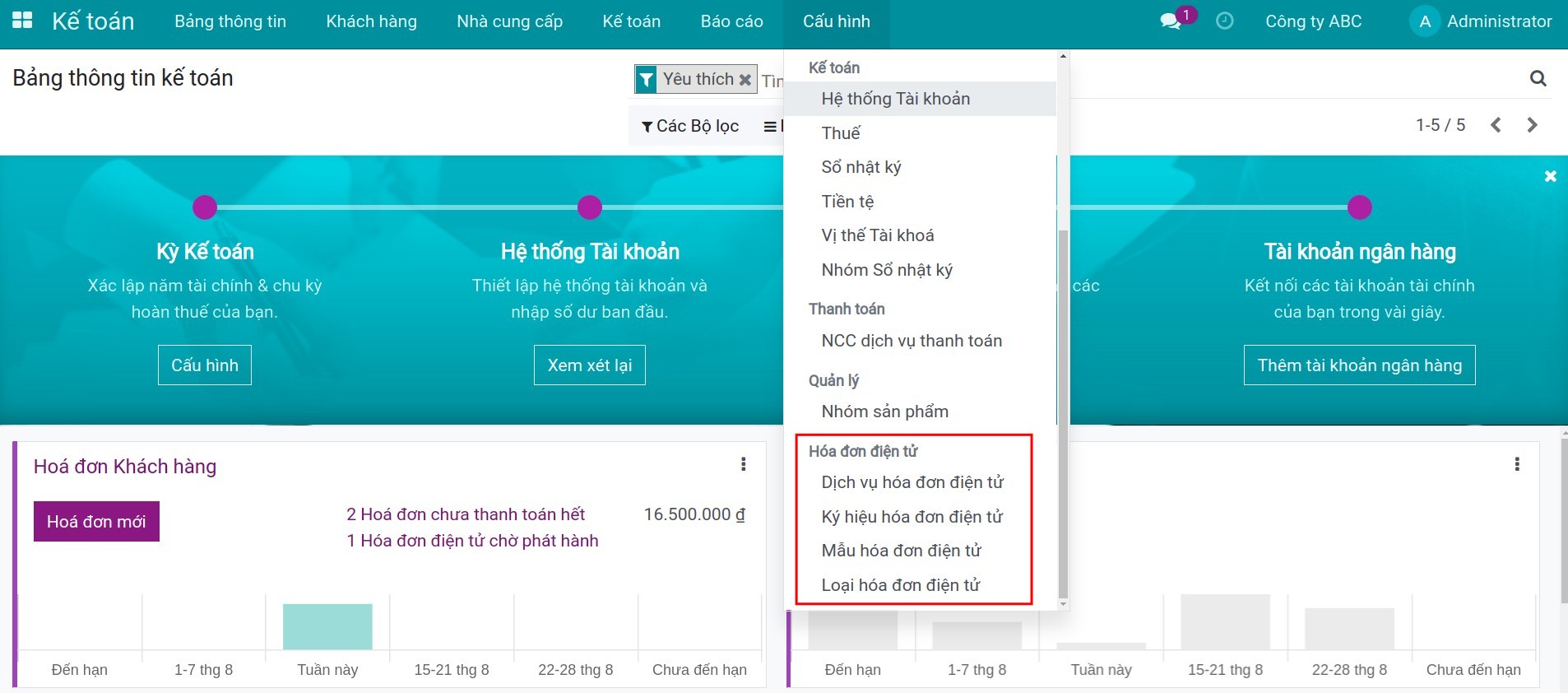
Khai báo thông tin tích hợp
Khai báo thông tin Hóa đơn điện tử theo đường dẫn: Kế toán > Cấu hình > Hóa đơn điện tử.
Phát hành Hóa đơn điện tử
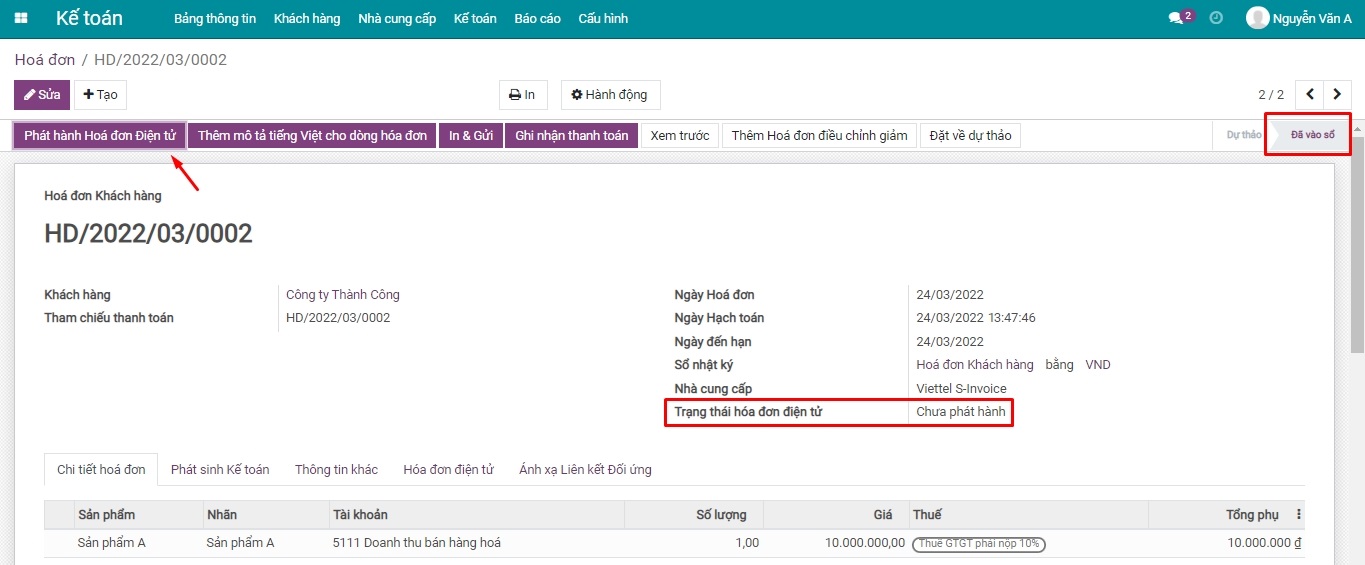
Trên giao diện hóa đơn Đã vào sổ, bấm Phát hành hóa đơn điện tử.
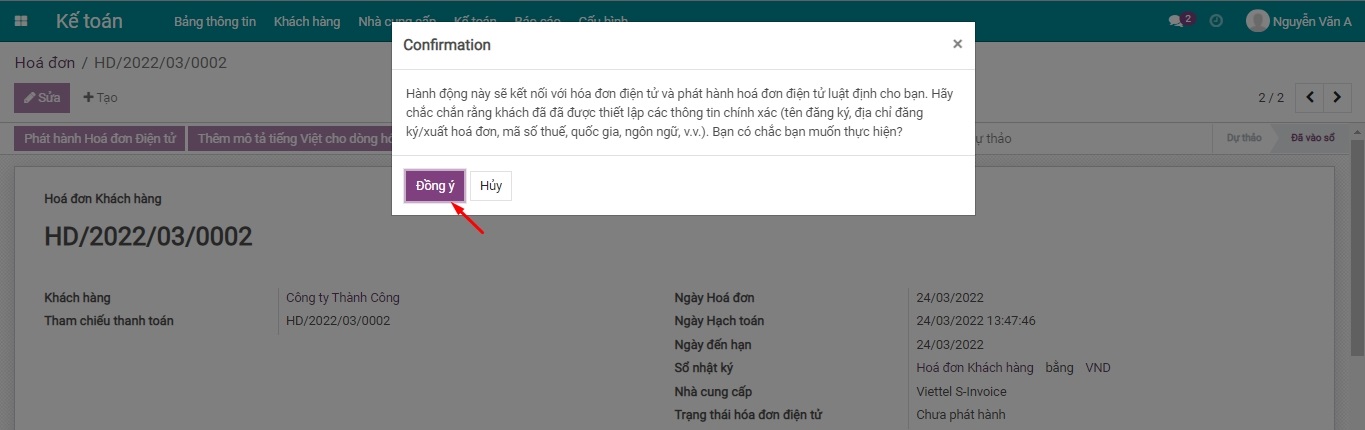
Trên hệ thống S-Invoice sẽ xuất hiện hoá đơn này ở trạng thái đã phát hành.
Tải về hóa đơn điện tử bản thể hiện, chuyển đổi
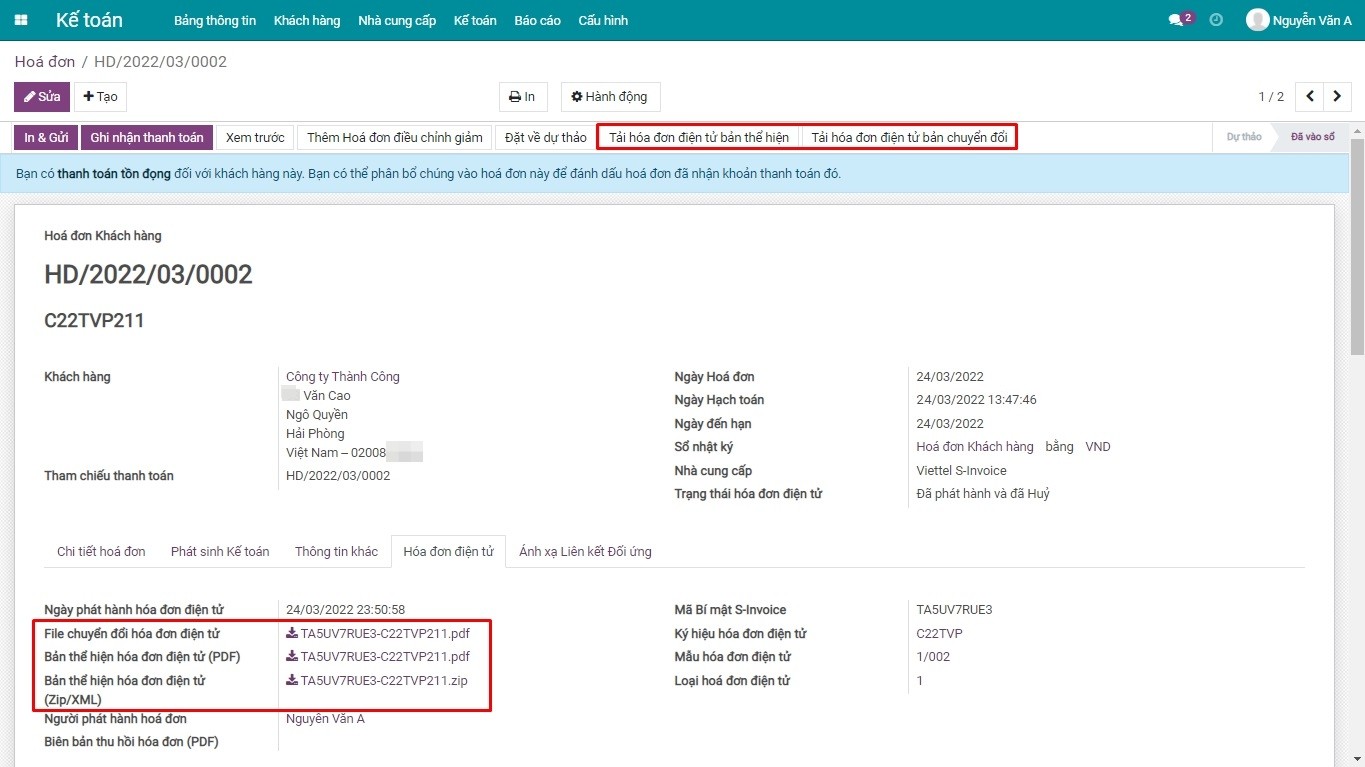
Trên giao diện hoá đơn đã được phát hành hoá đơn điện tử, bấm Tải hóa đơn điện tử bản chuyển đổi hoặc Tải hóa đơn điện tử bản thể hiện.
Tự động cập nhật trạng thái thanh toán của hoá đơn điện tử S-Invoice
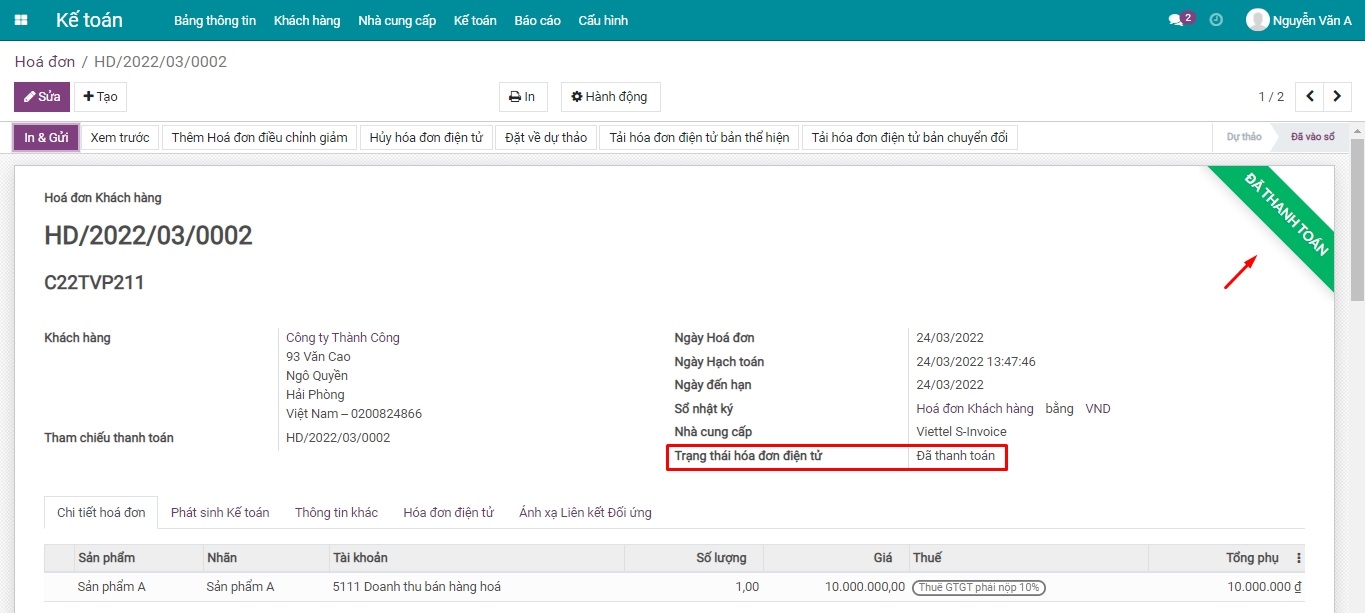
Sau khi ghi nhận thanh toán trên hóa đơn khách hàng của hệ thống phần mềm kế toán, trạng thái hóa đơn điện tử S-Invoice được cập nhật tự động:
- Trên phần mềm: chuyển sang trạng thái Đã thanh toán.
- Trên hệ thống S-Invoice: tắt trạng thái Chưa thanh toán.
Xóa bỏ hóa đơn điện tử S-Invoice trên phần mềm Viindoo
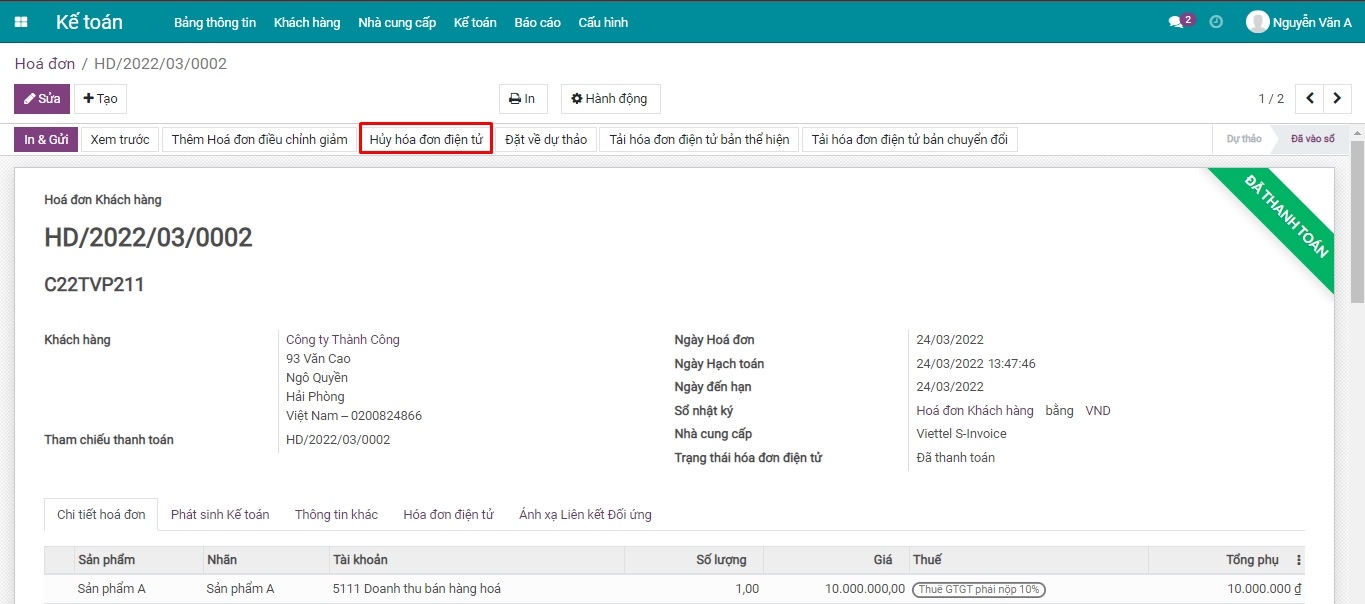
Trong trường hợp hóa đơn điện tử S-Invoice đã phát hành và phát hiện sai sót, bạn có thể xóa bỏ chúng ngay trên phần mềm:
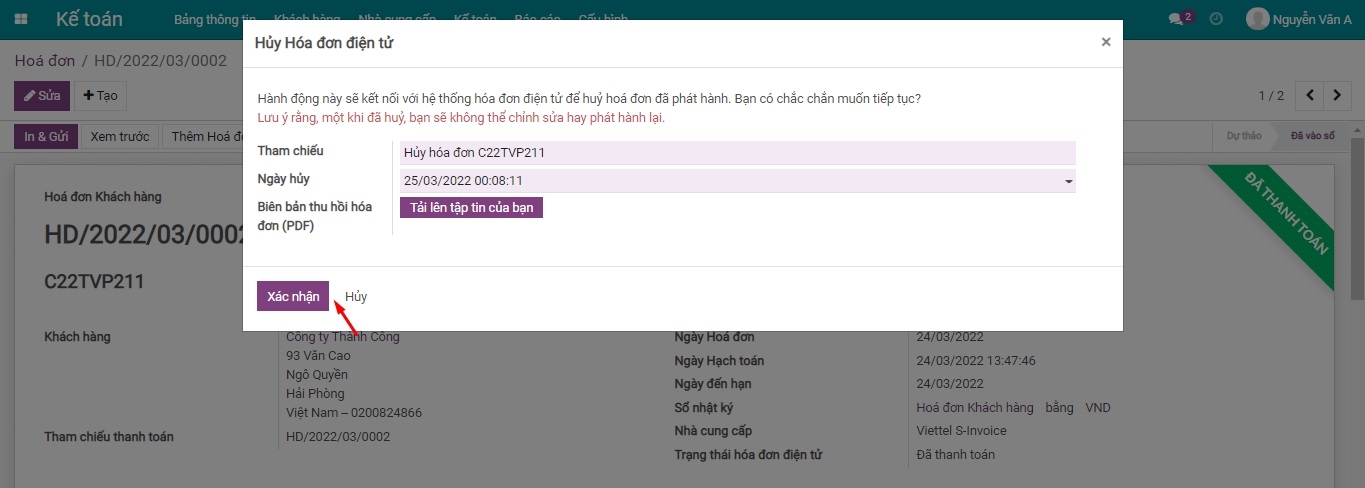
- Hủy Hóa đơn Điện tử: nhập lý do thu hồi hoá đơn, ngày huỷ hoá đơn,...
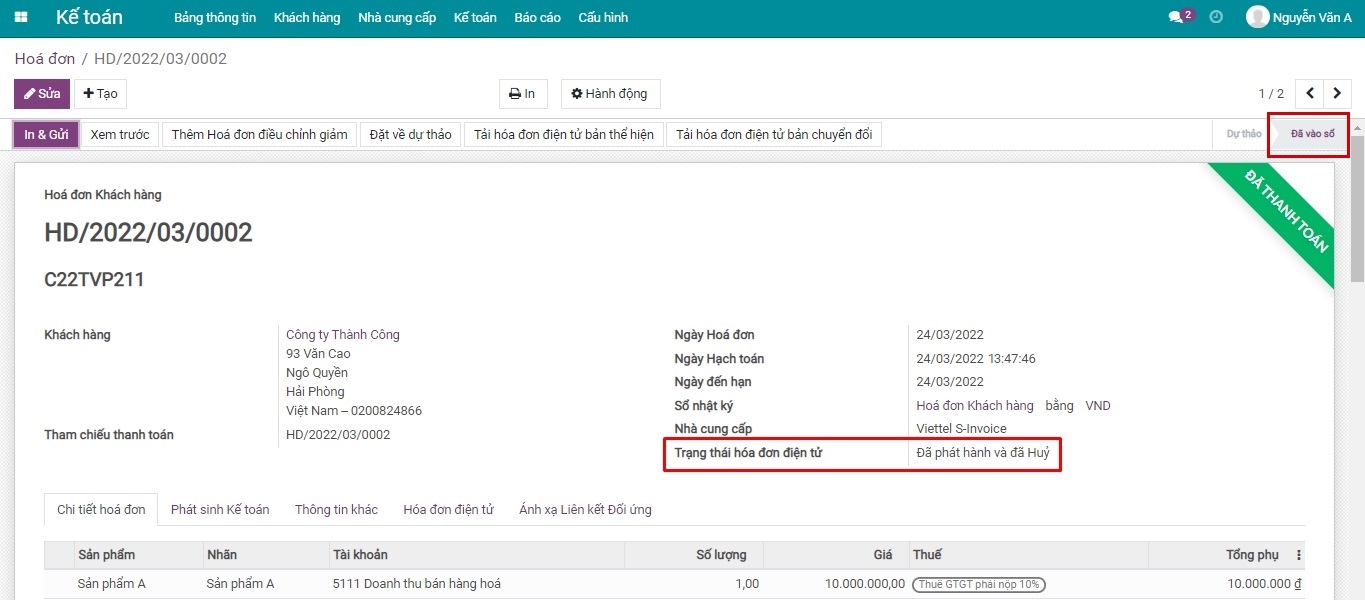
- Trạng thái hoá đơn điện tử S-Invoice được cập nhật huỷ:
- Trên hệ thống: chuyển sang trạng thái Đã phát hành và đã Huỷ.
- Trên hệ thống S-Invoice: chuyển sang trạng thái Hoá đơn xoá bỏ.
Mẹo: Sau khi huỷ hoá đơn điện tử S-Invoice, bạn tiến hành Hủy hóa đơn trên hệ thống như bình thường.
Phần mềm này và các tệp liên kết ("Phần mềm") được sử dụng (chạy, tuỳ biến, chạy sau khi được tuỳ biến) chỉ khi bạn mua được giấy phép có hiệu lực từ tác giả, điển hình như qua các Ứng dụng Odoo, hoặc trong trường hợp bạn nhận được thoả thuận bằng văn bản từ tác giả của Phần mềm (chi tiết tại tệp COPYRIGHT).
Bạn có thể phát triển các phân hệ Odoo có sử dụng Phần mềm như một Thư viện (thường là phụ thuộc vào, nhập vào và sử dụng nguồn của nó) nhưng không sao chéo bất kỳ mã nguồn hay tài liệu nào thuộc Phần mềm. Bạn có thể phân phối những phân hệ này theo giấy phép mà bạn lựa chọn, miễn sao nội dung giấy phép đó tương tích với điều khoản của Giấy phép Phần mềm Độc quyền Odoo (ví dụ: LGPL, MIT hay bất kỳ loại giấy phép phần mềm độc quyền nào tương tự vậy).
Nghiêm cấm phát hành, phân phối, cấp phép lại hoặc bán bản sao của Phần mềm hoặc bản sao Phần mềm đã được sửa đổi.
Thông báo bản quyền và chấp thuận nêu trên buộc phải được bao gồm trong tất cả các bản sao hoặc các phần quan trọng của Phần mềm.
PHẦN MỀM ĐƯỢC CUNG CẤP "NGUYÊN TRẠNG", KHÔNG BẢO ĐẢM DƯỚI BẤT KỲ HÌNH THỨC NÀO, ĐƯỢC THỂ HIỆN RÕ RÀNG HOẶC NGỤ Ý, KHÔNG GIỚI HẠN ĐẢM BẢO VỀ CÁC BẢO ĐẢM NGỤ Ý VỀ KHẢ NĂNG THƯƠNG MẠI, PHÙ HỢP VỚI MỤC ĐÍCH CỤ THỂ VÀ KHÔNG VI PHẠM. TRONG MỌI TRƯỜNG HỢP SẼ KHÔNG CÓ TÁC GIẢ HOẶC CHỦ SỞ HỮU BẢN QUYỀN NÀO CHỊU TRÁCH NHIỆM VỀ BẤT KỲ KHIẾU NẠI, THIỆT HẠI HOẶC TRÁCH NHIỆM PHÁP LÝ KHÁC NÀO TRONG PHẠM VI HỢP ĐỒNG, CÁC THIỆT HẠI HOẶC CÁCH KHÁC, PHÁT SINH TỪ, NGOÀI HOẶC CÓ LIÊN KẾT VỚI PHẦN MỀM HOẶC VIỆC SỬ DỤNG HOẶC KINH DOANH KHÁC TẠI PHẦN MỀM.